Introduction
Thank you for choosing the SZFZMZ Wireless Digital Rain Gauge. This device provides accurate measurements of rainfall and monitors indoor and outdoor temperatures. Its self-emptying design ensures maintenance-free operation, and the wireless transmission allows for convenient monitoring from inside your home. This manual will guide you through the setup, operation, and maintenance of your new rain gauge.

Image: The SZFZMZ Wireless Digital Rain Gauge system, showing the indoor display unit and the outdoor self-emptying rain sensor.
Продукт компоненттери
Your SZFZMZ Wireless Digital Rain Gauge system consists of two main units:
1. Display Unit (Indoor Console)
This unit displays all collected data, including rainfall, indoor temperature, outdoor temperature, time, and calendar. It also features alarm functions.
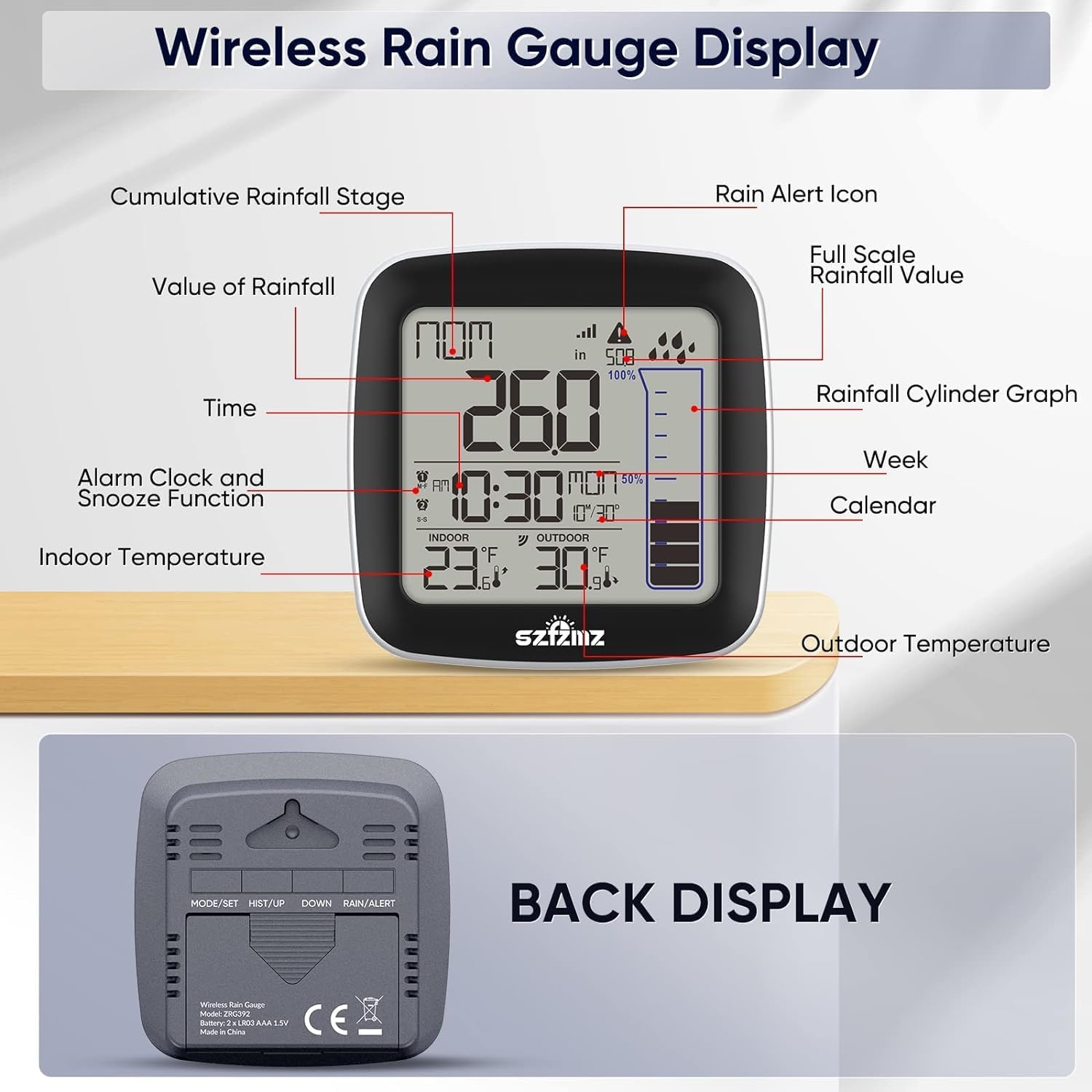
Сүрөт: алдыңкы жана арткы view of the indoor display unit, highlighting its various display elements such as cumulative rainfall, time, indoor/outdoor temperature, and control buttons on the back.
- Дисплей экраны: Shows current and historical rainfall data, indoor/outdoor temperature, time, and calendar.
- Башкаруу баскычтары: Located on the back, used for mode selection, history, setting time, and alarm/alert functions.
- Батарея бөлүмү: Requires 2x 'AAA' batteries (not included).
2. Outdoor Sensor (Rain Collector)
This unit collects rainfall data and transmits it wirelessly to the display unit. It also measures outdoor temperature.

Image: Exploded diagram of the outdoor sensor, detailing its components like the funnel buckle, rainfall measuring cup, sensor buckle, battery compartment, fixed hole, and fixed screw.
- Rainfall Measuring Cup: Collects and measures precipitation.
- Өзүн-өзү бошотуучу механизм: Automatically empties collected water, eliminating manual maintenance.
- көбүк деңгээли: Assists in ensuring proper, level installation for accurate readings.
- Батарея бөлүмү: Requires 2x 'AA' batteries (not included).
- Монтаждык тешиктер: Коопсуз орнотуу үчүн.
Жайгашуу
1. Батареяны орнотуу
- Дисплей бирдиги: Open the battery compartment on the back of the display unit. Insert 2 'AAA' batteries, observing the correct polarity (+/-). Close the compartment.
- Тышкы сенсор: Open the battery compartment on the outdoor sensor. Insert 2 'AA' batteries, observing the correct polarity (+/-). Close the compartment securely to ensure weather resistance.
2. Жайгаштыруу
Optimal placement is crucial for accurate readings and wireless transmission.
- Дисплей бирдиги: Place the display unit indoors, away from direct sunlight or heat sources that could affect indoor temperature readings. Ensure it is within 200ft/60m of the outdoor sensor.
- Тышкы сенсор:
- Choose an open area where the sensor is not obstructed by trees, buildings, or other structures that could block rainfall or affect wind patterns.
- Mount the sensor on a level surface using the provided mounting holes and screws. Use the integrated bubble level to ensure it is perfectly horizontal for accurate rainfall collection.
- Ensure the sensor is easily accessible for occasional cleaning but secure enough to withstand wind.
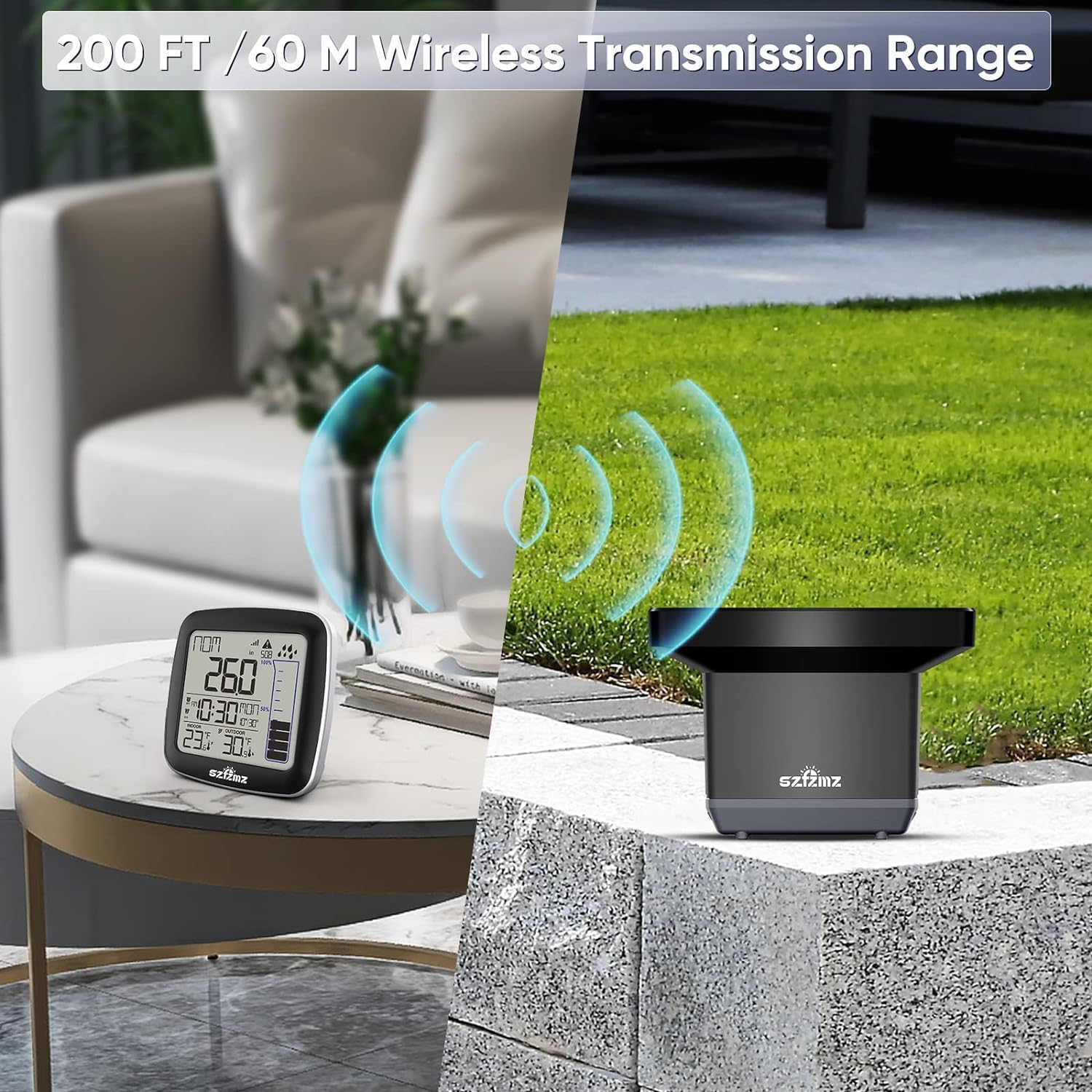
Image: Illustration showing the wireless connection between the indoor display unit and the outdoor sensor, demonstrating the 200ft/60m transmission range.
3. Синхрондоштуруу
Once batteries are installed in both units, they should automatically synchronize. If not, refer to the troubleshooting section.
Иштөө нускамалары
1. Функцияларды көрсөтүү
The display unit provides various data readouts:

Image: The indoor display unit showing various data points and icons, including temperature, rainfall, historical records, calendar, and time.
- Current Rainfall: Displays the most recent precipitation value.
- Historical Rainfall: Cycle through different time periods to view rainfall totals for: Now, 1 Hour, 24 Hours, Today, 7 Days, Month, Year, and Total. Use the 'HIST/UP' button to navigate.
- Ички температура: Current temperature at the display unit's location.
- Тышкы температура: Current temperature from the outdoor sensor.
- Time and Calendar: Учурдагы убакытты жана датаны көрсөтөт.

Image: A close-up of the display screen, illustrating how different rainfall measurement totals (Now, 1 Hour, 24 Hours, Today, 7 Days, Month, Year, Total) are presented.
2. Убакыт жана дата орнотуу
Refer to the buttons on the back of the display unit:
- Press and hold the 'MODE/SET' button to enter time setting mode.
- Use the 'UP' or 'DOWN' buttons to adjust the flashing value (e.g., hour, minute, year, month, day).
- Press 'MODE/SET' again to confirm and move to the next setting.
- Exit setting mode by pressing 'MODE/SET' after the last setting or by leaving it idle for a few seconds.
3. Programmable Rain Alarm
The device features a programmable 24-hour rainfall alert.

Image: A close-up of the display screen, showing the rain alert icon (a cloud with rain and an exclamation mark) indicating an active rainfall alert.
- Press the 'RAIN/ALERT' button to cycle through alert settings.
- When the alert icon flashes, use 'UP' or 'DOWN' to set the desired rainfall threshold for the alert.
- Press 'RAIN/ALERT' again to confirm the setting.
4. Alarm Clock and Snooze Function
The display unit includes an alarm clock with snooze.

Image: A close-up of the display screen, showing two alarm clock icons, one for weekdays (M-F) and one for weekends (S-S), along with AM/PM indicators.
- Press the 'MODE/SET' button repeatedly until the alarm time is displayed.
- Press and hold 'MODE/SET' to enter alarm setting mode.
- Use 'UP' or 'DOWN' to adjust the alarm time.
- Press 'MODE/SET' to confirm.
- To activate/deactivate the alarm, press the 'ALARM' button (if present, otherwise use 'MODE/SET' or 'UP'/'DOWN' in alarm display mode).
- When the alarm sounds, press any button (except 'MODE/SET' or 'RAIN/ALERT') to activate snooze, or press 'MODE/SET' to turn off the alarm.
Техникалык тейлөө
Жаан өлчөгүчтүн үзгүлтүксүз техникалык тейлөөсү анын узак мөөнөттүү иштешин жана тактыгын камсыз кылат.
- Сырткы сенсорду тазалоо: Periodically check the rainfall measuring cup and funnel for debris such as leaves, dirt, or insects. Clean gently with a soft cloth and water. Avoid abrasive cleaners.
- Батареяны алмаштыруу: Replace batteries in both units when the low battery indicator appears on the display. It is recommended to replace all batteries at the same time to ensure consistent performance.
- Деңгээлди текшерүү: Occasionally verify that the outdoor sensor remains level, especially after strong winds or ground shifts. Adjust if necessary using the bubble level.
- Кышкы кам көрүү: In areas with freezing temperatures, ensure the outdoor sensor is clear of ice and snow to prevent damage to the tipping bucket mechanism.
Проблемаларды чечүү
| Көйгөй | Мүмкүн себеп | Чечим |
|---|---|---|
| No outdoor temperature/rainfall data on display. | No wireless connection; Batteries low/dead; Sensor too far or obstructed. | Check batteries in both units. Move display unit closer to sensor. Ensure no large metal objects or thick walls are between units. Re-synchronize by removing and reinserting batteries in both units. |
| Жаан-чачындын көрсөткүчтөрү так эмес. | Sensor not level; Debris in funnel/tipping bucket; Sensor obstructed by overhead objects. | Ensure sensor is perfectly level using the bubble level. Clean the funnel and tipping bucket mechanism. Relocate sensor to an open area. |
| Display unit not turning on. | Батареялар туура эмес орнотулган же өлүп калган. | Check battery polarity. Replace with fresh 'AAA' batteries. |
| Дисплейде туура эмес убакыт/дата көрсөтүлүүдө. | Time/date not set or reset after battery change. | Follow instructions in 'Setting Time and Date' section to manually set. |
| Rain alarm not sounding. | Alarm not activated or threshold not met. | Ensure the rain alarm is enabled and the threshold is set correctly. |
Техникалык шарттар
- Модель номери: ZRG392-1
- Product Dimensions (Display Unit): 3.5 x 1 x 3.5 дюйм
- Outdoor Sensor Dimensions: 7.1 x 5.1 дюйм
- Элемент Салмагы: 15.2 унция (жалпы пакет)
- Зымсыз берүү диапазону: 200 фут / 60 м чейин (ачык асман алдында)
- Display Unit Power: 2x 'AAA' batteries (not included)
- Сырткы сенсордун кубаты: 2x 'AA' batteries (not included)
- Rainfall Measurement Units: дюйм
- Temperature Measurement Units: Celsius/Fahrenheit switchable

Image: Diagram illustrating the dimensions of both the indoor display unit (3.5x3.5 inches) and the outdoor sensor (7.1x5.1 inches), alongside a list of key features.
Кепилдик жана колдоо
For warranty information and customer support, please refer to the contact details provided with your product packaging or visit the official SZFZMZ brand store online. Keep your purchase receipt for warranty claims.
Онлайн бренд дүкөнү: SZFZMZ Official Store


