1. Киришүү
Thank you for choosing the CHNADKS EM-101 EMF Meter. This advanced 3-in-1 rechargeable electromagnetic field radiation detector is designed for precise measurement of electric field strength, radiation power, and magnetic field strength. It is an essential tool for home and office EMF inspections, and can also be used for detecting anomalous magnetic field fluctuations, making it suitable for various applications including ghost hunting.
This manual provides detailed instructions on how to set up, operate, and maintain your device to ensure optimal performance and longevity.

Figure 1.1: The CHNADKS EM-101 Electromagnetic Radiation Detector, showcasing анын компакт дизайн жана ачык дисплей.
2. Продукциянын өзгөчөлүктөрү
- Versatile Precise Measurements: Measures electric field strength, radiation power, magnetic field strength, and polarity of static magnetic fields with an effective measurement range of 50MHz-3.5GHz. Provides numerical reference for anomalous magnetic field fluctuations.
- Easy to Use Interface: Features a TFT 2.0 color screen with a graphical menu for intuitive operation. Includes sound and flash alerts with adjustable alarm thresholds. Supports electric and magnetic field waveform display modes.
- Портативдик дизайн: Compact dimensions (4.64x 2x0.78 inches) and lightweight (67g) with an IP3X protection level, making it easy to carry and durable for various settings.
- Кеңири колдонуу: Detects RF and measures electromagnetic radiation from household appliances, cell phone towers, and low-frequency appliances. Ideal for ghost hunting enthusiasts, office workers, pregnant women, and the elderly to limit exposure to potentially harmful radiation.
3. Пакеттин мазмуну
Пакетти ачкандан кийин, төмөнкү нерселердин бардыгы камтылганын текшериңиз:
- CHNADKS EM-101 EMF Meter (with built-in Li-ion battery)
- USB заряддоо кабели
- Portable Strap
- Колдонуучунун Колдонмосу (бул документ)
4. Түзмөктүн жайгашуусу жана компоненттери

Сүрөт 4.1: Алдыңкы view of the EM-101 EMF Meter, showing the LCD screen and control buttons.

4.2-сүрөт: Детальдуу view of the EM-101, highlighting the USB interface, comfort buttons, buzzer hole, and LCD screen.
- LCD экран: TFT 2.0 color display for showing measurement data, graphical menus, and settings.
- Башкаруу баскычтары:
- Кубат / OK баскычы: Central button for turning the device on/off and confirming selections.
- Navigation Buttons (AVR, MAX, HOLD): Used for navigating menus, adjusting settings, and selecting measurement modes. The HOLD button freezes the current reading.
- USB интерфейси: Located on the side for charging the device.
- Buzzer Hole: Emits audible alerts for detected radiation levels.
- Сенсорлор: Internal sensors for detecting electric fields, magnetic fields, and RF radiation. The magnetic sensor and RF antennas are indicated by markings on the case.
5. Орнотуу
5.1 Алгачкы заряддоо
Before first use, ensure the device is fully charged. The EM-101 has a built-in high-performance lithium battery.
- Connect the provided USB charging cable to the USB interface on the side of the EMF meter.
- USB кабелинин экинчи учун стандарттуу USB кубат адаптерине (кошулмада жок) же компьютердин USB портуна туташтырыңыз.
- The battery indicator on the LCD screen will show charging status. Allow the device to charge until the battery icon indicates a full charge.

Figure 5.1: The EM-101 connected for USB charging, illustrating its convenient and durable charging method.
5.2 Attaching the Portable Strap
Attach the portable strap to the designated loop on the device for convenient carrying and to prevent accidental drops.
6. Иштөө нускамалары
6.1 Күйгүзүү/өчүрүү
- Күйгүзүү үчүн: Press and hold the central Power/OK button until the LCD screen illuminates.
- Өчүрүү үчүн: Press and hold the central Power/OK button until the screen turns off.
6.2 Менюда навигация
The device features a graphical menu for easy navigation. Use the navigation buttons (AVR, MAX, HOLD) around the central Power/OK button to move through options and make selections.
- Өлчөм: Enter this mode to begin real-time EMF measurements.
- EF Wave: Displays the electric field waveform.
- MF Wave: Displays the magnetic field waveform.
- Ойготкуч: Adjust alarm thresholds for different field types.
- Бирдиги: Change measurement units (e.g., V/m, µW/cm²).
- Уйку: Configure auto-sleep settings to conserve battery.
- Тил: Дисплей тилин тандаңыз.
- Стандарт: View or adjust measurement standards.
- Жөнүндө: View device information and firmware version.
6.3 Өлчөөлөрдү алуу
Once powered on, select the "Measure" option from the main menu to enter the measurement interface. The device will display real-time readings for Electric Field, Radiated Power, and Magnetic Field.
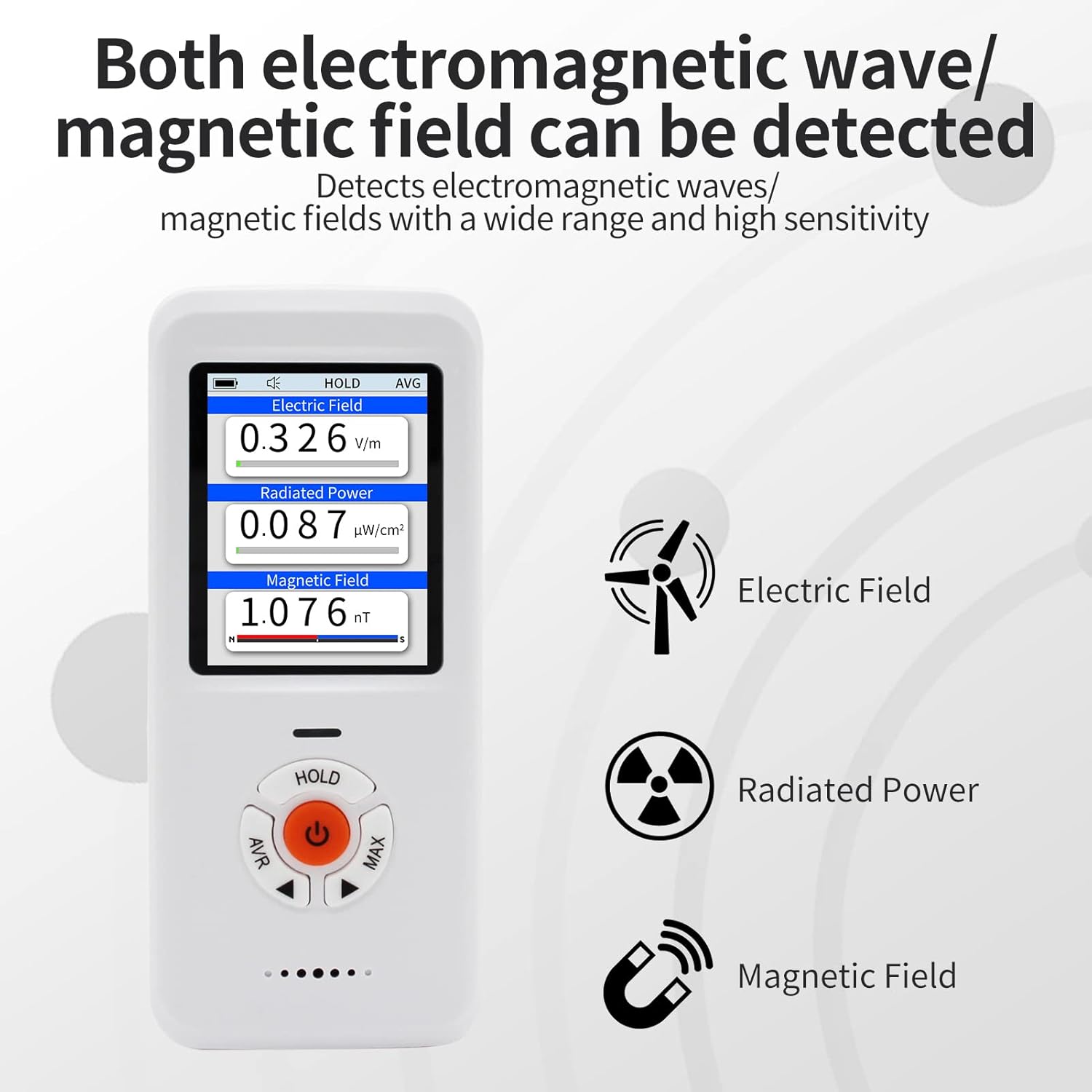
Figure 6.1: The EM-101 displaying simultaneous readings for Electric Field, Radiated Power, and Magnetic Field, along with their respective units.
- Электр талаасы (ЭТ): Measures electric field strength in V/m.
- Radiated Power (RF): Measures radiation power in µW/cm².
- Магнит талаасы (MF): Measures magnetic field strength in nT. The device also indicates N/S polarity for static magnetic fields.
- HOLD Функциясы: Press the "HOLD" button to pause the current readings on the screen. Press again to resume real-time measurements.
- Ойготкуч: If the detected radiation exceeds the set alarm threshold, the device will emit a sound and/or flash alert.
6.4 Практикалык колдонулуштар
The EM-101 can be used to test various sources of electromagnetic radiation:

Figure 6.2: The EM-101 being used to test common household appliances and devices for electromagnetic radiation, including a TV, microwave, WiFi router, and hairdryer.
- Тиричилик техникасы: Test TVs, microwaves, refrigerators, washing machines, etc.
- Зымсыз түзмөктөр: Check radiation from WiFi routers, mobile phones, Bluetooth devices.
- Power Lines & Electrical Equipment: Measure fields near power outlets, cables, and large electrical machinery.
- Ghost Hunting: Detect anomalous magnetic field fluctuations.
7. Техникалык тейлөө
- Тазалоо: Аппаратты тазалоо үчүн жумшак, кургак чүпүрөктү колдонуңуз. Абразивдүү тазалагычтарды же эриткичтерди колдонбоңуз.
- Сактагыч: Аппаратты түз күн нурунан жана экстремалдык температурадан алыс салкын, кургак жерде сактаңыз.
- Батареяга кам көрүү: Батареянын оптималдуу иштөө мөөнөтү үчүн, бат-баттан батареяны толук зарядсыздандырбаңыз. Аппаратты узак убакыт бою колдонбосо дагы, үзгүлтүксүз заряддаңыз.
- Таасирден качуу: Бышык болгону менен, түзмөктү түшүрүп албоодон же катуу соккуга дуушар кылбоодон алыс болуңуз.
8. Кыйынчылыктарды
| Көйгөй | Мүмкүн себеп | Чечим |
|---|---|---|
| Түзмөк күйбөйт. | Батареянын кубаты аз же түзмөктүн иштебей калышы. | Charge the device fully. If the issue persists, contact customer service. |
| Туура эмес окуулар. | Interference from other electronic devices; incorrect unit settings. | Move away from strong electromagnetic sources. Check and adjust unit settings in the menu. |
| Сигнал угулбай жатат. | Alarm threshold set too high; alarm function disabled. | Adjust the alarm threshold in the "Alarm" menu. Ensure the alarm function is enabled. |
If you encounter any issues not listed here or if the suggested solutions do not resolve the problem, please contact our customer service team for professional assistance.
9. Техникалык шарттар
| Атрибут | Нарк |
|---|---|
| Бренд | CHNADKS |
| Модель номери | EM-101 |
| Power Source | Батарея менен иштейт (орнотулган литий-ион) |
| Түс | Ак |
| Элемент Салмагы | 67 грамм |
| Өлчөмдөр | Болжол менен 4.64 x 2 x 0.78 дюйм (11.78 x 5.08 x 1.98 см) |
| Measurement Range (RF) | 50 МГц-3.5 ГГц |
| Дисплей | TFT 2.0 Color LCD |
| Коргоо деңгээли | IP3X |
| Камтылган компоненттер | LCD, Li-ion battery |
| Сертификация | CE |
| Келип чыккан өлкө | АКШ |
10. Кепилдик жана колдоо
Your CHNADKS EM-101 EMF Meter is designed for reliability and performance. While specific warranty details are not provided in this manual, CHNADKS is committed to customer satisfaction.
If you have any questions, concerns, or require assistance with your device, please do not hesitate to contact our dedicated customer service team. We are here to provide professional and thoughtful support.
Please refer to the product packaging or the official CHNADKS webэң акыркы кепилдик маалыматы жана байланыш маалыматтары үчүн сайт.


