1. Киришүү
This manual provides detailed instructions for the OQIMAX Projection Alarm Clock. This device features a 180° adjustable projection, a 7.8-inch LED mirror display with adjustable brightness, multiple alarm modes with snooze, and displays indoor temperature and humidity. Please read this manual thoroughly before use to ensure proper operation and to maximize the product's functionality.
2. Пакеттин мазмуну
Төмөндө тизмеленген нерселердин баары пакетиңизге камтылганын текшериңиз:
- 1 x OQIMAX Projection Alarm Clock
- 1 x 1.5m USB Cable (Power adapter not included)
- 1 x CR2032 Button Battery (Integrated for memory function)
- 1 x Колдонуучунун колдонмосу
3. Продукт бүтүп калдыview
Familiarize yourself with the alarm clock's components and controls.

Сүрөт 3.1: Алдыңкы жана арткы View of the Alarm Clock with Labeled Controls. This image illustrates the location of the alarm clock buttons (MODE, ALARM, SNOOZE/LIGHT, PROJECT, UP, DOWN), the projection lamp, speaker, power port, and the detachable stand.
Башкаруу элементтери жана дисплей элементтери:
- MODE баскычы: Used to switch between time, alarm, and temperature/humidity display modes.
- ALARM баскычы: Used to set and activate alarms.
- SNOOZE/LIGHT Button: Activates snooze during an alarm; adjusts display brightness.
- PROJECT Button: Activates and adjusts projection brightness.
- UP баскычы: Increases values during setting; switches temperature units.
- ТӨМӨН баскычы: Decreases values during setting; switches 12/24 hour format.
- Проекция Л.amp: Emits time projection.
- Баяндамачы: Emits alarm sound.
- Электр порту: Кубат үчүн USB-C киргизүү.
- Detachable Stand: Provides stable base for the clock.

Сүрөт 3.2: Product Dimensions and Key Features. This image shows the overall dimensions of the alarm clock and highlights its main features: projection function, 4-level brightness, temperature/humidity display, time & alarm, 12/24H format, and snooze.
4. Орнотуу
4.1 Кубат туташтыруу
The alarm clock requires continuous power via a USB cable. Connect the provided 1.5m USB cable to the power port on the back of the alarm clock and plug the other end into a USB power adapter (not included) or a powered USB port.
Эскертүү: The screen will turn off if the USB power cable is disconnected. The integrated CR2032 button battery serves as a backup to save time and alarm settings during power interruptions, but it does not power the display or projection.
4.2 Алгачкы даярдоо
Before first use, remove any protective film from the display mirror surface.
5. Иштөө нускамалары
5.1 Убакытты коюу
- Убакытты көрсөтүү режиминде, баскычын басып кармап туруңуз РЕЖИМ баскычын сааттын цифралары жаркылдай баштаганга чейин басыңыз.
- колдонуу UP or ылдый саатты тууралоо үчүн баскычтар.
- басыңыз РЕЖИМ button again to switch to minute setting. Use UP or ылдый мүнөтүн тууралоо үчүн.
- Басыңыз РЕЖИМ убакытты ырастоо жана андан чыгуу үчүн.
5.2 Сигналды коюу
The clock supports three alarm modes.

Сүрөт 5.1: Three Alarm Modes. This image shows the display for setting alarms for Monday-Friday, Monday-Saturday, and Everyday.
- басыңыз АЛАРМ button to enter alarm setting mode. The alarm icon will appear.
- басып, кармап туруңуз АЛАРМ баскычын сааттын цифралары жарк этмейинче басыңыз.
- колдонуу UP or ылдый каалаган ойготкуч саатын коюу үчүн баскычтар.
- Басыңыз АЛАРМ again to set the minutes. Use UP or ылдый тууралоо.
- Басыңыз АЛАРМ кайра сигнал режимин тандоо үчүн:
- 1-5: Дүйшөмбүдөн жумага чейин
- 1-6: Дүйшөмбүдөн ишембиге чейин
- 1-7: Күн сайын
- Басыңыз АЛАРМ ырастоо жана сигнал орнотуудан чыгуу.
- Ойготкучту жандыруу/өчүрүү үчүн, баскычын кыска басыңыз АЛАРМ button. The alarm icon will indicate its status.
5.3 Тындыруу функциясы
Ойготкуч басылганда, басыңыз SNOOZE / LIGHT button to activate the snooze function. The alarm will pause and sound again after the set snooze duration.
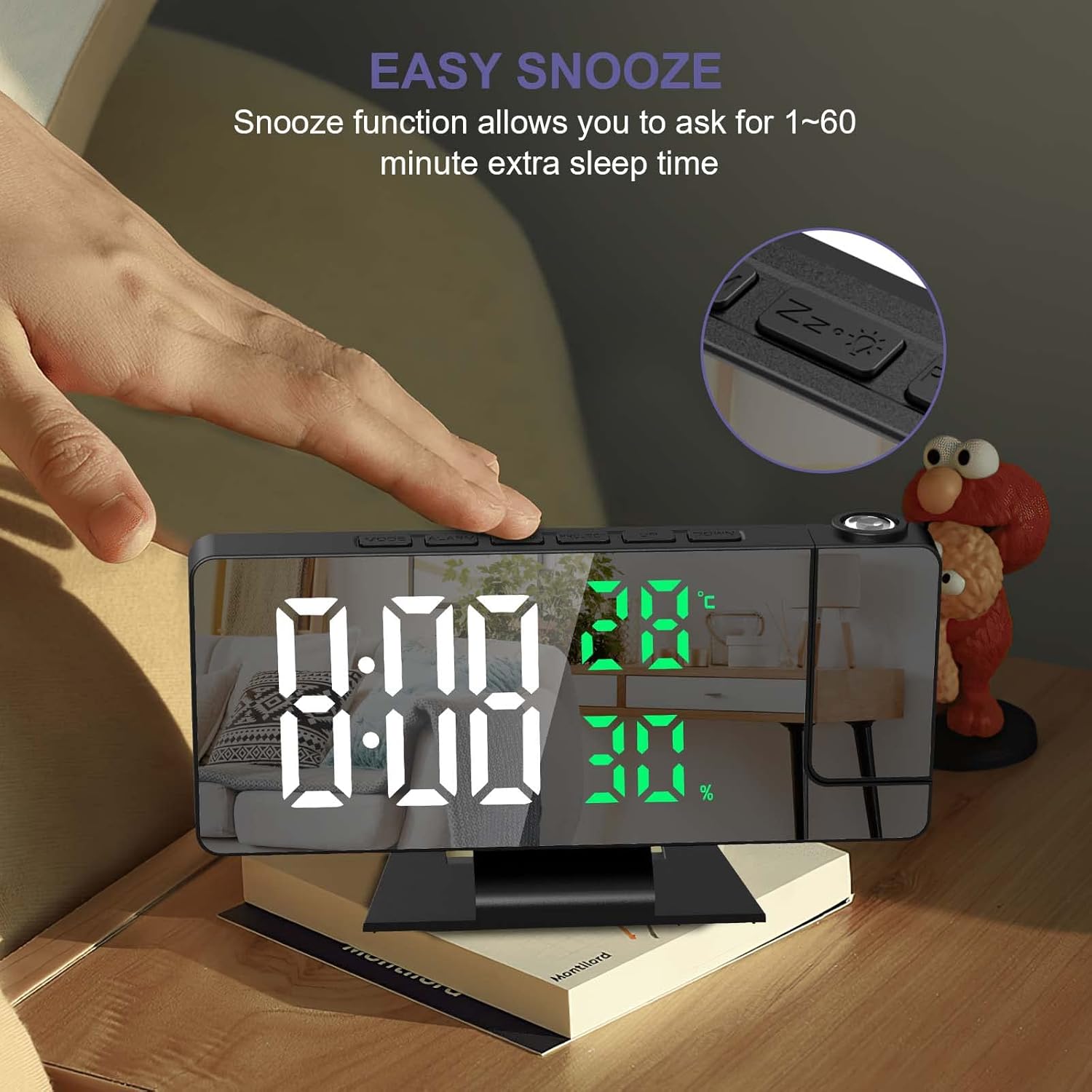
Сүрөт 5.2: Easy Snooze Function. This image shows a hand pressing the snooze button on the alarm clock, indicating the function allows for 1-60 minutes of extra sleep.
To adjust the snooze duration (default 5 minutes):
- While in alarm setting mode (after setting time and alarm mode), press АЛАРМ again to enter snooze duration setting.
- колдонуу UP or ылдый buttons to set the snooze duration between 1 and 60 minutes.
- Басыңыз АЛАРМ ырастоо үчүн.
5.4 Проекциялоо жөндөөлөрү
The alarm clock can project the time onto a wall or ceiling.
Сүрөт 5.3: 180° Projection and Brightness Levels. This image demonstrates the 180-degree adjustable projection angle and the three available projection brightness levels.
- Проекциялык бурчту тууралоо: The projection arm can be rotated 180° to direct the time display as needed.
- Проекциянын жарыктыгын тууралоо: басыңыз ДОЛБООРУ button repeatedly to cycle through 3 brightness levels (High, Medium, Low) or turn the projection off.
- Проекциялык аралык: Optimal projection distance is between 0.5 to 5 meters (1.6 to 16 feet).
- Эскертүү: The projection function is most effective in dark environments. The projection can only be oriented towards the back of the alarm clock. If projected towards the front, the numbers will appear inverted.
5.5 Дисплейдин жарыктыгы
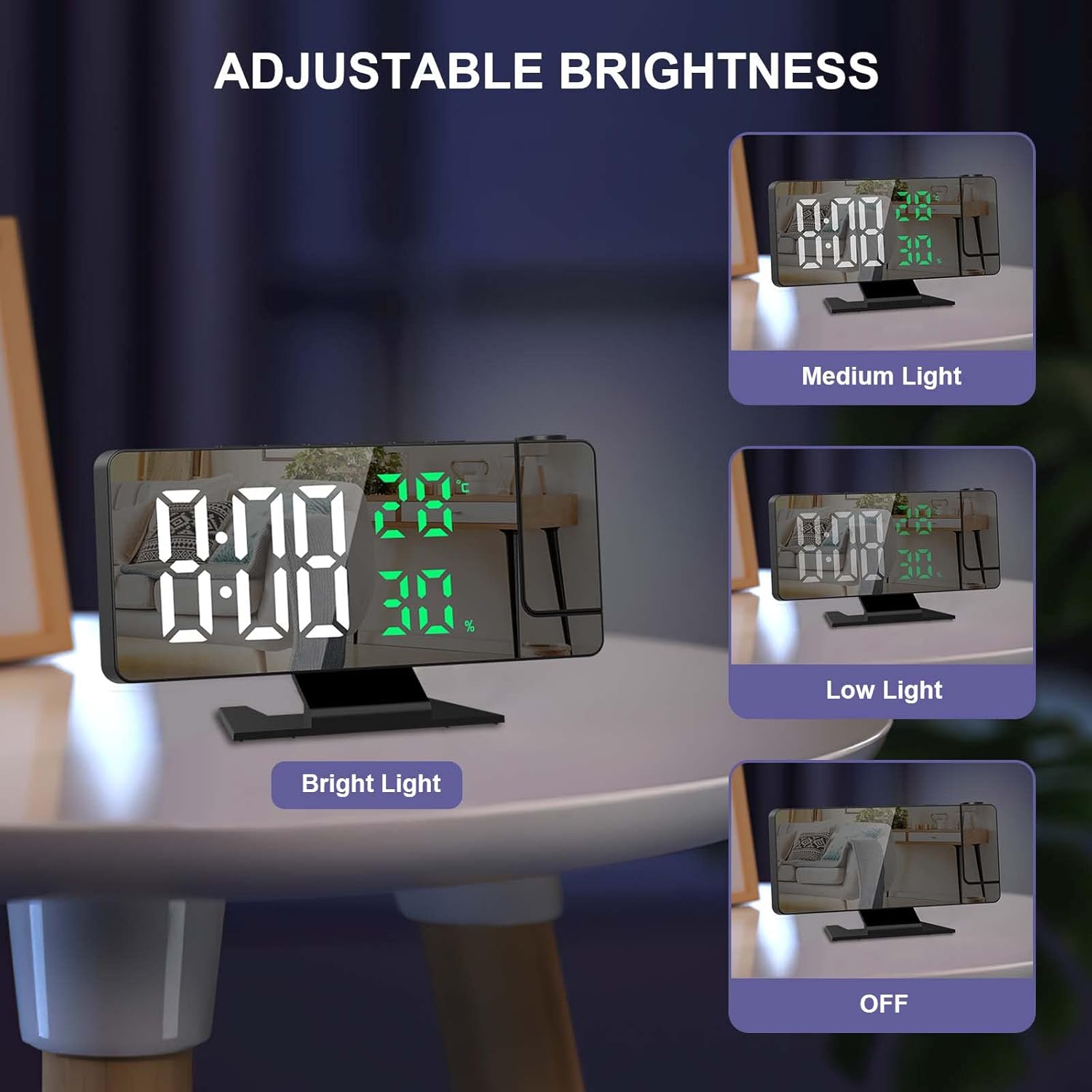
The 7.8-inch LED display has four adjustable brightness levels.
Сүрөт 5.4: Adjustable Display Brightness. This image illustrates the four display brightness options: Bright Light, Medium Light, Low Light, and OFF.
- басыңыз SNOOZE / LIGHT button (when alarm is not sounding) to cycle through the 4 brightness levels: High, Medium, Low, and OFF.
- Automatic Night Mode: The screen automatically dims from 18:00 (6 PM) to 5:59 (5:59 AM) to avoid disturbing sleep.
5.6 Температура жана нымдуулук дисплейи
The alarm clock displays real-time indoor temperature and humidity.
- Температура диапазону: -10°C to 50°C (14°F to 122°F), with an error margin of ±1°C.
- Нымдуулуктун чеги: 20% to 95%, with an error margin of ±5%.
- Цельсий (°C) жана Фаренгейт (°F) ортосунда которулуу үчүн, баскычын басыңыз ылдый баскычы температура дисплей режиминде.
5.7 12/24 саат форматы
12 сааттык жана 24 сааттык убакыт форматтарынын ортосунда которулуу үчүн, басыңыз ылдый button while in time display mode (not in setting mode).
5.8 USB кубаттоо порту
The alarm clock includes a USB port that can be used to charge smartphones or tablets.
6. Техникалык тейлөө
- Дисплейди тазалаңыз жана casing with a soft, dry cloth. Avoid abrasive cleaners or solvents.
- Keep the device away from direct sunlight, extreme temperatures, and high humidity.
- Ensure the ventilation holes on the back are not obstructed.
7. Кыйынчылыктарды
| Көйгөй | Мүмкүн себеп | Чечим |
|---|---|---|
| Дисплей өчүк. | The alarm clock is not connected to power. | Ensure the USB cable is securely connected to a power source. The display requires continuous USB power. |
| Projection is upside down. | The projection is oriented incorrectly. | The projection can only be correctly displayed when oriented towards the back of the alarm clock. Adjust the clock's position or the projection arm accordingly. |
| Электр энергиясы өчүрүлгөндөн кийин жөндөөлөр жоголот. | Backup battery is not functioning or depleted. | Ensure the integrated CR2032 button battery is correctly installed and functional. This battery saves settings during temporary power loss. |
| Projection is unclear or too dim. | Ambient light is too bright; projection distance is too far. | The projection function works best in dark environments. Adjust the projection brightness using the ДОЛБООРУ button. Ensure the projection distance is within 0.5 to 5 meters. |
| Buttons produce a loud beep, and volume is not adjustable. | This is a design characteristic of the product. | The button beep volume is not adjustable on this model. |
8. Техникалык шарттар
| Өзгөчөлүк | Деталь |
|---|---|
| Бренд | OQIMAX |
| Модел | B0BVFJHTLX |
| Продукциянын өлчөмдөрү | 11 x 3.81 x 3.5 см |
| Дисплей өлчөмү | 7.8 дюйм |
| Түс | White and Green Numbers |
| Стиль | Заманбап |
| Материал | Металл |
| Форма | Төрт бурчтуу |
| Power Source | USB Powered (Battery for memory function only) |
| Дисплей түрү | Санарип |
| Өзгөчөлүктөр | Alarm, Projection, Temperature Display, Humidity Display, Snooze, USB Charging Port |
| Элемент Салмагы | 230 грамм |
| Температура диапазону | -10°C~50°C (14°F~122°F) ±1°C |
| нымдуулук колому | 20%~95% ±5% |
9. Кепилдик жана колдоо
For any questions regarding product operation, functionality, or if the product is defective or damaged, please contact OQIMAX customer support. We are committed to resolving any issues you may encounter.
Кепилдиктин чоо-жайын жана байланыш маалыматын алуу үчүн сатып алуу документтерин караңыз.
