Introduction
Сатып алганыңыз үчүн рахматasing the Klipsch R-50PM Powered Speakers. These speakers are designed to deliver high-fidelity audio with powerful performance and versatile connectivity options. This manual provides detailed instructions for setting up, operating, and maintaining your speakers to ensure optimal performance and longevity.
Маанилүү коопсуздук нускамалары
- Бул нускамаларды окуңуз.
- Бул көрсөтмөлөрдү сактаңыз.
- Бардык эскертүүлөргө кулак сал.
- Бардык нускамаларды аткарыңыз.
- Бул аппаратты суунун жанында колдонбоңуз.
- Кургак чүпүрөк менен гана тазалаңыз.
- Эч кандай желдетүүчү тешиктерди жаап албаңыз. Өндүрүүчүнүн көрсөтмөлөрүнө ылайык орнотуу.
- Радиаторлор, жылуулук регистрлери, мештер же башка аппараттар (анын ичинде) сыяктуу жылуулук булактарынын жанына орнотпоңуз ampкөтөргүчтөр) жылуулукту пайда кылуучу.
- Поляризацияланган же жерге туташтыруучу сайгычтын коопсуздук максатын жокко чыгарбаңыз. Поляризацияланган сайгычтын эки бычагы бар, бири экинчисинен кенен. Жерге туташтыруучу түрдөгү сайгычтын эки бычак жана үчүнчү жерге туташтыруучу тиштери бар. Кең бычак же үчүнчү тиш сиздин коопсуздугуңуз үчүн берилген. Эгерде берилген сайгыч розеткага туура келбесе, эскирген розеткаңызды алмаштыруу үчүн электрикке кайрылыңыз.
- Электр шнурунун басылып кетүүсүнөн же кысып калуудан сактаңыз, айрыкча сайгычтарга, розеткаларга жана алар аппараттан чыга турган жерине.
- Өндүрүүчү тарабынан көрсөтүлгөн тиркемелерди/аксессуарларды гана колдонуңуз.
- Өндүрүүчү белгилеген же аппарат менен бирге сатылган араба, стенд, штатив, кронштейн же үстөл менен гана колдонуңуз. Араба колдонулганда, оодарылып кетүүдөн жаракат албаш үчүн арабаны/аппаратты айкалыштырууда этият болуңуз.
- Бул аппаратты чагылгандуу бороондордо же узак убакыт бою колдонбогондо электр розеткасынан ажыратыңыз.
- Бардык тейлөөлөрдү квалификациялуу тейлөө кызматкерлерине тапшырыңыз. Аппарат кандайдыр бир зыянга учураганда, мисалы, кубат берүүчү шнур же сайгыч бузулганда, суюктук төгүлгөндө же аппараттын ичине нерселер түшкөндө, аппарат жамгырга же нымдуулукка дуушар болгондо, нормалдуу иштебей калганда тейлөө талап кылынат. , же түшүрүлгөн.
Пакеттин мазмуну
Your Klipsch R-50PM Powered Speakers package should include the following items:
- Klipsch R-50PM Primary Powered Speaker
- Klipsch R-50PM Secondary Speaker
- Алыстан башкаруу
- Электр кабели
- Динамиктин кабели (негизги динамикти экинчи динамикке туташтыруу үчүн)
- USB-B - USB-A кабели
- Оптикалык кабель
- RCA кабели
Продукт бүттүview
The Klipsch R-50PM speakers feature a robust design with a 5.25-inch copper-spun TCP woofer and a 1-inch aluminum LTS tweeter paired with a Tractrix horn for clear, dynamic sound. The primary speaker houses all the necessary inputs and controls.

Сүрөт: алдыңкы view of the Klipsch R-50PM Powered Speakers with their protective grilles removed, revealing the distinctive copper-colored woofers and black Tractrix horn tweeters.

Сүрөт: алдыңкы view of the Klipsch R-50PM Powered Speakers with their magnetic grilles attached, presenting a sleek, all-black appearance.
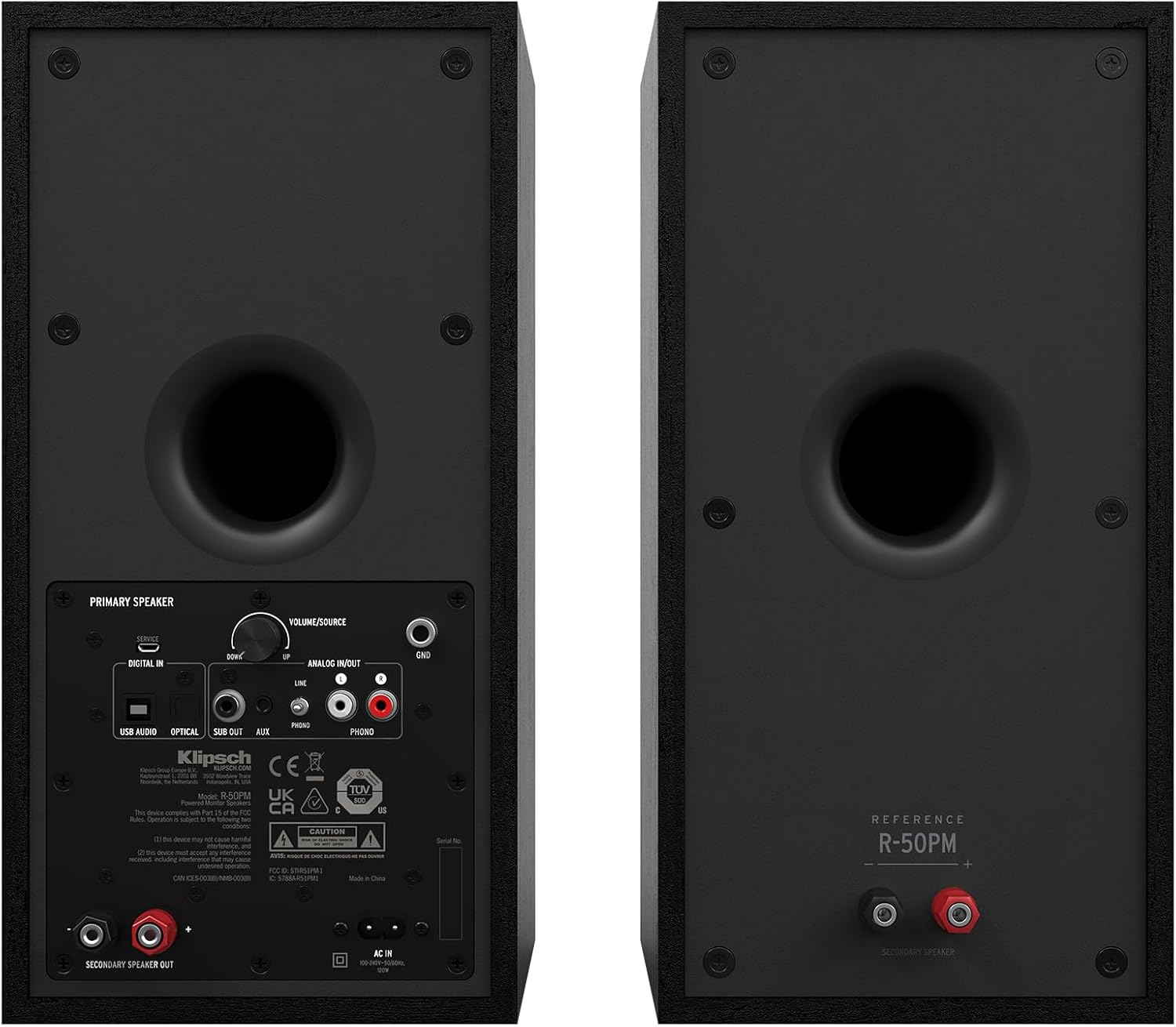
Image: Rear panel of the primary Klipsch R-50PM speaker, displaying various input ports including USB, Optical, AUX, Phono/Line, and a subwoofer output, along with the volume/source knob and power input.

Image: The remote control for the Klipsch R-50PM speakers, featuring buttons for power, volume, input selection (SUB, AUX, PHONO, USB, OPT), Bluetooth pairing, and playback controls.
Жайгашуу
Динамикти жайгаштыруу
For optimal sound, place the speakers on a stable surface, equidistant from your listening position. Ensure there is adequate space behind the speakers for the rear-firing ports to function effectively. The primary speaker (with inputs) should be placed on the side where your audio sources are most accessible.
Динамиктерди туташтыруу
- Connect the included speaker cable from the "SECONDARY SPEAKER OUT" port on the primary speaker to the input terminals on the secondary speaker. Ensure correct polarity (+ to + and - to -).
- Connect the power cord to the primary speaker and then to a wall outlet.
Аудио булактарын туташтыруу
The R-50PM speakers offer multiple input options:
- Bluetooth: Press the Bluetooth button on the remote or the source knob on the primary speaker until the Bluetooth indicator lights up. Pair with your device from its Bluetooth settings.
- Optical (Digital In): Connect an optical cable from your TV or digital audio source to the "OPTICAL" input.
- USB (Digital In): Connect a USB-B to USB-A cable from your computer to the "USB AUDIO" input.
- RCA (Analog In): Use an RCA cable to connect devices like CD players or media streamers to the "ANALOG INPUT" (Line).
- Phono (Analog In): For turntables with a built-in pre-amp, connect to the "ANALOG INPUT" (Phono). Ensure the PHONO/LINE switch is set to PHONO. If your turntable does not have a built-in pre-amp, you will need an external phono pre-amp.
- AUX (3.5 мм): Connect portable devices using a 3.5mm stereo cable to the "AUX" input.
Сабвуферди туташтыруу
For enhanced bass, connect an active subwoofer to the "SUB OUT" port on the primary speaker using a single RCA cable. The speakers will automatically adjust their low-frequency output when a subwoofer is detected.
Операция
Күйгүзүү/өчүрүү
Press the power button on the remote control or the volume/source knob on the primary speaker to turn the speakers on or off.
Киргизүүнү тандоо
Cycle through the available inputs by pressing the source knob on the primary speaker or using the dedicated input buttons (Bluetooth, AUX, USB, OPT, PHONO) on the remote control.
Үндү көзөмөлдөө
Adjust the volume using the volume up/down buttons on the remote or by rotating the volume/source knob on the primary speaker.
Bluetooth Жупташтыруу
To pair a new Bluetooth device, select the Bluetooth input. If no device is connected, the indicator will flash. On your device, search for "Klipsch R-50PM" and select it to pair. Once paired, the indicator will glow solid.
Алыстан башкаруу функциялары
- Кубат баскычы: Turns speakers on/off.
- LED: Toggles the front LED indicator on/off.
- Үнүн жогорулатуу/төмөндөтүү: Башкы үнүн тууралайт.
- Үнсүз: Аудионун үнүн басуу/ачуу.
- SUB +/-: Adjusts subwoofer output level (if connected).
- Ойнотуу башкаруулары: Play/Pause, Skip Forward, Skip Backward (for Bluetooth and USB audio).
- Киргизүүнү тандоо: Dedicated buttons for AUX, PHONO, USB, OPT, Bluetooth.
Техникалык тейлөө
To keep your Klipsch R-50PM speakers in excellent condition:
- Тазалоо: Use a dry, soft cloth to clean the speaker cabinets. Avoid using abrasive cleaners or solvents.
- Торлор: The magnetic grilles can be removed for cleaning or to expose the drivers. Handle them carefully to avoid damage.
- Чаң: Regularly dust the drivers and ports to prevent accumulation that could affect sound quality.
- Курчап турган чөйрө: Динамиктерди өтө жогорку температурага, нымдуулукка же түз күн нуруна дуушар кылбаңыз.
Проблемаларды чечүү
| Көйгөй | Мүмкүн болгон себеп / Чечим |
|---|---|
| Күч жок | Ensure the power cord is securely connected to both the speaker and a working wall outlet. Check if the power outlet is active. |
| Үн жок |
|
| Bluetooth туташпай жатат |
|
| Бурмаланган үн |
|
Техникалык шарттар
| Өзгөчөлүк | Деталь |
|---|---|
| Модель аты | R-50PM |
| Динамик түрү | Bookshelf, Powered |
| Вуфердин диаметри | 5.25 дюйм |
| Tweeter | 1-inch Aluminum LTS with Tractrix Horn |
| Динамиктин максималдуу чыгаруу күчү | 100 Ватт |
| Байланыш технологиясы | Bluetooth, Optical, USB, RCA (Phono/Line), 3.5mm AUX |
| Продукциянын өлчөмдөрү | 10.8"D x 7"W x 14"H |
| Элемент Салмагы | 30 фунт (жуп үчүн жалпысынан) |
| Түс | Кара |
| Материал | Copper (woofer), MDF (cabinet) |
| Башкаруу ыкмасы | Remote, On-speaker knob |
| UPC | 743878049763 |
Кепилдик жана колдоо
Klipsch provides a limited warranty for its products. For specific warranty terms and conditions, please refer to the warranty card included with your product or visit the official Klipsch webсайт. Техникалык колдоо, мүчүлүштүктөрдү оңдоо боюнча жардам же тейлөө боюнча суроолор үчүн Klipsch кардарларды колдоо кызматына алардын расмий каналдары аркылуу кайрылыңыз.
Өндүрүүчү: Klipsch
Webсайт: www.klipsch.com


