1. Продукт бүтүп калдыview
The Jansite TPMS-0215 is a solar-powered wireless tire pressure monitoring system designed to provide real-time tire pressure and temperature data for enhanced driving safety. It features a removable bracket for flexible placement and easy charging, along with four external sensors for comprehensive monitoring.
Негизги өзгөчөлүктөрү:
- Removable Bracket with 45° Adjustable Angle: Allows for easy removal and adjustment of the monitor for optimal viewing and solar charging.
- Six Alarm Modes: Provides alerts for air leak, low pressure, high pressure, high temperature, sensor failure, and low battery.
- Кош кубаттоо ыкмасы: Supports both high-efficiency solar charging and USB charging for continuous operation.
- Vibration Detection Function: Automatically powers on when driving and enters sleep mode after parking to conserve energy.
- IP67 Waterproof External Sensors: Durable sensors are resistant to water, dust, and snow, suitable for various weather conditions.
- Кеңири шайкештик: Designed for most 4-tire vehicles with tire pressures up to 6 bar, including cars, SUVs, and MPVs.
2. Package Contents (Packlist)
Пакетиңизде бардык буюмдар бар экенин текшериңиз:
- Tire Pressure Monitor (Display Unit) x 1
- External Waterproof Sensor x 4
- Removable Bracket x 1
- Anti-theft Hex Nuts x 4
- Ачкыч x 1
- USB кубаттоо кабели x 1
- Колдонуучунун колдонмосу x 1
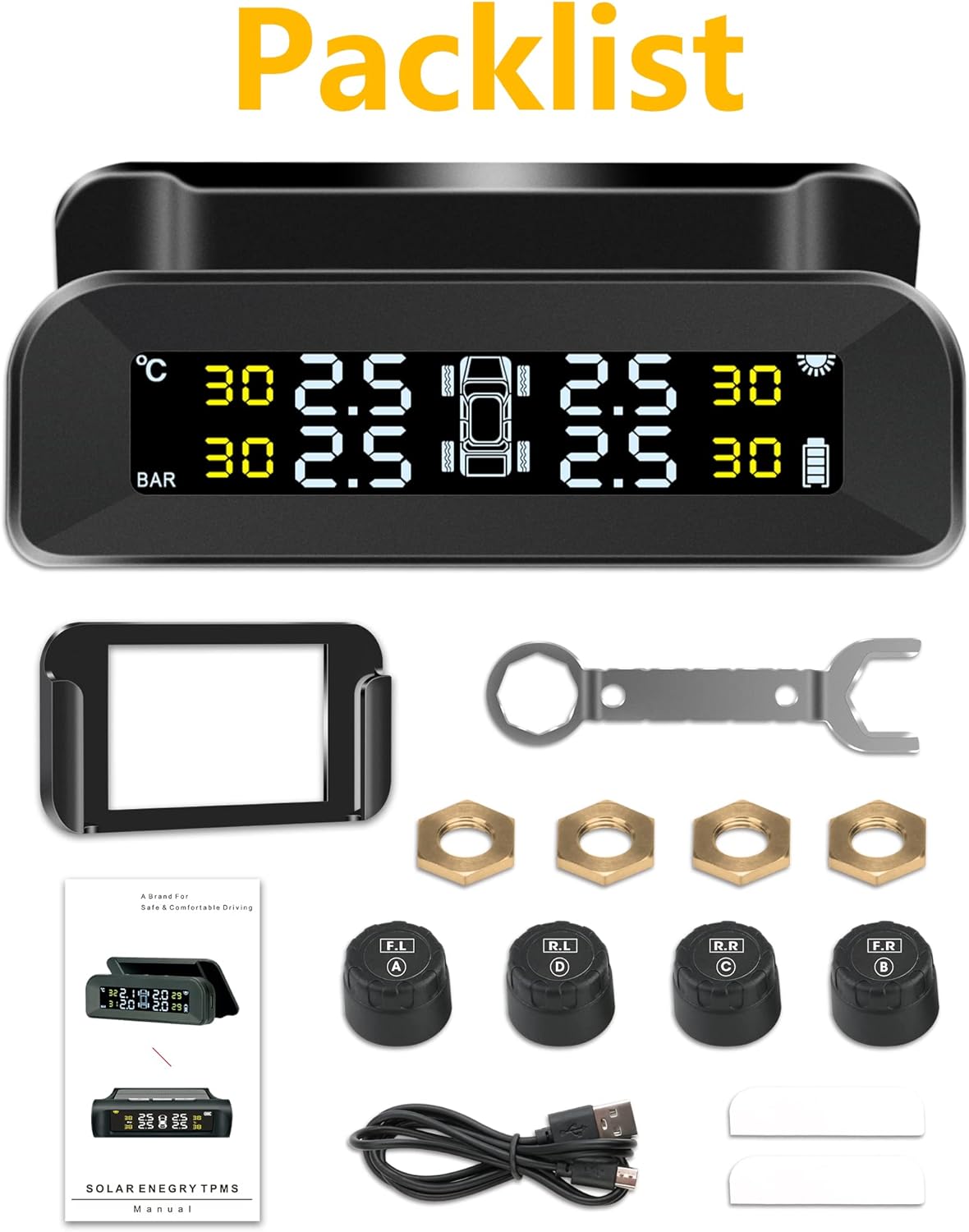
Image: Contents of the Jansite TPMS-0215 package.
3. Орнотуу жана орнотуу
3.1 Мониторду орнотуу
- Attach the monitor to the removable bracket.
- Mount the bracket on your vehicle's windscreen or dashboard. The bracket allows for a 45° angle adjustment for optimal viewing. For efficient solar charging, consider mounting on the windscreen.

Image: Monitor installation options and adjustable angle.
3.2 Сенсорду орнотуу
The external sensors are labeled for specific tire positions (F.L - Front Left, F.R - Front Right, R.L - Rear Left, R.R - Rear Right). Install them accordingly.
- Мониторду күйгүзүңүз: Ensure the monitor is powered on before installing sensors.
- Remove the valve cap: Шина клапанынан баштапкы клапан капкагын бурап алыңыз.
- Install the hex nut: Thread one of the anti-theft hex nuts onto the tire valve stem.
- Install the sensor: Screw the corresponding sensor (e.g., F.L for Front Left) onto the tire valve stem until it is hand-tight.
- Lock the sensor: Use the provided wrench to tighten the hex nut against the sensor, securing it in place and preventing theft.
- Repeat for all four tires.
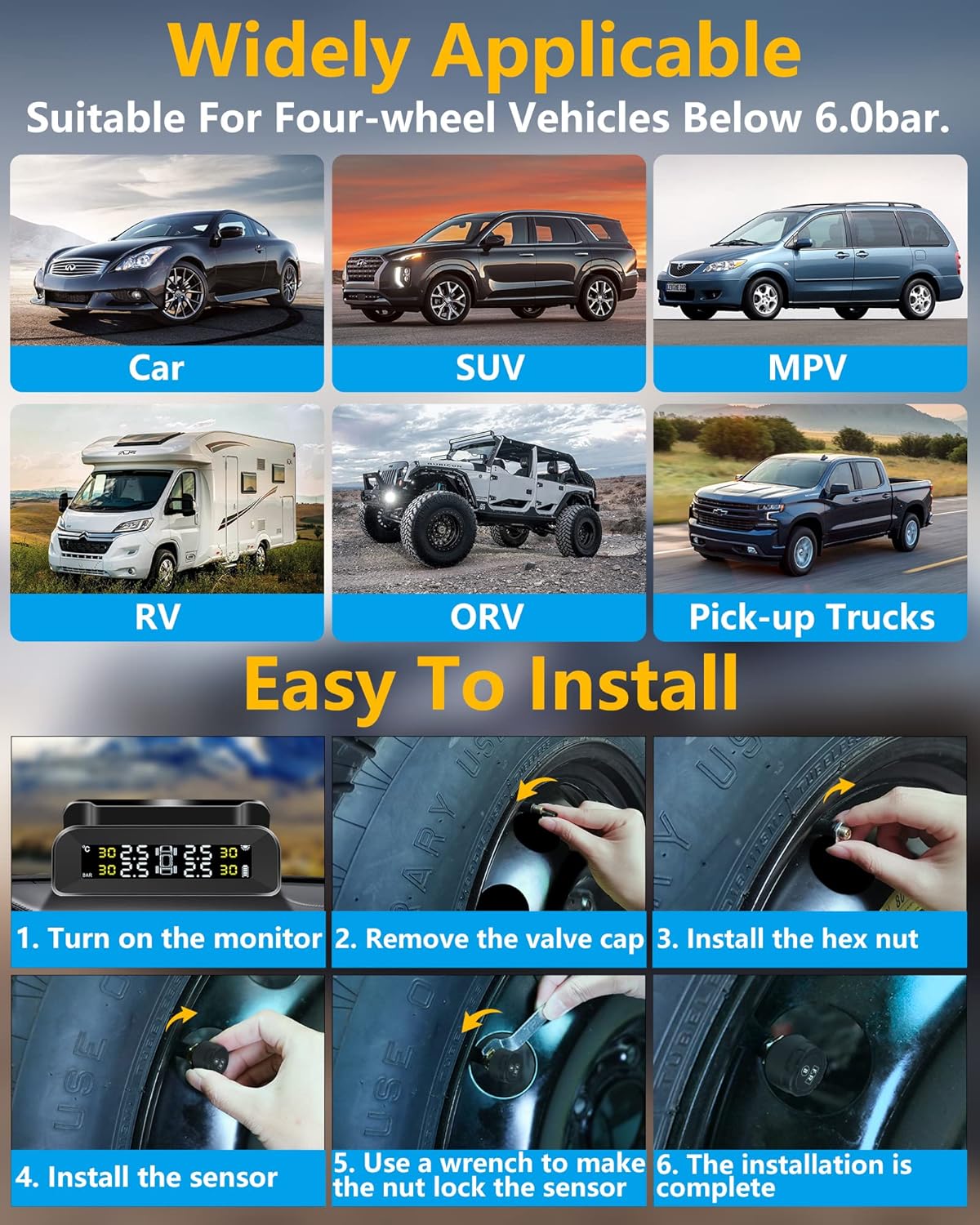
Image: Step-by-step sensor installation process.
4. Иштөө нускамалары
4.1 Алгачкы заряддоо
Before first use, charge the monitor for at least 3 hours using the provided USB cable. A full charge can last up to 180 days. The monitor also features solar charging for continuous power during sunny conditions.

Image: Solar and USB dual charging methods.
4.2 Power On/Off and Vibration Detection
The monitor has a built-in vibration sensing function:
- It will automatically turn on when it senses vibration (e.g., when you open the car door or start driving).
- If no vibration is detected within 4 minutes of parking, the screen will automatically go into sleep mode to save power.
- If you manually shut down the TPMS, you will need to manually restart it.

Image: Vibration detection for automatic power management.
4.3 Real-time Monitoring and Alarms
The monitor displays real-time tire pressure and temperature for all four tires. In case of abnormal data, the system will provide an audible and visual alarm.

Image: Real-time display of tire pressure and temperature.
The six alarm modes include:
- Air Leak Alarm
- Төмөн Басым Сигнал
- Жогорку басым сигнализациясы
- Жогорку температура сигналы
- Sensor Fault Alarm
- Батареянын аздыгы жөнүндө эскертүү

Сүрөт: бүттүview of the six alarm modes.
4.4 Бирдиктин орнотуулары
The monitor allows you to switch between different units for pressure and temperature. Refer to the detailed diagram below for button functions:
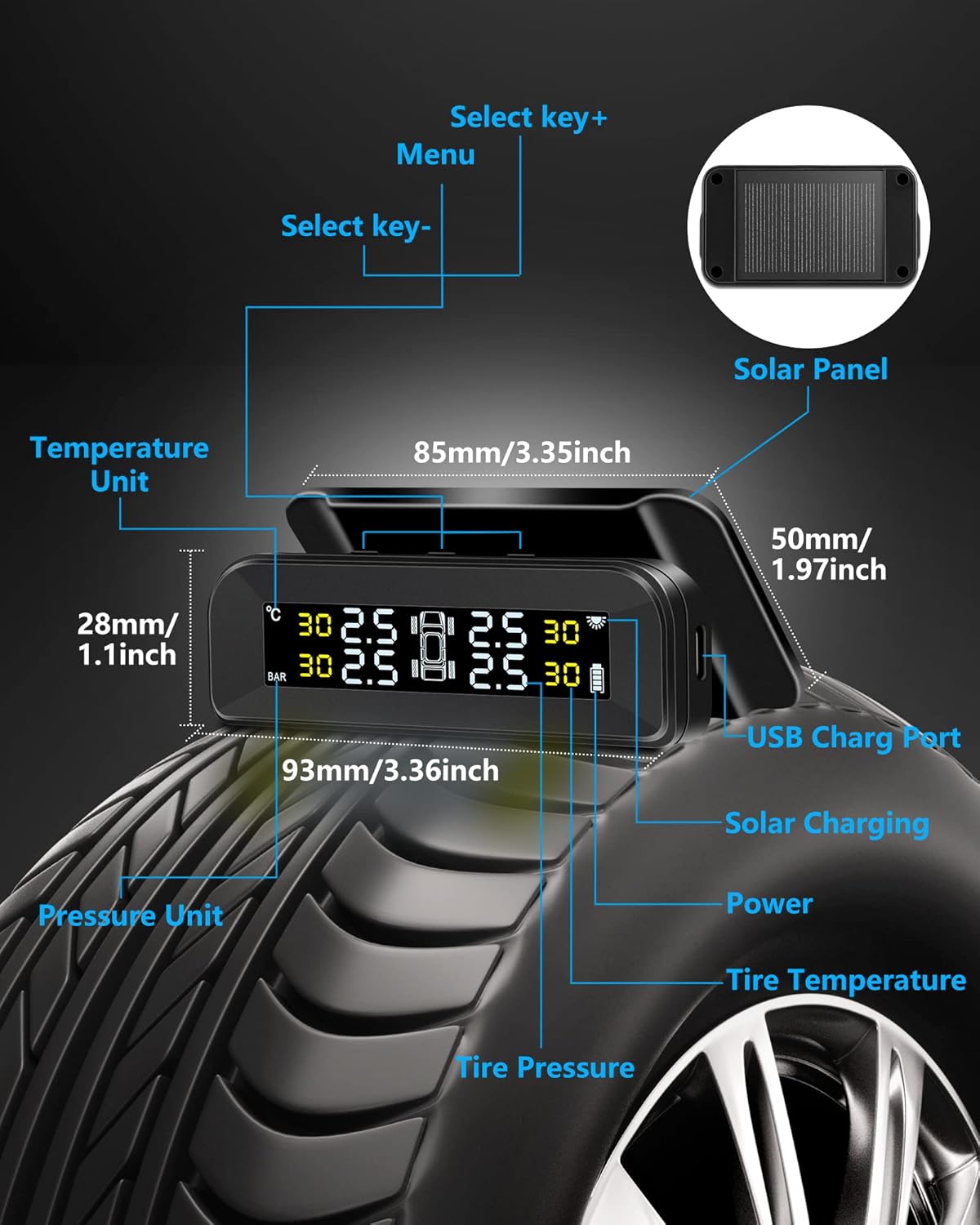
Image: Monitor diagram with labeled components and controls.
5. Техникалык тейлөө
5.1 Sensor Battery Replacement
The external sensors use replaceable batteries (CR1632). To replace a sensor battery:
- Use the provided wrench to open the sensor casing.
- Эски CR1632 батарейкасын этияттык менен алып салыңыз.
- Туура полярдуулукту камсыз кылуу менен жаңы CR1632 батареясын салыңыз.
- Сенсорду жабуу casing коопсуз.

Image: Sensor battery replacement steps.
5.2 Жалпы кам көрүү
The sensors are designed with IP67 waterproof performance, making them resistant to various environmental conditions. However, regular cleaning of the monitor and sensors with a soft, dry cloth is recommended to ensure optimal performance and longevity.

Image: IP67 waterproof performance and durability features.
6. Кыйынчылыктарды
If you encounter issues with your Jansite TPMS-0215, consider the following common solutions:
- Дисплей/кубат жок: Ensure the monitor is fully charged via USB. If using solar, confirm it's exposed to direct sunlight. Check if the vibration sensor is active or if the unit was manually turned off.
- Туура эмес окуулар: Verify that sensors are installed on the correct tires. Recheck tire pressure with a reliable gauge and compare. Ensure sensors are tightly secured.
- Сенсор туташпай жатат: Drive the vehicle for a few minutes to allow sensors to transmit data. Check if the sensor battery needs replacement. Ensure there are no strong electromagnetic interferences.
- Alarms Triggering Frequently: Check actual tire pressure and temperature. Adjust alarm thresholds if necessary (refer to the full manual for detailed settings).
- Батареянын бат түгөнүп калышы: Ensure the monitor is receiving sufficient solar charge. If consistently cloudy, rely on USB charging.
For persistent issues, please refer to the complete user manual or contact Jansite customer support.
7. Техникалык шарттар
| Өзгөчөлүк | Деталь |
|---|---|
| Бренд | Jansite |
| Модел | TPMS-0215 |
| Элемент Салмагы | 7.4 унция |
| Пакеттин өлчөмдөрү | 5.47 x 5.43 x 2.05 дюйм |
| Батареялар | 1 Lithium Polymer battery (included) for monitor, CR1632 for sensors |
| басым диапазону | 1.5-6 bar (approximately 22-87 PSI) |
| Waterproof Rating (Sensors) | IP67 |
| Заряддоо ыкмасы | Solar / USB |
| Шайкештик | Most 4-tire vehicles (Cars, SUVs, MPVs, etc.) |
8. Кепилдик жана колдоо
For warranty information, product support, or technical assistance, please refer to the warranty card included in your package or visit the official Jansite webсайт. Сатып алганыңыздын далили катары сатып алуу дүмүрчөгүңүздү сактаңыз.


