1. Киришүү
Thank you for choosing the CUPEISI CP20 Android 15 Tablet. This manual provides essential information for setting up, operating, and maintaining your device. Please read it thoroughly to ensure optimal performance and longevity of your tablet.
2. Кутуда эмне бар
Пакетиңизде бардык буюмдар бар экенин текшериңиз:
- CUPEISI CP20 Android 15 Tablet
- Зымсыз клавиатура
- Foldable Protective Cover
- Bluetooth чычкан
- Стилус
- Type-C кабели
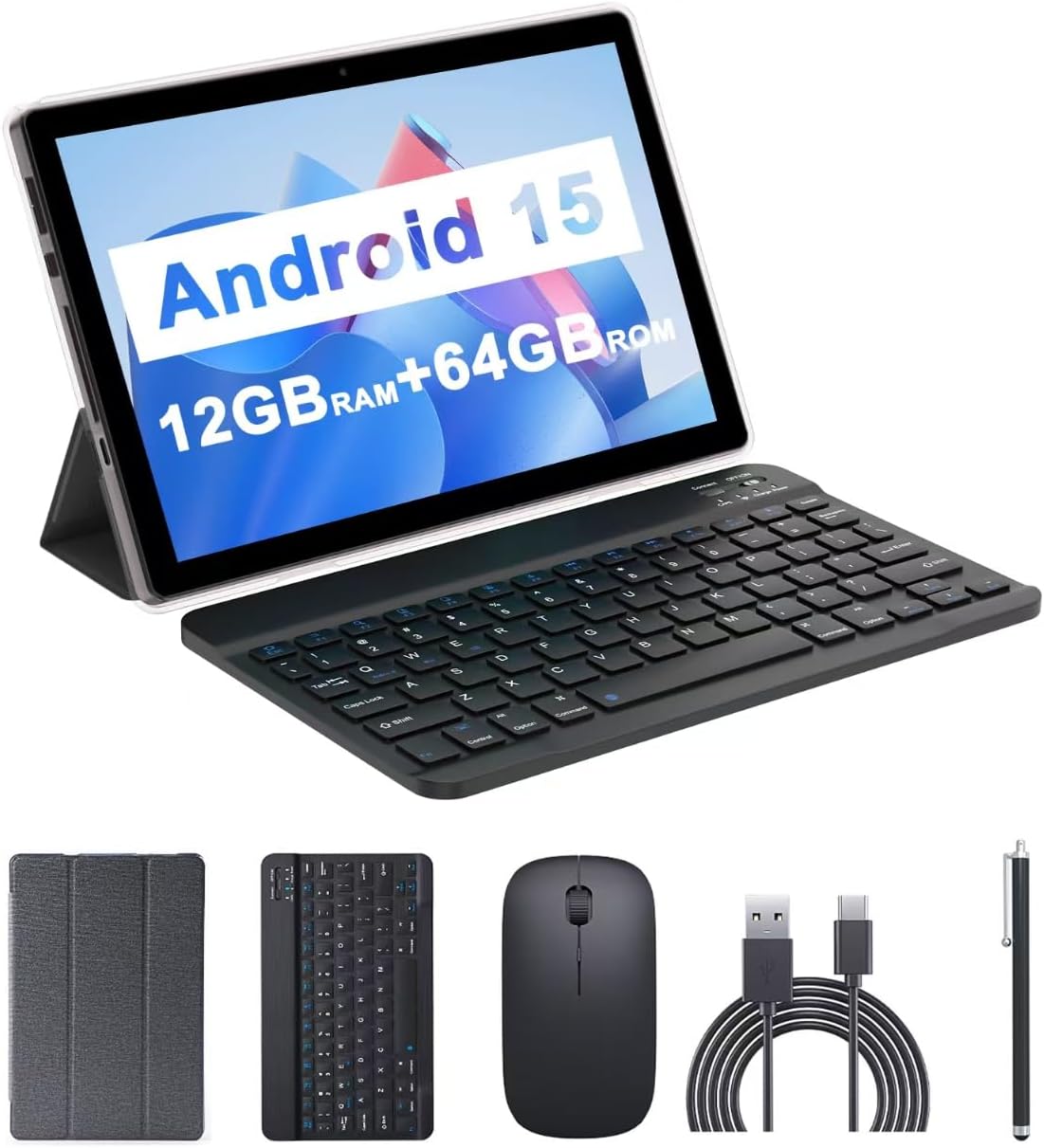
Image: The CUPEISI CP20 Tablet alongside its accessories, including the wireless keyboard, Bluetooth mouse, stylus, and foldable protective cover.
3. Продукттун өзгөчөлүктөрү жана компоненттери
The CUPEISI CP20 Tablet is designed for versatility and performance, offering a seamless user experience for both work and entertainment.
3.1 Негизги өзгөчөлүктөрү
- Операция системасы: Stable Android 15.0 system.
- Процессор: Built-in 1.8GHz Quad-core CPU for efficient multitasking.
- Эстутум жана сактоо: 12GB RAM (4GB+8GB expansion) and 64GB ROM, expandable up to 1TB via microSD card.
- Дисплей: Stunning 10.1-inch 1280x800 IPS HD touch screen for immersive visuals and eye protection.
- Батарея: Powered by a 6000mAh battery, providing approximately 6 hours of regular operation and up to 12 hours of standby time. Charges via 5V2A Type-C port.
- Камералар: 8MP rear camera with auto-focus and flash, and a 2MP front camera for clear video calls and photos.
- Байланыш: Supports 5G WiFi 6 and Bluetooth 5.0.
- 2-ин-1 Функциясы: Transforms into a laptop or computer mode with the included Bluetooth keyboard, wireless mouse, and foldable protective case.

Сүрөт: бүттүview of the tablet's core specifications and features.
3.2 Физикалык компоненттер
Планшеттин физикалык жайгашуусу менен таанышып алыңыз:
- Кубат баскычы: Капталында жайгашкан, планшетти күйгүзүү/өчүрүү же экранды ойготуу/уйку режимине өткөрүү үчүн колдонулат.
- Үн баскычтары: Аудио деңгээлин тууралоо.
- Тип-C Port: Заряддоо жана маалыматтарды өткөрүү үчүн.
- TF/SIM Card Slot: Кеңейтилген сактагыч үчүн microSD картаны салыңыз.
- Алдыңкы камера: Видео чалуулар жана селфи үчүн.
- Rear Camera & Flash: Жогорку сапаттагы сүрөттөр жана видеолор үчүн.
- Баяндамачылар: Two speakers for audio output.

Image: Labeled diagram of the tablet's ports and buttons.
4. Орнотуу колдонмосу
4.1 Алгачкы заряддоо
Before first use, fully charge your tablet. Connect the Type-C cable to the tablet's charging port and the other end to a compatible power adapter (5V2A recommended). The battery indicator will show charging status.
4.2 Күйгүзүү/өчүрүү
- Күйгүзүү үчүн: Экран күйгөнгө чейин Кубат баскычын басып, кармап туруңуз.
- Өчүрүү үчүн: Press and hold the Power Button, then select 'Power off' from the options that appear on the screen.
- Кайра баштоо үчүн: Press and hold the Power Button, then select 'Restart'.
4.3 Wi-Fiга туташуу
- барыңыз Орнотуулар > Тармак жана интернет > Wi-Fi.
- Wi-Fi күйгүзүңүз.
- Тизмеден каалаган Wi-Fi тармагын тандаңыз.
- Эгер суралса, сырсөздү киргизиңиз, андан кийин таптаңыз Туташуу.
4.4 Pairing Bluetooth Accessories
To use the wireless keyboard and Bluetooth mouse, they must be paired with your tablet.
- Баскычтоп жана чычкан заряддалганын жана күйүп турганын текшериңиз.
- Планшетиңизден төмөнкүгө өтүңүз Орнотуулар > Туташкан түзмөктөр > Bluetooth.
- Bluetooth күйгүзүү.
- The tablet will scan for available devices. Select the keyboard or mouse from the list.
- Жупташтыруу процессин аяктоо үчүн экрандагы көрсөтмөлөрдү аткарыңыз.

Image: Instructions for connecting the wireless keyboard and mouse via Bluetooth.
4.5 MicroSD картасын салуу
To expand storage, insert a microSD card (up to 1TB) into the TF/SIM card slot. Ensure the tablet is powered off before inserting or removing the card.
5. Планшетиңизди иштетүү
5.1 Негизги навигация
Navigate the Android interface using touch gestures:
- таптаңыз: Бир нерсени тандаңыз же колдонмону ачыңыз.
- Серпүү: Барактарды же тизмелерди жылдырыңыз.
- Чымчып чоңойтуу: Enlarge or shrink content.
- Узун басуу: Контексттик менюларга кириңиз же сүрөтчөлөрдү жылдырыңыз.
5.2 Using Keyboard and Mouse
Once paired, the keyboard and mouse function similarly to a laptop. The keyboard allows for efficient typing, while the mouse provides precise cursor control, enhancing productivity.

Image: The tablet in laptop mode, demonstrating its use for productivity tasks.
5.3 Камераны колдонуу
Open the Camera app to capture photos and videos. Switch between the 2MP front camera and the 8MP rear camera as needed. The rear camera features auto-focus and flash for improved image quality.

Image: Demonstrating the tablet's front and rear camera functionality for video calls and photography.
5.4 App Installation and Management
Download and install applications from the Google Play Store. To manage installed apps, go to Орнотуулар > Колдонмолор.

Image: The tablet running Android 15 OS, showing popular applications like YouTube, Google Play, and Netflix.
6. Техникалык тейлөө
6.1 Тазалоо
Планшеттин экранын жана корпусун тазалоо үчүн жумшак, түксүз чүпүрөктү колдонуңуз. Катуу химиялык заттарды же абразивдүү материалдарды колдонуудан алыс болуңуз. өжөр тактар үчүн, бир аз гampчүпүрөккө суу же электроника үчүн арналган экран тазалагыч.
6.2 Программалык камсыздоо жаңыртуулары
Планшетиңизде эң акыркы функциялар, коопсуздук жаңыртуулары жана майнаптуулугу жакшыртылганын текшерүү үчүн программалык камсыздоо жаңыртууларын дайыма текшерип, орнотуп алыңыз. барыңыз Орнотуулар > Система > Системаны жаңыртуу.
6.3 Сактагычты башкаруу
Оптималдуу көрсөткүчтөрдү сактоо үчүн, мезгил-мезгили менен кайра-кайра текшерип туруңузview жана планшетиңиздин сактагычын башкарыңыз. Керексиз жок кылуу files, колдонулбаган колдонмолорду чыгарып салуу жана чоң медиа файлдарды жылдыруу files to external storage (microSD card) if applicable. Go to Орнотуулар > Сактагыч чейин view колдонуу жана орун бошотуу.
7. Кыйынчылыктарды
This section addresses common issues you might encounter with your CUPEISI CP20 Tablet.
7.1 Планшет күйбөйт
- Планшеттин жетиштүү заряддалганын текшериңиз. Аны кубаттагычка кеминде 30 мүнөт туташтырыңыз.
- Perform a forced restart by pressing and holding the Power Button for 10-15 seconds.
7.2 Жай аткаруу
- Фондо иштеп жаткан колдонулбаган колдонмолорду жабуу.
- Clear cached data for apps (Settings > Apps > [App Name] > Storage & cache > Clear cache).
- жетиштүү бош орун камсыз кылуу.
- Планшетті мезгил-мезгили менен өчүрүп-күйгүзүңүз.
7.3 Wi-Fi туташуу маселелери
- Жөндөөлөрдөн Wi-Fi'ды өчүрүп жана күйгүзүңүз.
- Wi-Fi роутериңизди өчүрүп күйгүзүңүз.
- Forget the network and reconnect (Settings > Network & internet > Wi-Fi > [Network Name] > Forget).
7.4 Rapid Battery Drain
- Экран жарыктыгын азайтыңыз.
- Колдонулбаган учурда Wi-Fi, Bluetooth жана GPSти өчүрүңүз.
- Фондук колдонмону жаңыртууну чектеңиз.
- Энергияны көп сарптаган колдонмолорду аныктоо үчүн Орнотуулар > Батарея бөлүмүнөн батареянын колдонулушун текшериңиз.
8. Техникалык шарттар
| Өзгөчөлүк | Спецификация |
|---|---|
| Бренд | CUPEISI |
| Модель аты | CP20 |
| Операция системасы | Android 15 |
| Screen Size | 10 дюйм |
| Screen Resolution | 1280 x 800 пиксел (IPS HD) |
| Процессор | 1.8 ГГц төрт ядролуу |
| RAM | 12 GB (4GB+8GB expansion) |
| Flash эстутум өлчөмү | 64 ГБ |
| Кеңейтүүчү сактагыч | 1 ТБ чейин (microSD) |
| Арткы Webcam Resolution | 8 депутат |
| Алдыңкы камеранын чечилиши | 2 депутат |
| Зымсыз түрү | 802.11ax (5G WiFi 6) |
| Bluetooth | Bluetooth 5.0 |
| Батарея сыйымдуулугу | 6000 мАч литий полимери |
| Батареянын орточо иштөө мөөнөтү | 8 саат |
| Элемент Салмагы | 1 фунт |
| Продукциянын өлчөмдөрү | 9.7 x 6.5 x 0.3 дюйм |
9. Кепилдик жана колдоо
For warranty information and technical support, please refer to the documentation included with your purchase or visit the official CUPEISI webсайт. Кепилдик дооматтар үчүн сатып алганыңыздын далилин сактаңыз.
If you encounter issues not covered in this manual, please contact CUPEISI customer service for assistance.


