1. Киришүү
This manual provides essential information for the setup, operation, maintenance, and troubleshooting of your Dell Latitude 7490 Business Laptop. Please read this guide thoroughly to ensure proper use and to maximize the lifespan of your device. The Dell Latitude 7490 is designed for business professionals, offering a balance of performance, portability, and durability.
2. Кутуда эмне бар
Verify that all items are present before proceeding with setup.
- Dell Latitude 7490 ноутбугу
- AC адаптер

Image: The included AC adapter for charging the Dell Latitude 7490 laptop.
3. Продукт бүтүп калдыview
Familiarize yourself with the physical components and ports of your Dell Latitude 7490 laptop.
3.1 Фронт View

Сүрөт: алдыңкы view of the Dell Latitude 7490 laptop with the screen open, displaying a vibrant desktop background.
The front of the laptop features the 14-inch Full HD display, keyboard, and touchpad. The display offers a clear visual experience for various tasks.
3.2 тарап Viewс жана порттор

Сүрөт: сол жагы view of the Dell Latitude 7490, showing various ports including USB, HDMI, and power input.

Сүрөт: оң жак view of the Dell Latitude 7490, featuring additional ports such as USB and an SD card reader.
The Dell Latitude 7490 is equipped with a range of ports for connectivity. These include USB 3.0 ports, an HDMI port for external displays, an Ethernet port for wired network connections, an SD card reader, and a headphone/microphone combo jack. Specific port configurations may vary slightly.
3.3 Төмөнкү View
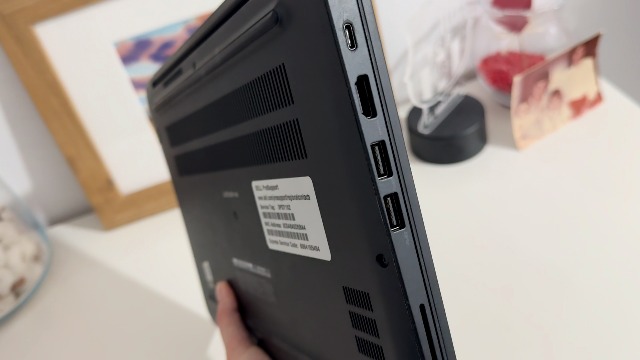
Сүрөт: Төмөнкү view of the Dell Latitude 7490, showing ventilation grilles and product labels.
The bottom of the laptop contains ventilation grilles to ensure proper airflow and prevent overheating. It also features product labels with important information such as the service tag and regulatory details.
4. Орнотуу
4.1 Баштапкы күйгүзүү
- AC адаптерин ноутбуктун кубат кирүүчү портуна, андан кийин розеткага туташтырыңыз.
- Ноутбуктун капкагын ачыңыз.
- Адатта баскычтоптун жогорку оң бурчунда жайгашкан кубат баскычын басыңыз.
- Windows 10 Pro орнотуусун аяктоо үчүн экрандагы көрсөтмөлөрдү, анын ичинде тилди тандоону, тармакка туташууну жана колдонуучу аккаунтун түзүүнү аткарыңыз.

Image: The Dell Latitude 7490 laptop powered on, displaying the Windows desktop, ready for initial setup or use.
4.2 Перифериялык түзүлүштөрдү туташтыруу
You can connect external devices such as a mouse, keyboard, or external monitor to the available USB and HDMI ports as described in the Product Overview бөлүм.
5. Ноутбукту иштетүү
5.1 Баскычтоп жана сенсордук такта
The laptop features a full-sized keyboard and a precision touchpad. Use the touchpad for navigation and gestures. The keyboard includes function keys (F1-F12) that can be used in combination with the Fn key for various shortcuts, such as adjusting screen brightness or volume.
5.2 Windows 10 Pro Operating System
Your Dell Latitude 7490 comes with Windows 10 Pro pre-installed. For detailed information on using Windows 10 Pro, refer to the official Microsoft documentation or support resources. Key features include the Start Menu, Taskbar, File Explorer, and various pre-installed applications.
6. Техникалык тейлөө
6.1 Ноутбугуңузду тазалоо
- Экран: Жумшак, түксүз кездемени жеңил колдонуңуз dampсуу же экран тазалоочу менен бүттү. Катуу химиялык заттардан алыс болуңуз.
- Баскычтоп жана шасси: Беттерди сүртүү үчүн жумшак чүпүрөк колдонуңуз. Жаракалардагы чаң үчүн кысылган абаны колдонуңуз.
- Порттор: Ensure ports are free of dust and debris to maintain connectivity.
6.2 Программалык камсыздоо жаңыртуулары
Regularly update your operating system and drivers to ensure optimal performance and security. Windows Update can be accessed through the Settings menu. Dell also provides driver updates through their official support webсайт.
7. Кыйынчылыктарды
This section addresses common issues you might encounter with your Dell Latitude 7490.
| Көйгөй | Мүмкүн чечим |
|---|---|
| Ноутбук күйбөйт. | Ensure the AC adapter is securely connected to both the laptop and a working power outlet. Check if the power outlet is functional. Try a different power outlet if available. |
| Экран бош же кара. | басыңыз Fn + F2 (or corresponding brightness key) to increase brightness. Connect an external monitor to check if the display output works. Restart the laptop. |
| Wi-Fi туташуу маселелери. | Check if Wi-Fi is enabled (often Fn + PrtSc or similar key). Restart your router and modem. Ensure drivers are updated. |
| Жай аткаруу. | Close unnecessary applications. Check for background processes using Task Manager. Ensure sufficient free storage space. Run a malware scan. |
| Батарея заряддалбай жатат. | Verify the AC adapter connection. Ensure the adapter is the correct one for your laptop. Check for any physical damage to the charging port or adapter. |
8. Техникалык шарттар
Below are the key technical specifications for the Dell Latitude 7490 Business Laptop (Intel Core i5-8350U, 16GB DDR4 RAM, 512GB SSD variant).
- Процессор: Intel Core i5-8350U (1.7 ГГц)
- RAM: 16 ГБ DDR4 SDRAM
- Сактагыч: 512 ГБ SSD (катуу абалдагы диск)
- Дисплей: 14-inch FHD (1920 x 1080) Anti-Glare, Non-Touch
- Графика: Интеграцияланган Intel Graphics
- Операция системасы: Windows 10 Pro (Multi-language support)
- Зымсыз туташуу: Bluetooth
- Порттор: 2x USB 3.0, HDMI, Ethernet, SD Card Reader, Headphone/Microphone Combo Jack (specific configuration may vary)
- Өлчөмдөрү (LxWxH): Болжол менен 14 x 9.3 x 0.6 дюйм
- Салмагы: Болжол менен 4.25 фунт
9. Кепилдик жана колдоо
9.1 Кепилдик маалыматы
This renewed product typically comes with a 90-day warranty. Please refer to your purchase documentation or contact the seller for specific warranty terms and conditions. The warranty covers defects in materials and workmanship under normal use.
9.2 Техникалык колдоо
For technical assistance, driver downloads, or further support, visit the official Dell ProSupport webсайт: www.dell.com/prosupport. You may need your Service Tag, which is located on a label on the bottom of your laptop, for support inquiries.


