Introduction
This manual provides essential instructions for the proper use and maintenance of your Kawai Universal Mini HD Satellite Remote Control. This remote is designed for seamless compatibility with various Kawai satellite receiver models, including Kw 900, Kw 6820, Kn 650, Kw 2000, 6850, 6950, and 8400. Please read this manual thoroughly before operating the device to ensure optimal performance and longevity.
Продукт бүттүview
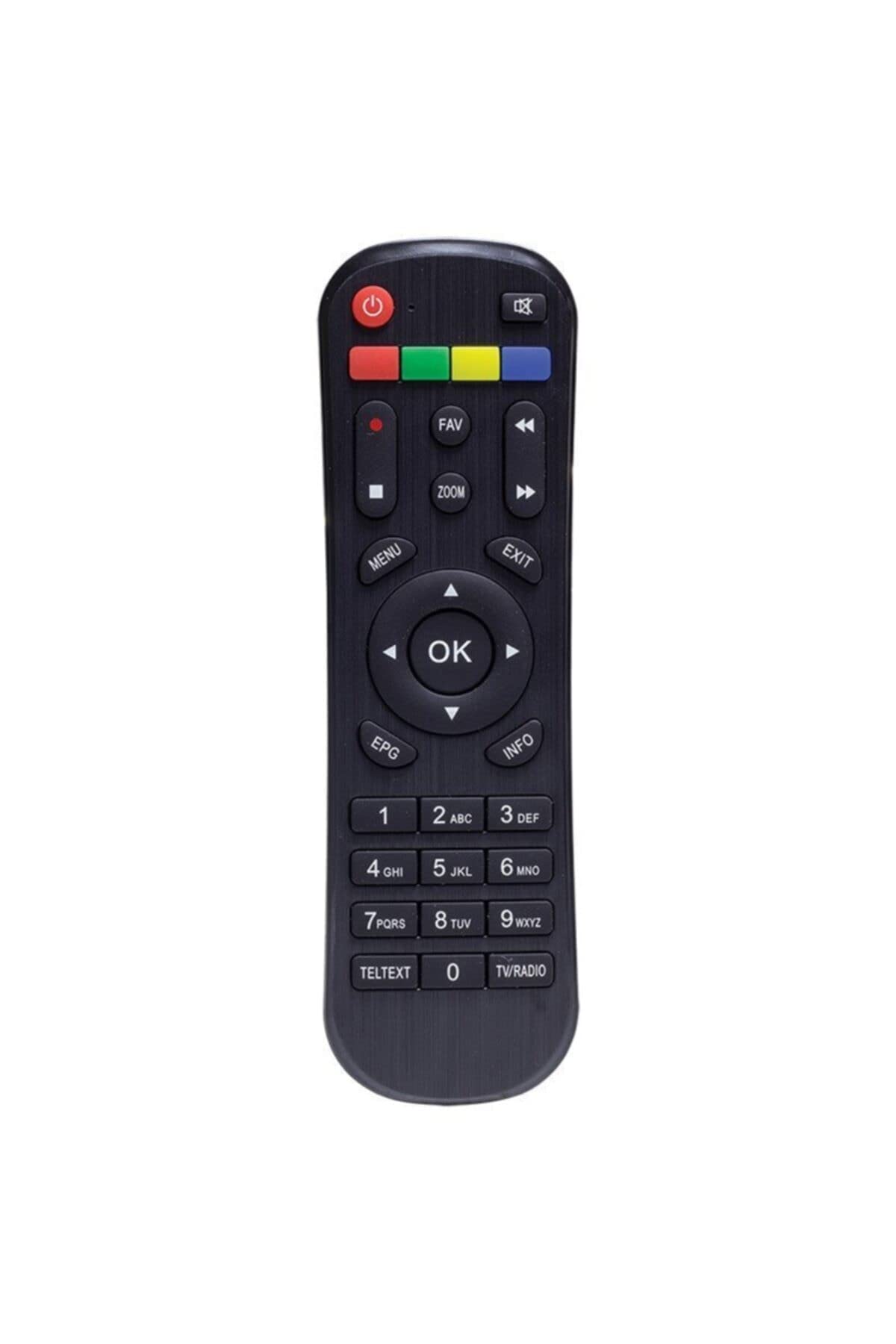
1-сүрөт: Фронт view of the Kawai Universal Mini HD Satellite Remote Control. This image displays the ergonomic design and button layout of the remote, highlighting its compact size and standard control functions.
The Kawai Universal Mini HD Satellite Remote Control is a compact and efficient device designed to provide full control over your compatible Kawai satellite receiver. Its intuitive button layout ensures ease of use for channel navigation, volume control, menu access, and other essential functions.
Жайгашуу
1. Батареяны орнотуу
- Пульттун артындагы батарея отсегин табыңыз.
- Батареянын капкагын ачуу үчүн ылдый же жебе менен көрсөтүлгөн багытта жылдырыңыз.
- Эки AAA батарейкасын (кошулмада жок) салып, оң (+) жана терс (-) терминалдардын бөлүмдүн ичиндеги диаграммаларга дал келгенин текшериңиз.
- Батареянын капкагын бекем чыккыча ордуна жылдырыңыз.
2. Алгачкы колдонуу
This remote control is pre-programmed for compatibility with the listed Kawai satellite receiver models. No additional pairing or setup is typically required. Simply point the remote at your satellite receiver and begin operation.
- Ensure there are no obstructions between the remote control and the satellite receiver.
- Confirm that the satellite receiver is powered on.
Иштөө нускамалары
Familiarize yourself with the primary functions of the remote control buttons:
- Кубат баскычы (●): Спутниктик кабыл алгычты күйгүзөт же өчүрөт.
- Канал өйдө/төмөн (CH +/-): Телеканалды өзгөртөт.
- Үнүн жогорулатуу/төмөндөтүү (VOL +/-): Аудионун үнүн тууралайт.
- Үнүн басуу (БАСУУ): Аудио чыгыштын үнүн басат.
- Сан баскычтары (0-9): Канал номерлерин түз киргизиңиз.
- меню (МЕНЮ): Accesses the satellite receiver's main menu.
- Чабыттоо баскычтары (▲ ▼ ◀ ▶): Меню параметрлери боюнча чабыттоо.
- OK/Enter (OK): Менюлардагы тандоолорду ырастайт.
- Exit/Back (ЧЫГУУ): Exits current menu or returns to the previous screen.
- маалымат (INFO): Программа жөнүндө маалыматты көрсөтөт.
Specific button functions may vary slightly depending on your Kawai satellite receiver model. Refer to your receiver's manual for detailed information on advanced features.
Техникалык тейлөө
Тазалоо
Алыстан башкаруу пультун тазалоо үчүн жумшак, кургак чүпүрөктү колдонуңуз. Өтө кир болсо, бир азampen the cloth with water or a mild, non-abrasive cleaner. Avoid using harsh chemicals, solvents, or abrasive materials, as these can damage the remote's surface and internal components.
Батареяны алмаштыруу
Replace batteries when the remote control's response becomes sluggish or stops functioning. Always replace both batteries simultaneously with new ones of the same type (AAA). Do not mix old and new batteries, or different types of batteries, as this can lead to leakage or damage.
- Remove old batteries promptly to prevent leakage.
- Колдонулган батарейкаларды жергиликтүү эрежелерге ылайык жок кылыңыз.
Проблемаларды чечүү
| Көйгөй | Мүмкүн себеп | Чечим |
|---|---|---|
| Пульт иштебей жатат. |
|
|
| Айрым баскычтар иштебейт. |
|
|
Техникалык шарттар
- Бренд: Kawai (Listed as Generic by seller)
- Өндүрүүчү: Жалпы
- ASIN: B0BW4KLTDS
- Биринчи жеткиликтүү датасы: 17-февраль, 2023-жыл
- Шайкештик: Kawai Kw 900, Kw 6820, Kn 650, Kw 2000, 6850, 6950, 8400 Mini HD Satellite Receivers
- Кубат булагы: 2 x AAA Батареялар (киргизилген эмес)
Кепилдик жана колдоо
For warranty information and technical support, please refer to the documentation provided with your original Kawai satellite receiver or contact the retailer from whom you purchased this remote control. Keep your purchase receipt as proof of purchase.
For further assistance, you may also visit the official Kawai website or contact their customer service department if available in your region.


