1. Киришүү
This user manual provides comprehensive instructions for the installation, operation, and maintenance of the Axis Communications AXIS Q6225-LE PTZ Camera. Please read this manual thoroughly before using the product to ensure proper functionality and safety. This camera is designed for robust outdoor surveillance in challenging conditions.
2. Коопсуздук маалыматы
Продукттун бузулушуна же персоналдын жаракатына жол бербөө үчүн төмөнкү коопсуздук чараларын сактаңыз:
- Орнотуу: Installation must be performed by qualified personnel in accordance with all local and national electrical and building codes.
- Электр камсыздоо: Use only the specified power supply (60 watts) for this device. Ensure the power source is stable and meets the camera's requirements.
- Курчап турган чөйрө: The camera is designed for outdoor use. However, avoid exposing it to extreme conditions beyond its specified operating range.
- Тазалоо: Тазалоодон мурун электр кубатынан ажыратыңыз. Жумшак, кургак чүпүрөктү колдонуңуз. Суюк же аэрозольдук тазалагычтарды колдонбоңуз.
- Өзгөртүүлөр: Do not attempt to modify or disassemble the camera. This may void the warranty and pose safety risks.
3. Пакеттин мазмуну
Пакетте бардык буюмдар бар экенин текшериңиз:
- AXIS Q6225-LE PTZ камерасы
- Орнотуу боюнча колдонмо
- Монтаждык кашаа жана жабдуу
- Network Cable Connector
- Documentation and Software CD (if applicable)
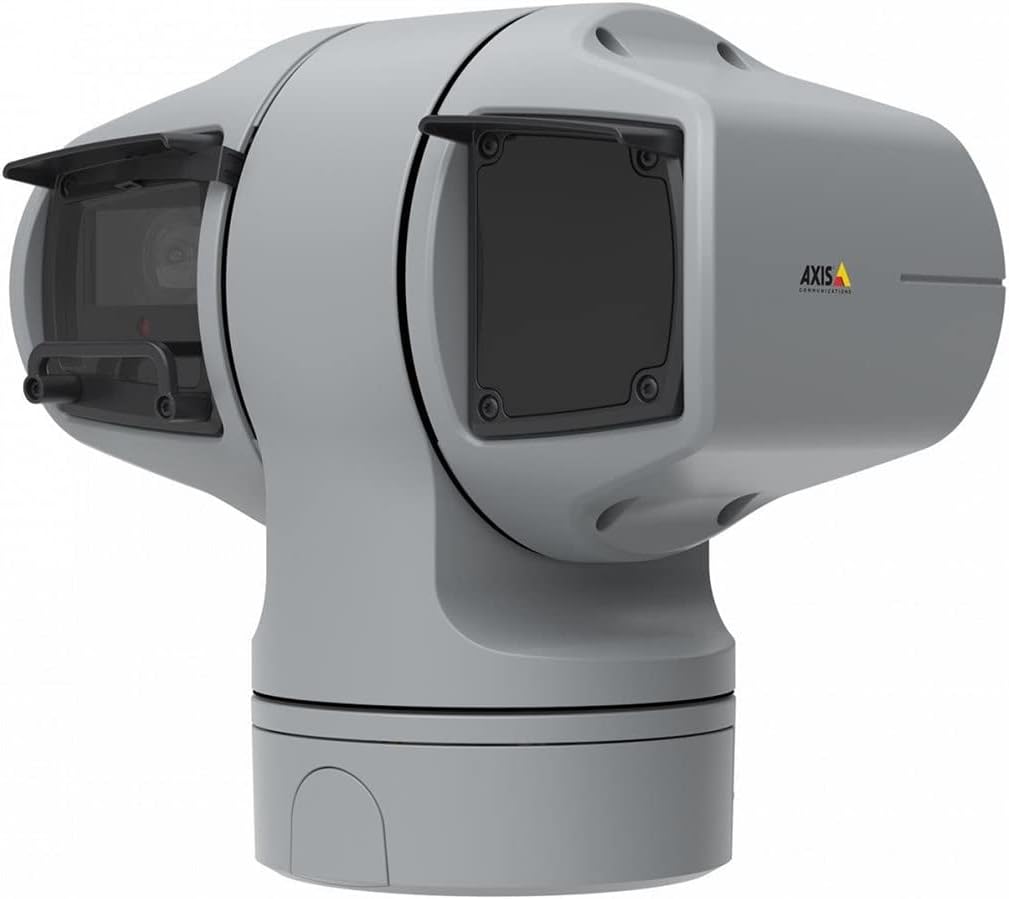
1-сүрөт: AXIS Q6225-LE PTZ Camera. This image displays the grey-colored PTZ camera unit, highlighting its robust housing and integrated lens system, designed for outdoor surveillance.
4. Орнотуу жана орнотуу
4.1 Камераны орнотуу
The AXIS Q6225-LE is designed for wall mount installation. Ensure the mounting surface is strong enough to support the camera's weight and withstand environmental conditions.
- Каалаган талааны камсыз кылган ылайыктуу монтаждоо жерин тандаңыз view жана кубатка жана тармактык байланыштарга жетет.
- Use the provided mounting template to mark drill holes on the wall.
- Drill pilot holes and secure the mounting bracket using appropriate screws and anchors.
- Attach the camera to the mounting bracket, ensuring it is firmly locked in place.
4.2 Электр энергиясы жана тармакка туташуу
Connect the camera to power and network as follows:
- Күч: Connect the power cable to a 60-watt power source. Ensure the connection is secure and weatherproof.
- Тармак: Connect an Ethernet cable from your network switch or router to the camera's network port. The camera supports Wi-Fi for wireless communication. Refer to the network configuration section for wireless setup.
4.3 Баштапкы конфигурация
After physical installation and connection, access the camera's web interface for initial configuration:
- ачуу а web browser on a computer connected to the same network as the camera.
- Enter the camera's IP address in the browser's address bar. If the IP address is unknown, use the AXIS IP Utility tool to discover it.
- Follow the on-screen prompts to set up a new password for the administrator account.
- Configure basic network settings, date/time, and video stream settings.
5. Камераны иштетүү
5.1 Панорамалоо, эңкейтүү жана масштабдоо (PTZ) башкаруусу
The AXIS Q6225-LE camera features full PTZ capabilities, allowing remote adjustment of its viewing angle and zoom level. Control is typically performed via the camera's web interface or compatible video management software (VMS).
- Пан: Rotate the camera horizontally to cover a wider area.
- Россия: Adjust the camera vertically to view objects at different heights.
- Оптикалык масштаб: Use the optical zoom feature to magnify distant objects without loss of image quality.
5.2 Кыймылды аныктоо жана эскертүүлөр
The camera supports motion-only alerts. Configure motion detection zones and sensitivity settings in the web interface to trigger recordings or notifications when movement is detected.
5.3 Infrared (IR) Illumination
Equipped with infrared light sources, the camera provides clear video surveillance in low-light or complete darkness. IR illumination activates automatically or can be manually controlled.
6. Техникалык тейлөө
6.1 Тазалоо
Regular cleaning of the camera lens and housing is recommended to ensure optimal performance, especially in dusty or harsh environments.
- Gently wipe the lens with a soft, lint-free cloth. For stubborn dirt, use a lens cleaning solution specifically designed for optical surfaces.
- Камера корпусун жарнама менен тазалаңызamp кездеме. Абразивдүү тазалагычтардан же эриткичтерден качыңыз.
6.2 Микропрограмма жаңыртуулары
Axis Communications кызматын мезгил-мезгили менен текшерип туруңуз website for firmware updates. Keeping the camera's firmware up-to-date ensures access to the latest features, security enhancements, and bug fixes.
7. Кыйынчылыктарды
This section addresses common issues you might encounter with your AXIS Q6225-LE camera.
| Көйгөй | Мүмкүн себеп | Чечим |
|---|---|---|
| Видео түрмөгү жок | Power disconnected, network issue, incorrect IP address. | Check power connection. Verify network cable or Wi-Fi connection. Confirm camera's IP address. |
| Сүрөттүн сапаты начар | Dirty lens, improper focus, low light conditions. | Clean the lens. Adjust focus via web interface. Ensure adequate lighting or verify IR functionality. |
| PTZ controls unresponsive | Network latency, software glitch, motor issue. | Check network connection. Restart the camera. If problem persists, contact support. |
8. Техникалык шарттар
| Өзгөчөлүк | Деталь |
|---|---|
| Модель номери | 02316-002 |
| Бренд | Axis Communications |
| Монтаж түрү | Дубалга орнотуу |
| Түс | Ак |
| Материал | Металл |
| Ватtage | 60 ватт |
| Байланыш технологиясы | Зымсыз, Wi-Fi |
| Ички/тышкы колдонуу | Сыртта |
| Башкаруу ыкмасы | Алыстан |
| Фото сенсор технологиясы | CMOS |
| Видео тартуу форматы | MPEG-4 |
| Жарык булагы түрү | Инфракызыл |
| Эскертүү түрү | Кыймыл гана |
| Чоңойтуу түрү | Оптикалык масштаб |
| Элемент Салмагы | 0.01 килограмм (0.352 унция) |
| Камтылган компоненттер | Камера/Аксессуарлар |
9. Кепилдик жана колдоо
For warranty information and technical support, please refer to the official Axis Communications webсайтка же ыйгарым укуктуу дилериңизге кайрылыңыз. Сатып алганыңыздын далили катары сатып алуу дүмүрчөгүңүздү сактаңыз.
Онлайн ресурстар: www.axis.com


