1. Киришүү
This manual provides detailed instructions for the ENDORFY Thock Wireless Mechanical Keyboard, model EY5A078. It covers setup, operation, maintenance, and troubleshooting to ensure optimal performance and longevity of your device. Please read this manual thoroughly before using the keyboard.

Image 1.1: The ENDORFY Thock Wireless Mechanical Keyboard EY5A078. This image displays the full QWERTY layout with illuminated keys, showcasing the keyboard's design and RGB capabilities.
2. Пакеттин мазмуну
Пакетте бардык буюмдар бар экенин текшериңиз:
- ENDORFY Thock Wireless Mechanical Keyboard EY5A078
- USB-C to USB-A Cable (detachable)
- 2.4 ГГц USB кабыл алгыч
- Баскыч капкагын тарткыч
- Switch Puller
- Колдонуучунун Колдонмосу (бул документ)
3. Орнотуу жана туташуу
The ENDORFY Thock Wireless Mechanical Keyboard offers three connection modes: wired, 2.4 GHz wireless, and Bluetooth.
3.1. Зымдуу туташуу
- Locate the USB-C port on the keyboard (typically on the back or top edge).
- Connect the provided USB-C to USB-A cable to the keyboard.
- Кабелдин USB-A учунун компьютериңиздеги жеткиликтүү USB портуна туташтырыңыз.
- Баскычтоп автоматтык түрдө аныкталып, колдонууга даяр болот.
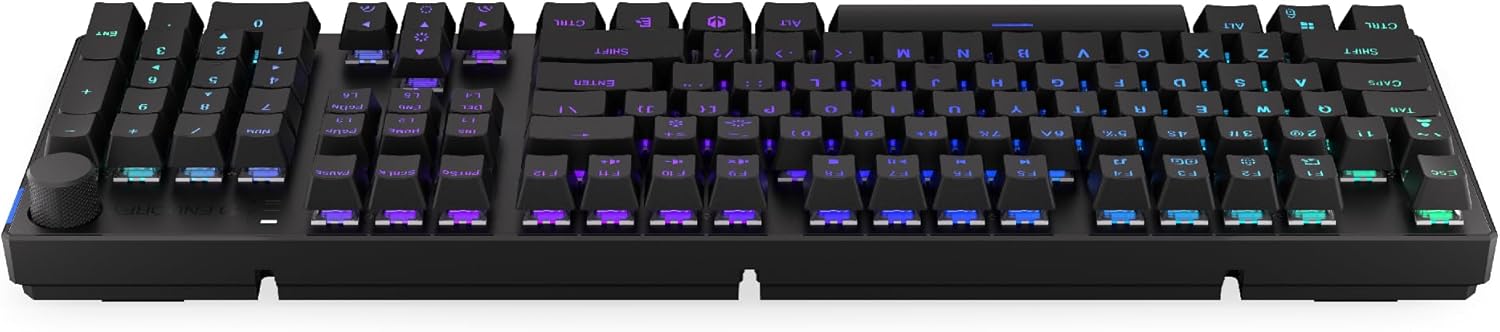
Сүрөт 3.1: Каптал view of the keyboard, highlighting the USB-C port for wired connection and charging.
3.2. 2.4 ГГц зымсыз байланыш
- Locate the 2.4 GHz USB receiver. It may be stored in a compartment on the underside of the keyboard.
- 2.4 ГГц USB кабыл алгычын компьютериңиздеги жеткиликтүү USB портуна сайыңыз.
- On the keyboard, locate the mode switch (usually on the back or side) and set it to the 2.4 GHz wireless mode (often indicated by a specific icon or "2.4G").
- The keyboard should automatically connect. An indicator light may confirm the connection.

Image 3.2: Underside of the keyboard, showing the compartment for storing the 2.4 GHz USB receiver and adjustable feet.
3.3. Bluetooth туташуусу
- On the keyboard, set the mode switch to Bluetooth mode (often indicated by a Bluetooth icon or "BT").
- The keyboard may have multiple Bluetooth profiles (e.g., BT1, BT2, BT3). Select one by pressing Fn + 1, Fn + 2, or Fn + 3. The corresponding indicator light will flash.
- Компьютериңизде же түзмөгүңүздө Bluetooth жөндөөлөрүн ачып, жаңы түзмөктөрдү издеңиз.
- Select "ENDORFY Thock Wireless" (or similar name) from the list of available devices.
- Жупташтыруу процессин аяктоо үчүн экрандагы көрсөтмөлөрдү аткарыңыз.
- Жупташтырылгандан кийин, клавиатурадагы индикатор жарыгын өчүрбөйт жана туруктуу бойдон калат.
4. Операция
4.1. Key Functions and Shortcuts
The keyboard features various function key combinations (Fn + Key) for multimedia control, lighting adjustments, and other settings.
- Fn + F1-F12: Multimedia and system functions (e.g., volume control, media playback, calculator). Refer to the keycap legends for specific functions.
- Fn + Жебе баскычтары: Adjust RGB lighting effects (e.g., brightness, speed, direction).
- Fn + 1/2/3: Bluetooth pro ортосунда которулууfiles.
- Fn + 4: Switch to 2.4 GHz wireless mode.
- Fn + 5: Зымдуу режимге которулуу.
4.2. RGB жарыкты башкаруу
The ENDORFY Thock keyboard features programmable RGB backlighting. Use the following combinations to customize the lighting:
- Fn + Right Arrow: Change lighting effect.
- Fn + Left Arrow: Change lighting effect direction.
- Fn + Өйдө жебе: Жарыктыкты жогорулатуу.
- Fn + Төмөн жебе: Жарыктыкты азайтыңыз.
- Fn + Ins: Түсү өзгөртүү.
- Fn + Del: Adjust effect speed.
4.3. Көлөм баскычы
The dedicated volume knob located on the top right of the keyboard allows for quick audio adjustments.
- Саат жебеси боюнча айлантуу: Үнүн жогорулатуу.
- Сааттын жебесине каршы айландыруу: Үнүн азайтуу.
- Төмөн басыңыз: Аудиону үнсүз кылуу/үнсүз кылуу.

Image 4.1: Detail of the volume knob and status indicator lights, located on the upper right side of the keyboard.
4.4. Ыкчам алмаштыруучу которгучтар
The ENDORFY Thock keyboard features hot-swappable switches, allowing you to change mechanical switches without soldering. This enables customization of typing feel.
- Баскыч капкагын алып салуу: Каалаган клавиатураны акырын алып салуу үчүн берилген клавиатура тарткычын колдонуңуз.
- Которуштурууну алып салуу: Которгучтун үстүнкү жана астыңкы клиптерин кылдаттык менен кармап, аны түз көтөрүү үчүн берилген которгуч тарткычты колдонуңуз.
- Жаңы которгуч киргизүү: Align the pins of the new switch with the holes on the PCB. Press the switch firmly until it clicks into place. Ensure pins are not bent.
- Баскыч капкагын алмаштыруу: Баскычтын капкагын жаңы өчүргүч сабына кайра салыңыз.

Сүрөт 4.2: Жакын план view of the Kailh Box Brown mechanical switches, demonstrating the hot-swappable design.
5. Техникалык тейлөө
5.1. Баскычтопту тазалоо
Үзгүлтүксүз тазалоо клавиатуранын иштешин жана көрүнүшүн сактоого жардам берет.
- Тазалоодон мурун клавиатураны компьютерден ажыратыңыз.
- Кылдат тазалоо үчүн баскычтоптун капкактарын алып салуу үчүн баскычтоптун капкактарын тартуучу каражатты колдонуңуз.
- Баскычтардын ортосундагы чаңды жана калдыктарды тазалоо үчүн кысылган абаны колдонуңуз.
- Wipe keycaps and the keyboard surface with a soft, damp кездеме. Катуу химиялык заттардан алыс болуңуз.
- Кайра туташтыруудан мурун, клавиатура толугу менен кургак экенин текшериңиз.
5.2. Клавиатураны жана которгучту алмаштыруу
Refer to Section 4.4 for detailed instructions on replacing keycaps and switches. Use only compatible keycaps and switches to avoid damage.
6. Кыйынчылыктарды
| Көйгөй | Мүмкүн себеп | Чечим |
|---|---|---|
| Баскычтоп жооп бербей жатат (Зымдуу) | Кабель туташуу бош, USB порту туура эмес. | USB-C кабелинин бекем туташканын текшериңиз. Башка USB портун же кабелин колдонуп көрүңүз. |
| Клавиатура жооп бербей жатат (зымсыз) | Low battery, incorrect mode, receiver not plugged in, pairing issue. | Charge the keyboard. Ensure mode switch is set correctly (2.4G or BT). Re-pair Bluetooth or re-insert 2.4 GHz receiver. |
| RGB жарыктандыруу иштебейт | Lighting turned off, low battery, software issue. | Check lighting controls (Fn + Arrow keys). Charge the keyboard. Restart computer. |
| Баскычтар эки жолу терилип жатат же катталбай жатат | Dust/debris under switch, faulty switch. | Clean under keycaps with compressed air. If issue persists, replace the switch (refer to Section 4.4). |
7. Техникалык шарттар
- Модел: EY5A078
- Бренд: ENDORFY
- Байланыш: Wired (USB-C), 2.4 GHz Wireless, Bluetooth
- Которуу түрү: Kailh Box Brown (Hot-swappable)
- Баскыч капкактары: PBT Double Shot
- Макет: Full-size QWERTY
- Арткы жарыктандыруу: Программалануучу RGB
- Операциялык системалар: Linux, Mac OS X 10.12 Sierra, Windows 10
- Түсү: Кара
- Материал: Полибутилентерефталат (PBT)
- Өзгөчөлүктөр: Detachable cable, Volume knob with mute, Hot-swappable switches
- Батарея: Литий-ион (кошулган)
8. Кепилдик жана колдоо
ENDORFY products are covered by a manufacturer's warranty. For detailed warranty information, please refer to the warranty card included with your product or visit the official ENDORFY website. For technical support, product inquiries, or service requests, please contact ENDORFY customer support through their official channels.
Официалдуу Webсайт: www.endorfy.com
9. Коопсуздук маалыматы
- Баскычтопту суюктуктардан жана ашыкча нымдуулуктан алыс кармаңыз.
- Клавиатураны экстремалдык температурага тийгизүүдөн сактаңыз.
- Do not attempt to disassemble or modify the keyboard beyond hot-swapping switches and keycaps, as this may void the warranty and cause damage.
- Берилген же сунушталган заряддоо кабелин гана колдонуңуз.
- Dispose of the battery and electronic components responsibly according to local regulations.


