1. Киришүү
Thank you for choosing the LUXBIRD Digital Heat Mat Thermostat Controller. This device is designed to precisely regulate temperature for various applications, including seedling germination, reptile habitats, home brewing, and greenhouse environments. It supports both heating and cooling modes, ensuring optimal conditions within a temperature range of 32.0℉ to 113℉ (0℃ to 45℃). Please read this manual thoroughly before operation to ensure safe and efficient use.

Image 1.1: LUXBIRD Digital Heat Mat Thermostat Controller with temperature probe and power plug.
2. Продукциянын өзгөчөлүктөрү
The LUXBIRD Digital Heat Mat Thermostat Controller offers a range of features for precise temperature management:
- Күчтүү аткаруу: 10га чейин колдойт Amps and 1200 Watts for efficient heating or cooling.
- Ар тараптуу температураны көзөмөлдөө: Adjustable range from 32.0℉ to 113℉ (0℃ to 45℃).
- Refrigeration Compressor Delay: Prevents frequent starts and stops of cooling equipment, extending its lifespan.
- Комплекстүү ойготкучтар: Features probe anomaly alarms and high/low temperature alarms to maintain target range.
- Convenient Unit Switch: Цельсий (℃) жана Фаренгейт (℉) ортосунда оңой которулуңуз.
- Long Probe and Power Cables: 2m (6.56 ft) temperature probe and 1.5m (4.9 ft) power cable for flexible placement.
- Санариптик дисплей: Clear digital tube display for current temperature and settings.
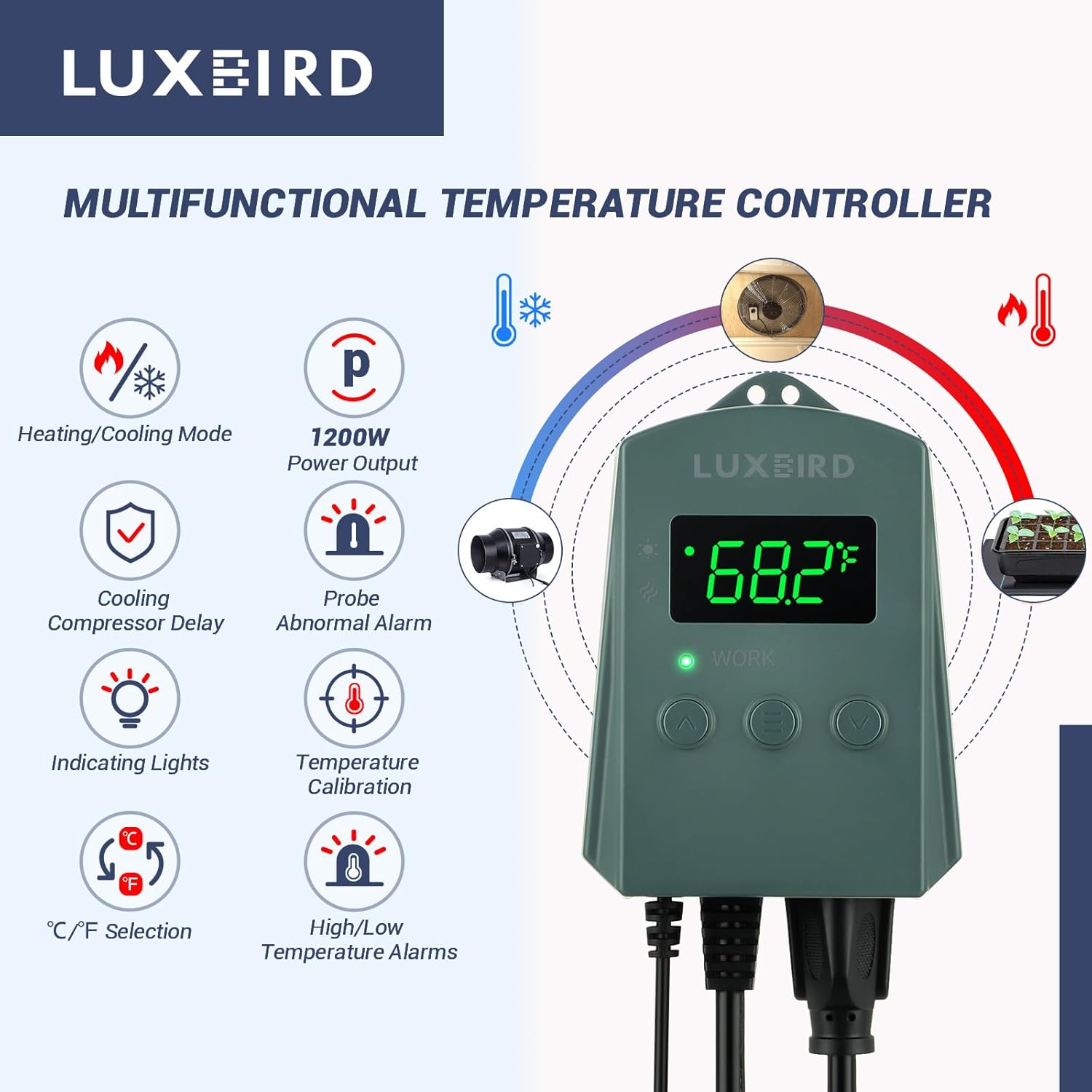
Сүрөт 2.1: Бүттүview of the controller's multifunctional features, including heating/cooling mode, power output, compressor delay, alarms, and unit selection.
3. Коопсуздук маалыматы
Сураныч, жаракаттарды же аппаратты бузууну болтурбоо үчүн төмөнкү коопсуздук чараларын сактаңыз:
- Do not exceed the maximum load capacity of 10A / 1200W. Overloading can cause damage or fire.
- Түзмөктүн жерге туташтырылган розеткага туташтырылганын текшериңиз.
- Контроллерди жана зондду суудан же ашыкча нымдуулуктан алыс кармаңыз.
- Аппаратты ажыратпаңыз же өзгөртпөңүз. Бардык тейлөөлөрдү квалификациялуу кызматкерлерге тапшырыңыз.
- Балдар жетпеген жерде сактаңыз.
- Regularly inspect the power cord and probe for any signs of damage. Discontinue use if damaged.
4. Орнотуу
- Контроллерди таңгактан чыгаруу: Carefully remove the thermostat controller and temperature probe from its packaging.
- Контроллерди орнотуу: The controller can be hung on a wall using the integrated hanging holes or placed on a stable surface.
- Температура зондун жайгаштыруу:
- Place the metal tip of the temperature probe in the area where you want to measure and control the temperature.
- For heat mats, place the probe directly on the mat or in the growing medium.
- For reptile enclosures, position the probe near the heat source but out of direct contact with the animal.
- Use the included suction cup to secure the probe if needed.
- Түзмөктү туташтыруу: Plug your heating or cooling device (e.g., heat mat, fan) into the outlet on the bottom of the thermostat controller.
- Күйгүзүү: Plug the thermostat controller's power cord into a standard 120V AC electrical outlet. The display will illuminate.

Image 4.1: Components and features for easy setup, including mounting holes, suction cup for the probe, and cable lengths.
5. Иштөө нускамалары
The controller features a digital display and three buttons: Up (∧), Menu (≡), and Down (∨).
5.1. Күйгүзүү/өчүрүү
The device powers on automatically when plugged in. To turn off the display, press and hold the Menu (≡) button for 3 seconds. Press any button to turn it back on.
5.2. Максаттуу температураны коюу
- Press the Menu (≡) button once. The current target temperature will flash on the display.
- Use the Up (∧) or Down (∨) buttons to adjust the target temperature to your desired value.
- Press the Menu (≡) button again to confirm the setting, or wait 5 seconds for it to save automatically.
5.3. Температура бирдиктерин которуу (℃/℉)
With the display on, press and hold both the Up (∧) and Down (∨) buttons simultaneously for 3 seconds to toggle between Celsius (℃) and Fahrenheit (℉).

Image 5.1: The controller display showing temperature and the range of operation, with C/F selection highlighted.
6. Өркүндөтүлгөн жөндөөлөр
To access advanced settings, press and hold the Menu (≡) button for 5 seconds until "F1" appears on the display. Use the Up (∧) or Down (∨) buttons to navigate through the settings (F1-F4). Press Menu (≡) to enter a setting, adjust with Up/Down, and press Menu (≡) again to confirm.
| Орнотуу | Description | Диапазон | Демейки |
|---|---|---|---|
| F1: Temperature Differential (Hysteresis) | The difference between the set temperature and the temperature at which the device turns on/off. This prevents rapid cycling. | 0.5℉ - 10℉ (0.3℃ - 5.6℃) | 2℉ (1.1℃) |
| F2: Compressor Delay (Cooling Mode Only) | Delay time before the cooling device restarts after turning off. Protects compressors. | 0 - 10 мүнөт | 1 мүнөт |
| F3: High Temperature Alarm | Sets the maximum temperature before an alarm sounds. | 32℉ - 113℉ (0℃ - 45℃) | 113℉ (45℃) |
| F4: Low Temperature Alarm | Sets the minimum temperature before an alarm sounds. | 32℉ - 113℉ (0℃ - 45℃) | 32℉ (0℃) |

Image 6.1: The controller indicating a high/low temperature alarm, prompting user action.
7. Тиркемелер
The LUXBIRD Digital Heat Mat Thermostat Controller is suitable for a wide range of temperature-sensitive applications:
- Seedling Germination: Provides consistent warmth for optimal plant growth.
- Сойлоп жүрүүчүлөрдүн жашоо чөйрөсү: Maintains precise temperatures for various reptile species.
- Үй шартында сыра кайнатуу: Controls fermentation temperatures for consistent results.
- Инкубация: Ensures stable temperatures for egg incubation.
- Күнөсканалар: Regulates ambient temperature for plant health.
- Cooling Devices: Can control fans or other cooling equipment to prevent overheating.

Сүрөт 7.1: Мисamples of flexible use in daily life, demonstrating the controller's versatility across different environments.
8. Техникалык тейлөө
- Тазалоо: Wipe the controller with a soft, dry cloth. Do not use abrasive cleaners or immerse in water.
- Пробка кам көрүү: Keep the temperature probe clean and free from debris. Avoid bending or damaging the probe cable.
- Сактагыч: When not in use, store the controller in a cool, dry place away from direct sunlight.
9. Кыйынчылыктарды
| Көйгөй | Мүмкүн себеп | Чечим |
|---|---|---|
| Дисплей өчүк | No power; Display sleep mode. | Check power connection. Press any button to wake from sleep mode. |
| Device not heating/cooling | Incorrect temperature setting; Device not plugged in; Faulty device. | Verify target temperature. Ensure heating/cooling device is properly connected and functional. Check F1 (differential) setting. |
| "EE" or "HHH" on display | Probe anomaly (error); Temperature out of range. | Check probe connection. Ensure probe is not damaged. If temperature is outside 32℉-113℉, the display may show "HHH" (high) or "LLL" (low). |
| Сигнализация тез-тезден үнү чыгат | High/Low temperature alarm limits set too close to target. | Adjust F3 (High Temp Alarm) and F4 (Low Temp Alarm) settings to allow for normal temperature fluctuations. |
10. Техникалык шарттар
- Модел: Digital Heat Mat Термостат контроллери
- Бренд: Люксбирд
- Тtage: 120 Вольт
- Максималдуу жүк: 10А / 1200 Вт
- Температураны көзөмөлдөө диапазону: 32.0℉ – 113℉ (0℃ден 45℃ге чейин)
- Дисплей түрү: Санарип түтүк дисплей
- Temperature Probe Length: 2 метр (6.56 фут)
- Электр кабелинин узундугу: 1.5 метр (4.9 фут)
- Материал: Пластик
- Элемент Салмагы: Болжол менен 10.2 унция (0.64 фунт)
- Сертификаттар: FCC-Certified (as per product title)
11. Кепилдик жана колдоо
For warranty information and technical support, please refer to the documentation included with your purchase or contact Luxbird customer service directly. Keep your purchase receipt for warranty claims.
For further assistance, you may visit the official Luxbird store on Amazon: Luxbird Store.


