1. Киришүү
SOUND FORGE Audio Studio 17 is a versatile software solution designed for various audio tasks, including recording, editing, restoration, and mastering. It offers a user-friendly interface and a range of professional tools to achieve high-quality audio results.

Сүрөт 1.1: Бүттүview of SOUND FORGE Audio Studio 17 software packaging and user interface elements.
2. Системалык талаптар
To ensure optimal performance, your system should meet the following minimum specifications:
- Процессор: Minimum 1 GHz
- Операция системасы: Windows 10 or Windows 11 (current version)
- RAM: 2 ГБ
- Үн картасы: Internal sound card
- Дисплейдин чечилиши: 1024 x 768 пиксель
The software package dimensions are approximately 0.31 x 7.48 x 5.12 inches and weighs 1.13 ounces.
3. Орнотуу жана орнотуу
Follow these steps to install SOUND FORGE Audio Studio 17 on your PC:
- Locate the serial number provided with your purchase. This is essential for software activation.
- Download the software installer from the official MAGIX website or use the provided installation media (if applicable).
- Орноткучту иштетиңиз жана экрандагы көрсөтмөлөрдү аткарыңыз.
- During the installation process, you will be prompted to enter your serial number to activate the software.
- Once installation is complete, launch SOUND FORGE Audio Studio 17.

Image 3.1: The software box containing the license key for installation.
4. Иштөө нускамалары
4.1. Аудио жаздыруу
SOUND FORGE Audio Studio 17 allows for high-quality audio recording, ideal for podcasts and music. The software supports recording on up to six channels simultaneously.

Image 4.1.1: A user engaged in audio recording using a microphone and headphones, demonstrating the software's recording capabilities.
4.2. Audio Editing
The software provides tools for quick and easy editing of audio files. Its 64-bit power ensures efficient processing.

Image 4.2.1: The audio editing interface displaying multiple audio tracks and waveforms, indicating various editing options.
4.3. Restoration and Mastering
Restore old recordings, such as vinyls and cassettes, and master your tracks for professional output. The software includes the mastering tool iZotope Ozone 10 Elements.
4.3.1. Loudness Meter
Utilize the Loudness Meter for improved workflows and to ensure your audio meets broadcast and streaming standards.

Image 4.3.1.1: The Loudness Meter interface showing real-time audio level analysis.
4.3.2. Mono Compatibility Meter
Ensure perfect audio playback across various systems with the Mono Compatibility Meter, which helps identify and correct phase issues.

Image 4.3.2.1: The Mono Compatibility Meter displaying stereo and mono signal correlation.
4.3.3. VST Enhancements
The software offers enhanced support and stability for VST plug-ins, allowing integration of third-party effects and instruments.

Image 4.3.3.1: A VST plugin interface, specifically a tape machine emulation, demonstrating VST integration.
4.3.4. coreFX Utility
The coreFX Utility simplifies basic audio operations, making them easy and automatable within your workflow.

Image 4.3.4.1: The coreFX Utility interface showing various controls for audio manipulation.
4.3.5. Optimized Onboarding
A streamlined onboarding process helps users start their work quickly and efficiently.
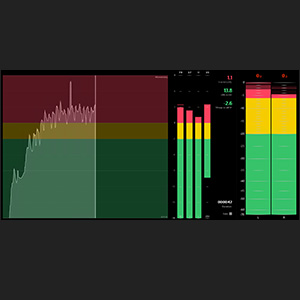
Image 4.3.5.1: An icon representing the optimized onboarding process.
4.4. Кошумча функциялар
- wizardFX Suite: Benefit from professional effect plug-ins included with the software.
- Instant Action & Context Menu Extensions: New features for faster editing and workflow.
5. Продукт бүтүп калдыview Video
Видео 5.1: Аткаминер бүттүview of SOUND FORGE Audio Studio 17, highlighting its key features and capabilities for audio editing and production.
6. Кыйынчылыктарды
If you encounter issues with SOUND FORGE Audio Studio 17, consider the following general troubleshooting steps:
- Системалык талаптарды текшерүү: Verify that your computer meets all minimum system requirements.
- Программалык камсыздоо жаңыртуулары: Ensure your software is updated to the latest version. Check the MAGIX webжеткиликтүү жаңыртуулар үчүн сайт.
- Драйвер жаңыртуулары: Ensure your audio drivers and graphics drivers are up to date.
- Кайра орнотуу: If problems persist, try uninstalling and reinstalling the software. Remember to have your serial number ready.
- Conflict with other software: Temporarily disable other audio-related software or plugins to check for conflicts.
7. Колдоо
For further assistance, technical support, or to report issues, please visit the official MAGIX support website. You can typically find FAQs, knowledge bases, and contact options there.
Official MAGIX Support: https://www.magix.com/us/support/


