Introduction
This manual provides comprehensive instructions for the setup, operation, and maintenance of your MageGee STAR98 Mechanical Gaming Keyboard and Mouse. Please read this manual thoroughly before using the product to ensure optimal performance and longevity.
Продукт бүттүview
The MageGee STAR98 Mechanical Gaming Keyboard and Mouse combo is designed for an enhanced gaming and computing experience, featuring responsive mechanical switches, customizable backlighting, and an ergonomic design.
Баскычтоптун өзгөчөлүктөрү
- 94% Layout with Number Pad: This keyboard features 98 keys, providing a compact design while retaining essential keys like arrow keys, number keys, and multimedia keys. It offers more desk space compared to a standard full-size keyboard.
- Adjustable Tilt Angles: Two-step rear feet allow for setting the keyboard at 3 different tilt angles for ergonomic comfort.
- 2-in-1 Multifunctional Knob: Located in the upper right corner, this knob controls both audio volume and backlight settings.
- Сызыктуу кызыл өчүргүчтөр: Equipped with responsive red mechanical switches, offering a smooth and less audible keystroke, ideal for gaming and typing. These switches have an expected lifespan of 50 million actuations.
- 100% Анти-Гостинг: Ensures every keystroke is detected correctly, even when multiple keys are pressed simultaneously.
- Gorgeous Rainbow Backlighting: Features 8 light modes (static & dynamic), 5 brightness levels, and 4 speed levels for customizable illumination.
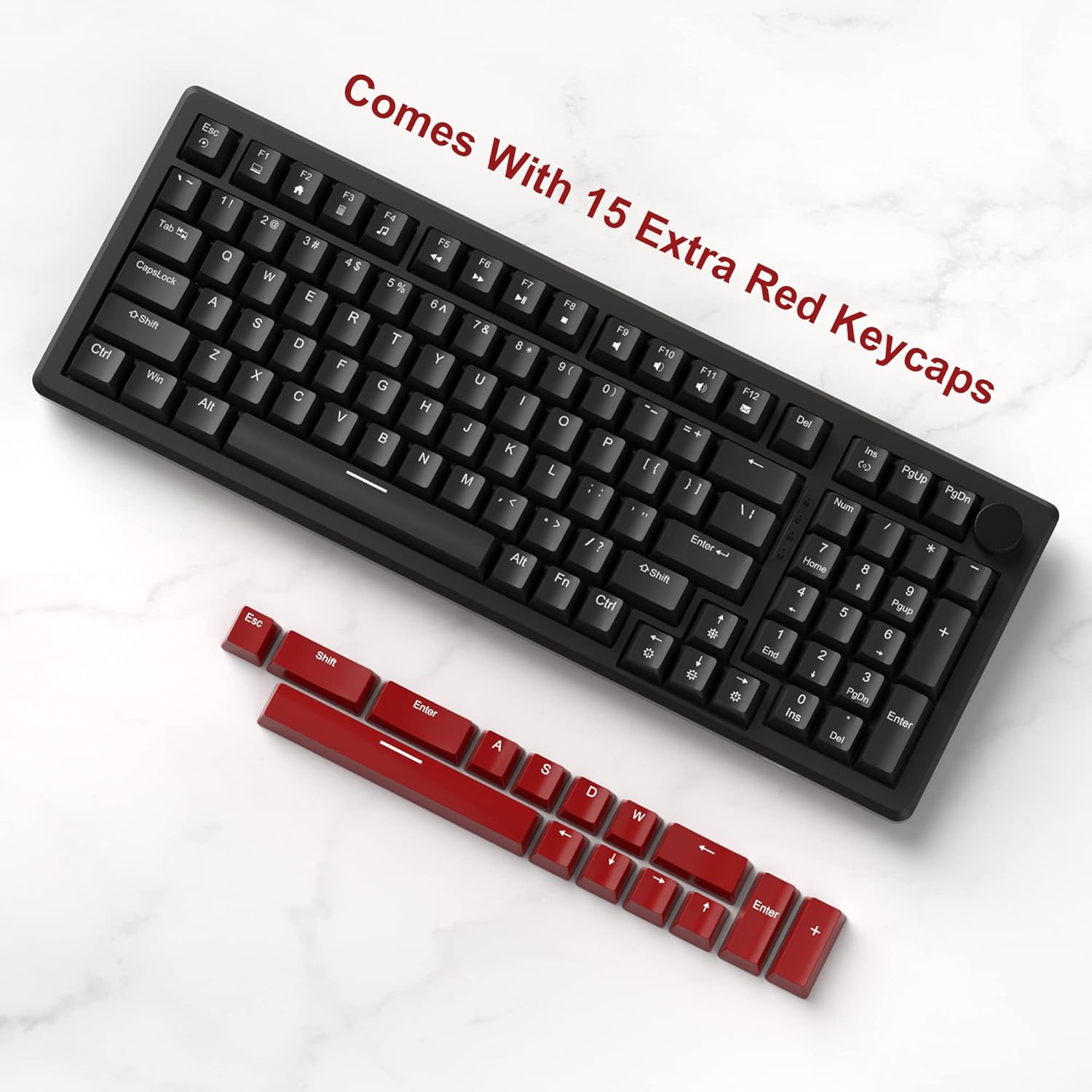
- Extra Keycaps: Includes an additional 15 red/yellow keycaps for DIY customization.
Чычкан өзгөчөлүктөрү
- Ergonomic Gaming Mouse: Designed for comfort and control, fitting perfectly in the palm with an anti-slip design.
- 7 Баскычтар: Provides versatile control for various applications and games.
- 6 Speed Levels (DPI): Adjustable DPI settings (600/800/1200/1600/2400/3200) allow for easy customization of mouse speed to suit different scenarios.
- 7-Color Breathing LED Lights: The mouse features breathing LED lights in white, yellow, blue, purple, green, red, and cyan, enhancing the gaming atmosphere.
- Accurate Positioning and Stable Transmission: Ensures smooth and precise gameplay.
Жайгашуу
Follow these steps to set up your MageGee STAR98 Mechanical Gaming Keyboard and Mouse:
- Продуктту таңгактан чыгаруу: Carefully remove the keyboard and mouse from their packaging. Ensure all components, including the additional keycaps and USB cable, are present.
- Баскычтопту туташтыруу: Locate the USB cable attached to the keyboard. Plug the USB-A connector into an available USB port on your computer (desktop PC or laptop). The keyboard is plug-and-play and does not require additional drivers for basic functionality.
- Чычканды туташтыруу: Locate the USB cable attached to the mouse. Plug the USB-A connector into another available USB port on your computer. The mouse is also plug-and-play.
- Баскычтоптун жантайышын тууралоо: Flip the keyboard over and extend the two-step adjustable feet to your preferred typing angle. There are three possible angles.
- Баштапкы күйгүзүү: Once connected, the keyboard and mouse backlighting should illuminate, indicating they are powered on and ready for use.


Иштөө нускамалары
Баскычтоптун иштеши
- Мультимедиа ачкычтары: The function keys (F1-F12) often have secondary multimedia functions. These are typically accessed by pressing the Fn каалаган функция баскычы менен бир убакта басыңыз. Мисалы,ampле, Fn + F1 for Media Player, Fn + F2 for Volume Down, etc.
- Көп функционалдуу баскыч:
- Volume Control (Default): Turn the knob left to decrease volume, right to increase volume. Short press the knob to pause or play media.
- Арткы жарык режими: Long press the knob to switch to backlight control mode. The 'M' indicator light will illuminate. In this mode:
- Turn the knob left or right to adjust backlight brightness.
- Short press the knob to cycle through different backlight effects/modes.
- Backlight Control (Fn Combinations):
- Жарык режимдерин которуштуруу: Басыңыз Fn + Ins to cycle through 8 different light modes (static & dynamic).
- Жарыкты күйгүзүү/өчүрүү: Басыңыз Fn + Del арткы жарыкты күйгүзүү же өчүрүү үчүн.
- Жарыктын ылдамдыгын тууралоо: Басыңыз Fn + Сол жебе to decrease light speed, Fn + Оңго жебе to increase light speed (for dynamic modes).
- Жарыктын жарыктыгын жөндөө: Басыңыз Fn + Өйдө жебе жарыктыгын жогорулатуу үчүн, Fn + Төмөн жебе жарыктыгын азайтуу үчүн.
- Баскычтарды ыңгайлаштыруу: Use the provided keycap puller (if included) to carefully remove existing keycaps and replace them with the additional red/yellow keycaps for a personalized look.


Чычкан операциясы
- DPI жөндөө: The mouse features a dedicated DPI button (usually located behind the scroll wheel). Press this button to cycle through the 6 available speed levels (600/800/1200/1600/2400/3200 DPI). The LED lighting may change color to indicate the current DPI setting.
- 7-Color Breathing LED: The mouse's LED lights automatically cycle through 7 colors, creating a breathing effect. There is no manual control for specific colors or modes for the mouse lighting.
- Эргономикалык дизайн: Position your hand comfortably over the mouse, utilizing its ergonomic shape and anti-slip surface for extended use.

Техникалык тейлөө
Proper maintenance ensures the longevity and optimal performance of your keyboard and mouse:
- Тазалоо:
- Тазалоодон мурун түзмөктөрдү компьютериңизден ажыратыңыз.
- Бир аз жумшак, түксүз кездемени колдонуңуз dampбеттерин сүртүү үчүн суу же жумшак тазалоочу эритме менен чайкаңыз.
- For the keyboard, use compressed air to remove dust and debris from between the keycaps.
- For deeper cleaning, keycaps can be carefully removed using a keycap puller and cleaned separately. Ensure they are completely dry before reattaching.
- Катуу химиялык заттарды, абразивдүү тазалагычтарды же эриткичтерди колдонуудан алыс болуңуз.
- Сактагыч: Store the keyboard and mouse in a cool, dry place away from direct sunlight and extreme temperatures when not in use for extended periods.
- Колдонуу: Avoid dropping the devices or exposing them to excessive force, which can damage internal components or switches.
Проблемаларды чечүү
If you encounter issues with your MageGee STAR98 Mechanical Gaming Keyboard and Mouse, refer to the following common solutions:
| Көйгөй | Мүмкүн себеп | Чечим |
|---|---|---|
| Баскычтоп/чычкан жооп бербей жатат | Бош USB туташуу, туура эмес USB порт, драйвер маселеси. |
|
| Арткы жарык иштебей жатат же жыпылыктап жатат | Backlight turned off, brightness too low, software conflict. |
|
| Чычкан курсору туруксуз же жооп бербей жатат | Dirty sensor, incorrect DPI setting, surface issue. |
|
| Ачкычтар катталбайт же эки жолу терилбейт | Баскыч капкагынын астындагы сыныктар, бузулган өчүргүч. |
|
Техникалык шарттар
- Бренд: MageGee
- Модел: STAR98
- Баскычтоптун жайгашуусу: 94% (98 ачкыч)
- Которуу түрү: Сызыктуу кызыл өчүргүчтөр
- Арткы жарык: Rainbow LED (8 modes, 5 brightness, 4 speed)
- Байланыш: Зымдуу USB
- Баскычтоптун өлчөмдөрү: Болжол менен 15.1 x 5.4 x 1.6 дюйм
- Чычкан баскычтары: 7
- Чычкандын DPI деңгээлдери: 6 (600/800/1200/1600/2400/3200)
- Mouse Lighting: 7 түстүү дем алуучу LED
- Чычкандын өлчөмдөрү: Болжол менен 5.1 x 2.8 x 1.6 дюйм
- Элемент Салмагы: 2.44 pounds (Keyboard and Mouse combined)
- Шайкеш түзмөктөр: Ноутбук, персоналдык компьютер
- Операциялык системанын шайкештиги: Windows


Кепилдик жана колдоо
MageGee products are manufactured to high-quality standards. For warranty information, technical support, or service inquiries, please refer to the contact information provided with your product packaging or visit the official MageGee webсайт. Сураныч, кепилдик дооматтар үчүн сатып алуу далилиңизди сактап коюңуз.


