Introduction
Сатып алганыңыз үчүн рахматasing the Dolphin LX-220 Boombox Bluetooth Speaker. This manual provides essential information for setting up, operating, and maintaining your speaker. Please read it thoroughly before use to ensure optimal performance and safety.
Маанилүү коопсуздук маалыматы
- Динамикти экстремалдык температурага же түз күн нуруна узак убакытка калтырбаңыз.
- Keep the speaker away from heat sources, dust, and corrosive materials.
- Динамикти өз алдынча бөлүктөргө бөлбөңүз, оңдобоңуз же өзгөртпөңүз. Жардам алуу үчүн квалификациялуу тейлөө кызматкерлерине кайрылыңыз.
- Динамиктин IPX5 суу өткөрбөө рейтингин сактоо үчүн, суунун жанында колдонулганда, бардык порттордун капкактары бекем жабылганын текшериңиз.
- Заряддоо үчүн берилген кубаттоо кабелин же тастыкталган USB-C кабелин гана колдонуңуз.
- Динамикке оор нерселерди коюудан алыс болуңуз.
Пакеттин мазмуну
- Dolphin LX-220 Boombox Bluetooth Speaker
- USB-C заряддоо кабели
- Толук өлчөмдөгү алыстан башкаруу
- Колдонуучунун Колдонмосу (бул документ)
Продукт бүттүview
The Dolphin LX-220 is a portable Bluetooth speaker designed for robust audio performance and versatility. It features dual bass radiators and dual 3-inch full-range drivers for powerful sound. Its IPX5 waterproof rating makes it suitable for various environments, and the sound-activated ring lights add a dynamic visual element.
Динамиктин компоненттери жана башкаруу элементтери


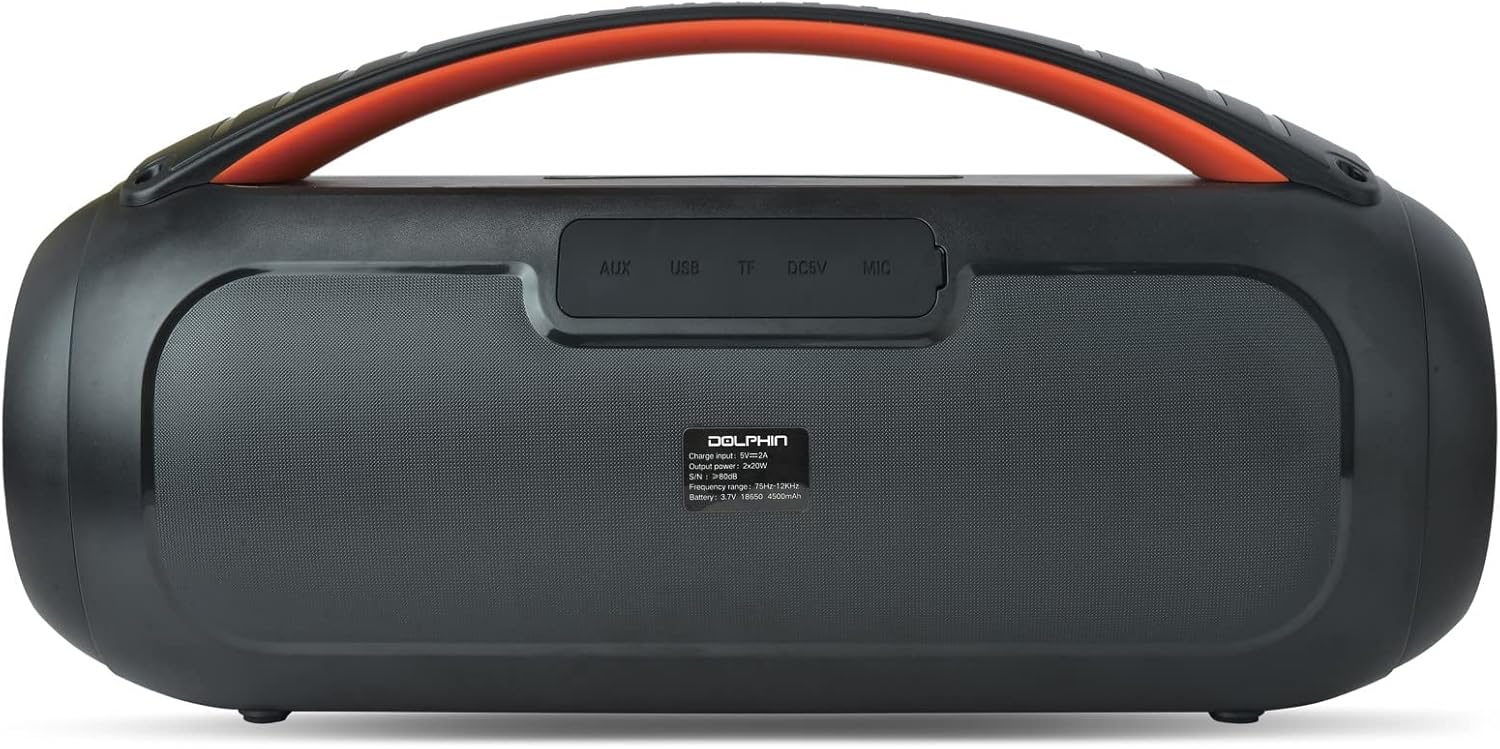
Башкаруу панелинин макети
- Кубат баскычы: Динамикти күйгүзүү/өчүрүү үчүн басып туруңуз.
- Bluetooth баскычы: Bluetooth жупташтыруу режимине кирүү үчүн басыңыз.
- Үнүн төмөндөтүү (-): Үнүн азайтуу.
- Ойнотуу/тындыруу баскычы: Аудио ойнотууну ойнотуу же тындыруу.
- Үнүн жогорулатуу (+): Үнүн жогорулатуу.
- Жарык режим баскычы: Cycle through 10 different sound-activated lighting modes.
- Бас жогорулатуу баскычы: Жакшыртылган бассты иштетүү же өчүрүү.
Rear Port Panel (Under Protective Cover)
- AUX киргизүү: Тышкы аудио түзүлүштөрдү туташтыруу үчүн 3.5 мм уяча.
- USB порт: For USB drive playback or charging external devices (power bank function).
- TF карта уячасы: TF (microSD) картаны ойнотуу үчүн.
- DC 5V (USB-C) порту: Динамикти заряддоо үчүн.
Жайгашуу
Спикерди заряддоо
- Open the protective rubber cover on the rear panel to access the charging port.
- Connect the provided USB-C charging cable to the DC 5V port on the speaker.
- USB-C кабелинин экинчи учун туура келген USB кубат адаптерине туташтырыңыз (кошумча эмес).
- The battery level indicator will show the charging status. Charge until the indicator shows a full charge.
- Once fully charged, disconnect the cable and securely close the protective rubber cover to maintain waterproofing.
Күйгүзүү/өчүрүү
- Күйгүзүү үчүн: Press and hold the Power button on the top panel for approximately 2-3 seconds until the speaker powers on and the lights activate.
- Өчүрүү үчүн: Press and hold the Power button again for approximately 2-3 seconds until the speaker powers off.
Bluetooth Жупташтыруу
- Ensure the speaker is powered on and in Bluetooth mode (indicated by a flashing blue light). If not, press the Bluetooth button to enter pairing mode.
- Мобилдик түзмөгүңүздө (смартфон, планшет ж.б.) Bluetooth иштетип, жеткиликтүү түзмөктөрдү издеңиз.
- Select "Dolphin LX-220" from the list of devices.
- Once paired, the speaker will emit an audible confirmation, and the Bluetooth indicator light will become solid blue.
WaveSync Technology (True Wireless Stereo Pairing)
To achieve a stereo sound experience, you can pair two Dolphin LX-220 speakers using WaveSync technology.
- Ensure both LX-220 speakers are powered on and in Bluetooth pairing mode.
- On one of the speakers, press and hold the WaveSync button (often indicated by a chain-link icon).
- The speakers will automatically search for and connect to each other. An audible prompt will confirm successful pairing.
- Once paired, connect your mobile device to one of the speakers via Bluetooth as described above. Audio will now play in stereo across both speakers.
Иштөө режимдери
Bluetooth режими
After successful Bluetooth pairing, you can control playback (Play/Pause, Volume Up/Down) directly from your connected device or using the speaker's control panel/remote control.
USB ойнотуу
- MP3 аудиосу бар USB флэш-дискти салыңыз files into the USB port on the rear panel (under the protective cover).
- The speaker will automatically switch to USB mode and begin playing audio.
- Use the Play/Pause and Volume buttons on the speaker or remote to control playback.
TF картасын ойнотуу
- MP3 аудио камтылган TF (microSD) картасын салыңыз fileарткы панелдеги TF карта уячасына салыңыз.
- The speaker will automatically switch to TF card mode and begin playing audio.
- Use the Play/Pause and Volume buttons on the speaker or remote to control playback.
FM радио режими
- Press the Mode button (often labeled 'M') on the speaker or remote to cycle through modes until FM Radio is selected.
- Динамик автоматтык түрдө жеткиликтүү FM станцияларын сканерлейт жана сактайт.
- Use the Previous/Next track buttons (often combined with Volume +/-) to navigate between saved stations.
AUX киргизүү режими
- Connect an external audio device (e.g., MP3 player, laptop) to the AUX input port on the rear panel using a 3.5mm audio cable (not included).
- Динамик автоматтык түрдө AUX режимине өтөт.
- Аудио ойнотууну жана үн көлөмүн түздөн-түз туташкан тышкы түзмөгүңүздөн башкарыңыз.
Үн иштетилген жарыктар
The Dolphin LX-220 features sound-activated speaker ring lights and side lights with 10 different lighting modes.
- Press the Light Mode button on the speaker or remote to cycle through the available lighting patterns.
- The lights will react to the rhythm and intensity of the music being played.
Техникалык шарттар
| Өзгөчөлүк | Деталь |
|---|---|
| Модель аты | LX-220 |
| Динамик түрү | Портативдик Bluetooth динамиги |
| Power Output | 30 RMS Уоттс |
| Динамик өлчөмү | Dual 3" Full Range Drivers |
| Суу өткөрбөйт рейтинги | IPX5 |
| Батарея | Built-In 4500mAh 3.7V Lithium-ion Battery |
| Заряддоо | USB-C Chargeable with Battery Level Indicator |
| Байланыш | Bluetooth, USB, TF, FM, AUX (3.5mm Jack) |
| Өзгөчөлүктөр | Dual Bass Radiator, WaveSync Technology, Sound Activated Speaker Ring Lights & Side Lights (10 modes), Remote Control |
| Продукциянын өлчөмдөрү | 7.3"H x 14.3"W x 5.5"D (Unit Information) |
| Элемент Салмагы | 4.5 фунт |
Проблемаларды чечүү
- Кубат жок: Батарея заряддалганын текшериңиз. Динамикти USB-C кабели аркылуу кубат булагына туташтырыңыз.
- Bluetooth жупташтыруу мүмкүн эмес: Make sure the speaker is in Bluetooth pairing mode (flashing blue light). Ensure your device's Bluetooth is enabled and within range. Try restarting both the speaker and your device.
- Үн жок: Check the volume levels on both the speaker and your connected device. Ensure the correct input mode (Bluetooth, USB, TF, AUX, FM) is selected.
- Үн сапаты начар: Ensure the speaker is not too far from the connected Bluetooth device. Check for interference from other wireless devices. For AUX mode, ensure the cable is fully inserted and not damaged.
- Жарыктар иштебейт: Press the Light Mode button to ensure lights are enabled and to cycle through modes.
- Алыстан башкаруу иштебейт: Check the remote control's battery. Ensure there are no obstructions between the remote and the speaker.
Техникалык тейлөө
- Динамикти жумшак менен тазалаңыз, гamp кездеме. Абразивдүү тазалагычтарды же эриткичтерди колдонбоңуз.
- Ensure all port covers are sealed when not in use or when exposed to water.
- Динамикти түз күн нурунан жана өтө температурадан алыс салкын, кургак жерде сактаңыз.
- If the speaker will not be used for an extended period, charge it periodically to maintain battery health.
Кепилдик жана колдоо
The Dolphin LX-220 Boombox Bluetooth Speaker comes with a limited warranty. For detailed warranty information, please refer to the warranty card included in your package or visit the official Dolphin website. For technical support, troubleshooting assistance, or service inquiries, please contact Dolphin customer service through the contact information provided on our webсайтында же продукт документациясында.
Сиз да зыярат кылсаңыз болот Амазонкадагы Дельфин дүкөнү кошумча продукт маалымат жана колдоо ресурстар үчүн.





