Introduction
This manual provides comprehensive instructions for the setup, operation, and maintenance of your XtremeMac Bluetooth Wireless Keyboard and Mouse. Please read this manual thoroughly before using the product to ensure optimal performance and longevity.
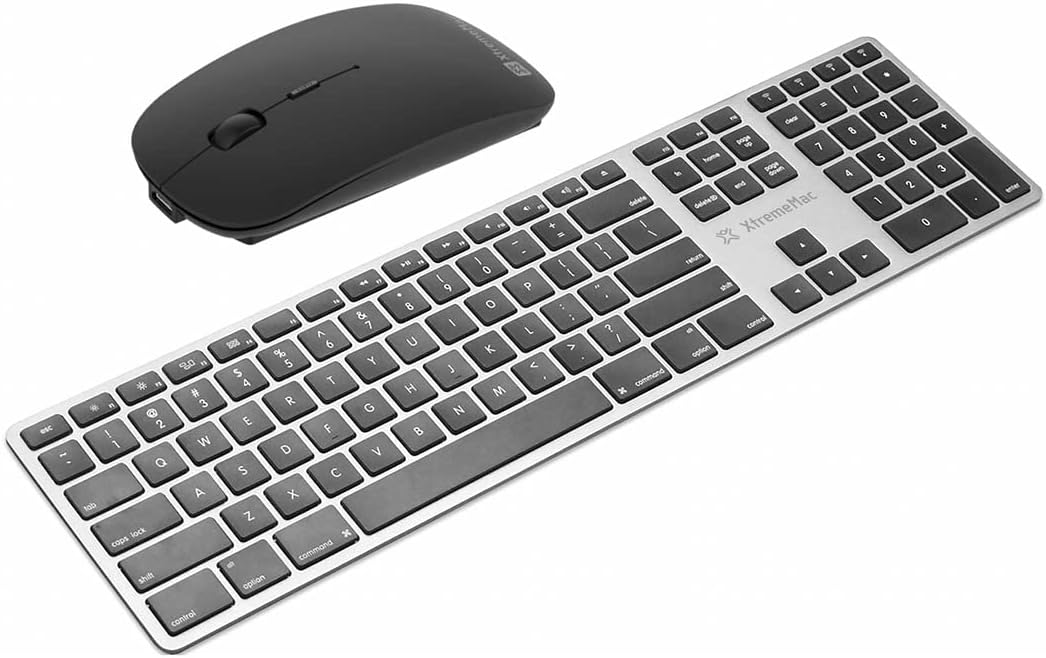
Үстүбүздөгү чыгым view of the XtremeMac Bluetooth wireless keyboard and mouse. The keyboard is silver with black keys, featuring a full layout including a numeric keypad. The mouse is black and has a sleek, ergonomic design.
Пакеттин мазмуну
Пакетте бардык буюмдар бар экенин текшериңиз:
- XtremeMac Bluetooth Wireless Keyboard
- XtremeMac Bluetooth Wireless Mouse
Орнотуу нускамалары
1. Күйгүзүү
Баскычтоп: Locate the power switch, usually on the top edge or underside of the keyboard. Slide it to the "ON" position. An indicator light may briefly illuminate.
Чычкан: Locate the power switch on the underside of the mouse. Slide it to the "ON" position. An optical sensor light may activate.
2. Bluetooth Жупташтыруу
Ensure your Mac's Bluetooth is enabled. Navigate to Системалык орнотуулар (же Системанын артыкчылыктары macOS'тун эски версияларында) > Bluetooth.
Баскычтопту жупташтыруу:
- With the keyboard powered on, press and hold the Bluetooth pairing button (often located on the underside or top edge, sometimes combined with a function key) until the indicator light begins to flash, indicating it is in pairing mode.
- On your Mac, look for "XtremeMac Keyboard" or a similar name in the list of nearby Bluetooth devices.
- Click "Connect" or "Pair." Follow any on-screen prompts, such as typing a code on the keyboard and pressing Enter.
- Once connected, the indicator light on the keyboard will stop flashing and remain solid or turn off.
Чычканды жупташтыруу:
- With the mouse powered on, press and hold the Bluetooth pairing button (usually on the underside) until the indicator light begins to flash.
- On your Mac, look for "XtremeMac Mouse" or a similar name in the list of nearby Bluetooth devices.
- Click "Connect" or "Pair."
- Once connected, the indicator light on the mouse will stop flashing and remain solid or turn off.
Эскертүү: The XtremeMac keyboard and mouse are designed for use with Mac OS. Compatibility with other operating systems may vary.
Иштөө нускамалары
Баскычтопту колдонуу
- Стандарттык терүү: Use the keys as you would a standard keyboard.
- Функция баскычтары: The top row of keys typically includes media controls and system functions. These may require pressing the "Fn" key simultaneously for their secondary function, depending on your Mac's settings.
- Mac-Specific Keys: Utilize the Command (⌘) and Option (⌥) keys for macOS shortcuts.
- Сандык баскычтоп: The dedicated numeric keypad allows for efficient data entry.
Чычканды колдонуу
- Сол чыкылдатуу: Негизги аракет, тандоо.
- Оң чыкылдатуу: Контексттик меню.
- Жылдыруу дөңгөлөгү: Документтерди сыдырыңыз жана web барактар.
- Оптикалык көз салуу: The mouse uses optical technology for precise cursor movement on most surfaces.
Техникалык тейлөө
- Тазалоо: Бир аз жумшак, түксүз кездемени колдонуңуз dampened with water or a mild cleaning solution to clean the surfaces of the keyboard and mouse. Avoid excessive moisture.
- Батареяны алмаштыруу: If the devices become unresponsive or the indicator lights dim, it may be time to replace the batteries. Refer to the battery compartment on the underside of each device for battery type and replacement instructions.
- Сактагыч: When not in use for extended periods, turn off both devices to conserve battery life. Store them in a cool, dry place.
Проблемаларды чечүү
Device Not Connecting or Unresponsive
- Күчтү текшерүү: Ensure both the keyboard and mouse are powered on and have sufficient battery charge. Replace batteries if necessary.
- Түзмөктөрдү кайра жупташтыруу: Go to your Mac's Bluetooth settings, remove the XtremeMac keyboard and mouse from the list of devices, and then repeat the pairing process as described in the "Setup Instructions" section.
- Bluetooth on Mac: Verify that Bluetooth is enabled on your Mac and that it is not in Airplane Mode.
- Түзмөктөрдү кайра иштетүү: Turn off and then turn on both the keyboard, mouse, and your Mac.
- Интерференция: Move the devices closer to your Mac and away from other wireless devices that might cause interference (e.g., Wi-Fi routers, cordless phones).
Cursor Jumps or Lagging (Mouse)
- Бети: Чычкандын таза, чагылбаган жана тунук эмес бетте колдонулганын текшериңиз.
- Батарея: Replace the mouse batteries.
- Оптикалык сенсор: Check the optical sensor on the underside of the mouse for any obstructions or dirt.
Техникалык шарттар
| Бренд: | Xtrememac |
| Модель номери: | XWH-BBT-13 |
| Байланыш технологиясы: | Bluetooth |
| Шайкеш түзмөктөр: | Laptop, Personal Computer (Mac OS) |
| Mouse Tracking Technology: | Оптикалык |
| Болжолдуу өлчөмдөрү (пакет): | 54.5 x 14.4 x 3.4 см |
| Болжолдуу салмагы (таңгак): | 690 г |
Кепилдик жана колдоо
XtremeMac products are covered by a limited warranty. For detailed warranty information, product registration, or technical support, please visit the official XtremeMac webсайтка же кардарларды тейлөөгө кайрылыңыз. Кепилдик дооматтар үчүн сатып алганыңыздын далилин сактаңыз.
Өндүрүүчү: XTREMEMAC


