Introduction
This manual provides detailed instructions for the Elecom Off-toco 3-Way PC Backpack, model BM-OF04GY2. This backpack is designed for versatile use, offering multiple carrying styles and organized storage for daily essentials and a laptop.
The backpack features a bi-color design with a textured, water-repellent polyester fabric. Please note that while the fabric is water-repellent, the product is not designed to prevent water from entering the interior completely.
Негизги өзгөчөлүктөрү жана колдонуу
1. 3-Way Carrying Style
The backpack can be carried in three ways: as a backpack, a shoulder bag, or a handbag. The shoulder straps can be stored in a dedicated pocket on the back when not in use, allowing for a clean handbag appearance.

Image: Shoulder straps can be stored for handbag use.
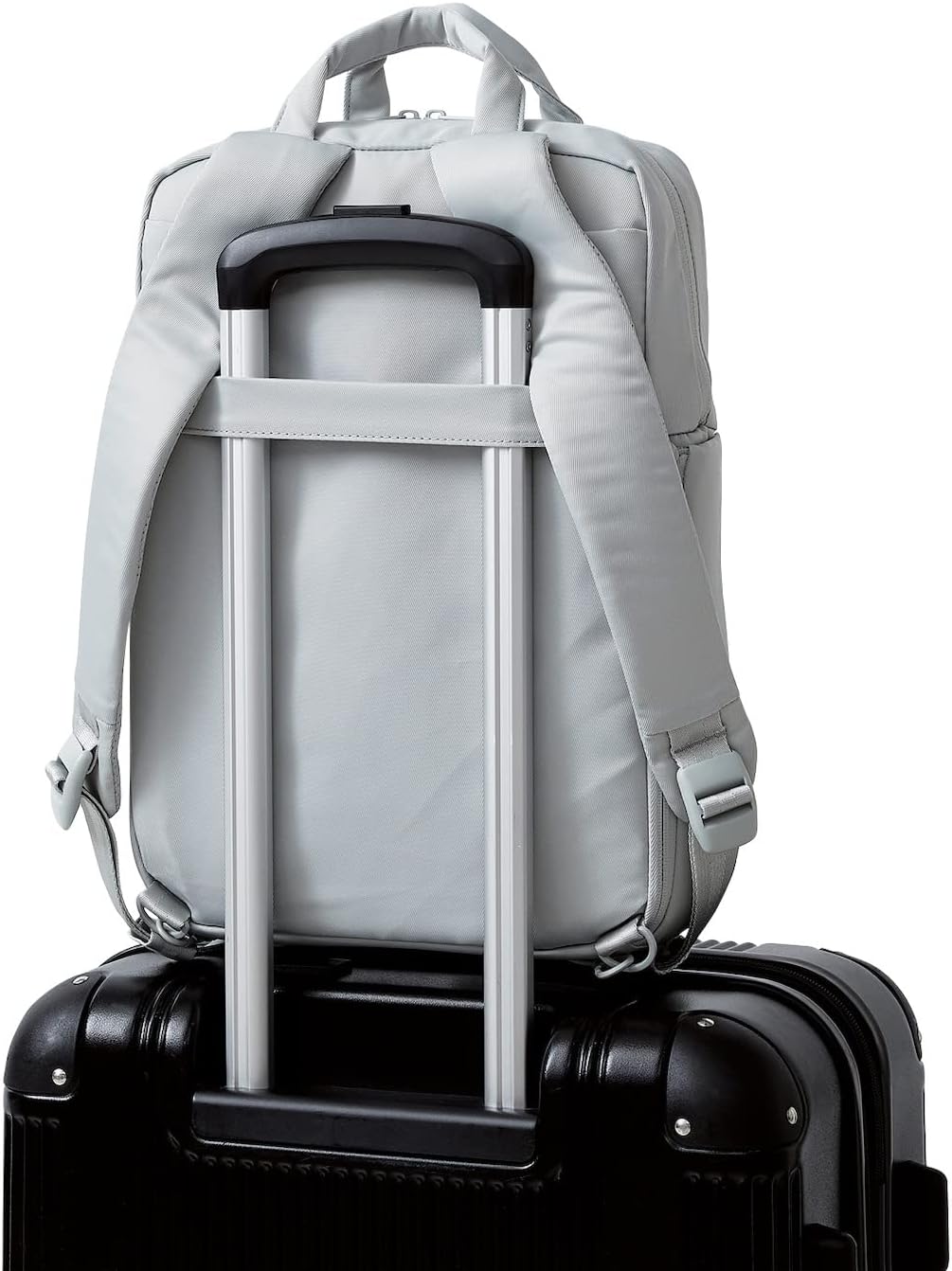
Image: Detail of the shoulder strap storage.
2. Laptop Storage
A dedicated compartment is provided to securely store laptops up to 13.3 inches independently from other items.

Image: Laptop compartment with a 13.3-inch laptop.
3. Adjustable Main Compartment
The main storage area features a zippered divider, allowing you to switch between a single large compartment and two separate compartments (duplex air chamber) based on your storage needs.

Image: Adjustable main compartment with zippered divider.
4. Organized Pockets
- Top Space: Includes convenient storage pockets and a zipper pocket for small items.
- Right Side Storage: Features a double-handle zipper and a magnetic flap for easy access. Ideal for clothes or pouches.
- Left Side Storage: Designed to independently store a folding umbrella or a plastic bottle.
- Алдыңкы чөнтөк: A large L-shaped zipper pocket for quick access to notebooks and other small items.
- Rear Hidden Pocket: A discreet zipper pocket on the back allows you to store smartphones or wallets securely without removing the bag.

Image: Front and side pockets for small item storage.

Image: Right side storage compartment.

Image: Left side storage for bottles or umbrellas.

Image: Front L-shaped zipper pocket.

Image: Rear hidden pocket for valuables.
5. Carrying Belt for Luggage
A carrying belt on the back allows the backpack to be securely fixed to the handle of a rolling luggage or carry-on bag, making it convenient for travel.

Image: Backpack secured to luggage handle.
Техникалык тейлөө
- Тазалоо: For minor dirt, wipe with a damp cloth. For stubborn stains, use a mild soap solution and gently clean the affected area. Avoid harsh chemicals or abrasive cleaners.
- Кургатуу: Air dry the backpack completely in a shaded, well-ventilated area. Do not use direct heat sources like hair dryers or direct sunlight, as this may damage the fabric.
- Суу өткөрбөйт: The outer and inner fabrics are water-repellent. However, this treatment may diminish over time with use. This product is not fully waterproof; avoid prolonged exposure to heavy rain or submerging it in water.
- Сактагыч: Колдонбогондо рюкзакты күн тийбеген, салкын, кургак жерде сактаңыз.
Проблемаларды чечүү
This section addresses common concerns. If you encounter issues not covered here, please contact customer support.
- Сыдырма жабышы: Apply a small amount of zipper lubricant or graphite (from a pencil) to the zipper teeth and gently work the zipper back and forth.
- Fabric appearance variations: Due to the nature of the wrinkled fabric, individual variations in texture and appearance may occur. This is a characteristic of the material and not a defect.
- Shoulder strap discomfort: Ensure the shoulder straps are adjusted evenly to distribute weight across both shoulders. Avoid overloading the backpack.
Техникалык шарттар
| Модель номери | BM-OF04GY2 |
| Түс | Frosty Gray |
| Сырткы өлчөмдөр | W 10.6 x D 4.1 x H 15.4 inches (270 x 105 x 390 mm) *Excluding handle and shoulder strap |
| Bag Interior Dimensions (Reference) | W 9.6 x D 3.4 x H 14.2 inches (245 x 87 x 360 mm) |
| PC Storage Interior Dimensions | W 9.1 x D 1.1 x H 12.4 inches (230 x 28 x 315 mm) *Fits up to 13.3-inch laptops |
| Чөнтөктөрдүн саны | Upper storage space (interior: pocket x 2, zipper pocket x 1, PC pocket x 1), front storage space (interior: pocket x 1), right side storage port x 1, left side bottle storage port x 1, rear shoulder storage port x 1, hidden back pocket x 1 |
| Материал | Surface and Back: Polyester (water repellent) |
| Салмагы | Болжол менен 27.2 унция (695 г) |
| Кубаттуулугу | Болжол менен 14 литр |
Кепилдик маалымат
Specific warranty details for the Elecom Off-toco 3-Way PC Backpack are not provided in this manual. For information regarding product warranty, including coverage and duration, please contact Elecom customer support directly using the contact details provided in the Support section.
Кардарларды колдоо
For product inquiries, technical assistance, or warranty claims, please contact the Elecom General Information Center:
- Телефон: 0570-084-465
- ФАКС: 0570-050-012
- Кабыл алуу убактысы: 10:00 - 19:00 daily


