1. Киришүү
This manual provides essential information for the safe and effective use of your Panasonic HC-X2000 UHD 4K Pro Camcorder. Please read this manual thoroughly before using the product and retain it for future reference. Understanding the features and operations will ensure optimal performance and longevity of your camcorder.
2. Продукт бүтүп калдыview
2.1 Негизги өзгөчөлүктөрү
- UHD 4K Video Recording: Captures high-resolution 4K video at broadcast-compatible frame rates.
- 24x оптикалык масштабдуу линза: Features a 25mm wide-angle to 600mm telephoto range.
- 5-Axis Hybrid Image Stabilization: Combines optical and electronic stabilization for smooth footage.
- Интеграцияланган Wi-Fi: Enables wireless control from a tablet or smartphone via the HC ROP app.
- Professional Audio Inputs: Supports 24-bit PCM audio recording with XLR inputs.
- 3G-SDI and HDMI Outputs: Provides versatile connectivity for professional workflows.
- Компакт жана жеңил дизайн: Engineered for mobility and ease of use in various shooting environments.
2.2 Камтылган компоненттер
The following items are typically included with your Panasonic HC-X2000 Camcorder:
- Panasonic HC-X2000 UHD 4K 3G-SDI/HDMI Pro Camcorder
- Алынуучу тутка бирдиги
- Литий-иондук батарейка
- AC адаптер/заряддагыч
- Eecup
- Линза капкагы
- Микрофон кармагыч

Figure 2.2.1: The Panasonic HC-X2000 Camcorder shown with its detachable handle unit, battery, and other accessories.
3. Орнотуу
3.1 Батареяны заряддоо жана орнотуу
- Connect the AC adapter to the battery charger and a power outlet.
- Батареяны кубаттагычка салыңыз. Кубаттоо индикатору күйөт.
- Заряддоо аяктагандан кийин, батареяны заряддагычтан чыгарыңыз.
- Align the charged battery with the battery slot on the rear of the camcorder and slide it in until it clicks securely into place.
3.2 SD картаны салуу
- Open the SD card slot cover on the side of the camcorder.
- Insert the SD card (UHS-I compatible recommended for 4K recording) into the slot with the label facing the correct direction until it clicks.
- SD карта уясынын капкагын жабыңыз.
3.3 Attaching the Handle Unit
- Align the handle unit with the accessory shoe on top of the camcorder.
- Тутка блогун ордуна бекитилгенче алдыга жылдырыңыз.
- Secure the handle unit using the locking screw.

Figure 3.3.1: The Panasonic HC-X2000 Camcorder with the detachable handle unit and an external light attached.
4. Иштөө нускамалары
4.1 Күйгүзүү/өчүрүү
- Күйгүзүү үчүн, POWER которгучун ON абалына жылдырыңыз.
- Өчүрүү үчүн, POWER которгучун OFF абалына жылдырыңыз.
4.2 Негизги жаздыруу
- Open the LCD monitor or extend the viewтапкыч.
- Press the REC START/STOP button to begin recording. The REC indicator will illuminate.
- Press the REC START/STOP button again to stop recording.
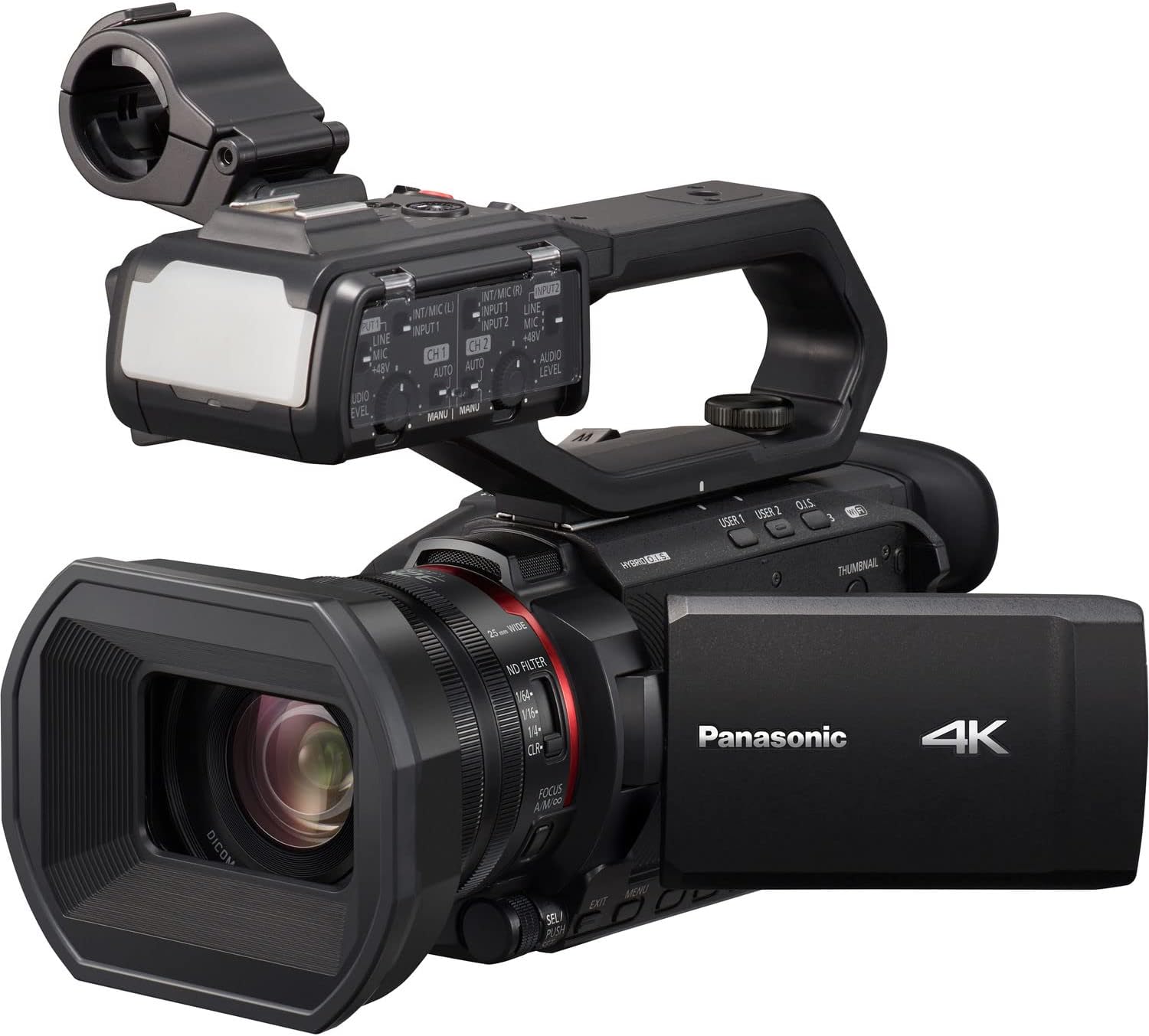
Figure 4.2.1: The Panasonic HC-X2000 Camcorder with its LCD monitor open, displaying the recording interface.
4.3 Чоңойтуу операциясы
Use the zoom lever located on the handle or the lens barrel to adjust the zoom. Push the lever towards 'T' for telephoto (zoom in) and 'W' for wide-angle (zoom out).
4.4 Фокусту тууралоо
The camcorder supports both auto-focus (AF) and manual focus (MF). Switch between modes using the AF/MF switch on the lens barrel. In MF mode, rotate the focus ring to adjust focus manually.
4.5 Сүрөттү турукташтыруу
The 5-Axis Hybrid O.I.S. (Optical Image Stabilizer) is typically active by default. Ensure it is enabled in the menu settings for stable handheld footage.
4.6 Wi-Fi башкаруу
To use Wi-Fi control, enable Wi-Fi in the camcorder's menu and connect your smartphone or tablet to the camcorder's Wi-Fi network. Use the Panasonic HC ROP app for remote camera settings and lens control.
5. Техникалык тейлөө
5.1 Видеокамераны тазалоо
- Объектив: Use a soft, lint-free cloth specifically designed for optical lenses. For stubborn smudges, use a lens cleaning solution sparingly.
- Дене: Wipe the camcorder body with a soft, dry cloth. Avoid using strong detergents or solvents.
- ЖК монитор: Жумшак, кургак чүпүрөк менен акырын сүртүңүз.
5.2 Батареяга кам көрүү
- Биринчи жолу колдонуудан мурун батарейканы толук кубаттаңыз.
- Батареяларды колдонбогондо салкын, кургак жерде сактаңыз.
- Батареянын иштөө мөөнөтүн узартуу үчүн бат-баттан толук зарядсыздануудан качыңыз.
5.3 Сактоо
When storing the camcorder for extended periods, remove the battery and store the unit in a dry, dust-free environment, preferably in a protective case.
6. Кыйынчылыктарды
| Көйгөй | Мүмкүн себеп | Чечим |
|---|---|---|
| Видеокамера күйбөйт. | Батарея заряддалган эмес же туура салынган эмес. | Charge the battery and ensure it is securely inserted. |
| Видео жаздыруу мүмкүн эмес. | No SD card, SD card full, or write-protected. | Insert an SD card, delete unnecessary files, or unlock the write-protection switch on the card. |
| Сүрөт бүдөмүк. | Incorrect focus, dirty lens, or image stabilization off. | Adjust focus, clean the lens, or enable image stabilization. |
| Аудио жаздырылган жок. | Microphone not connected, audio levels too low, or input settings incorrect. | Check microphone connection, adjust audio input levels, and verify audio settings in the menu. |
7. Техникалык шарттар
| Өзгөчөлүк | Деталь |
|---|---|
| Модель номери | HC-X2000 |
| Сенсор | 1/2.5" 8.29M MOS Sensor |
| Video Resolution | UHD 4K (3840 x 2160), Full HD (1920 x 1080) |
| Оптикалык масштаб | 24x |
| Фокустун узундугу | 25mm - 600mm (35mm equivalent) |
| Image Stabilization | 5-Axis Hybrid O.I.S. |
| Байланыш | 3G-SDI, HDMI, USB, Wi-Fi |
| Аудио формат | 24-бит PCM |
| Сактагыч медиа | SD/SDHC/SDXC картасы |
| Өлчөмдөрү (W x Y x D) | 10.12 x 6.26 x 5.08 дюйм (болжол менен) |
| Салмагы | 16.88 фунт (болжол менен) |
8. Кепилдик жана колдоо
Кепилдик маалыматы жана техникалык колдоо үчүн расмий Panasonicке кайрылыңыз website or contact your authorized Panasonic dealer. Keep your proof of purchase for warranty claims.
Онлайн ресурстар: For the latest drivers, firmware updates, and detailed FAQs, visit the official Panasonic support page for the HC-X2000 model.


