1. Продукт бүтүп калдыview
The Novastar T30 is a multimedia player designed for full-color LED displays. It combines playback and sending capabilities, allowing users to manage and control LED displays using various devices such as computers, mobile phones, or tablets. The T30 supports cloud-based publishing and monitoring platforms, enabling remote management of LED displays.
This device is suitable for commercial LED display applications, including fixed displays, lamp-post displays, chain store displays, advertisement players, mirror displays, retail store displays, door head displays, and shelf displays.

1-сүрөт: Жогорку view of the Novastar T30 multimedia player circuit board, showing various components, heat sinks, and connectors.
2. Негизги өзгөчөлүктөрү
- Жүктөө жөндөмдүүлүгү: Supports up to 650,000 pixels with a maximum width of 4096 pixels and a maximum height of 4096 pixels.
- Кайра иштетүү кубаттуулугу: Equipped with powerful processing capabilities for efficient display management.
- Dual-Wi-Fi Mode: Features dual-Wi-Fi functionality, allowing switching between Wi-Fi AP (Access Point) and Wi-Fi STA (Station) modes.
- Flawless Playback: Designed for smooth and uninterrupted content playback.
- 4G Module Support: The T30 supports 4G modules for enhanced connectivity. Note that the 4G module is sold separately and must be purchased based on regional network requirements.
3. Орнотуу нускамалары
3.1 Кутудан чыгаруу жана Пакеттин мазмуну
Carefully unpack the Novastar T30 multimedia player and verify all components are present. The standard package typically includes the T30 unit, an antenna, and a power cable. Additional accessories may vary.
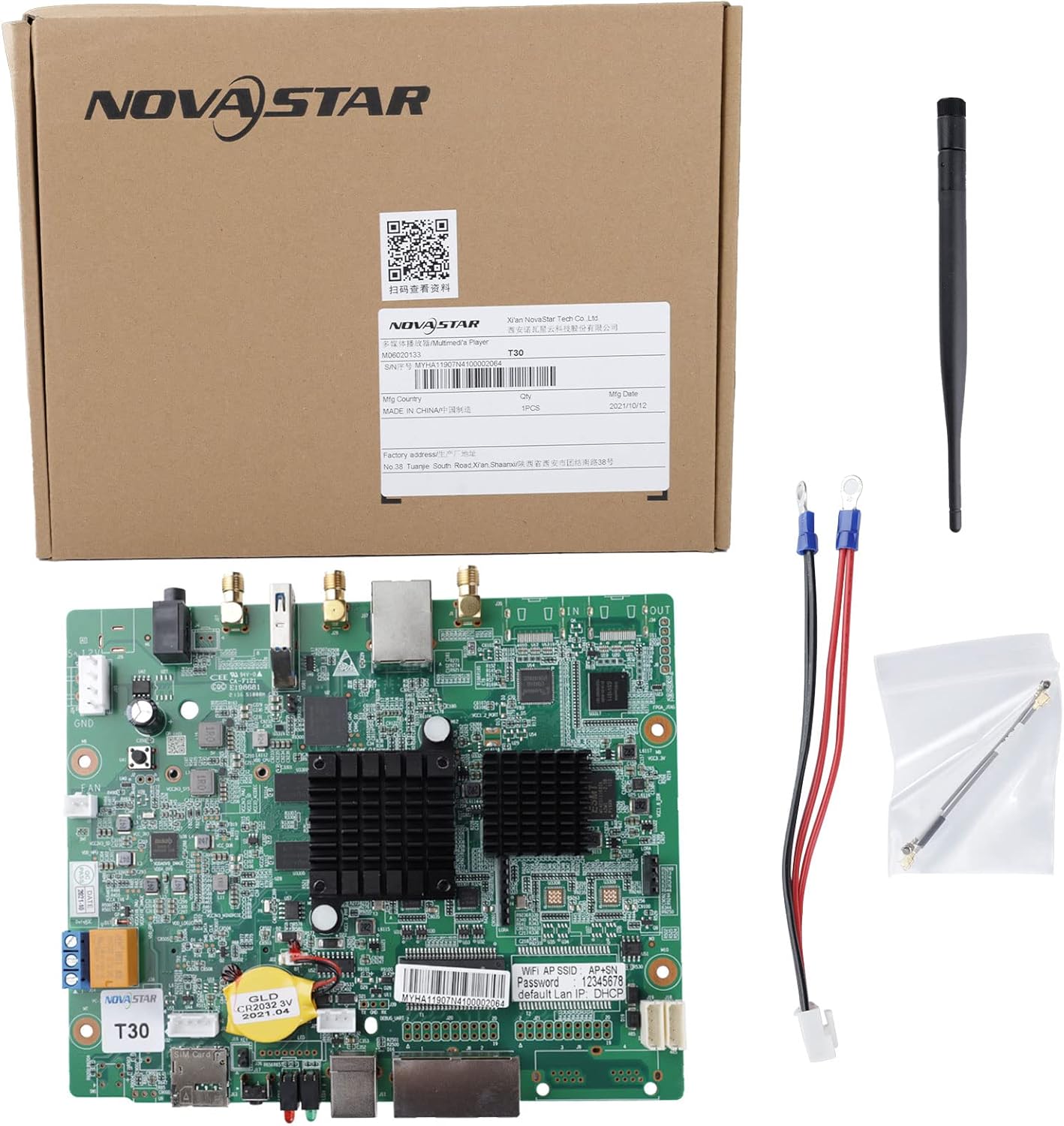
Figure 2: Novastar T30 unit shown with its retail packaging, Wi-Fi antenna, and power connection cable.
3.2 Аппараттык байланыштар
- Кубат туташуу: Connect the provided power cable to the T30 unit and a suitable power source. Ensure the power supply matches the device's requirements (typically 5-12V DC).
- Тармак туташуусу:
- Ethernet: Connect an Ethernet cable from your network router or switch to the Ethernet port(s) on the T30.
- Wi-Fi: Attach the Wi-Fi antenna to the designated connector on the T30. The device supports dual-Wi-Fi modes (AP and STA).
- 4G (Optional): If 4G connectivity is required, install a compatible 4G module (purchased separately) into the designated slot.
- LED Display Connection: Connect the T30's output ports to your LED display's receiving cards using appropriate cables. Refer to your LED display's documentation for specific connection details.
- Перифериялык байланыштар: Connect any other necessary peripherals such as USB devices or sensors to the available ports.

3-сүрөт: Бурчтуу view of the T30 board, highlighting Ethernet ports, USB ports, antenna connectors, and power input.

Figure 4: A different angled perspective of the T30 board, providing a clearer view of the SIM card slot and other peripheral connectors.
3.3 Баштапкы конфигурация
After connecting the hardware, the T30 requires initial configuration using Novastar's dedicated software. This software allows you to set up network parameters, display resolutions, and content playback schedules. Refer to the official Novastar documentation for detailed software configuration guides.
For relevant configuration software and instructions, please visit: Novastar T30 Documentation
4. Иштөө нускамалары
4.1 Content Publishing
Content can be published to the T30 using various methods:
- Компьютердик Программалык камсыздоо: Use Novastar's PC-based software to create, upload, and schedule content.
- Мобилдик түзмөктөр: Control and publish content via dedicated mobile applications on smartphones or tablets.
- LAN Control: Manage the device over a local area network.
- Cloud Platform: Utilize Novastar's cloud-based publishing and monitoring platforms for remote, centralized content management and display monitoring from any Internet-connected device.
4.2 Дисплейди башкаруу
The T30 allows for comprehensive control over connected LED displays, including brightness adjustment, power on/off scheduling, and display mode switching. Specific control functions are accessible through the configuration software and cloud platform.
Синхрондоштуруу: For applications requiring high synchronization precision, a time synchronization module is recommended. Please consult Novastar technical staff for details on acquiring and integrating this module.
5. Техникалык тейлөө
To ensure optimal performance and longevity of your Novastar T30, follow these general maintenance guidelines:
- Экологиялык шарттар: Operate the device within its specified temperature and humidity ranges. Avoid exposure to extreme temperatures, direct sunlight, and high moisture environments.
- Тазалоо: Gently clean the exterior of the device with a soft, dry cloth. Do not use liquid cleaners or solvents. Ensure ventilation openings are free from dust and obstructions.
- Программалык камсыздоонун жаңыртуулары: Regularly check for and install official firmware updates from Novastar to benefit from performance improvements and new features.
- Электр камсыздоо: Use only the recommended power adapter. Disconnect power during periods of non-use or during electrical storms.
6. Кыйынчылыктарды
This section provides basic troubleshooting steps for common issues. For more complex problems, refer to the official Novastar support resources or contact technical support.
| Көйгөй | Мүмкүн себеп | Чечим |
|---|---|---|
| Түзмөк күйбөйт | Электр энергиясы жок; туура эмес электр адаптери; бош байланыш. | Check power cable connection; verify power outlet; try a different power adapter if available. |
| Дисплей чыгаруу жок | Incorrect cable connection to LED display; incorrect display settings; LED display not powered. | Ensure display cables are securely connected; verify display resolution and settings in software; check LED display power. |
| Тармакка туташуу маселелери | Loose Ethernet cable; incorrect Wi-Fi settings; network configuration error. | Check Ethernet cable; verify Wi-Fi password and network name; ensure T30 is in correct Wi-Fi mode (AP/STA); restart router/T30. |
| Мазмун ойнотулбай жатат | Content not uploaded; incorrect schedule; file формат колдоого алынбайт. | Verify content upload status; check playback schedule; ensure content is in a supported format. |
7. Техникалык шарттар
| Өзгөчөлүк | Деталь |
|---|---|
| Бренд | Novastar |
| Модель аты | T30 |
| Байланыш технологиясы | Wi-Fi, Ethernet |
| Туташтыргыч түрү | Ethernet |
| Өзгөчө өзгөчөлүк | LED дисплей башкаруу |
| Резолюция | 4K (3840x2160 video output) |
| Controller Type | Remote Control (via software/cloud) |
| Форма фактору | TV Box (Embedded Board) |
| Шайкеш түзмөктөр | Television, Smartphone, Personal Computer, Laptop, Tablet |
| Элемент Салмагы | 14.1 унция |
| Пакеттин өлчөмдөрү | 10.87 x 7.17 x 2.4 дюйм |
| Дата биринчи жеткиликтүү | 20-март, 2023-жыл |
8. Кепилдик жана колдоо
For technical assistance, detailed documentation, or warranty inquiries, please refer to the official Novastar support channels. You can find comprehensive resources and contact information on the Novastar webсайт.
For specific configuration software and instructions, please visit the official Novastar documentation portal: Novastar T30 Documentation
If you require a time synchronization module for high-demand applications, it is recommended to consult directly with Novastar technical staff for guidance and purchase.


