Продукт бүттүview
The LEVOIT LTF-F422 Tower Fan is designed to provide efficient and quiet air circulation for various indoor spaces. Featuring a brushless DC motor, 12 wind speeds, 90° oscillation, and 60° up/down adjustment, it offers customizable cooling. This manual provides essential information for safe operation, maintenance, and troubleshooting.

Image: The LEVOIT LTF-F422 Tower Fan in white and black, with its remote control. The fan features a sleek, tall design with a digital display showing '12', indicating a speed setting. Blue arrows illustrate the adjustable airflow direction.
Коопсуздук нускамалары
Please read and understand all safety instructions before using this appliance to prevent injury or damage.
- Колдонуудан мурун бардык нускамаларды окуп чыгыңыз.
- Желдеткичти шнур же сайгыч бузулган менен иштетпеңиз.
- Вентиляторду суудан жана нымдуулуктан алыс кармаңыз.
- Do not insert fingers or foreign objects into the grille.
- Тазалоодон же тейлөөдөн мурун желдеткичти сууруп алыңыз.
- Бул шайман физикалык, сезүү же акыл-эс жөндөмү начар же тажрыйбасы жана билими жок адамдар (анын ичинде балдар) үчүн, эгерде алардын коопсуздугуна жооптуу адам тарабынан көзөмөлсүз же шайманды колдонуу боюнча көрсөтмө болбосо, колдонууга арналбайт.
Пакеттин мазмуну
Verify that all components are present in the package upon unboxing.

Image: The product packaging box, showing a label with "Package Contents" including 1x Tower Fan, 2x Base, 1x Plastic Nut, 1x Remote Control, 1x Power Adapter, 1x Quick Start Guide, and 1x User Manual.
- 1x Tower желдеткич
- 2x база
- 1x Plastic Nut
- 1x Алыстан башкаруу
- 1x Power адаптер
- 1x Ыкчам Баштоо Көрсөтмөсү
- 1x Колдонуучунун колдонмосу
Жайгашуу
Follow these steps to assemble your LEVOIT Tower Fan:
- Бардык таңгактоочу материалдарды желдеткичтен жана анын компоненттеринен кылдаттык менен алып салыңыз.
- Assemble the two base pieces by interlocking them.
- Align the fan body with the assembled base and secure it using the plastic nut provided. Ensure the fan is stable on its base.
- Connect the power adapter to the fan's power input and then plug it into a suitable electrical outlet.
Иштөө нускамалары
Башкаруу панели жана алыстан башкаруу
The fan can be operated using the top-mounted control panel or the included remote control.

Сүрөт: деталдуу view of the top of the LEVOIT Tower Fan, highlighting the control panel, the remote control storage slot, and the detachable rear cover. This illustrates the user-friendly design features.
Күйгүзүү/өчүрүү
Вентиляторду күйгүзүү же өчүрүү үчүн башкаруу панелиндеги же пульттагы кубат баскычын басыңыз.
Шамалдын ылдамдыгын тууралоо
The fan offers 12 speed options. Use the '+' and '-' buttons to increase or decrease the wind speed.
Tip: Speeds 1-3 for gentle breezes, 4-6 for mild cooling, 7-9 for strong winds, and 10-12 for powerful airflow.
Термелүү
Press the oscillation button to activate or deactivate the 90° horizontal oscillation feature, distributing air across a wider area.

Image: The LEVOIT Tower Fan demonstrating its adjustable up and down airflow. Blue arrows indicate the vertical movement of air, allowing users to direct the airflow upwards or downwards by up to 30 degrees.
Өйдө жана ылдый тууралоо
Manually adjust the fan head up or down by 60° to direct airflow precisely where needed.
Иштөө режимдери
The fan features several intelligent modes:
- Авто режим: Бөлмөнүн температурасына жараша желдеткичтин ылдамдыгын автоматтык түрдө тууралайт.
- Турбо режими: Provides maximum airflow for rapid cooling.
- Уйку режими: Operates at a low, quiet speed with dimmed display for undisturbed sleep. The fan may oscillate automatically after one hour in this mode.
- Кадимки режим: Standard operation with manual speed control.

Image: The LEVOIT Tower Fan illustrating its temperature-reactive feature. The image shows the fan in two different room settings, one at 30°C and another at 21°C, indicating its ability to detect ambient temperature and adjust fan speed accordingly.
Таймер функциясы
Желдеткичти белгиленген мөөнөттөн кийин, 12 саатка чейин автоматтык түрдө өчүп тургандай кылып коюңуз.
Техникалык тейлөө
Үзгүлтүксүз тазалоо желдеткичиңиздин оптималдуу иштешин жана узак мөөнөттүү иштешин камсыз кылат.
Сырты тазалоо
Желдеткичтин сыртын жумшак менен сүртүңүз, гamp кездеме. Абразивдүү тазалагычтарды же эриткичтерди колдонбоңуз.
Дөңгөлөктү тазалоо
The rear cover of the fan is detachable and washable for easy cleaning of the internal impeller.
- Желдеткичти розеткадан сууруп алыңыз.
- Carefully remove the detachable rear cover.
- Wipe the impeller blades with a soft, dry cloth to remove dust and debris.
- Ensure the screws are aligned with the flat surface of the motor shaft when reassembling the impeller to avoid reduced airflow.
- Reattach the rear cover securely.
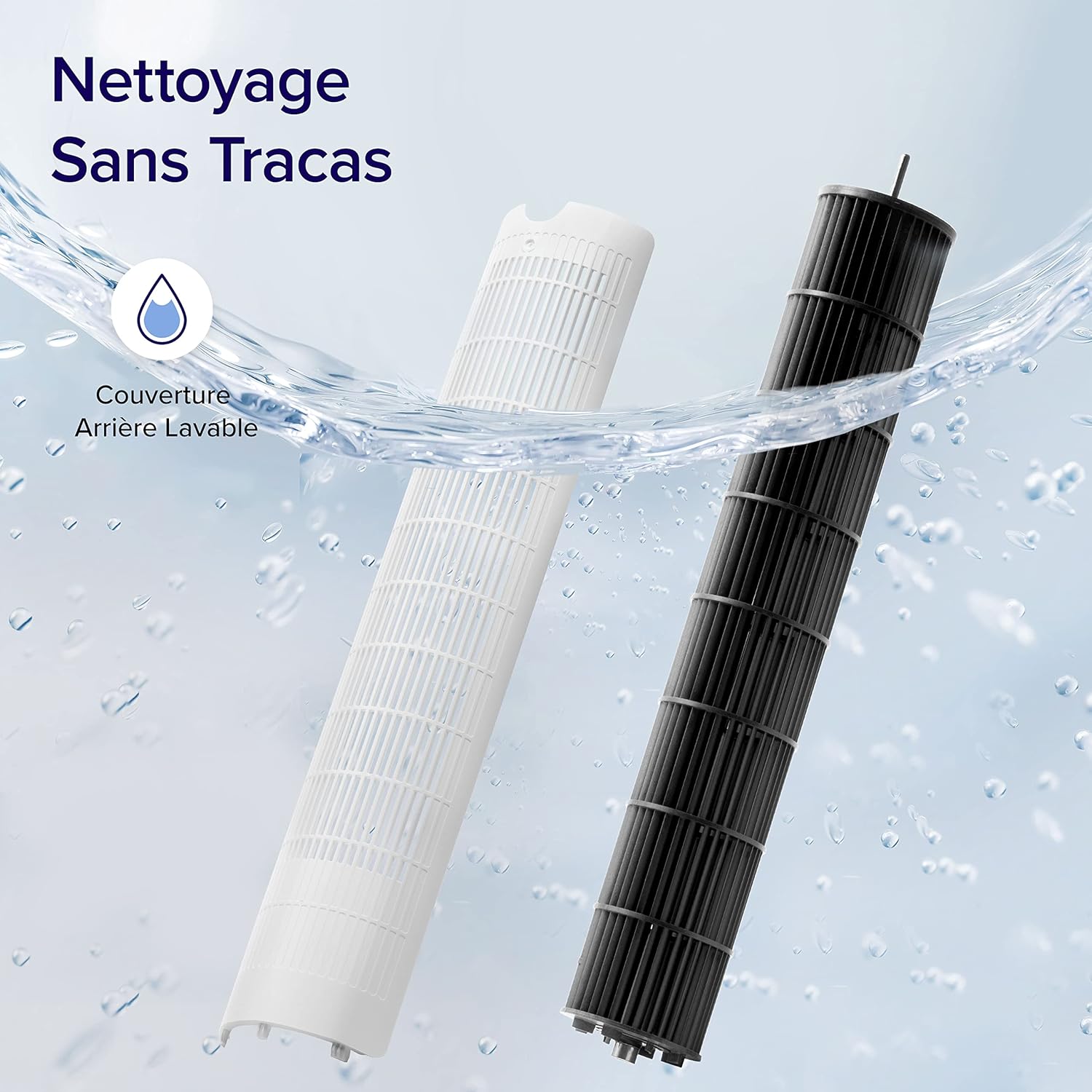
Image: The detachable and washable rear cover of the LEVOIT Tower Fan, shown being cleaned under running water. This highlights the ease of maintenance for the fan's internal components.
Проблемаларды чечүү
This section addresses common issues you might encounter with your LEVOIT Tower Fan.
| Көйгөй | Мүмкүн себеп | Чечим |
|---|---|---|
| Fan suddenly oscillates | Advanced Sleep Mode default behavior. | This is normal in Advanced Sleep Mode; oscillation begins automatically after one hour. If not in this mode, contact customer service. |
| Reduced airflow after cleaning impeller | Screws not aligned with flat surface of motor shaft during reinstallation. | Ensure screws are aligned with the flat surface of the motor shaft, not the arc surface, during reassembly. Contact Levoit support if issues persist. |
| Желдеткич капыстан токтойт | Timer function was accidentally set. | Таймер орнотууларын текшерип, керек болсо баштапкы абалга келтириңиз. |
| Top control panel unresponsive | Fan is in Advanced Sleep Mode or screen is manually turned off. | Press the panel twice: first to wake it, second to adjust settings. |
Техникалык шарттар
| Өзгөчөлүк | Деталь |
|---|---|
| Бренд | LEVOIT |
| Модель номери | LTF-F422-WEU |
| Түс | Ак |
| Өлчөмдөрү (L x W x Y) | 33 x 33 x 107.6 см |
| Салмагы | 4.99 килограмм |
| Күч | 23 Ватт |
| Тtage | 24.0 V |
| Ызы-чуу деңгээли | 25 dB (lowest) |
| Өзгөчөлүктөр | Remote Control, Timer, Oscillating, Up/Down Adjustment |
| Шамалдын ылдамдыгы | 7.9 м/сек чейин |
| Термелүү бурч | 90° |
| Up/Down Adjustment Angle | 60° |
| Таймер | 12 саат |
Кепилдик жана колдоо
LEVOIT is committed to providing high-quality products and satisfactory after-sales services. If you have any questions or concerns regarding your product, please do not hesitate to contact the LEVOIT customer support team.
For assistance, visit the official LEVOIT website or refer to the contact information provided in the Quick Start Guide.
Сатуучудан бул модель үчүн расмий продукт видеолору табылган жок.


