1. Киришүү
This user manual provides essential information for the proper installation, operation, and maintenance of the Futaba SBS-01ML Telemetry Sensor. The SBS-01ML is designed as a telemetry adapter specifically for drone flight controllers, such as the Pixhawk system. It enables the transmission of various flight data from your drone to your compatible Futaba transmitter, allowing for real-time monitoring of critical flight parameters.
Коопсуз жана натыйжалуу иштешин камсыз кылуу үчүн, продуктуну колдонуудан мурун, бул колдонмону кылдат окуп чыгыңыз.
2. Коопсуздук маалыматы
Always observe the following safety precautions to prevent injury or damage to the product and other equipment:
- Ensure all connections are secure and correct before powering on your system. Incorrect wiring can cause damage.
- Operate the sensor within its specified voltage range (DC 3.5V to 8.4V). Exceeding these limits may damage the unit.
- Keep the sensor away from moisture, dust, and extreme temperatures.
- Do not attempt to disassemble or modify the sensor. Unauthorized modifications can lead to malfunction and void the warranty.
- This product does not contain or require batteries or fuel for its operation. Do not attempt to connect external power sources other than the specified flight controller connection.
3. Продукт бүтүп калдыview
3.1 Өзгөчөлүктөрү
The Futaba SBS-01ML Telemetry Sensor provides real-time monitoring of the following data points when connected to a compatible Pixhawk flight controller and Futaba telemetry-enabled transmitter:
- Батарея Voltage
- Battery Current Value
- Бийиктик
- Жер ылдамдыгы
- Аба ылдамдыгы
- Number of GPS Satellites Received
- HDOP (Тактыктын горизонталдык суюлтуусу)
3.2 Пакеттин мазмуну
The Futaba SBS-01ML Telemetry Sensor package typically includes:
- Futaba SBS-01ML Telemetry Sensor Unit
- Integrated connection cables

Figure 3.2.1: The Futaba SBS-01ML Telemetry Sensor unit, showing its compact design and integrated wiring for connection to a flight controller and receiver.
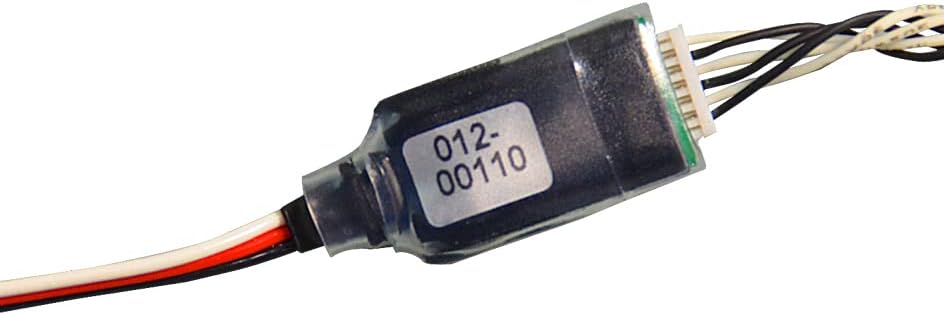
Сүрөт 3.2.2: Жакын пландан view of the sensor unit, highlighting the model identification label "012-00110" on its clear casing.
4. Орнотуу жана орнотуу
The SBS-01ML sensor is designed for straightforward integration with Pixhawk flight controllers. Follow these general steps for installation:
- Туташуу портторун аныктоо: Locate the telemetry or sensor input port on your Pixhawk flight controller. Consult your Pixhawk manual for specific port identification.
- Сенсорду туташтыруу: Connect the appropriate cable from the SBS-01ML sensor to the designated telemetry port on your Pixhawk flight controller. Ensure the connector is fully seated and oriented correctly.
- Connect to Receiver (if applicable): If your setup requires a direct connection to your Futaba receiver for telemetry data, connect the other end of the sensor's cable to the S.BUS2 port on your compatible Futaba receiver. Refer to your receiver's manual for S.BUS2 port location.
- Сенсорду бекитүү: Mount the sensor securely within your drone's frame using double-sided tape or a suitable mounting method. Ensure it is protected from vibrations and potential damage.
- Күйгүзүү жана текшерүү: Power on your drone and transmitter. Verify that the sensor is recognized by your flight controller and that telemetry data is being transmitted to your Futaba transmitter.
Эскертүү: Specific wiring diagrams and setup procedures may vary depending on your Pixhawk version and Futaba transmitter model. Always refer to the respective manuals for detailed instructions.
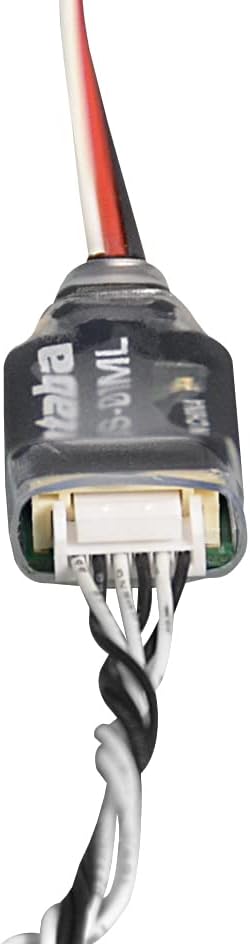
4.1-сүрөт: Аягы view of the sensor, illustrating the multi-pin connector for integration with the flight controller or receiver.
5. Иштөө нускамалары
Once the Futaba SBS-01ML Telemetry Sensor is correctly installed and connected, you can access the telemetry data on your compatible Futaba transmitter. The exact steps to view telemetry data will depend on your specific transmitter model.
5.1 Viewing Telemetry Data
Generally, you will navigate to the telemetry menu or sensor display screen on your transmitter. Here, you should see the data points being transmitted by the SBS-01ML sensor:
- Батарея Voltage: Учурдагы томду көрсөтөтtage of the main flight battery. Essential for monitoring power levels.
- Battery Current Value: Shows the current draw from the battery. Useful for understanding power consumption.
- Бийиктиги: Indicates the drone's current height above ground or sea level, depending on calibration.
- Жер ылдамдыгы: The speed of the drone relative to the ground.
- Аба ылдамдыгы: The speed of the drone relative to the surrounding air.
- GPS Satellites: The number of GPS satellites currently being tracked, indicating GPS signal strength and accuracy.
- HDOP: Horizontal Dilution of Precision, a measure of GPS position accuracy. Lower values indicate better accuracy.
Refer to your Futaba transmitter's instruction manual for detailed guidance on configuring and displaying telemetry screens.
6. Техникалык тейлөө
The Futaba SBS-01ML Telemetry Sensor is a low-maintenance device. Adhering to these simple guidelines will help ensure its longevity and reliable performance:
- Тазалоо: Keep the sensor clean and free from dust, dirt, and debris. Use a soft, dry cloth for cleaning. Do not use solvents or harsh chemicals.
- Сактагыч: Store the sensor in a dry, cool place, away from direct sunlight and extreme temperatures.
- Текшерүү: Periodically inspect the cables and connectors for any signs of wear, fraying, or damage. Replace if necessary.
- Курчап турган чөйрөнү коргоо: Ensure the sensor is protected from water and excessive humidity during operation and storage.

6.1-сүрөт: Каптал view of the sensor, showing its clear protective casing which should be kept clean and free from damage.
7. Кыйынчылыктарды
If you encounter issues with your Futaba SBS-01ML Telemetry Sensor, consider the following troubleshooting steps:
- No Telemetry Data Displayed:
- Check all cable connections between the sensor, Pixhawk, and receiver. Ensure they are secure and correctly oriented.
- Verify that your Futaba transmitter is telemetry-enabled and properly configured to receive data from the S.BUS2 port.
- Ensure the Pixhawk flight controller is powered on and functioning correctly.
- Confirm that the sensor is compatible with your specific Pixhawk firmware version.
- Incorrect or Erratic Readings:
- Check for electromagnetic interference from other electronic components. Try repositioning the sensor if possible.
- Ensure the sensor is securely mounted and not subject to excessive vibration.
- For GPS-related data (Satellites, HDOP), ensure the drone has a clear view of the sky and sufficient time to acquire a GPS lock.
- Verify that the Pixhawk is correctly calibrated for its sensors (e.g., barometer for altitude).
- Sensor Not Recognized:
- Double-check the connection to the Pixhawk's telemetry port.
- Ensure the sensor is receiving adequate power within its specified voltage диапазону.
If problems persist after following these steps, contact Futaba customer support or your local dealer for further assistance.
8. Техникалык шарттар
| Параметр | Нарк |
|---|---|
| Модель номери | SBS-01ML (036873) |
| Колдонмо | Telemetry Adapter for Drone Flight Controller (e.g., Pixhawk) |
| Жалпы узундук | 180 мм |
| Салмагы | 3.6 г |
| Rated Voltage | Туруктуу ток 3.7V - 7.4V |
| Usable Voltage Диапазон | 3.5В - 8.4В |
| Telemetry Items | Батарея Voltage, Battery Current, Altitude, Ground Speed, Airspeed, GPS Satellites, HDOP |
| Продукциянын өлчөмдөрү (болжол менен) | 2 x 10 x 10 cm (packaging/overall) |
| Келип чыккан өлкө | Кытай |
9. Кепилдик жана колдоо
For warranty information and technical support, please refer to the official Futaba website or contact your authorized Futaba dealer. Keep your proof of purchase for any warranty claims.
For the latest updates, firmware, and additional resources, visit the official Futaba Denshi Kogyo webсайт: www.futaba.co.jp


