Introduction
Сатып алганыңыз үчүн рахматasing the Ankilo WA123W 10.5-inch LED Digital Alarm Clock. This manual provides detailed instructions for setting up, operating, and maintaining your new clock. Please read this manual thoroughly before use and retain it for future reference.

Image: The Ankilo WA123W digital alarm clock displaying time, temperature, and date.
Коопсуздук маалыматы
- Аппаратты экстремалдык температурага, түз күндүн нуруна же жогорку нымдуулукка дуушар кылбаңыз.
- Аппаратты түшүрүүдөн же катуу таасирлерден сактаныңыз.
- Use only the provided power adapter or a compatible USB power source.
- Балдар жетпеген жерде сактаңыз.
- Түзмөктү өз алдынча бөлүктөргө бөлүүгө же оңдоого аракет кылбаңыз. Тейлөө керек болсо, кардарларды колдоо кызматына кайрылыңыз.
Пакеттин мазмуну
- Ankilo WA123W Digital Alarm Clock
- USB кубат кабели
- User Manual

Image: The Ankilo WA123W clock, USB cable, and user manual in its packaging.
Продукт бүттүview
The Ankilo WA123W features a large LED display for clear visibility, showing time, date, and temperature. It includes dual alarms and adjustable brightness.
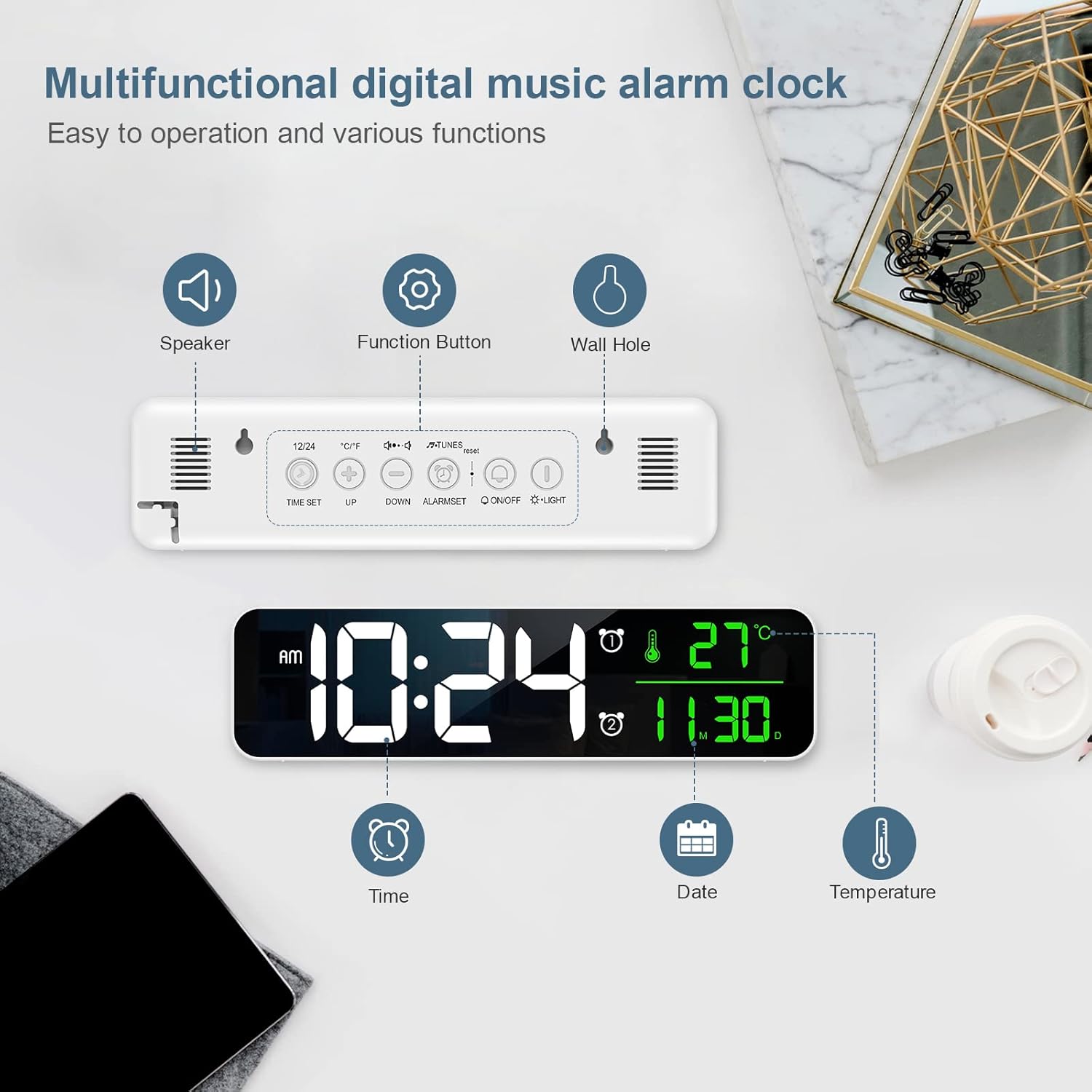
Image: Diagram showing the back panel with speaker, function buttons, and wall hole, along with display elements for time, date, and temperature.
Башкаруу элементтери жана дисплей элементтери:
- LED дисплей: Убакытты, датаны жана температураны көрсөтөт.
- Баяндамачы: For alarm sounds.
- Функция баскычтары: (e.g., TIME SET, UP, DOWN, ALARM SET, ON/OFF, LIGHT) located on the back for various settings.
- Wall Hole: Дубалга орнотуу үчүн.
Жайгашуу
Күйгүзүү:
- Connect the provided USB cable to the clock's power input port.
- USB кабелинин экинчи учун шайкеш келген USB кубат адаптерине (кошулмада жок) же кубаттуу USB портуна сайыңыз.
- Дисплей күйүп, сааттын күйүп турганын көрсөтөт.
Жайгаштыруу параметрлери:
The clock can be placed on a flat surface or mounted on a wall.

Image: Demonstrates the clock being wall-mounted and placed on a table.
- Столдун үстүнө жайгаштыруу: Simply place the clock on any stable, flat surface.
- Дубалга орнотуу: Use the integrated wall hole on the back of the clock to hang it securely on a wall hook or screw (not included).
Иштөө нускамалары
Убакытты жана датаны коюу:
- басыңыз УБАКЫТТЫ ОРНОТУУ убакыт орнотуу режимине өтүү үчүн баскыч.
- колдонуу UP жана ылдый саатты тууралоо үчүн баскычтар.
- Басыңыз УБАКЫТТЫ ОРНОТУУ мүнөттүк жөндөөлөргө өтүү үчүн кайрадан, андан кийин менен тууралаңыз UP/ылдый.
- Басууну улантыңыз УБАКЫТТЫ ОРНОТУУ жыл, ай жана күн жөндөөлөрүн өзгөртүү үчүн, ар бирин тууралоо UP/ылдый.
- Басыңыз УБАКЫТТЫ ОРНОТУУ орнотуу режиминен чыгуу үчүн акыркы жолу.
- 12 сааттык жана 24 сааттык форматтын ортосунда которулуу үчүн, басыңыз 12/24 button (if available, otherwise it might be part of time setting).
Ойготкучтарды орнотуу (кош ойготкучтар):
Саат эки көз карандысыз ойготкучту колдойт.

Image: The clock display showing two alarm settings and volume levels.
- басыңыз Сигналды орнотуу 1-ойготкучту же 2-ойготкучту тандоо үчүн баскычын басыңыз.
- Once an alarm is selected, press Сигналды орнотуу again to enter alarm time setting.
- Колдонуу UP жана ылдый ойготкучтун саатын жана мүнөтүн тууралоо үчүн баскычтарды басыңыз.
- Басыңыз Сигналды орнотуу to confirm and move to the next setting (e.g., alarm sound, snooze duration).
- Ойготкучту жандыруу/өчүрүү үчүн басыңыз КҮЙГҮЗҮҮ/ӨЧҮРҮҮ button associated with the alarm (or cycle through modes with Сигналды орнотуу until ON/OFF option appears).
- When the alarm sounds, press any button (except snooze/light) to stop it, or press the snooze/light button for snooze function.
Жарыктыкты жөндөө:
The clock features 5 levels of brightness adjustment.
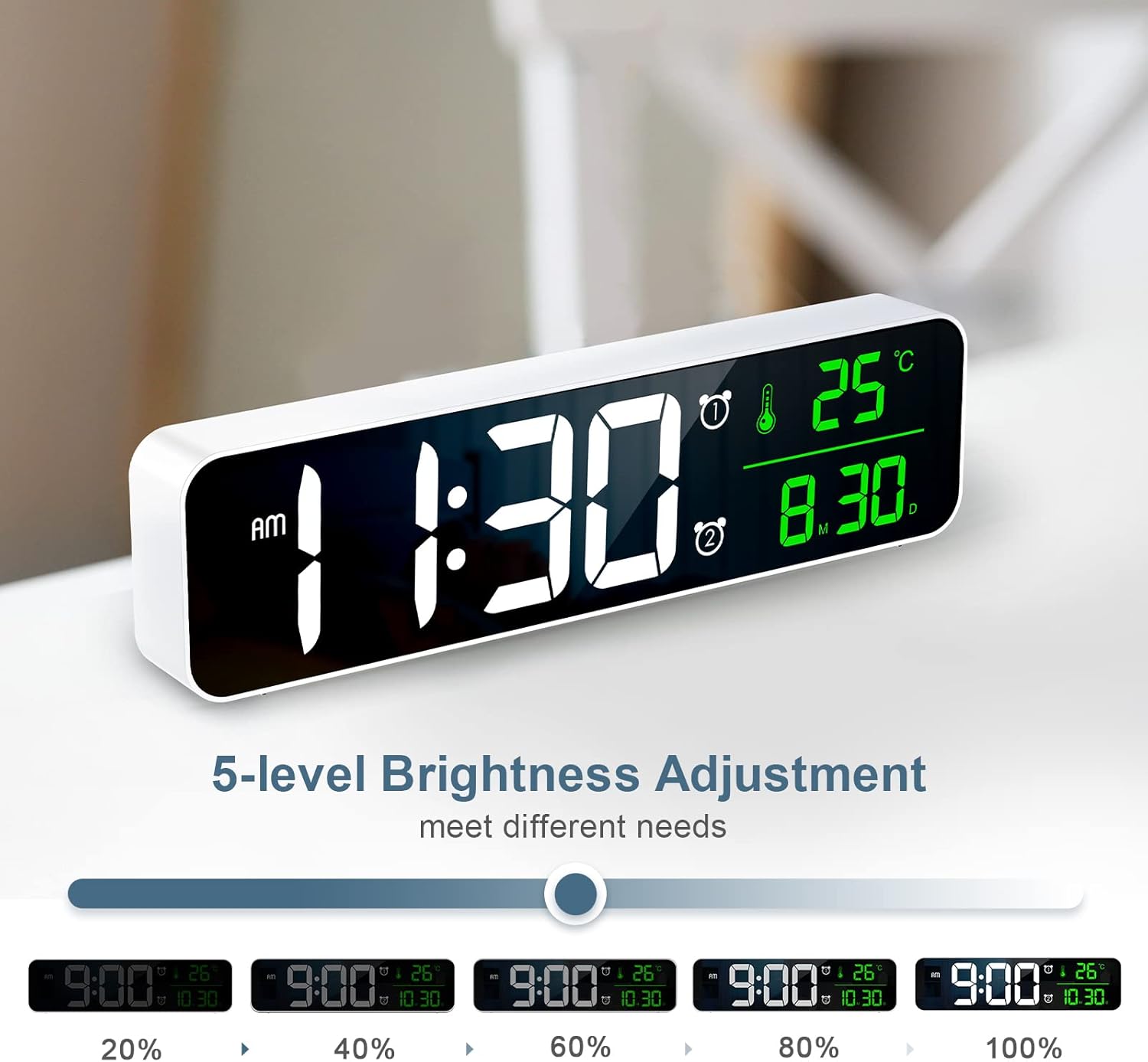
Image: Visual representation of the clock display at different brightness levels (20% to 100%).
- басыңыз ЖАРЫК button (or a dedicated brightness button) to cycle through the 5 brightness levels.
- Select the desired brightness for optimal visibility in different lighting conditions.
Температура дисплейи:
The clock displays the ambient temperature. To switch between Celsius and Fahrenheit:
- басыңыз ° C / ° F button (if available) or a combination of buttons as indicated on the device (e.g., long press UP button).
Техникалык тейлөө
- Тазалоо: Саатты жумшак, кургак чүпүрөк менен сүртүңүз. Абразивдүү тазалагычтарды же эриткичтерди колдонбоңуз.
- Сактагыч: If storing for an extended period, disconnect the power cable and store in a cool, dry place.
Проблемаларды чечүү
| Көйгөй | Мүмкүн себеп | Чечим |
|---|---|---|
| Clock does not turn on. | Электр кубаты жок же байланыш үзүлгөн. | Ensure the USB cable is securely connected and the power source is active. Try a different USB port or adapter. |
| Дисплей өтө күңүрт/жарык. | Жарыктык туура эмес коюлган. | басыңыз ЖАРЫК button to adjust brightness levels. |
| Ойготкуч угулбайт. | Ойготкуч иштетилген эмес же үн өтө төмөн. | Check if the alarm is set and activated. Ensure alarm volume is not muted or set to minimum. |
| Туура эмес убакыт/дата. | Убакыт/дата туура эмес коюлган. | Баштапкы абалга келтирүү үчүн "Убакытты жана датаны орнотуу" көрсөтмөлөрүн аткарыңыз. |
Техникалык шарттар
- Модел: WA123W
- Дисплей түрү: LED Digital
- Экрандын өлчөмү: Болжол менен 10.5 дюйм (26.7 см)
- Өлчөмдөрү (L x W x Y): 5 x 3.81 x 10 см
- Салмагы: 320 г
- Материал: Акрилонитрил бутадиен стирол (ABS)
- Кубат булагы: USB менен иштейт
- Өзгөчөлүктөрү: Calendar Display, Alarm, Charging Port

Image: The clock displaying time, temperature, and date, with dimensions indicated as 10.4 inches wide and 2.8 inches high.
Кепилдик жана колдоо
Ankilo products are designed for reliability and performance. For warranty information or technical support, please refer to the contact details provided with your purchase or visit the official Ankilo webсайт.
Көбүрөөк жардам алуу үчүн, кардарларды тейлөө кызматына кайрылыңыз.
