Introduction
Thank you for choosing the TOPTECH Audio Angel-12 Bluetooth Speaker. This 12-inch LED rechargeable wireless portable speaker system is designed to deliver powerful and clear sound for various applications, including live performances, karaoke, and general audio playback. It features Bluetooth connectivity, a microphone input, and convenient portability with wheels and a handle. This manual provides detailed instructions for setup, operation, maintenance, and troubleshooting to ensure you get the most out of your device.
Коопсуздук маалыматы
Please read and understand all safety instructions before using the speaker. Keep this manual for future reference.
- Динамикти сууга же ашыкча нымдуулукка дуушар кылбаңыз.
- Динамикти радиаторлор, жылыткычтар, плиталар же башка шаймандар (анын ичинде ampкөтөргүчтөр) жылуулукту пайда кылуучу.
- Өндүрүүчү белгилеген тиркемелерди/аксессуарларды гана колдонуңуз.
- Чагылган бороондо же көпкө колдонулбаганда динамикти электр розеткасынан ажыратыңыз.
- Бардык тейлөөнү квалификациялуу тейлөө кызматкерлерине тапшырыңыз. Аппарат кандайдыр бир жол менен бузулганда тейлөө талап кылынат.
- Эч кандай желдетүүчү тешиктерди жаап албаңыз. Өндүрүүчүнүн көрсөтмөлөрүнө ылайык орнотуу.
- Электр шнурунун басылып кетүүсүнөн же кысып калуудан сактаңыз, өзгөчө сайгычтарда, розеткаларда жана алар аппараттан чыга турган жеринде.
Пакеттин мазмуну
Төмөндө тизмеленген нерселердин баары пакетиңизде бар экенин текшериңиз:
- Audio Angel-12 Bluetooth Speaker
- Зымдуу микрофон
- Кубат адаптери/заряддоо кабели
- Колдонуучунун Колдонмосу (бул документ)

Image: The Audio Angel-12 Bluetooth Speaker, showing its front view with colorful LED lights and the retractable handle extended. This image represents the main unit included in the package.
Продукт бүттүview
Familiarize yourself with the various components and controls of your Audio Angel-12 speaker.
Сүрөт 1: Алдыңкы View. Shows the main speaker grille, LED light panels, and the overall design.

Figure 2: Top Control Panel. Displays the various knobs, buttons, and ports for controlling the speaker's functions.

3-сүрөт: Каптал View. Highlights the robust casing and design features.
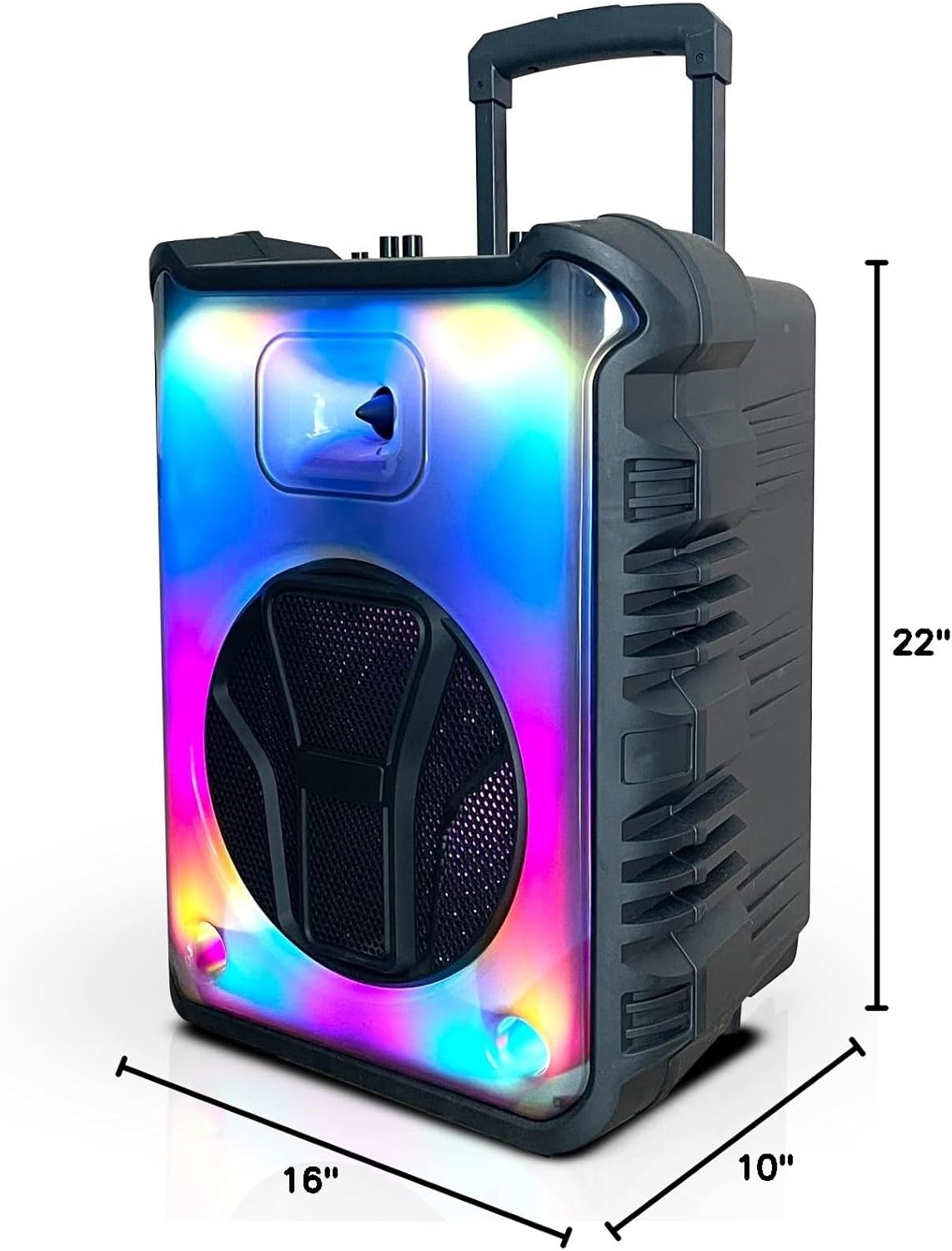
Figure 4: Dimensions. Illustrates the speaker's height (22"), width (16"), and depth (10").
Башкаруу панелинин өзгөчөлүктөрү:
- Кубат баскычы: Динамикти күйгүзөт/өчүрөт.
- Үн баскычы: Негизги үндү тууралайт.
- Микрофон киргизүү (MIC IN): Connects the wired microphone.
- USB порт: USB флэш-дискти ойнотуу үчүн.
- TF карта уячасы: TF (MicroSD) картасын ойнотуу үчүн.
- Көмөкчү киргизүү (AUX IN): 3.5 мм кабели аркылуу тышкы аудио түзмөктөрдү туташтыруу үчүн.
- Режим баскычы: Switches between Bluetooth, FM Radio, USB, and TF Card modes.
- Ойнотуу/тындыруу баскычы: Медиа режимдеринде ойнотууну башкарат.
- Мурунку/Кийинки трек баскычтары: Navigates through tracks or FM radio stations.
- LED жарык баскычы: LED жарык эффекттерин башкарат.
Жайгашуу
Динамикти заряддоо:
Before first use, fully charge the speaker. Connect the provided power adapter to the speaker's charging port and plug it into a standard wall outlet. The charging indicator light will illuminate. Once fully charged, the light may change color or turn off. A full charge provides up to 6 hours of playtime.
Күйгүзүү/өчүрүү:
басып, кармап туруңуз Кубат баскычы on the control panel to turn the speaker on or off.
Микрофонду туташтыруу:
Insert the plug of the wired microphone into the MIC IN port on the speaker's control panel. Adjust the microphone volume using the dedicated microphone volume knob (if available) or the main volume knob.
Иштеп жатат
Bluetooth жупташууда:
- Turn on the Audio Angel-12 speaker. It will automatically enter Bluetooth pairing mode, indicated by a flashing Bluetooth indicator light or an audible prompt.
- Смартфонуңузда же башка шайкеш түзмөктө Bluetooth'ду иштетиңиз.
- Издөө "Angel-12" or "TOPTECH Speaker" in your device's Bluetooth list.
- Select the speaker to connect. Once paired, you will hear a confirmation sound, and the Bluetooth indicator light will become solid.
- Эми сиз аудиону түзмөгүңүздөн динамикке зымсыз агылта аласыз.
USB/TF картасын ойнотуу:
- Insert a USB flash drive or TF (MicroSD) card into the respective port on the control panel.
- Динамик автоматтык түрдө USB же TF карта режимине которулуп, аудиону ойното баштайт fileс. Болбосо, басыңыз Режим баскычы туура киргизүүнү тандоо үчүн.
- колдонуу Ойнотуу/Тыныгуу жана Мурунку/Кийинки трек ойнотууну башкаруу үчүн баскычтар.
FM радиосу:
- басыңыз Режим баскычы repeatedly until you enter FM Radio mode.
- басыңыз Ойнотуу/тындыруу баскычы once to initiate an automatic scan for available FM stations. The speaker will save all found stations.
- колдонуу Мурунку/Кийинки трек баскычтар сакталган станциялардын ортосунда чабыттоо.
Микрофонду колдонуу:
Once the microphone is connected, simply speak or sing into it. Adjust the microphone volume and echo effects (if available) using the corresponding knobs on the control panel for optimal sound.
LED жарык эффекттери:
басыңыз LED жарык баскычы to cycle through different light modes or to turn the LED lights off. The speaker features dynamic light displays that can enhance your audio experience.
Техникалык тейлөө
Тазалоо:
- Тазалоодон мурун ар дайым өчүрүп, динамикти розеткадан сууруп алыңыз.
- Динамиктин сыртын сүртүү үчүн жумшак, кургак чүпүрөктү колдонуңуз.
- Суюк тазалоочу каражаттарды, аэрозолдорду же абразивдүү химиялык заттарды колдонбоңуз, анткени алар капталга же ички компоненттерге зыян келтириши мүмкүн.
Сактагыч:
- Динамикти түз күн нурунан жана өтө температурадан алыс салкын, кургак жерде сактаңыз.
- Эгер батарейканы узак убакытка сактасаңыз, анын иштөө мөөнөтүн сактоо үчүн аны мезгил-мезгили менен (мисалы, ар бир 3 ай сайын) кубаттап туруңуз.
Батареяга кам көрүү:
- Батареяны бат-баттан толук кубаттап калуудан алыс болуңуз.
- Do not leave the speaker plugged in for excessively long periods after it is fully charged.
Проблемаларды чечүү
If you encounter issues with your speaker, refer to the following table for common problems and solutions.
| Көйгөй | Мүмкүн чечим |
|---|---|
| Динамик күйбөйт. | Батарея заряддалганын текшериңиз. Кубат адаптерин туташтырып, кайра аракет кылыңыз. |
| Динамиктен үн жок. | Динамиктин жана туташкан түзмөктүн үнүнүн деңгээлин текшериңиз. Туура киргизүү режими (Bluetooth, USB, AUX) тандалганын текшериңиз. |
| Bluetooth түзмөгү жупташа албайт. | Ensure the speaker is in Bluetooth pairing mode. Move the speaker closer to the device. Turn off and on Bluetooth on your device. Forget the speaker from your device's Bluetooth list and try pairing again. |
| Микрофон иштебей жатат. | Ensure the microphone is securely plugged into the MIC IN port. Check microphone volume settings. Test with another microphone if possible. |
| FM радиосун кабыл алуу начар. | Extend the antenna fully (if applicable). Try repositioning the speaker to improve signal. |
Техникалык шарттар
| Модель аты | Angel-112 |
| Бренд | Топтех |
| Динамик өлчөмү | 12 дюйм |
| Продукциянын өлчөмдөрү | 10"D x 16"W x 22"H |
| Power Source | Батарея менен иштейт |
| Зымсыз байланыш технологиясы | Bluetooth, FM |
| Байланыш технологиясы | Көмөкчү, Bluetooth, USB |
| Өзгөчөлүктөр | Bluetooth, Built In Microphone Input, Display, Radio, USB Port |
| Камтылган компоненттер | Зымдуу микрофон |
| UPC | 752574407241 |
Кардарларды колдоо
For further assistance, technical support, or warranty inquiries, please contact TOPTECH customer service. Refer to the product packaging or the official TOPTECH webэң акыркы байланыш маалыматы үчүн сайт.
Сиз да зыярат кылсаңыз болот Amazon'догу TOPTECH дүкөнү көбүрөөк продукт маалымат жана колдоо ресурстар үчүн.


