Introduction
The Technaxx TX-238 is a versatile emergency radio designed for reliability and independence from external power sources. It integrates a hand crank, solar panel, and USB charging capabilities, making it an ideal companion for travel, camping, and emergency situations. This manual provides detailed instructions for the setup, operation, and maintenance of your device.

Image: The Technaxx TX-238 radio, showcasing its compact design, extended antenna, and illuminated LED flashlight. The hand crank is folded down on top.
Негизги өзгөчөлүктөрү
- Independent Power Supply: Features an integrated solar panel and a hand crank for charging, ensuring operation without external power.
- Эң сонун радио кабыл алуу: Equipped with a special radio antenna for clear reception of AM/FM stations.
- Bright Emergency Lighting: Includes a super bright LED flashlight for illumination in dark environments or emergencies.
- Мобилдик түзмөктү кубаттоо: USB output allows convenient charging of smartphones and tablets on the go.
- Туруктуу курулуш: Made from high-quality ABS plastic for robustness and durability.

Image: An infographic highlighting the multi-functional capabilities of the TX-238, including solar charging, SOS alarm, reading lamp, USB charging, 1200mAh battery, 3W flashlight, AM/FM radio, and headphone function. The radio is shown with its flashlight on, in a mountainous outdoor setting.
Продукт компоненттери жана башкаруу элементтери
Familiarize yourself with the various parts and controls of your Technaxx TX-238 radio:
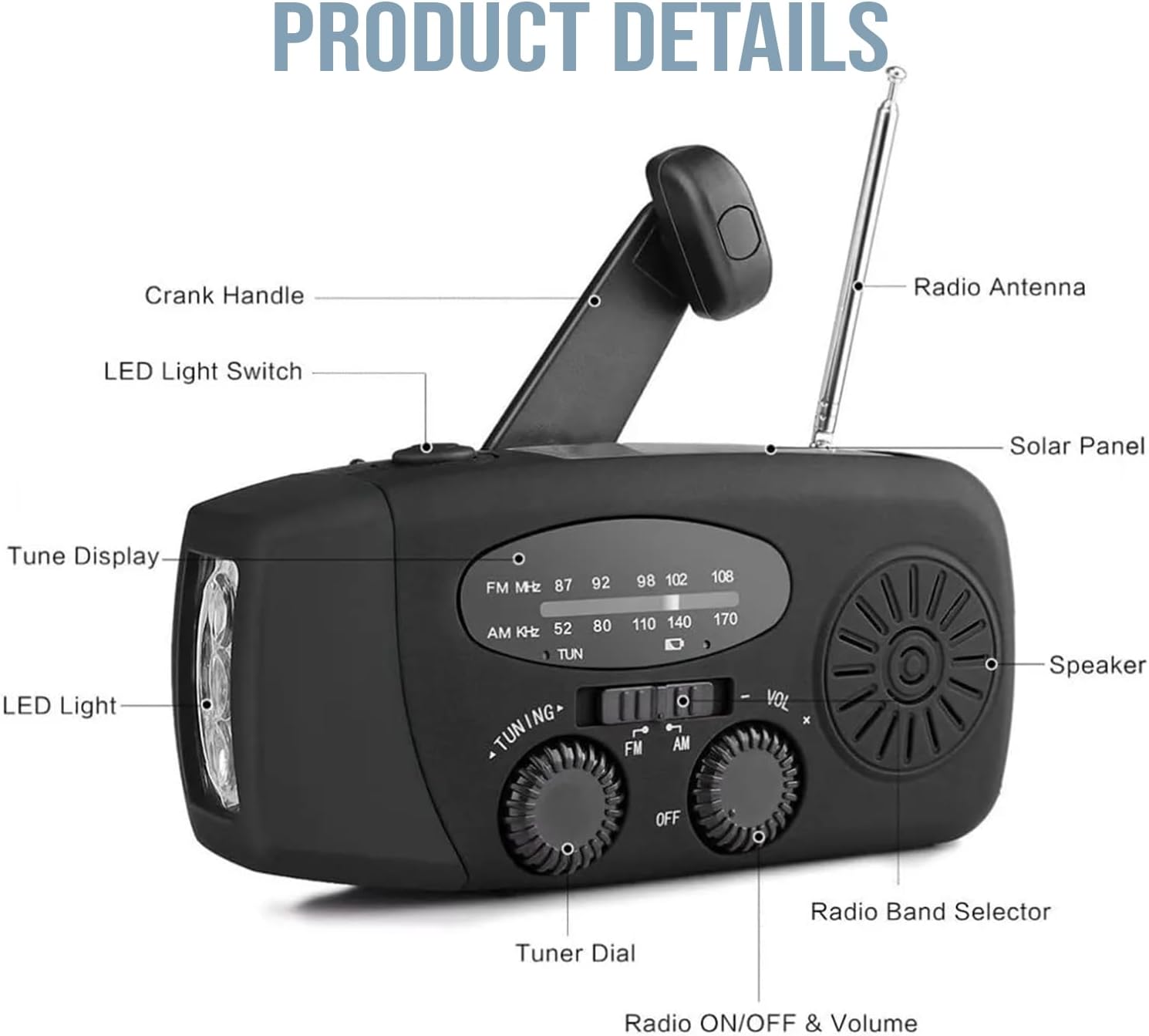
Image: A detailed diagram illustrating the various components of the TX-238 radio, including the crank handle, LED light switch, tune display, LED light, radio antenna, solar panel, speaker, radio band selector, tuner dial, and the combined radio ON/OFF and volume knob.
- Кранка туткасы: Used for manual power generation.
- LED жарык өчүргүч: Activates the front LED flashlight.
- Көрсөтүүнү тууралоо: Shows the selected radio frequency.
- LED жарык: Front-facing flashlight.
- Радио антенна: Extendable antenna for improved radio reception.
- Күн панели: Top-mounted panel for solar charging.
- Баяндамачы: Audio output for radio.
- Радио жыштыктарын тандагыч: Switch between FM, AM, and WB (Weather Band, if applicable).
- Тюнердин тергичи: Adjusts the radio frequency.
- Radio ON/OFF & Volume: Rotary knob to turn the radio on/off and control volume.
Аппаратты кубаттандыруу
The TX-238 offers multiple methods for power generation and charging:
1. Hand-Cranked Charging
Extend the crank handle from the back of the unit and rotate it clockwise or counter-clockwise at a steady pace. Approximately 2.5 hours of continuous cranking can fully charge the device.
2. Күн кубаттоо
Place the radio with its solar panel facing direct sunlight. Ensure no obstructions block the panel. Solar charging is slower, requiring approximately 40-50 hours of direct sunlight for a full charge. This method is ideal for maintaining charge or slow charging over extended periods.
3. USB Charging (Input)
Connect the provided USB cable to the micro-USB input port on the side of the radio and to a standard USB power adapter (not included) or a computer USB port. This is the fastest method for initial charging or quick top-ups.

Image: A visual guide demonstrating the three primary charging methods: USB input, manual hand-crank, and solar panel charging, with arrows indicating the direction of power input.
USB чыгышы (кубат банкынын функциясы)
The radio features a USB-A output port to charge external mobile devices like smartphones and tablets. Connect your device's charging cable to this port. The internal battery of the radio will then supply power to your connected device.

Image: The TX-238 radio connected to a smartphone via its USB output, demonstrating its function as an emergency power bank. Text highlights the 1200mAh battery and charging duration estimates.
Операция
Радио функциясы
- Turn On/Off and Volume: Rotate the "Radio ON/OFF & Volume" knob clockwise to turn on the radio and increase volume. Rotate counter-clockwise to decrease volume and turn off.
- Тандоо тобу: Use the "Radio Band Selector" switch to choose between FM, AM, or WB (Weather Band, if applicable).
- Жөндөө станциясы: Rotate the "Tuner Dial" to scan for stations. The "Tune Display" will show the frequency. Extend the radio antenna for better reception.
Фонардын иштеши
Slide the "LED Light Switch" to turn the front LED flashlight on or off. This is useful for emergency lighting or general illumination in dark conditions.

Image: A split image demonstrating the lighting capabilities: the top panel shows the reading lamp feature, while the bottom panel illustrates the powerful flashlight illuminating a camping tent at night.
Өзгөчө кырдаалдарга даярдык
The Technaxx TX-238 is designed to be a reliable tool in various emergency scenarios:
- Аба ырайы эскертүүлөрү: Tune into the Weather Band (WB) for critical weather updates during storms or natural disasters.
- Байланыш: Stay informed with AM/FM radio broadcasts when other communication methods are unavailable.
- Жарыктандыруу: The integrated flashlight provides essential illumination during power outagже караңгы чөйрөдө.
- Power for Devices: Use the USB output to charge essential mobile devices, ensuring you can make emergency calls or access information.

Image: A composite image illustrating the TX-238 radio's utility in various emergency situations such as fires, earthquakes, hurricanes, snowstorms, and floods, emphasizing its role in preparedness.
Техникалык шарттар
| Өзгөчөлүк | Деталь |
|---|---|
| Модель аты | TX-238 |
| Өлчөмдөр | 130 x 48.5 x 62 мм (4.8 x 6.4 x 12.8 см) |
| Салмагы | 235 грамм |
| Материал | Акрилонитрил бутадиен стирол (ABS) |
| Radio Bands | AM, FM (Frequency: 108 MHz for FM) |
| Кубат булактары | Hand Crank, Solar Panel, USB (Input) |
| Чыгуу | USB-A (for charging mobile devices) |
| Өзгөчөлүктөр | Built-in Flashlight, Solar Powered |

Image: A visual representation of the TX-238 radio's physical dimensions, indicating its height (6.4cm), width (4.8cm), and length (12.8cm).
Техникалык тейлөө жана кам көрүү
- Тазалоо: Аппаратты жумшак, кургак чүпүрөк менен сүртүңүз. Катуу химиялык заттарды же абразивдүү тазалагычтарды колдонбоңуз.
- Сактагыч: Радиону узак убакыт бою колдонбогон учурда салкын, кургак жерде, күндүн түз нурунан жана өтө жогорку температурадан алыс сактаңыз.
- Батареянын ден соолугу: For optimal battery life, fully charge the device at least once every three months, even if not in regular use.
- Суу каршылык: While designed to withstand some moisture (as indicated by "WATERPROOF" image), avoid submerging the device in water. Ensure all ports are dry before charging.

Image: The TX-238 radio being splashed with water, illustrating its water-resistant design suitable for use in rain and challenging weather conditions.
Проблемаларды чечүү
- Кубат жок:
- Ensure the battery is charged using the hand crank, solar panel, or USB input.
- Check if the ON/OFF knob is fully rotated to the 'ON' position.
- Радио кабыл алуу начар:
- Телескоптук антеннаны толугу менен узартыңыз.
- Try repositioning the radio to a different location, especially near a window or outdoors.
- Adjust the tuner dial slowly to fine-tune the station.
- Кол чырак иштебейт:
- Батареянын жетиштүү заряды бар экенин текшериңиз.
- Check the LED Light Switch position.
- Mobile Device Not Charging via USB Output:
- Радионун ички батареясынын жетиштүү заряддалганын текшериңиз.
- Verify the USB cable is securely connected to both the radio and the mobile device.
- Try a different USB cable or mobile device to rule out compatibility issues.
Кепилдик жана колдоо
Technaxx products are designed for reliability and performance. For warranty information, technical support, or service inquiries, please refer to the warranty card included with your product or visit the official Technaxx webсайт. Сатып алуу квитанциясын кепилдик дооматтары үчүн сатып алуунун далили катары сактаңыз.
For further assistance, please contact Technaxx customer support through their official channels.


