
1. Киришүү
Thank you for choosing the Saiyin 24-inch Sound Bar. This manual provides detailed instructions for setting up, operating, and maintaining your new sound bar to ensure optimal performance and longevity. Please read this manual thoroughly before use and retain it for future reference.

Image: The Saiyin 24-inch Sound Bar shown with its included remote control, highlighting its sleek black design.
2. Коопсуздук маалыматы
Электр тогуна урунуу, өрт чыгуу же шаймандын бузулуу коркунучун азайтуу үчүн төмөнкү коопсуздук чараларын сактаңыз:
- Бул шайманды жамгырга же нымга тийгизбеңиз.
- Ваза сыяктуу суюктуктар толтурулган нерселерди шаймандын үстүнө койбоңуз.
- Туура желдетүүнү камсыз кылыңыз. Эч кандай желдетүүчү тешиктерди жаап албаңыз.
- Радиаторлор, жылуулук регистрлери, мештер же башка аппараттар (анын ичинде) сыяктуу жылуулук булактарынын жанына орнотпоңуз ampкөтөргүчтөр) жылуулукту пайда кылуучу.
- Электр зымын басып же кысылып калуудан, айрыкча, сайгычтардан, ыңгайлуу идиштерден жана шаймандан чыккан жеринен сактаңыз.
- Өндүрүүчү тарабынан көрсөтүлгөн тиркемелерди/аксессуарларды гана колдонуңуз.
- Чагылган бороондо же узак убакыт бою колдонбогондо бул шайманды розеткадан ажыратыңыз.
- Бардык тейлөөлөрдү квалификациялуу тейлөө кызматкерлерине тапшырыңыз. Аппарат кандайдыр бир зыянга учураганда, мисалы, кубат берүүчү шнур же сайгыч бузулганда, суюктук төгүлгөндө же аппараттын ичине нерселер түшкөндө, аппарат жамгырга же нымдуулукка дуушар болгондо, нормалдуу иштебей калганда тейлөө талап кылынат. , же түшүрүлгөн.
3. Пакеттин мазмуну
Сураныч, төмөнкү нерселер үчүн кутучаны белгилеңиз:
- Алынуучу үн панели
- Электр кабели
- Алыстан башкаруу
- Оптикалык кабель
- 3.5 ммден 3.5 ммге чейинки аудио кабель
- User Manual
- Mount Screws (for wall mounting)

Image: A visual representation of all items included in the Saiyin Sound Bar package, such as the sound bar, remote, cables, power adapter, user manual, and mount screws.
4. Продукт бүтүп калдыview
4.1. Үн тилкесинин компоненттери
The Saiyin Sound Bar features a sleek design with integrated controls and various input ports for versatile connectivity.

Сүрөт: жакын план view of the sound bar's central display, showing LED indicators for different input modes: OPT (Optical), ARC (HDMI ARC), BT (Bluetooth), and AUX.
4.2. Өлчөмдөр
The sound bar measures approximately 24 inches (L) x 3.5 inches (W) x 2.5 inches (H), making it suitable for various TV sizes.

Image: A visual comparison demonstrating the Saiyin Sound Bar's compact size relative to various TV screen sizes, including 24, 32, 40, and 42 inches.
5. Орнотуу
5.1. Жайгаштыруу
The sound bar can be placed on a desktop or mounted on a wall. Ensure it is positioned centrally below your TV for the best audio experience.
- Иш тактада жайгаштыруу: Place the sound bar on a stable, flat surface in front of your TV. Ensure it does not block the TV's remote sensor.
- Дубалга орнотуу: Use the included mount screws to secure the sound bar to the wall. Refer to the wall mounting template (if provided in packaging) for precise drilling locations.

Image: The Saiyin Sound Bar positioned neatly on a media console beneath a wall-mounted television in a living room setting.
5.2. Телевизоруңузга туташуу
The Saiyin Sound Bar offers multiple connection options:

Image: An illustration showing the various connectivity options for the Saiyin Sound Bar: Optical, HDMI (ARC), Bluetooth, and AUX.
- HDMI (ARC): For the best audio quality and TV remote control integration, connect an HDMI cable (not supplied) from your TV's HDMI ARC port to the sound bar's HDMI ARC port. The sound bar's indicator will light up Ак for this input.
- Оптикалык: Connect the supplied optical cable from your TV's optical output to the sound bar's optical input. The sound bar's indicator will light up Кызгылт көк for this input.
- AUX: Connect the supplied 3.5mm audio cable from your TV's headphone jack or AUX output to the sound bar's AUX input. The sound bar's indicator will light up Жашыл for this input.
5.3. Bluetooth Жупташтыруу
Мобилдик түзмөгүңүздү Bluetooth аркылуу туташтыруу үчүн:
- Press the 'BT' button on the remote control or the sound bar to switch to Bluetooth mode. The sound bar's indicator will light up Көк and flash, indicating it's in pairing mode.
- On your mobile device, enable Bluetooth and search for 'Saiyin Sound Bar'.
- Select 'Saiyin Sound Bar' from the list of available devices to pair. Once connected, the blue indicator will stop flashing and remain solid.

Image: The Saiyin Sound Bar connected via Bluetooth, with a smartphone displaying music playback, illustrating wireless audio streaming.
5.4. TV Audio Settings
For optimal sound quality, especially when using Optical or HDMI ARC connections, ensure your TV's audio output settings are configured correctly. The Saiyin Sound Bar is not compatible with Dolby and DTS audio formats.
- Navigate to your TV's audio settings menu.
- Select the sound output to either HDMI(ARC) or Оптикалык, depending on your connection.
- Change the Digital Output Audio Format to PCM or Стерео.

Image: A diagram illustrating how to adjust TV audio settings, specifically selecting HDMI(ARC)/Optical as sound output and setting Digital Output Audio Format to PCM, along with a depiction of a TV's rear panel showing HDMI ARC and Optical ports.
6. Иштөө нускамалары
6.1. Күйгүзүү/өчүрүү
Түзмөктү күйгүзүү же өчүрүү үчүн үн тилкесиндеги же алыстан башкаруу пультундагы кубат баскычын басыңыз.
6.2. Киргизүүнү тандоо
Press the 'Input' button on the sound bar or the corresponding input buttons (OPT, ARC, BT, AUX) on the remote control to switch between different audio sources. The LED indicator on the sound bar will change color to reflect the active input:
- Оптикалык: Кызгылт көк
- HDMI (ARC): Ак
- Bluetooth: Көк
- AUX: Жашыл
6.3. Үндү башкаруу
Use the 'Volume +' and 'Volume -' buttons on the sound bar or the remote control to adjust the volume level.
6.4. Үн режимдери
The sound bar features three customized sound modes optimized for different content types:
- Музыка режими: Музыканын тунуктугун жана бассты жакшыртат.
- Кино режими: Provides a more immersive cinematic experience with enhanced dialogue and surround effects.
- Жаңылыктар режими: Optimizes vocal clarity for news broadcasts and talk shows.
Press the 'Music', 'Movie', or 'News' buttons on the remote control to select the desired sound mode.

Image: A hand holding the Saiyin Sound Bar remote control, with a TV screen in the background displaying three distinct sound modes: Music, Movie, and News, each with corresponding visual content.
6.5. Алыстан башкаруу
The included remote control provides full functionality for the sound bar. Ensure the remote is pointed directly at the sound bar's sensor for optimal response.

Image: A close-up of the Saiyin Sound Bar's remote control, showing its various buttons for power, volume, input selection, and sound modes.
7. Техникалык тейлөө
To keep your Saiyin Sound Bar in optimal condition:
- Бетти жумшак, кургак чүпүрөк менен тазалаңыз. Абразивдүү тазалагычтарды же эриткичтерди колдонбоңуз.
- Avoid exposing the sound bar to extreme temperatures or humidity.
- Do not attempt to disassemble the unit. Refer all servicing to qualified personnel.
8. Кыйынчылыктарды
If you encounter issues with your sound bar, please refer to the following common solutions:
| Көйгөй | Мүмкүн болгон себеп / Чечим |
|---|---|
| Үн тилкесинен үн чыкпайт. |
|
| Sound is distorted or buzzing. |
|
| Пульт иштебей жатат. |
|
| Bluetooth жупташуусу болбой жатат. |
|
9. Техникалык шарттар
| Өзгөчөлүк | Description |
|---|---|
| Модель аты | Detachable Sound Bar for Smart TV |
| Динамик түрү | Саундбар |
| Динамиктин максималдуу чыгаруу күчү | 100 Ватт |
| Байланыш технологиясы | HDMI (ARC), Optical, AUX, Bluetooth |
| Зымсыз байланыш технологиясы | Bluetooth 5.3 |
| Bluetooth диапазону | 10 метр |
| Аудио чыгаруу режими | Стерео |
| Көлөмдүү үн каналынын конфигурациясы | 2.0 |
| Продукциянын өлчөмдөрү | 5"D x 24"W x 4"H |
| Элемент Салмагы | 3.75 фунт |
| Башкаруу ыкмасы | Алыстан башкаруу, баскыч |
| Power Source | Электр зымдары |
| Монтаж түрү | Дубалга орнотуу |
| Шайкеш түзмөктөр | Desktop, Gaming Console, Home Theater, Projector, Television |
10. Кепилдик жана Кардарларды колдоо
Saiyin provides lifetime technical support for its products. For any inquiries, technical assistance, or warranty claims, please contact our customer support team.
- Кепилдик: Up to 12-month warranty.
- Кайтаруу саясаты: 30-day free return.
- Кызматтар: 24/7 E-mail assistance.
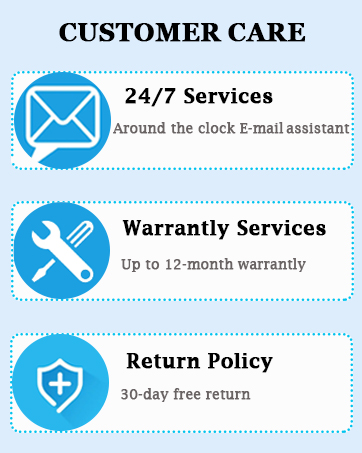
Image: A graphic detailing Saiyin's customer care services, including 24/7 email support, up to 12-month warranty services, and a 30-day free return policy.
Please refer to the contact information provided in your product packaging or visit the official Saiyin webакыркы колдоо маалымат үчүн сайт.


