1. Киришүү
This manual provides comprehensive instructions for the operation and maintenance of your ANYSECU UV-K5 Dual Band Walkie Talkie. The UV-K5 is a versatile communication device featuring UHF/VHF dual-band capabilities, 200 memory channels, and advanced functions such as NOAA Weather Alert, DTMF, FM radio, and voice encryption. Please read this manual thoroughly to ensure proper usage and to maximize the performance of your device.

Figure 1.1: ANYSECU UV-K5 Dual Band Walkie Talkie
2. Кутуда эмне бар
Upon unboxing your ANYSECU UV-K5, please verify that all the following components are included:
- UV-K5 Radio Unit
- Антенна
- Батарея
- Charger (Desk Charger)
- Belt Clip
- User Manual

Figure 2.1: Included components of the UV-K5 package.
3. Продукт бүтүп калдыview
Familiarize yourself with the various parts and controls of your UV-K5 radio:

Figure 3.1: Labeled diagram of the UV-K5 radio, showing the antenna, flashlight, switch/volume key, PTT, menu/confirm key, keys 1-9, up/down/return keys, headphone jack, and Type-C charger port.
- Антенна: Сигналдарды берүү жана кабыл алуу үчүн.
- Switch/Volume Key: Радиону күйгүзөт/өчүрөт жана үнүн тууралайт.
- PTT (баскыч менен сүйлөшүү) баскычы: Өтүү үчүн басып туруңуз, кабыл алуу үчүн коё бериңиз.
- Menu/Confirm Key (M): Enters the menu and confirms selections.
- Өйдө/төмөн баскычтары: Navigate through menu options or adjust frequencies/channels.
- Сандык баскычтоп: For direct frequency input, channel selection, and accessing shortcut functions.
- C типтеги кубаттагычтын порту: For direct charging of the radio.
- Гарнитура уячасы: For connecting an external earpiece or microphone.
4. Орнотуу
4.1. Батареяны орнотуу жана заряддоо
The UV-K5 comes with a rechargeable polymer lithium-ion battery. For air transport requirements, the battery may be pre-installed. This does not indicate a used product.

Figure 4.1: Important note regarding battery installation for shipping.
To charge the radio, you can use either the included desk charger or a Type-C cable directly. The radio supports multiple charging modes for convenience.
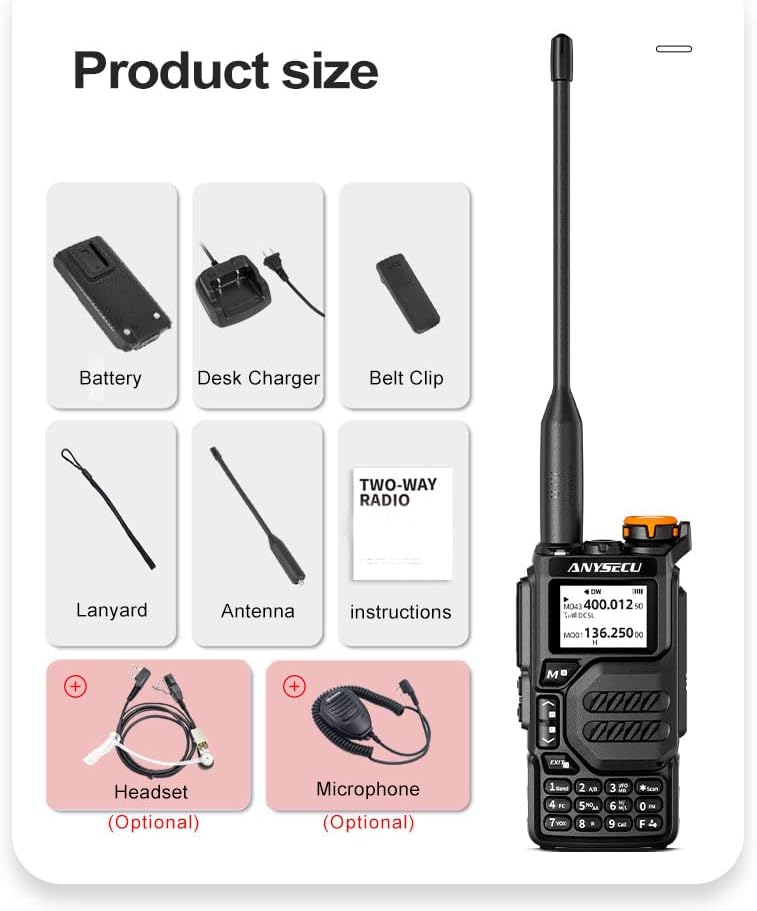
Figure 4.2: The UV-K5 supports both Type-C direct charging and traditional seat charging.
The battery provides durable power and long standby time, with a capacity of 1600mAh.

Figure 4.3: The UV-K5 features a 1600mAh polymer lithium-ion battery for extended use.
4.2. Антенна тиркемеси
Screw the antenna clockwise into the antenna connector on top of the radio until it is finger-tight. Do not overtighten.
5. Иштөө нускамалары
5.1. Күйгүзүү/өчүрүү жана үндү жөндөө
To power on the radio, rotate the Switch/Volume key clockwise. To power off, rotate it counter-clockwise until it clicks. Rotate the key to adjust the volume level.
5.2. Mode Switching (Channel/Frequency Mode)
The UV-K5 supports both Channel Mode and Frequency (VFO) Mode. You can switch between these modes using the appropriate function key or menu option. In Frequency Mode, you can directly input frequencies using the numeric keypad. In Channel Mode, you can select from up to 200 pre-programmed channels.

Figure 5.1: The UV-K5 features a dual-band dual display, allowing simultaneous monitoring of two frequencies or channels.
5.3. Меню навигациясы
The UV-K5 has 51 menu options for various settings. Press the M (Menu/Confirm) key to enter the menu. Use the Өйдө/Төмөн keys to navigate through options. Press M again to select an option, then use Өйдө/Төмөн to change its value. Press M to confirm the change, or ЧЫГУУ жокко чыгаруу.
5.4. Негизги өзгөчөлүктөрү
- NOAA аба ырайы жөнүндө эскертүү: The radio can receive NOAA weather alerts. To hear the station, you need to press the RECEIVE side button (left side under PTT); it is not automatic RX.
- Fast Copy One Channel (Wireless Frequency Copy): This feature allows you to quickly copy a frequency from another radio.
- DTMF: Dual-Tone Multi-Frequency signaling for various control functions.
- FM радиосу: Listen to standard FM broadcast radio.
- Voice Encryption (Scrambler): Enhances communication privacy.
- VOX функциясы: Voice-activated transmission, allowing hands-free operation.
- Шашылыш эскертүү: Activates an alarm signal for emergency situations.
- Power-on Protection Password: Set a password to prevent unauthorized use.

Figure 5.2: Activating NOAA receive function requires pressing the side button.

Figure 5.3: Wireless frequency copy in action, showing two radios.

Figure 5.4: Visual representation of key features including Emergency Alert, Wireless Replication, Power-on Password, Voice Encryption, NOAA Weather Reminder, and Intercom.
5.5. Programming the Radio
The UV-K5 can be programmed manually via the keypad or using dedicated software on a computer. A programming cable (same as Baofeng UV-5R 2-pin cable) is required for computer programming.
For software download and programming instructions, please refer to the official ANYSECU webсайт:
- Программаны жүктөө: http://www.szanysecu.com/h-col-106.html (named: UV-K5)
- Кандай Программанын: http://www.szanysecu.com/en/en/h-nd-37.html
5.6. Расмий продукт Video
Watch this official video for a demonstration of the ANYSECU UV-K5 Dual Band Radio's features and operation:
Video 5.1: Demonstration of the ANYSECU UV-K5 Dual Band Radio, showcasing its interface and basic functions.
6. Техникалык тейлөө
To ensure the longevity and optimal performance of your UV-K5 radio, follow these maintenance guidelines:
- Тазалоо: жумшак колдонуу, damp радионун сыртын тазалоо үчүн чүпүрөк. Катуу химиялык заттарды же абразивдүү тазалагычтарды колдонбоңуз.
- Батареяга кам көрүү: Charge the battery regularly. Avoid fully discharging the battery frequently, as this can reduce its lifespan. Store the radio and battery in a cool, dry place when not in use for extended periods.
- Антеннага кам көрүү: Handle the antenna carefully. Bending or forcing it can damage the connector.
- Курчап турган чөйрөнү коргоо: Protect the radio from extreme temperatures, direct sunlight, dust, and moisture. The radio is not water resistant.
7. Кыйынчылыктарды
If you encounter issues with your UV-K5 radio, refer to the following common troubleshooting tips:
| Көйгөй | Мүмкүн себеп | Чечим |
|---|---|---|
| Радио күйбөйт | Low or dead battery; incorrect battery installation | Батареяны заряддоо; батареянын туура орнотулганын текшериңиз. |
| Өткөрүп же кабыл албайт | Incorrect frequency/channel; antenna not connected; squelch level too high | Verify frequency/channel settings; ensure antenna is securely attached; adjust squelch level. |
| Аудио сапаты начар | Weak signal; volume too low/high; microphone/speaker issues | Move closer to transmitting radio; adjust volume; check for obstructions on microphone/speaker. |
| Баскычтоп жооп бербейт | Баскычтоптун кулпусу жандырылды | Deactivate keypad lock (refer to manual for specific key combination). |
For more complex issues or problems not listed here, please contact customer support or refer to the detailed troubleshooting section in the full user manual.
8. Техникалык шарттар
Below are the technical specifications for the ANYSECU UV-K5 Walkie Talkie:
| Спецификация | Нарк |
|---|---|
| Бренд | ANYSECU |
| Модель номери | UV K5 |
| Элемент Салмагы | 15.5 унция |
| Продукциянын өлчөмдөрү | 1 x 3 x 5 дюйм |
| Батареялар | 1 А батарейка талап кылынат (кошулган) |
| Түс | Кара |
| Каналдардын саны | 200 (as per product title) |
| Өзгөчө өзгөчөлүк | UHF, VHF, DTMF, FM, Scrambler, NOAA Weather Alert, Fast Copy One Channel |
| Жыштык диапазону | UHF, VHF |
| Сүйлөшүү диапазону максималдуу | 5 километр |
| Tuner Technology | UHF, VHF |
| Тtage | 7.4 вольт |
| Сууга туруктуулук деңгээли | Сууга чыдамдуу эмес |
| Дата биринчи жеткиликтүү | 3-апрель, 2023-жыл |
9. Кепилдик жана колдоо
The ANYSECU UV-K5 radio body comes with a 1 жылдык кепилдик сатып алынган күндөн тартып.
For technical support, software downloads, or further assistance, please visit the official ANYSECU website or contact their customer service. Relevant links for programming software and guides are provided in Section 5.5 of this manual.


