1. Introduction and Overview
Сатып алганыңыз үчүн рахматasing the Pyle Bluetooth Portable PA Party Speaker. This high-powered audio system is designed to deliver robust sound with versatile connectivity options, including Bluetooth, USB, AUX, and FM radio. Featuring dual 12-inch subwoofers, a 3-inch tweeter, and dynamic multi-color LED lights, it's perfect for parties, karaoke, and outdoor events. This manual provides detailed instructions for setup, operation, maintenance, and troubleshooting to ensure optimal performance and longevity of your speaker.
2. Маанилүү коопсуздук нускамалары
- Динамикти иштетүүдөн мурун бардык көрсөтмөлөрдү кунт коюп окуп чыгыңыз.
- Keep the speaker away from water, moisture, and direct heat sources.
- Түзмөктү өз алдынча ачууга же оңдоого аракет кылбаңыз. Бардык тейлөө иштерин квалификациялуу адистерге тапшырыңыз.
- Кубаттоо үчүн көрсөтүлгөн кубат адаптерин гана колдонуңуз.
- Иштеп жатканда динамиктин айланасында туура желдетүүнү камсыз кылыңыз.
- Батареяны экстремалдык температурага же тике күн нуруна калтырбаңыз.
3. Пакеттин мазмуну
Сураныч, кутучада бардык буюмдар бар экенин текшериңиз:
- Pyle Bluetooth Portable PA Party Speaker
- Зымсыз микрофон
- Кубаттуу адаптер
- Колдонуучунун Колдонмосу (бул документ)
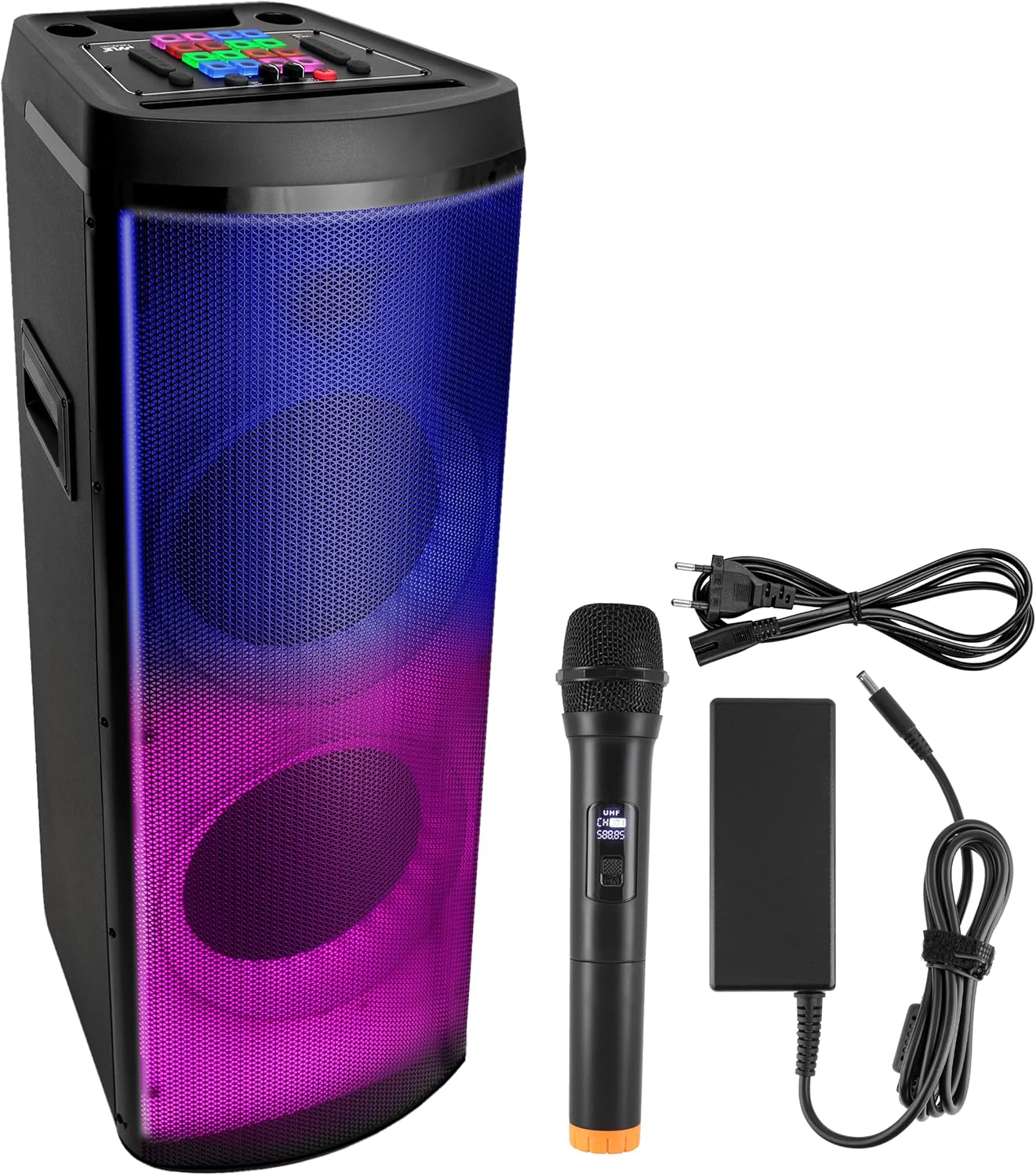
Image: The Pyle Portable PA Party Speaker shown with its wireless microphone and power adapter.
4. Продукциянын өзгөчөлүктөрү
- 600 Ватт жогорку кубаттуулугу: Күчтүү жана так аудио чыгарууну берет.
- Dual 12-inch Subwoofers + 3-inch Tweeter: Provides full-range stereo sound with impressive bass response.
- Чыныгы зымсыз стерео (TWS) функциясы: Allows connection of two identical speakers for a wider stereo soundstage.
- Bluetooth 5.0 туташуусу: Seamless wireless music streaming from compatible devices.
- Multi-Color Flashing Flame LED Lights: Built-in dynamic LED lights for stunning visual effects.
- FM радиосу: Integrated FM tuner with digital LED display.
- USB Flash Drive & SD Card Reader: Supports MP3 digital audio file ойнотуу.
- 3.5 мм AUX киргизүү: Connect external audio devices via cable.
- 1/4'' Microphone Input: For karaoke and public address applications.
- Камтылган кайра заряддалуучу батарея: 12.8V, 5500mAh battery for portable use (up to 3 hours playtime).
- Integrated Extending Carry Handle: Жеңил ташуу үчүн.
- Treble & Bass Adjustment: Customize sound performance.
- X-Bass функциясы: Enhances bass for a more powerful sound.
- DJ Sound Effects Selection: Various built-in sound effects for added fun.

Image: Illustration of the speaker's internal dual 12-inch subwoofers and 3-inch tweeter for enhanced audio.

Image: The speaker's multi-color flashing LED lights in action, creating a party atmosphere.
5. Баштапкы орнотуу
5.1. таңгактан чыгаруу
Carefully remove the speaker and all accessories from the packaging. Retain the packaging for future storage or transport.
5.2. Батареяны заряддоо
Before first use, fully charge the speaker's built-in battery. Connect the provided power adapter to the speaker's DC 15V input port and plug it into a standard wall outlet. The charging indicator will illuminate. A full charge takes approximately 5 hours.
5.3. Күйгүзүү / Өчүрүү
Locate the ON/OFF switch on the speaker's control panel. Flip the switch to the 'ON' position to power on the speaker. Flip it to 'OFF' to power down the unit. It is recommended to turn off the speaker when not in use to preserve battery life and prevent damage.

Image: Information regarding the speaker's built-in rechargeable battery, showing capacity and approximate playing time.
6. Иштетүү үчүн колдонмо
6.1. Bluetooth байланышы
- Power on the speaker. The speaker will automatically enter Bluetooth pairing mode, indicated by a flashing Bluetooth icon or voice prompt.
- Смартфонуңузда, планшетиңизде же башка түзмөгүңүздө Bluetooth'ду иштетиңиз.
- Издөө Bluetooth devices and select 'PYLEUSA' from the list.
- Once connected, the speaker will confirm with an audible tone or steady Bluetooth indicator. You can now stream audio wirelessly.

Image: The speaker's compatibility with Bluetooth-enabled devices like smartphones, tablets, and laptops.
6.2. Чыныгы зымсыз стерео (TWS) жупташтыруу
To use the TWS function, you need two identical Pyle PHPD212A.5 speakers.
- Эки динамик тең күйгүзүлгөнүн жана эч кандай Bluetooth түзмөгүнө туташкан эмес экенин текшериңиз.
- On one speaker, press and hold the TWS button (if available) or the Bluetooth pairing button until you hear a confirmation tone.
- Эки динамик автоматтык түрдө бири-бирин издеп, жупташат. Жупташкандан кийин, сиз ырастоо үнүн угасыз.
- Now, connect your Bluetooth device to one of the speakers (the master speaker) as described in section 6.1. Audio will play in stereo across both speakers.
6.3. USB/MP3 ойнотуу
- MP3 аудиосу бар USB флеш-дискти (32 ГБ чейин) салыңыз files into the USB port on the speaker's control panel.
- The speaker will automatically switch to USB mode and begin playing the audio files.
- Use the Play/Pause, Next, and Previous buttons on the control panel to navigate your music.
6.4. AUX киргизүү
- 3.5 мм аудио кабелинин бир учун (киргизилген эмес) динамиктеги AUX киргизүү портуна туташтырыңыз.
- Connect the other end of the cable to the headphone jack or audio output of your external device (e.g., smartphone, MP3 player, laptop).
- The speaker will automatically switch to AUX mode. Control playback from your connected device.

Image: Close-up of the 3.5mm AUX input, demonstrating wired connectivity.
6.5. FM радиосунун иштеши
- Press the Mode button on the control panel to switch to FM Radio mode.
- Жеткиликтүү FM станцияларын автоматтык түрдө сканерлөө жана сактоо үчүн Ойнотуу/Тыным баскычын басыңыз.
- Use the Next and Previous buttons to navigate between saved stations.
6.6. Микрофонду колдонуу
- Insert the wireless microphone's receiver into the 1/4'' microphone input jack on the speaker.
- Микрофон күйгүзүлгөнүн текшериңиз.
- Adjust the microphone volume using the dedicated knob on the speaker's control panel.
6.7. Flashing Party Flame Lights
The speaker features multi-color LED lights that can be controlled from the control panel. Press the Light Mode button to cycle through various lighting effects and patterns, or to turn the lights off.
6.8. Sound Adjustments (Treble, Bass, X-Bass)
Use the dedicated Treble and Bass control knobs on the speaker's control panel to fine-tune the audio output to your preference. Press the 'X-Bass' button to activate or deactivate the extra bass boost function for a more powerful low-end sound.
6.9. DJ Sound Effects
The speaker includes several pre-programmed DJ sound effects. Press the dedicated DJ effect buttons on the control panel to activate various sound effects during playback for added entertainment.
7. Battery and Charging Information
The Pyle speaker is equipped with a 12.8V, 5500mAh rechargeable battery, providing approximately 3 hours of playtime on a full charge. Charging time is about 5 hours.
Маанилүү эскертүү: To prevent battery damage, please ensure the speaker is powered off using the ON/OFF switch when not in use for extended periods. Do not leave the unit in standby mode for prolonged durations.
Image: Visual representation of the speaker's battery life and capacity.
8. Кароо жана тейлөө
- Тазалоо: Динамиктин сыртын тазалоо үчүн жумшак, кургак чүпүрөктү колдонуңуз. Абразивдүү тазалагычтарды, момдорду же эриткичтерди колдонбоңуз.
- Сактагыч: Колдонулбаган учурда динамикти салкын, кургак жерде, тике күндүн нурунан жана өтө температурадан алыс сактаңыз.
- Батареяга кам көрүү: For optimal battery life, avoid fully discharging the battery frequently. Recharge the battery regularly, even if the speaker is not used often.
- Колдонуу: Always use the integrated carry handle when moving the speaker. Avoid dropping or subjecting the speaker to strong impacts.
9. Көйгөйлөрдү чечүү боюнча колдонмо
| Көйгөй | Мүмкүн себеп | Чечим |
|---|---|---|
| Динамик күйбөйт. | Батарея түгөндү; Кубат адаптери туташтырылган эмес же бузук. | Charge the battery fully; Ensure power adapter is securely connected and working. |
| Үн чыгышы жок. | Volume too low; Incorrect input mode selected; Device not properly connected. | Increase speaker and source device volume; Press Mode button to select correct input (BT, USB, AUX, FM); Reconnect Bluetooth/AUX cable. |
| Bluetooth туташпай жатат. | Speaker not in pairing mode; Device Bluetooth off; Speaker already connected to another device; Too far from speaker. | Ensure speaker is in pairing mode; Turn on device Bluetooth; Disconnect from other devices; Move device closer to speaker (within 32ft). |
| Бурмаланган үн. | Volume too high; Source audio quality is poor; Speaker placed too close to interference. | Lower volume on speaker and source device; Try a different audio source; Move speaker away from other electronic devices. |
| LED жарыктары иштебейт. | жарык өчүрүлгөн; Бузулуу. | Press the Light Mode button to cycle through options; If problem persists, contact customer support. |
10. Техникалык шарттар
| Өзгөчөлүк | Спецификация |
|---|---|
| Power Output | 600 Ватт МАКС |
| Динамик системасы | Dual 12-inch Subwoofers + 3-inch Tweeter |
| Bluetooth версиясы | 5.0 |
| Bluetooth тармагынын аталышы | 'PYLEUSA' |
| Зымсыз диапазон | 32'+ футка чейин. |
| Аудио киргизүү | Bluetooth, USB, 3.5mm AUX, 1/4'' Microphone |
| USB интерфейсинин түрү | 2.0 |
| Digital Audio File Колдоо | MP3 |
| Максималдуу USB Flash колдоосу | 32 ГБ |
| Заряддалуучу батарея | 12.8 В, 5500 мАч – 70.4 Вт |
| Батареянын иштөө мөөнөтү | 3 саатка чейин |
| Заряддоо убактысы | Болжол менен 5 саат |
| Электр камсыздоо | 120/240V (15V/4A Power Adapter) |
| Турак жай курулуш материалы | ABS + темир тор + жыгач |
| Өлчөмдөрү (L x W x Y) | 14.2'' x 12.6'' x 41.7'' -дюйм |
| Элемент Салмагы | 48.9 фунт |
| Модель номери | PHPD212A.5 |
| UPC | 842893160054 |
11. Кепилдик жана Кардарларды колдоо
Pyle products are designed and manufactured to the highest quality standards. For information regarding warranty coverage, please refer to the warranty card included with your purchase or visit the official Pyle webсайт.
If you encounter any issues or have questions about your Pyle Bluetooth Portable PA Party Speaker, please contact Pyle customer support for assistance. Contact details can typically be found on the Pyle webсайтында же продуктунун таңгагында.


