1. Киришүү
The Elitech RC-4HC is a multi-use digital temperature and humidity data logger designed for precise environmental monitoring. It features both an internal temperature-humidity sensor and an external temperature sensor, allowing for dual measurement capabilities. This device is ideal for applications requiring accurate temperature and humidity tracking, such as in medical refrigerators, vaccine storage, and general cold chain logistics. It can record up to 16,000 temperature points and 16,000 humidity points, providing comprehensive data for analysis.
The logger is equipped with audible and visual alarms to notify users of temperature or humidity excursions beyond set thresholds. Its powerful LCD provides all key recording information, including alarm status and temperature statistics in both Celsius and Fahrenheit. Data can be easily exported to PDF or Excel formats via a USB connection to a PC.
2. Пакеттин мазмуну
Төмөндө тизмеленген нерселердин баары пакетиңизге камтылганын текшериңиз:
- 1 x RC-4HC маалыматтарды каттоочу
- 1 х тышкы температура сенсору
- 1 x USB кабели
- 1 x User Manual
- 1 x Текшерүү сертификаты
- 1 x Battery (CR2450)

Figure 2.1: Contents of the Elitech RC-4HC package.
3. Орнотуу
3.1. Батареяны орнотуу
Before initial use, install the provided CR2450 battery. Use a coin to open the battery compartment cover on the back of the device. Place the battery under the small metal clip with the positive pole (+) facing you. Close the cover securely.

Figure 3.1: Battery installation process for the RC-4HC.
3.2. Connecting External Probe
If using the external temperature sensor, plug its jack firmly into the designated port on the side of the data logger.

Figure 3.2: RC-4HC Data Logger with external probe connected.
3.3. Initial PC Connection
Connect the data logger to your computer using the provided USB cable. This connection is necessary for initial setup, parameter configuration, and data download.
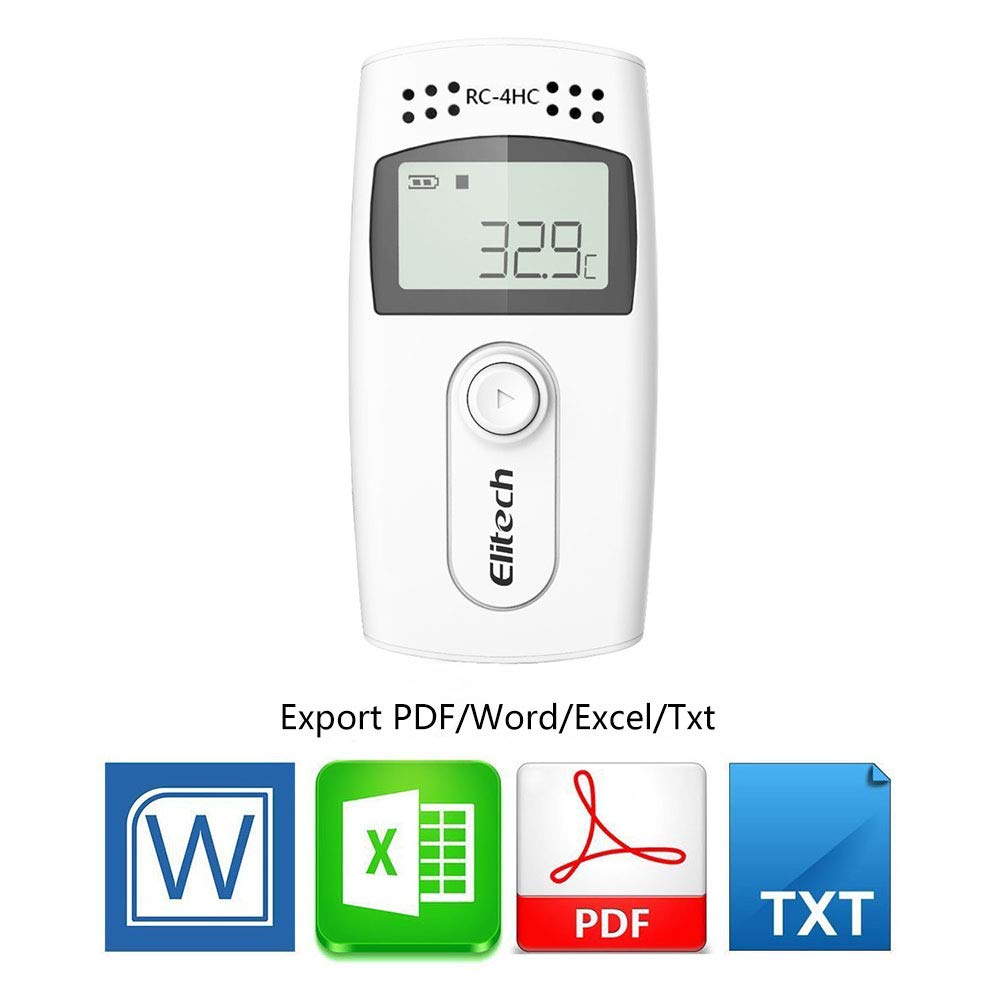
Figure 3.3: Connecting the RC-4HC to a computer via USB.
4. Иштөө нускамалары
4.1. Starting the Logger
To start logging data, press the button on the logger once to light up the screen. Then, press and hold the button for more than 4 seconds. A triangle sign will firmly light up on the logger screen, indicating that logging has successfully started.
4.2. Viewing Data on Device
Once logging has started, you can press the button again to cycle through various data points on the LCD screen. This includes current temperature, humidity, total logged points, current time, date, maximum temperature, minimum temperature, and upper/lower temperature limits.
Video 4.1: Demonstrates battery installation, PC connection, and basic operation of the Elitech RC-4HC data logger, including starting the device and cycling through display information.
5. Программаны колдонуу
The Elitech RC-4HC requires dedicated software for full functionality, including parameter configuration and data download. The software can be downloaded from the Elitech webсайт.
5.1. Downloading and Configuring Parameters
- Connect the logger to your computer via USB.
- Open the ElitechLog software.
- Navigate to the 'Parameter' tab.
- Adjust settings such as the log interval (e.g., to 10 seconds) and alarm thresholds as needed.
- Click the 'Save Parameter' button to apply changes to the logger.
- Disconnect the logger from the computer.

Figure 5.1: ElitechLog software workflow for data management and parameter settings.
5.2. Маалыматтарды экспорттоо
After logging, reconnect the device to your computer. The software allows you to download the recorded data and export it in various formats, including PDF, Word, Excel, and TXT, for detailed analysis and reporting.

Figure 5.2: Data export options available through the ElitechLog software.
6. Техникалык шарттар
| Өзгөчөлүк | Спецификация |
|---|---|
| Модель номери | RC-4HC |
| Өлчөмдөр | 3.8 x 1.6 x 4.3 дюйм; 3.21 унция |
| Ички температура диапазону | -22℉ден 140℉ге чейин (-30℃ден 60℃ге чейин) |
| External Temperature Range | -40℉ден 185℉ге чейин (-40℃ден 85℃ге чейин) |
| нымдуулук колому | 0% RH 99% RH |
| Температуранын тактыгы | ±0.9 ℉ (±0.5 ℃) |
| Нымдуулуктун тактыгы | ±3% RH |
| Record Capacity | 16,000 temperature points, 16,000 humidity points |
| Power Source | 1 x Lithium Metal battery (CR2450) |
| Дисплей түрү | LCD |
| Өзгөчө өзгөчөлүк | Угуу жана визуалдык ойготкуч |
| Кайра колдонууга жарамдуу | Кайра колдонууга болот |

Figure 6.1: RC-4HC temperature range and record capacity.

Figure 6.2: RC-4HC dimensions.
7. Техникалык тейлөө
7.1. Тазалоо
To maintain the device, simply wipe it clean with a soft, dry cloth. Avoid using abrasive cleaners or solvents that could damage the casing же электрондук компоненттер.
7.2. Батареяны алмаштыруу
When the battery indicator on the LCD shows low power, replace the CR2450 battery following the installation steps in Section 3.1. Ensure proper polarity during replacement.

7.1-сүрөт: Батареяны алмаштыруу кадамдары.
8. Кыйынчылыктарды
8.1. Device Not Recognized by PC
If the device is not recognized when connected to your computer, ensure that the ElitechLog software and necessary drivers (e.g., CP210x USB-UART bridge VCP driver, CH340 Serial Driver for Mac) are correctly installed. Restarting both the device and the computer may also resolve connection issues.
8.2. Clearing Logged Data
To clear historical data and free up memory for continuous recording, export the data using the software and then click the 'Save Parameter' button. This action will clear the device's memory.
8.3. Software Interface and Export Limitations
The software interface may appear basic, and data export options are primarily limited to PDF, Excel, Word, and TXT formats. Data can only be read by the ElitechLog application or exported into these specified formats. Ensure you are comfortable with these formats for your data analysis needs.
9. Кепилдик жана колдоо
Elitech provides comprehensive customer support for its products. For any technical assistance, inquiries, or to request a calibration certificate, please contact Elitech Technology, Inc. directly.
- Телефон: +1 (408) 844-4070
- Электрондук почта: support@elitechus.com
- Webсайт: www.elitechustore.com
24/7 US Technician Support is available via email and phone.


