1. Киришүү
This manual provides essential instructions for the safe and efficient use of your Claiks Mobile Standing Desk. Please read this manual thoroughly before assembly and operation, and retain it for future reference.
The Claiks Mobile Standing Desk is designed to offer a versatile and ergonomic workspace. Featuring pneumatic height adjustment, a tiltable desktop, and mobile wheels, it adapts to various working styles and environments.
2. Коопсуздук боюнча маанилүү маалымат
Бул коопсуздук нускамаларын аткарбоо жаракатка же буюмдун бузулушуна алып келиши мүмкүн.
- Салмак чеги: Бул продукт максималдуу салмак сунуштамасына ээ 22 фунт (10 кг). Do not exceed this limit. Exceeding the weight limit could cause instability, damage to the desk, or personal injury.
- Иш такта материалы: The desktop is made of engineered wood. Handle with care to prevent damage.
- Pneumatic Adjustment: The desk features pneumatic height adjustment. Operate the adjustment mechanism carefully, ensuring hands and other objects are clear of moving parts to prevent pinching or injury.
- Туруктуулук: Ensure all locking mechanisms (e.g., wheel locks) are engaged when the desk is stationary to prevent unintended movement.
- Балдар жана үй жаныбарлары: Keep children and pets away from the desk during adjustment or movement to prevent accidents.
- Ассамблея: Assemble the desk according to the instructions provided. Ensure all components are securely fastened before use.
- Жайгашкан жери: Place the desk on a level surface. Avoid placing it near heat sources, direct sunlight, or in damp чөйрөлөр.
3. Пакеттин мазмуну
Монтаждоону баштоодон мурун бардык компоненттер бар экенин жана бузулбаганын текшериңиз. Эгерде кандайдыр бир бөлүктөрү жок же бузулуп калса, кардарларды колдоо менен байланышыңыз.
- Desktop with integrated tilt mechanism and anti-fall bracket
- Main support column with pneumatic cylinder
- Base with hidden sliding wheels and crescent-shaped feet
- Desk hook (optional attachment)
- Assembly hardware (screws, wrench, etc.)
- Көрсөтмө (бул документ)
4. Орнотуу жана чогултуу
The Claiks Mobile Standing Desk is designed for straightforward assembly. It is recommended that one person performs the assembly.
4.1 Чогултуу кадамдары
- Компоненттерди таңгактан чыгаруу: Таңгактан кылдаттык менен бардык бөлүктөрүн алып салыңыз. Чийип кетпеши үчүн, аларды таза, жумшак бетке жайыңыз.
- Негизги тилкеге тиркөө: Secure the main support column to the base using the provided hardware. Ensure all screws are tightened firmly.
- Иш тактасын тиркөө: Connect the desktop to the top of the main support column. Follow the specific instructions in the included assembly guide for proper alignment and secure fastening.
- Install Desk Hook (Optional): If desired, attach the robust desk hook to the designated slot on the side of the desktop.
- Туруктуулукту текшерүү: Once assembled, gently shake the desk to ensure all connections are secure and the desk is stable.

Figure 1: Assembled Claiks Mobile Standing Desk and its folded configuration.

Figure 2: Desk dimensions for upright and folded states.
5. Иштөө нускамалары
5.1 Бийиктикти тууралоо
The desk features a pneumatic height adjustment system, allowing for smooth transitions between sitting and standing positions.
- Көтөрүү: Locate the height adjustment handle (typically on the side or underside of the desktop). Press the handle and gently lift the desktop. The pneumatic mechanism will assist in raising the desk. Release the handle at the desired height.
- Төмөндөтүү үчүн: Press the height adjustment handle and apply gentle downward pressure on the desktop. The desk will smoothly lower. Release the handle at the desired height.
The adjustable height range is approximately 29.9 inches (76 cm) to 44.9 inches (114 cm).

Figure 3: Height adjustment and desktop tilt capabilities.
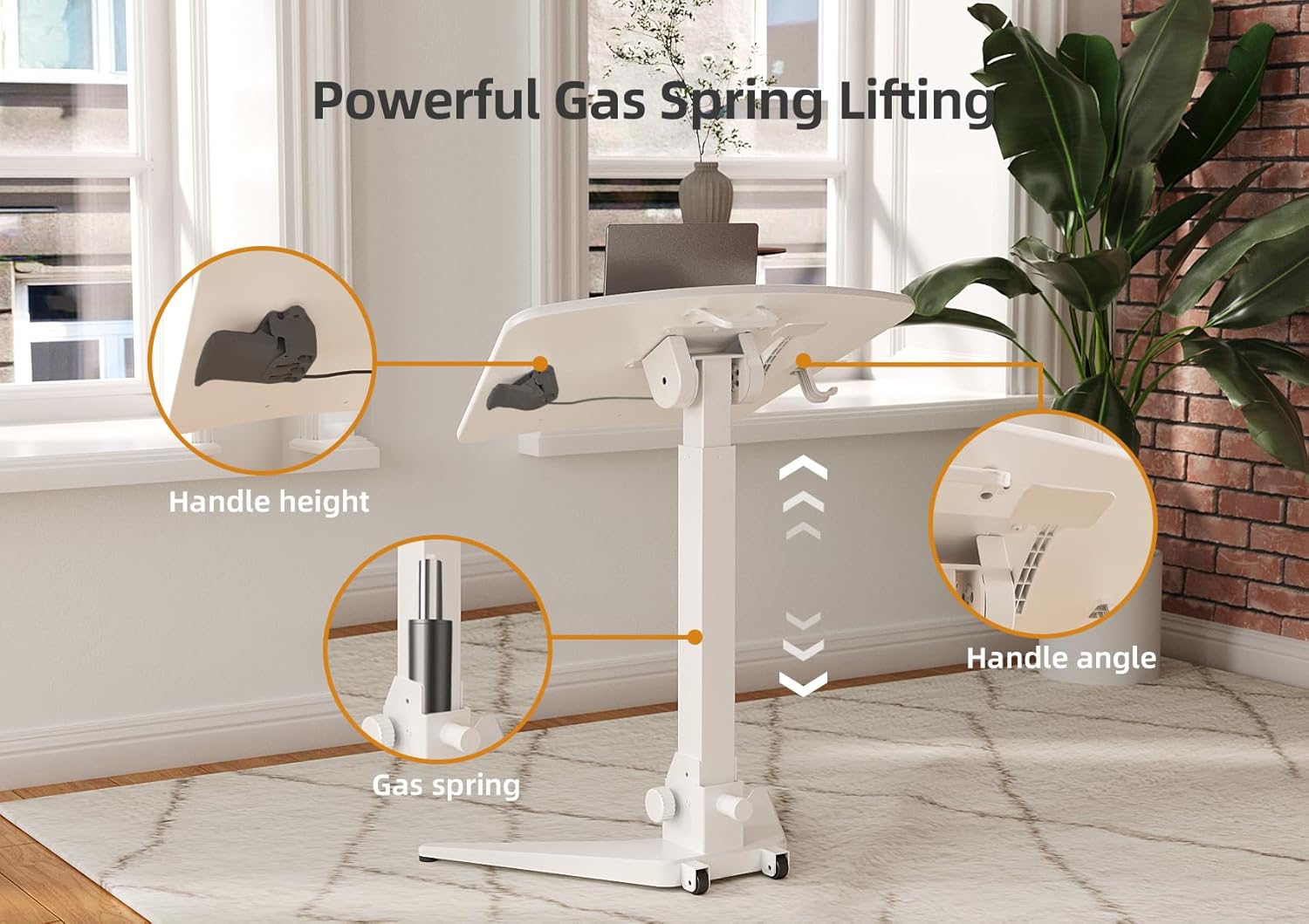
Figure 4: Components of the powerful gas spring lifting system.
5.2 Adjusting Desktop Tilt
The desktop can be tilted from 0° to 90° to accommodate various activities like reading, writing, or drawing.
- Эңкейтүү үчүн: Locate the tilt adjustment knob or lever (refer to your specific model's assembly guide for exact location). Loosen the knob/lever, adjust the desktop to the desired angle, and then tighten the knob/lever to secure it.
- Anti-Fall Bracket: The desktop includes an anti-fall bracket to prevent items from sliding off when tilted. Ensure items are placed securely against this bracket.

Figure 5: Anti-Fall Bracket for tilted use.

6-сүрөт: Мисamples of desktop tilt angles for different activities.
5.3 Үстөлдү жылдыруу
The desk is equipped with hidden sliding wheels for easy mobility.
- Жылдыруу үчүн: Ensure the desktop is in a stable, horizontal position and any items are secured. Unlock the wheel locks if engaged. Gently push or pull the desk to its new location.
- Коопсуздукту камсыз кылуу үчүн: Once in position, engage the wheel locks to prevent unintended movement.

Figure 7: Hidden sliding wheels and crescent-shaped base for mobility and stability.
5.4 Сактоо үчүн бүктөлмө
The desk can be folded for compact storage, making it suitable for small spaces.
- Step 1: Lower the Desk: Adjust the desk to its lowest height.
- Step 2: Flip Desktop: Adjust the desktop to a 90° vertical position.
- Step 3: Loosen Knob: Locate the folding knob at the base of the main column and loosen it.
- Step 4: Fold Base: Fold the base inwards until the desk is in its compact, folded state. Tighten the knob to secure.
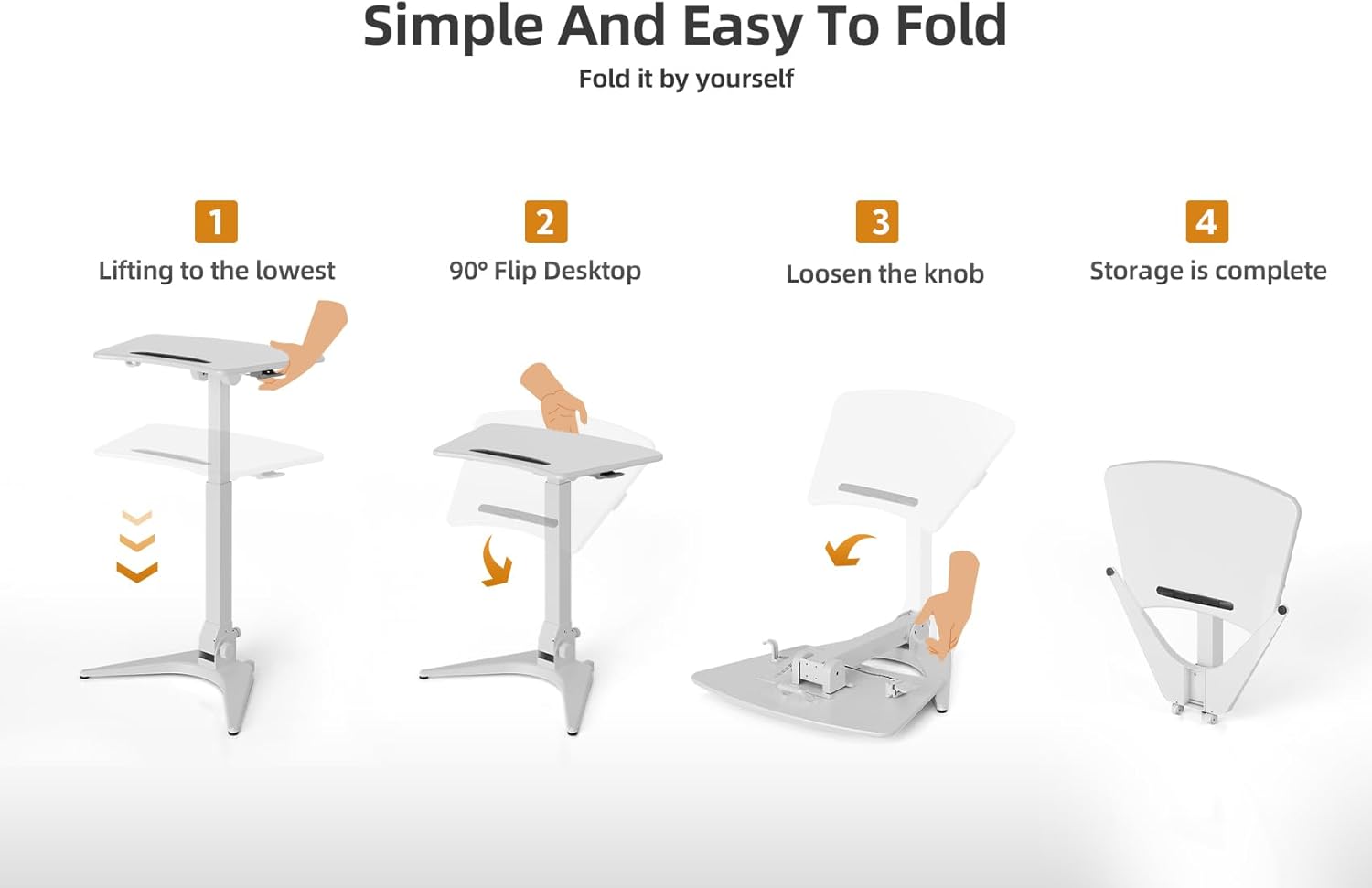
Figure 8: Step-by-step guide to folding the desk.
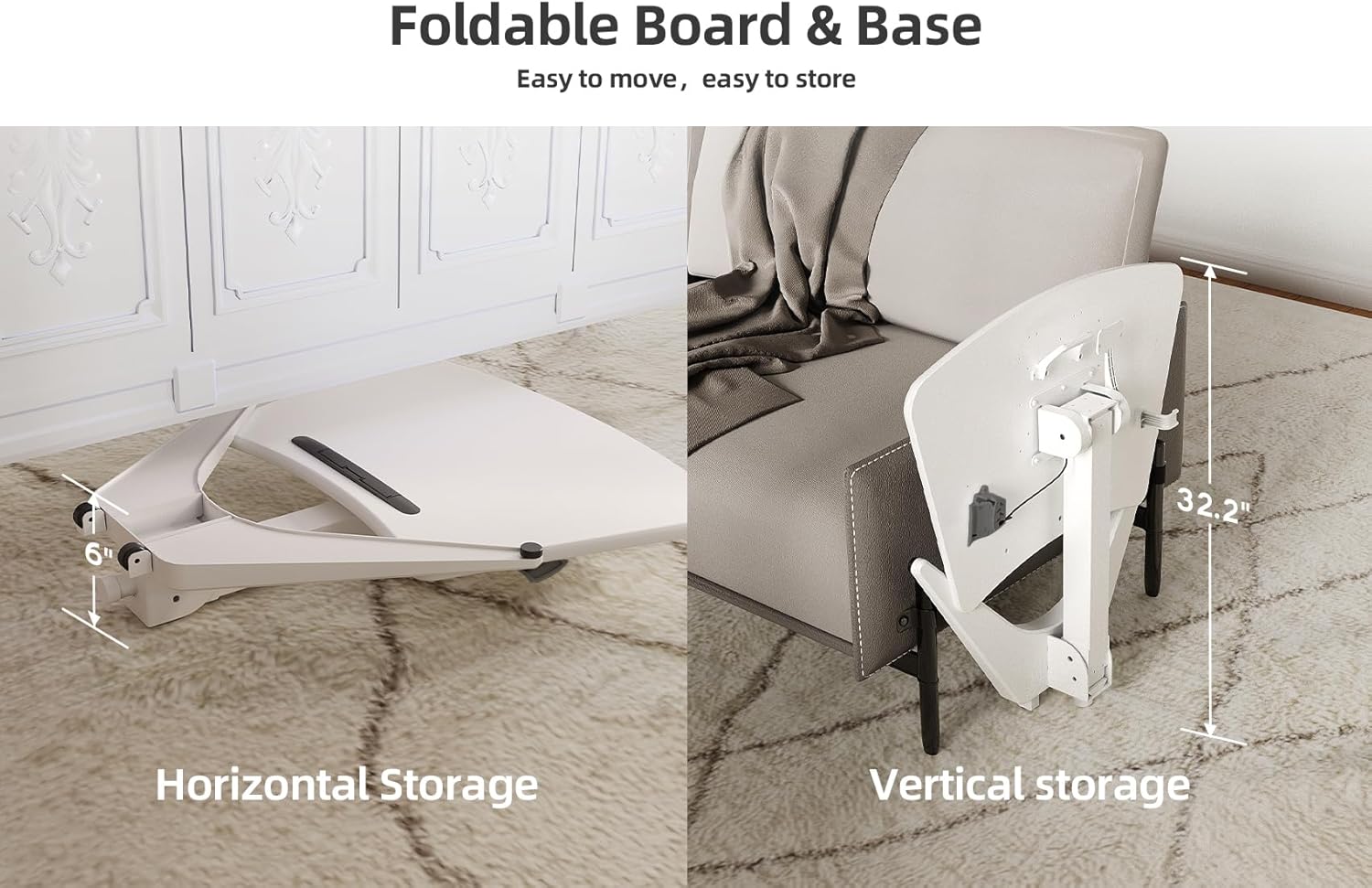
Figure 9: Horizontal and vertical storage options for the folded desk.
5.5 Using the Desk Hook
A robust hook is provided for hanging items such as headphones, bags, or cables, helping to keep your workspace organized.

Figure 10: Robust desk hook in use.
6. Техникалык тейлөө
Regular maintenance ensures the longevity and optimal performance of your Claiks Mobile Standing Desk.
- Тазалоо: Үстөлдүн беттерин жарнама менен сүртүңүзamp кездеме. Абразивдүү тазалагычтардан же финишке зыян келтирүүчү катаал химиялык заттардан алыс болуңуз.
- Текшерүүлөр: Мезгил-мезгили менен бардык бурамалар менен байланыштарды текшерип туруңуз, алар бекем бойдон калууда. Керек болсо кайра тартыңыз.
- Пневматикалык система: The pneumatic cylinder is maintenance-free. Do not attempt to lubricate or disassemble it.
- Дөңгөлөктөр: Жылмакай кыймылды камсыз кылуу үчүн дөңгөлөктөрдү таштандылардан таза кармаңыз.
7. Кыйынчылыктарды
If you encounter issues with your Claiks Mobile Standing Desk, refer to the following common problems and solutions:
| Көйгөй | Мүмкүн себеп | Чечим |
|---|---|---|
| Үстел туруксуз же солкулдап турат. | Loose connections; uneven floor; damaged base/feet. | Ensure all assembly screws are tightened. Move the desk to a level surface. Inspect the base for damage. |
| Бийиктикти тууралоо кыйынчылыгы. | Mechanism obstruction; excessive weight on desktop; pneumatic cylinder issue. | Check for obstructions around the column. Reduce weight on the desktop (ensure it's below 22 lbs). If the issue persists, contact customer support. |
| Desktop does not tilt or secure properly. | Tilt knob/lever not tightened; mechanism obstruction. | Ensure the tilt adjustment knob/lever is fully tightened after adjusting the angle. Check for any foreign objects obstructing the tilt mechanism. |
| Wheels do not roll smoothly or are stuck. | Wheel locks engaged; debris in wheels; damaged wheels. | Disengage wheel locks. Clean any hair or debris from the wheels. If wheels are damaged, contact customer support for replacements. |
| Жеткирүү учурунда жок же бузулган тетиктер. | Жеткирүү зыяны; таңгактоо катасы. | Do not proceed with assembly. Contact Claiks customer support immediately with your purchase details. |
If you experience a problem not listed here or if the suggested solutions do not resolve the issue, please contact Claiks customer support for further assistance.
8. Продукттун спецификациялары
| Өзгөчөлүк | Деталь |
|---|---|
| Бренд | Claiks |
| Модель номери | CLAIKS-S-86f974f8ea |
| Продукциянын өлчөмдөрү (D x W x Y) | 19.6"D x 28.7"W x 45"H (49.8 см D x 72.9 см В x 114.3 см H) |
| Түс | Ак |
| Стиль | Заманбап |
| Негизги материал | Металл (эритилген болот) |
| Жогорку Материал түрү | Инженердик жыгач |
| Аяктоо түрү | Polished, Rust-resistant coating |
| Өзгөчө өзгөчөлүк | Adjustable Height, Tiltable Desktop, Foldable, Mobile Wheels |
| Минималдуу бийиктик | 29.9 дюйм (75.9 см) |
| Максималдуу бийиктик | 44.9 дюйм (114 см) |
| Максималдуу кыйшаюу бурч | 90 градус |
| Максималдуу салмак боюнча сунуш | 22 фунт (10 кг) |
| Элемент Салмагы | 18.22 килограмм (болжол менен 40.17 фунт) |
| Керектүү Ассамблея | Ооба (1 адам сунушталат) |
| Камтылган компоненттер | Desk, Assembly Hardware, Desk Hook |
| Продукцияга кам көрүү боюнча нускамалар | Д менен сүртүңүзamp Кездеме |
9. Кепилдик жана Кардарларды колдоо
Claiks stands behind the quality of its products. For specific warranty details, please refer to the warranty card included with your purchase or visit the official Claiks webсайт.
If you have any questions, require assistance with assembly, or need to report a missing/damaged part, please contact Claiks customer support:
- Webсайт: Visit the Claiks Store on Amazon
- Электрондук почта: Түз байланыш маалыматы үчүн өнүмүңүздүн таңгагын же кепилдик картасын караңыз.
- Телефон: Түз байланыш маалыматы үчүн өнүмүңүздүн таңгагын же кепилдик картасын караңыз.
Please have your model number (CLAIKS-S-86f974f8ea) and purchase date ready when contacting support.


