1. Киришүү
The Dioche Skin Scalp Hair Analyzer is a versatile USB digital microscope designed for detailed observation of skin, scalp, and hair conditions. With its high magnification and LED illumination, it provides clear images for analysis, making it suitable for personal use or professional settings like beauty salons.
Негизги өзгөчөлүктөр төмөнкүлөрдү камтыйт:
- Scalp Detection: Specifically designed to observe scalp conditions, offering LED light source and up to 500X magnification.
- Көп функциялуулугу: Allows for detailed examination of scalp, hair, and skin. Can also be used for other magnified observations such as porcelain, stamps, and textiles.
- Компакт өлчөмү: Lightweight and portable, functioning as a convenient handheld microscope.
- Так натыйжалар: Delivers high-resolution, clear images for easy assessment and scientific test results.
- Кесиптик колдонуу: Ideal for analyzing hair damage and recommending appropriate products in salon environments.
2. Продукт бүтүп калдыview
The Dioche Skin Scalp Hair Analyzer is a USB-connected digital microscope. It features adjustable magnification and built-in LED lighting to illuminate the subject for clear viewing.

Figure 2.1: The Dioche Skin Scalp Hair Analyzer connected via USB, mounted on its adjustable stand.
The device includes a focus roller for adjusting image clarity, a button for capturing images, and a control for LED light brightness. It connects to a computer via a USB cable.

Figure 2.2: All components of the Dioche Skin Scalp Hair Analyzer package, including the microscope, stand, USB adapters, and calibration ruler.
3. Пакеттин мазмуну
Пакетиңизде бардык буюмдар бар экенин текшериңиз:
- 1 x Skin Hair Detector (USB Microscope)
- 1 x Bracket (Adjustable Stand)
- 1 x CD (Software Driver)
- 1 x Micro USB Port Adapter
- 1 x Type C Port Adapter
- 1 x Corrective Ruler (Calibration Ruler)
4. Системалык талаптар
To use the Dioche Skin Scalp Hair Analyzer, your computer must meet the following specifications:
- Port Support: USB 3.0, USB 2.0, or USB 1.1
- Колдоого алынган операциялык системасы: For WINDOWS XP, VISTA, 7, 8, 10 (both 32-bit and 64-bit versions)
5. Орнотуу нускамалары
Follow these steps to set up your Dioche Skin Scalp Hair Analyzer:
- Программаны орнотуу: Insert the provided CD into your computer's CD drive and install the camera tool software. If your computer does not have a CD drive, you may need to download the software from the manufacturer's webсайт (эгер бар болсо).
- Түзмөктү туташтыруу: Connect the USB microscope to an available USB port on your computer. Use the appropriate Micro USB or Type C adapter if necessary.
- Ачык программалык камсыздоо: Launch the installed camera tool software.
- Түзмөктү тандоо: Within the camera tool software, navigate to the 'Device' or 'Camera Selection' option and select the connected USB microscope as the observation camera.
6. Иштөө нускамалары
Once the device is set up and recognized by the software, you can begin observation:
- Position Object: Aim the lens of the USB microscope at the object you wish to examine (e.g., scalp, hair, skin).
- Фокусту тууралоо: Slowly rotate the focus roller on the microscope until a clear image appears on your computer screen. Note that different distances between the lens and the object will result in varying magnifications.
- Control LED Lighting: Use the light brightness control on the device to adjust the intensity of the 8 built-in LED lights for optimal illumination.
- Capture Images/Video: Utilize the camera tool software to take photos or record videos of your observations. The device also has a dedicated button for capturing pictures.

6.1-сүрөт: Мисamples of magnified views, showing a circuit board and hair follicles, demonstrating the device's capability.
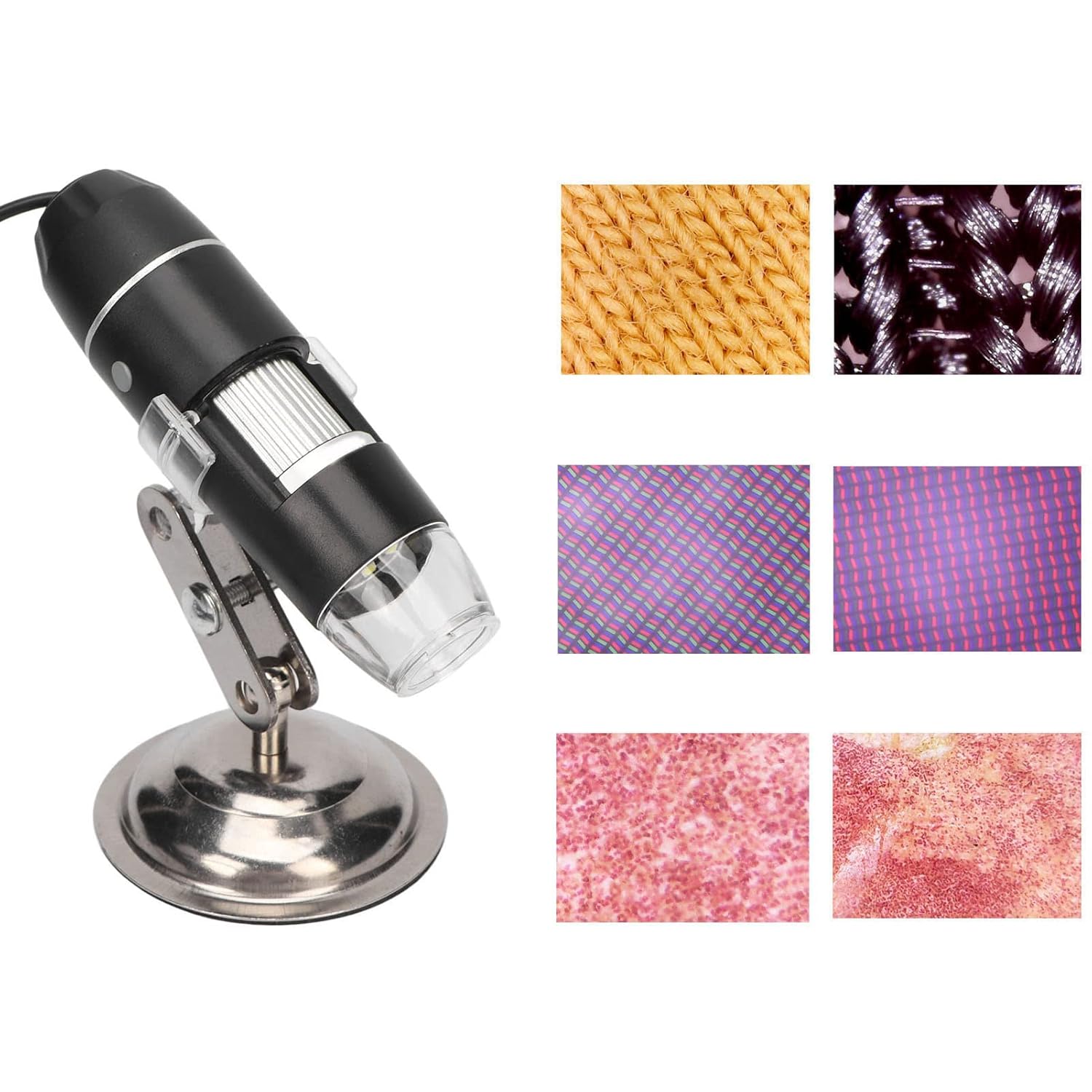
6.2-сүрөт: Андан ары мисалamples of magnified views, illustrating fabric texture and skin cells under observation.
7. Техникалык тейлөө жана кам көрүү
To ensure the longevity and proper functioning of your Dioche Skin Scalp Hair Analyzer, please observe the following guidelines:
- Бөлүнбөңүз: Avoid disassembling the product to prevent electrostatic breakdown of the sensitive internal components.
- Тазалоо: Do not use organic solvents for cleaning. Use a soft, dry cloth for external cleaning.
- Линзага кам көрүү: Do not touch the lens with your fingers to prevent scratches and dirt accumulation on the surface. Use a lens cleaning cloth if necessary.
- Экологиялык шарттар: When used outdoors, avoid high temperatures and high humidity to prevent short circuits in electronic devices. This product is not waterproof; avoid exposure to rain and water.
- Тышкы зат: If any foreign matter or liquid enters the product, immediately disconnect the USB cable and send the device to a qualified maintenance center for repair. Do not attempt to repair it yourself.
8. Кыйынчылыктарды
If you encounter issues with your Dioche Skin Scalp Hair Analyzer, please refer to the following common solutions:
- Экранда сүрөт жок:
- USB кабелинин микроскопко да, компьютерге да бекем туташтырылганын текшериңиз.
- Verify that the camera tool software is open and the correct device is selected.
- Check your computer's device manager to confirm the microscope is recognized.
- Сүрөт бүдөмүк же бүдөмүк:
- Adjust the focus roller on the microscope slowly until the image becomes clear.
- Линзанын таза жана чаңдан же тактардан таза экенине ынаныңыз.
- Микроскоптун линзасы менен объекттин ортосундагы аралыкты тууралаңыз.
- LED жарыктары иштебейт:
- Check the light brightness control on the device to ensure it is turned up.
- Ensure the device is properly connected and receiving power via USB.
- Программа түзмөктү тааныбай жатат:
- Reinstall the camera tool software from the provided CD or manufacturer's webсайт.
- Try connecting the device to a different USB port on your computer.
- Ensure your operating system is compatible (Windows XP/Vista/7/8/10).
9. Техникалык шарттар
| Өзгөчөлүк | Деталь |
|---|---|
| Элемент түрү | Hair Scalp Detector |
| Материал | ABS |
| Photosensitive Chip | HD Color CMOS |
| Сүрөттүн чечилиши | Standard 640×480, maximum 1600×1200 (2M) |
| Сүрөттүн чечилиши | Standard 640×480, maximum 1600×1200 (2M) |
| Узундук | Кол менен тууралоо |
| Чоңойтуу | 0X-500X |
| Port Support | USB 3.0, USB 2.0, and USB 1.1 |
| Колдоого алынган система | For WINDOWS XP, VISTA, 7, 8, 10 32 bit and 64 bit |
| Light Chips | 8шт |
| Пакеттин өлчөмдөрү | 5.87 x 5.16 x 1.81 дюйм; 7.76 унция |
| Элемент моделинин номери | Diochednq497xva3 |
| Өндүрүүчү | Диох |
10. Кепилдик жана колдоо
For warranty information and customer support, please refer to the documentation included with your purchase or contact Dioche customer service directly. Keep your proof of purchase for any warranty claims.
Кошумча жардам алуу үчүн, сураныч, баш багыңыз Dioche Store on Amazon.