1. Киришүү
This manual provides comprehensive instructions for the Maxcom Fit FW55 Aurum Pro Smartwatch. It covers essential information regarding product setup, operation, maintenance, and troubleshooting to ensure optimal performance and user experience. Please read this manual carefully before using your device.
2. Пакеттин мазмуну
Төмөндө тизмеленген нерселердин баары сиздин продукт таңгагыңызда бар экенин текшериңиз:
- Maxcom Fit FW55 Aurum Pro Smartwatch
- Заряддоо кабели
- Колдонуучунун Колдонмосу (бул документ)
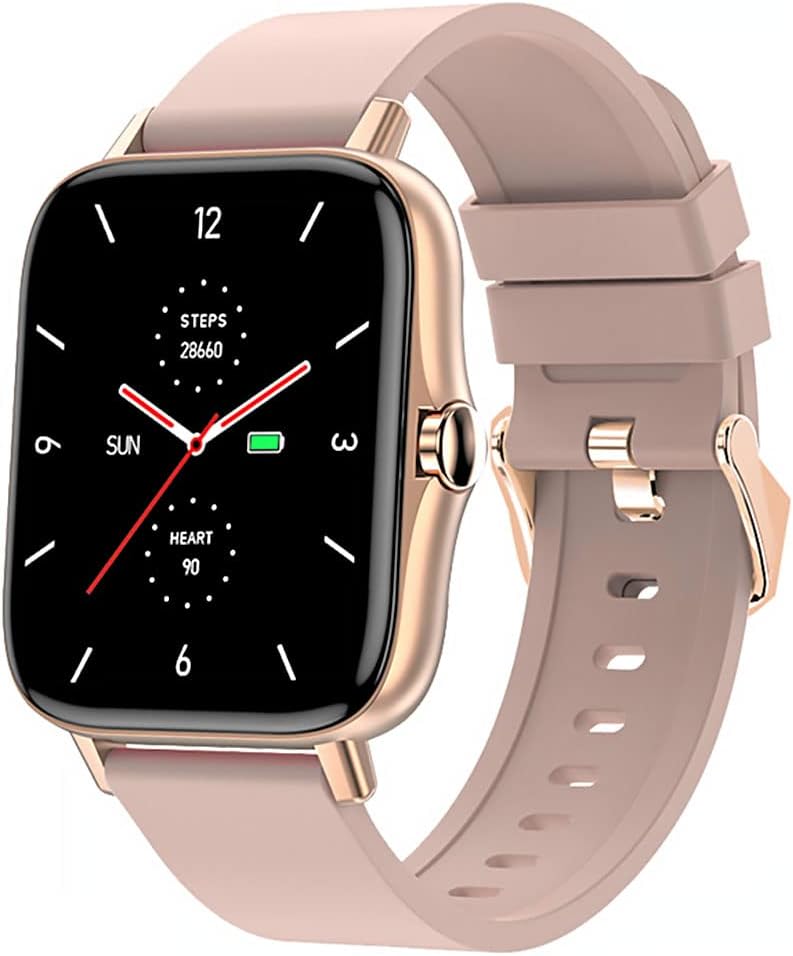
Image 1: Maxcom Fit FW55 Aurum Pro Smartwatch with a pink silicone band. The watch face displays steps, heart rate, and time.
3. Орнотуу
3.1. Акылдуу саатты заряддоо
Before initial use, fully charge your Maxcom Fit FW55 Aurum Pro Smartwatch. Connect the provided charging cable to the charging port on the back of the smartwatch and plug the other end into a standard USB power adapter (not included) or a computer's USB port. The watch display will indicate charging status.
- Ensure the charging pins are clean and properly aligned with the watch's charging contacts.
- Толук кубаттоо, адатта, болжол менен 2 саатты талап кылат.
3.2. Смартфонуңуз менен жупташуу
To unlock the full functionality of your smartwatch, you need to pair it with your smartphone via Bluetooth.
- Колдонмону жүктөп алыңыз: Издөө the official Maxcom Fit application in your smartphone's app store (iOS App Store or Google Play Store) and install it.
- Bluetooth иштетүү: Смартфонуңузда Bluetooth иштетилгенин текшериңиз.
- Колдонмону ачуу: Launch the Maxcom Fit application on your smartphone.
- Түзмөк кошуу: Follow the in-app instructions to add a new device. Select "FW55 Aurum Pro" from the list of available devices.
- Жупташтыруу ырастоо: A pairing request may appear on both your smartphone and the smartwatch. Confirm the pairing on both devices.
Once successfully paired, the smartwatch will synchronize data with your phone, and you can customize settings through the app.
4. Акылдуу саатты иштетүү
4.1. Күйгүзүү/өчүрүү
- Күйгүзүү: Press and hold the side button for a few seconds until the Maxcom logo appears.
- Өчүрүү: From the watch face, swipe down to access quick settings, or navigate to the 'Settings' menu. Select 'Power Off' and confirm. Alternatively, press and hold the side button and select 'Power Off'.
4.2. Негизги навигация
- Сенсордук экран: The FW55 Aurum Pro features a 1.7-inch touch screen for intuitive interaction.
- Өйдө/ылдый сүрүү: Scroll through notifications, menus, or quick settings.
- Солго/Оңго сүрүү: Access different widgets or main functions (e.g., heart rate, activity data).
- таптаңыз: Бир нерсени тандаңыз же аракетти ырастаңыз.
- Каптал баскычы: Press to return to the watch face or wake the screen. A long press may access power options.
4.3. Негизги өзгөчөлүктөрү
The Maxcom Fit FW55 Aurum Pro Smartwatch offers a range of features to support your daily activities and health monitoring:
- Активдүүлүккө көз салуу: Баскан кадамдарыңызды, басып өткөн аралыкты жана күйгөн калорияларды көзөмөлдөйт.
- Жүрөктүн кагышын көзөмөлдөө: Чыныгы убакытта жүрөктүн кагышынын маалыматтарын берет.
- Уйкунун мониторинги: Уйкунун үлгүсүн жана сапатын көзөмөлдөйт.
- Эскертмелер: Жупташкан смартфонуңуздан чалуулар, билдирүүлөр жана тиркеме эскертмелери жөнүндө эскертмелерди алат.
- GPS: Integrated GPS for accurate outdoor activity tracking.
- Ыңгайлаштырылган саат жүздөрү: Personalize your watch face through the companion app.

Image 2: Maxcom Fit FW55 Aurum Pro Smartwatch featuring a gold metal mesh band. The watch face displays digital time, steps, and heart rate.
5. Техникалык тейлөө
Proper care and maintenance will extend the lifespan of your smartwatch.
- Тазалоо: Regularly wipe the watch screen and body with a soft, dry, lint-free cloth. For stubborn dirt, slightly dampчүпүрөктү суу менен. Катуу химиялык заттарды же абразивдүү материалдарды колдонуудан алыс болуңуз.
- Боону багуу: Clean the watch strap according to its material. Silicone straps can be washed with mild soap and water. Metal straps may require specific cleaning agents.
- Экстремалдуу шарттарды болтурбоо: Do not expose the smartwatch to extreme temperatures, direct sunlight for prolonged periods, or corrosive liquids.
- Суу каршылык: While the watch may have some water resistance, it is not suitable for diving or high-pressure water activities. Refer to the product specifications for detailed water resistance ratings.
6. Кыйынчылыктарды
If you encounter issues with your Maxcom Fit FW55 Aurum Pro Smartwatch, try the following solutions:
- Күйгүзүлбөй жаткан саат: Саат толук заряддалганын текшериңиз. Аны заряддагычка кеминде 30 мүнөт туташтырыңыз.
- Смартфон менен жупташуу мүмкүн эмес:
- Телефонуңузда жана саатыңызда Bluetooth иштетилгенин текшериңиз.
- Саат телефонуңуздун Bluetooth диапазонунда экенин текшериңиз.
- Телефонуңузду да, акылдуу саатыңызды да өчүрүп күйгүзүңүз.
- Түзмөктү колдонмо аркылуу жупташып, кайра жупташып көрүңүз.
- Так эмес маалыматтар (кадамдар, жүрөктүн кагышы):
- Сааттын билегиңизге, туурасы билегиңизден бир манжадай жогору тагылганын текшериңиз.
- Сааттын артындагы сенсорду тазалаңыз.
- Update the companion app to the latest version.
- Билдирмелер алынган жок:
- Check notification settings in the Maxcom Fit app.
- Телефонуңуздун эскертмелерге уруксаттары колдонмого берилгенин текшериңиз.
- Verify that the watch is successfully paired and connected to your phone.
If problems persist, consult the Maxcom support webсайтка же кардарларды тейлөөгө кайрылыңыз.
7. Техникалык шарттар
Below are the technical specifications for the Maxcom Fit FW55 Aurum Pro Smartwatch:
| Өзгөчөлүк | Деталь |
|---|---|
| Бренд | Maxcom |
| Модель номери | FW55 Aurum Pro |
| Screen Size | 1.7 дюйм |
| Байланыш технологиясы | Bluetooth |
| Зымсыз байланыш стандарты | Bluetooth |
| Шайкеш түзмөктөр | Смартфон |
| GPS | Интегралдык GPS |
| Форма | Square |
| Максаттуу аудитория | Чоңдор үчүн унисекс |
| Камтылган компоненттер | Заряддагыч |

Сүрөт 3: Алдыңкы view of the Maxcom Fit FW55 Aurum Pro Smartwatch with a pink silicone band, highlighting the square display.
8. Кепилдик жана колдоо
For warranty information and customer support, please refer to the documentation included with your purchase or visit the official Maxcom webсайт. Кепилдик дооматтар үчүн сатып алганыңыздын далилин сактаңыз.
For technical assistance or further inquiries, please contact Maxcom customer service through their official channels.


