1. Киришүү
The MUNBYN IMC51 Money Counter Machine is designed for efficient and accurate banknote counting and counterfeit detection. This manual provides detailed instructions for setting up, operating, maintaining, and troubleshooting your device to ensure optimal performance and longevity. Please read this manual thoroughly before operating the machine.
2. Коопсуздук маалыматы
- Ensure the machine is connected to a 110V power supply.
- Машинаны сууга же ашыкча нымдуулукка дуушар кылбаңыз.
- Колдорду жана кенен кийимдерди иштөө учурунда кыймылдуу бөлүктөрдөн алыс кармаңыз.
- Тазалоодон же тейлөөдөн мурун машинаны электр розеткасынан сууруп алыңыз.
- Do not attempt to disassemble or repair the machine yourself. Contact technical support for assistance.
3. Пакеттин мазмуну
Пакетте бардык буюмдар бар экенин текшериңиз:
- MUNBYN IMC51 акча эсептегич машина
- Тышкы LCD дисплей
- Электр кабели
- Тазалоочу щетка
- Колдонуучунун Колдонмосу (бул документ)
- Алмаштыруучу Fuse

Figure 3.1: Contents included in the MUNBYN IMC51 package.
4. Продукт бүтүп калдыview
Familiarize yourself with the main components of the IMC51 Money Counter:
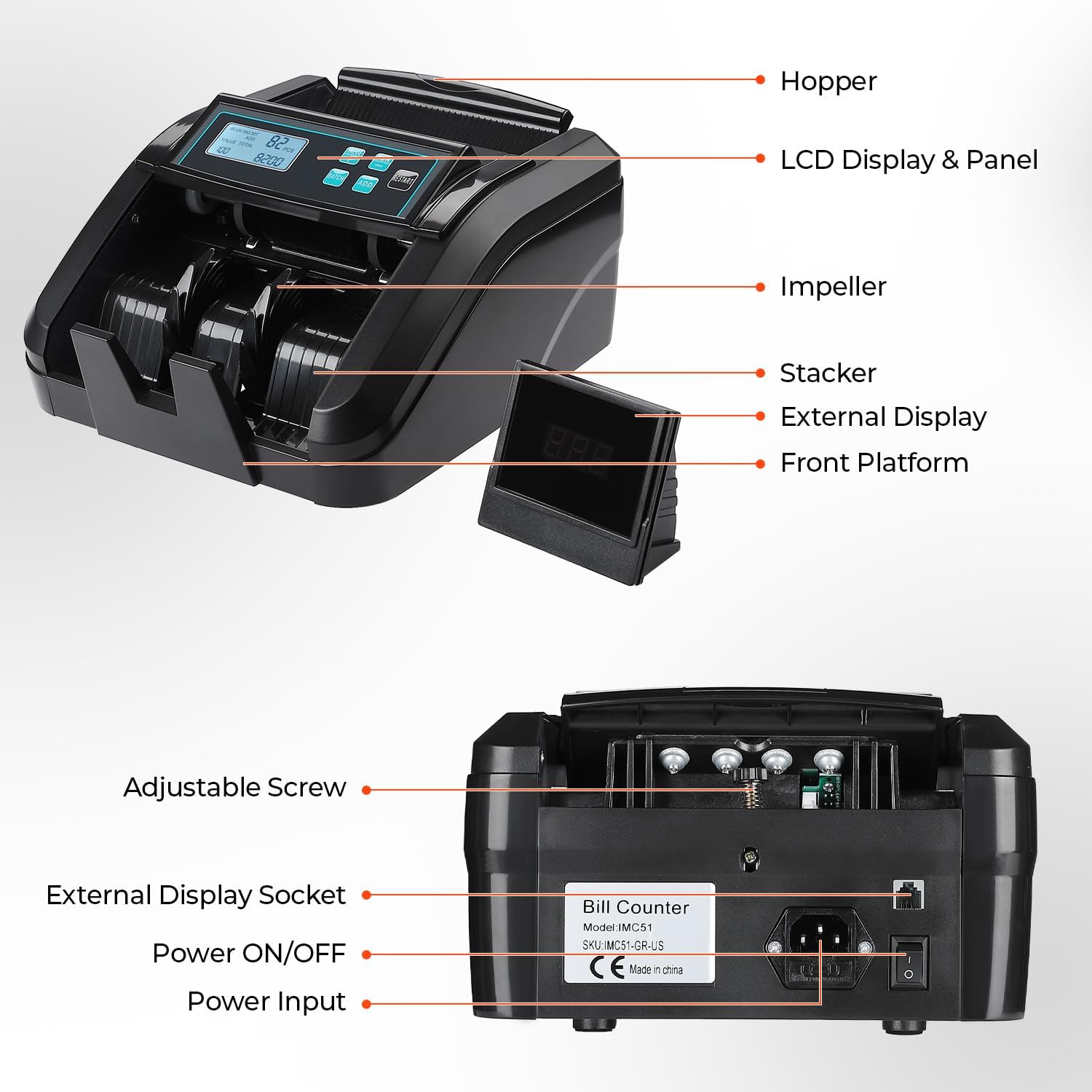
Figure 4.1: Key components of the IMC51 Money Counter.
- Хоппер: Эсептөө үчүн банкноттор кайда жүктөлөт.
- LCD Display & Panel: Shows counting results, modes, and control buttons.
- Дөңгөлөктүү: Internal mechanism that feeds bills through the machine.
- Stacker: Саналган банкноттор кайда чогултулат.
- Тышкы дисплей: Provides a separate view of the count for customers or observers.
- Front Platform: Guides bills into the counting mechanism.
- Жөнгө салынуучу винт: Used to fine-tune the feeding gap for different bill conditions.
- Тышкы дисплей розеткасы: Тышкы дисплейди туташтыруу үчүн порт.
- Күйгүзүү/өчүрүү: Негизги электр өчүргүч.
- Кубат киргизүү: Connects the power cord to the machine.
5. Орнотуу
- Таңылганын ачуу: Бардык компоненттерди таңгактан кылдаттык менен алып салыңыз.
- Жайгашкан жери: Place the money counter on a stable, flat surface.
- Туташуу кубаты: Ensure the machine's power switch is OFF. Connect the power cord to the Power Input on the back of the machine, then plug the other end into a 110V AC power outlet.
- Тышкы дисплейди туташтыруу: Plug the external LCD display cable into the External Display Socket on the back of the machine.
- Күйгүзүү: Flip the Power ON/OFF switch to the ON position. The machine will perform a self-test.
Video 5.1: Unboxing and initial setup of the MUNBYN IMC51 Money Counter.
6. Иштөө нускамалары
The IMC51 offers various counting modes to suit your needs. Ensure bills are neatly stacked and free from excessive creases or tears for optimal performance.

Figure 6.1: The IMC51 machine helps save time in business operations.
6.1. Value Count Mode
This mode allows you to count the value of bills. It is crucial to separate bills by denomination before counting, as the machine does not count mixed denominations in this mode.
- басыңыз VALUE button to select the denomination you are counting (e.g., $1, $5, $10, $20, $50, $100).
- Place a stack of bills of the selected denomination into the hopper.
- The machine will count the number of pieces and display the total value.
- To add to the total, ensure КОШУУ mode is active (see 6.2).
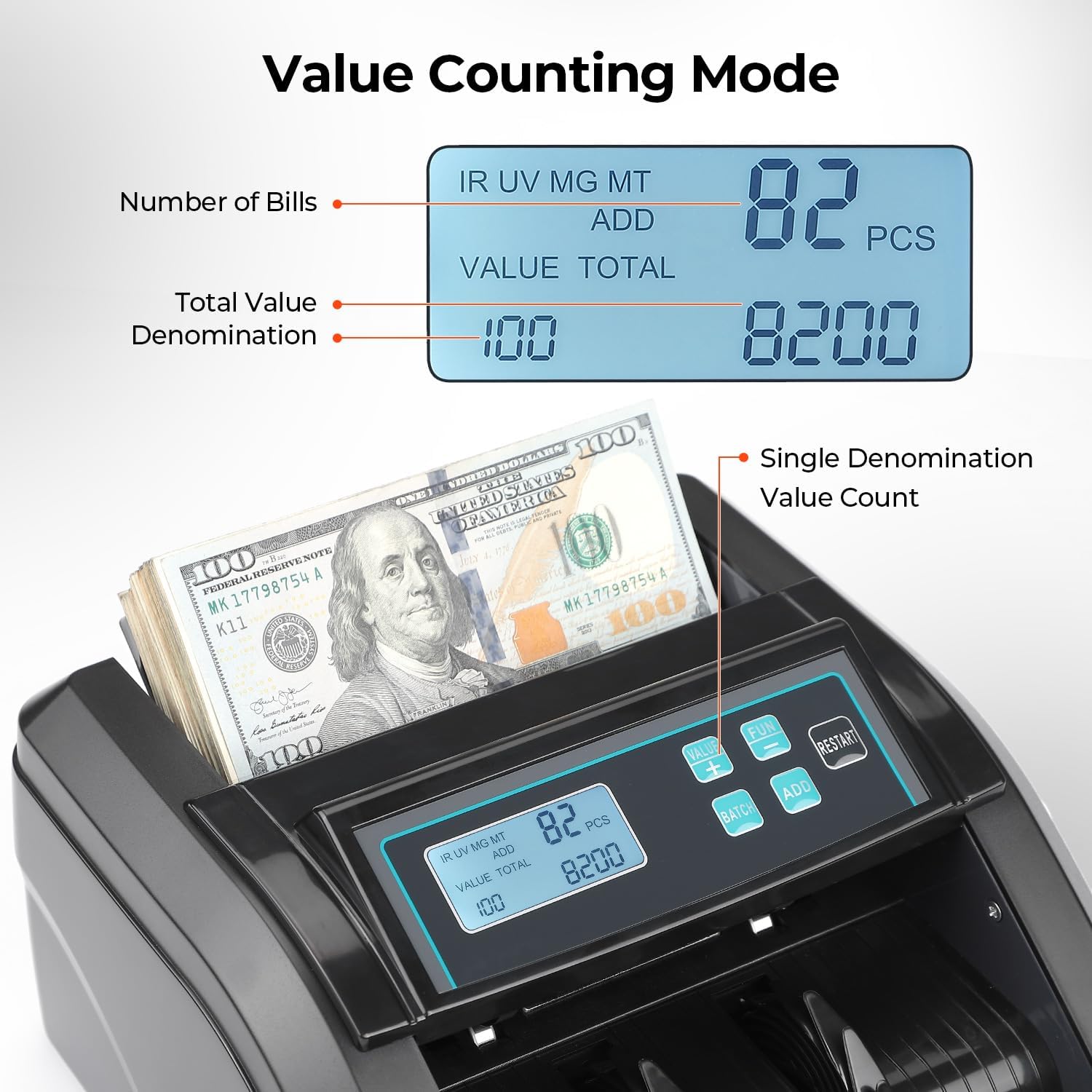
Figure 6.2: Display in Value Counting Mode.
6.2. Add + Batch Mode
The КОШУУ mode accumulates the total count across multiple batches. The БАТЧ mode allows you to set a predetermined number of bills for the machine to stop at.
- басыңыз КОШУУ button to activate Add mode. The display will show 'ADD'.
- басыңыз БАТЧ button repeatedly to cycle through preset batch sizes (e.g., 10, 20, 50, 100) or use the +/- buttons to set a custom batch size.
- Place bills in the hopper. The machine will count and stop when the batch size is reached. Remove the batch and place more bills to continue counting and adding to the total.
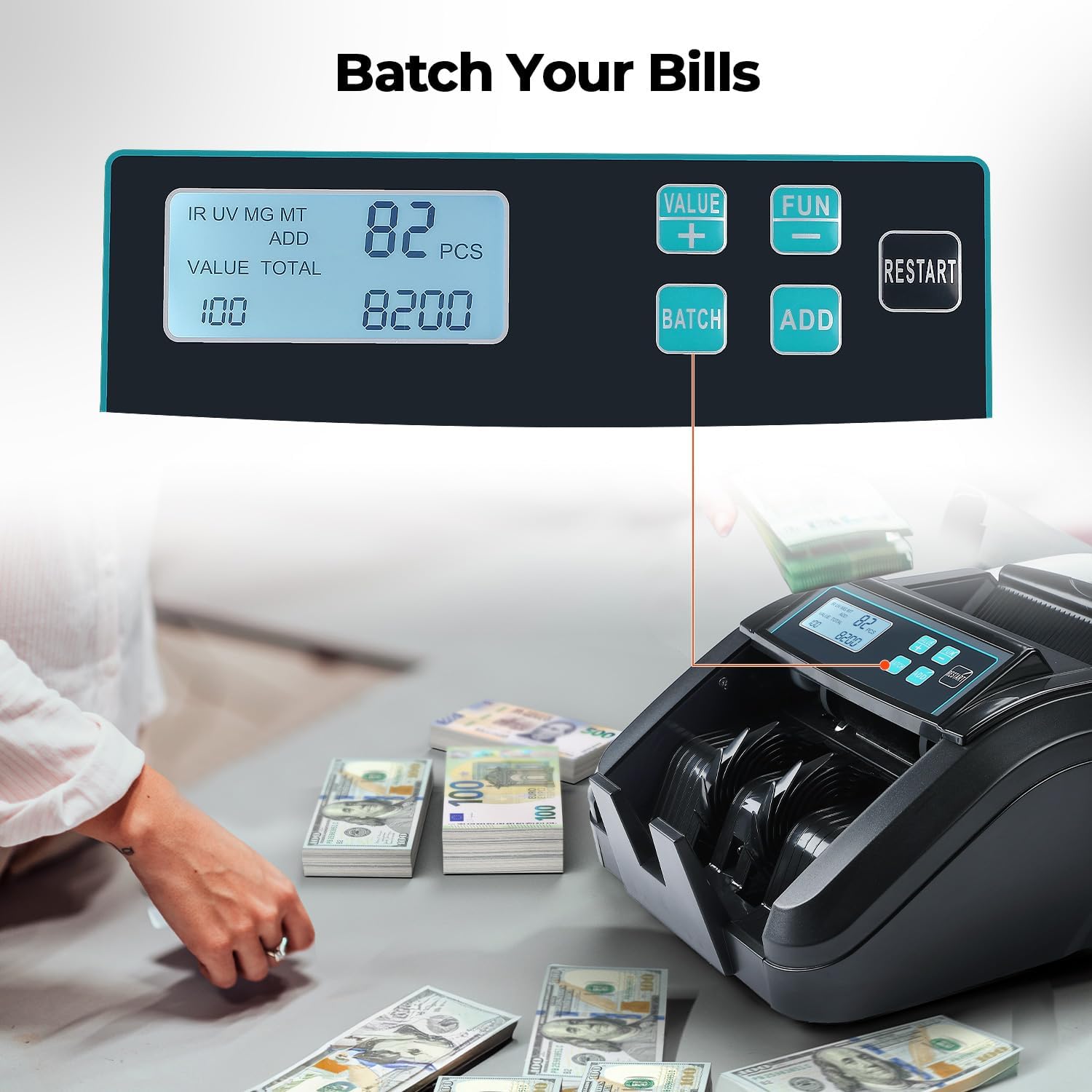
Figure 6.3: Batching bills for specific quantities.
6.3. Precise Detection (UV/MG/IR/MT)
The IMC51 uses multiple detection technologies to identify counterfeit bills:
- Ультрафиолет (ультрафиолет): Detects UV features on banknotes.
- MG (Magnetic): Checks for magnetic ink and security threads.
- IR (Инфракызыл): Verifies infrared patterns.
- MT (Metallic Thread): Металлдык коопсуздук жиптерин аныктайт.
- The machine will stop and display an error code if a suspicious bill is detected. Remove the bill and press КАЙРА БАШТЫРУУ улантуу.

Figure 6.4: Comprehensive counterfeit detection methods.
6.4. Full Function Introduction Video
Видео 6.1: Детальдууview of the MUNBYN IMC51's functions, including counting, batching, and counterfeit detection.
7. Техникалык тейлөө
Regular maintenance ensures the longevity and accuracy of your money counter.
7.1. Тазалоо
Dust and debris can accumulate on sensors and rollers, affecting performance. Use the provided cleaning brush to regularly clean the internal components, especially the feeding sensors.

Figure 7.1: Internal rollers that require regular cleaning.
7.2. Feeding Gap Adjustment
If bills are jamming frequently or counting is inaccurate, the feeding gap may need adjustment. Use the adjustable screw on the back of the machine:
- Turn the screw clockwise to decrease the gap (tighten) for smoother feeding of worn or thin bills.
- Turn the screw anticlockwise to increase the gap (loosen) to reduce friction for new or thick bills.
- Test with a single banknote to ensure it passes through smoothly without triggering errors.
8. Кыйынчылыктарды
Жалпы маселелер жана аларды чечүү жолдору:
8.1. Bill Jamming Problem
- Check Bill Condition: Ensure bills are not excessively creased, torn, or folded.
- Adjust Feeding Gap: Refer to Section 7.2 for instructions on adjusting the feeding gap.
- Clean Sensors/Rollers: Dust on sensors or rollers can cause jams. Clean them as described in Section 7.1.
8.2. Machine Does Not Work / No Power
- кубат туташуу текшерүү: Электр шнурунун машинага да, розеткага да бекем сайылганын текшериңиз.
- Розетканы текшерүү: Розетканын кубат бар экенин текшерүү үчүн башка түзмөк менен текшериңиз.
- Сактагычты текшерүү: The machine has a replaceable fuse. Check if the fuse is burnt out and replace it if necessary (refer to the maintenance video below).
8.3. Troubleshooting & Maintenance Video
Video 8.1: Guide on how to troubleshoot and perform basic repairs on the money counter.
9. Техникалык шарттар
| Өзгөчөлүк | Спецификация |
|---|---|
| Бренд | МУНБЫН |
| Модель номери | IMC51-BK |
| Элемент Салмагы | 9.08 фунт |
| Продукциянын өлчөмдөрү | 11.1 x 9.41 x 5.71 дюйм |
| Эсептөө ылдамдыгы | 1100 вексель/мин |
| аныктоо технологиясы | UV/IR/MG/MT |
| Түс | Кара |
| Power Input | 110V (US Standard) |
10. Кепилдик жана колдоо
MUNBYN is committed to providing comprehensive money handling solutions and technical assurance for all our products.
- Техникалык колдоо: Expect a reply within 2 hours for any technical inquiries.
- Local Fix Zone: Жергиликтүү оңдоо кызматтарына жетүү мүмкүнчүлүгү.
- For detailed warranty information, please refer to the official MUNBYN webсайты же продуктуңуз менен бирге берилген PDF колдонуучу колдонмосу.
Сиз ошондой эле расмий Колдонуучунун колдонмосун таба аласыз (PDF) бул жерде.


