1. Киришүү
The NELKO P110 is a portable Bluetooth thermal label printer designed for various labeling needs in home, office, and small business environments. It connects wirelessly to your Android or iOS smartphone via Bluetooth 4.0, allowing you to create and print custom labels using the dedicated "Qlabel" application. This device utilizes thermal printing technology, eliminating the need for ink or toner cartridges.
2. Кутуда эмне бар
Upon unboxing your NELKO P110 Label Maker, please verify that all components are present:
- NELKO P110 Label Printer
- 1 Roll of Thermal Labels (40x30 mm)
- USB заряддоо кабели (Type-C)
- Колдонуучунун колдонмосу / Ыкчам баштоо колдонмосу

Image: Contents of the NELKO P110 package, including the label maker and a roll of labels.
Видео: Бүттүview of the items included in the NELKO P110 Label Maker package.
3. Орнотуу
3.1. Энбелгилер жүктөлүүдө
- Slide to open the paper bin cover.
- Take out the paper holder from inside the printer.
- Load the label paper roll onto the paper holder, ensuring the printing side faces down.
- Insert the label paper tab into the buckle of the paper holder.
- Place the assembled paper holder back into the paper bin.
- Gently rotate the paper roll to retract any excess paper, leaving approximately 2mm of paper outside the machine.
- Close the paper bin cover securely.

Image: Visual instructions for loading the thermal label roll into the printer.
3.2. Аппаратты күйгүзүү
Press and hold the power button located on the front of the device until the screen illuminates and displays "Welcome P110".

Image: The NELKO P110 Label Maker powered on, showing the welcome message.
4. App Installation & Bluetooth Connection
4.1. Downloading the "Qlabel" App
The "Qlabel" app is essential for operating your NELKO P110. You can download it using one of the following methods:
- Method 1: Scan QR Code: Use your smartphone's camera to scan the QR code provided in the Quick Start Guide or on the product packaging.
- Method 2: Search App Store: Open your device's app store (Google Play Store for Android or Apple App Store for iOS) and search for "Qlabel".

Image: A smartphone displaying the Qlabel app download page, next to the label maker.
4.2. Bluetooth аркылуу туташуу
- Смартфонуңузда Bluetooth иштетилгенин текшериңиз.
- Open the "Qlabel" app.
- Navigate to the "Me" section or a similar connection setting within the app.
- Select "Connect machine" and choose "P110" from the list of available Bluetooth devices.
- Once connected, a Bluetooth icon will appear on the P110's display.
Video: Demonstrates the process of connecting the NELKO P110 Label Maker to an Android mobile device via Bluetooth.
Video: Illustrates how to connect the NELKO P110 Label Maker to an iOS mobile device via Bluetooth.
5. Иштөө нускамалары
5.1. Белгилерди түзүү жана түзөтүү
The "Qlabel" app offers a wide range of customization options:
- Калыптар: Choose from various pre-designed templates for different categories (e.g., home, office, business, creative).
- Ыңгайлаштырылган дизайн: Tap "New" to create a label from scratch.
- Текст: Add text, customize fonts (20+ available), sizes, and alignment.
- Symbols & Icons: Incorporate symbols (300+ emojis, 200+ materials) and icons to enhance your labels.
- Штрихкоддор жана QR коддору: Штрих-коддорду же QR коддорун түзүңүз жана кошуңуз.
- Other Elements: Add tables, dates, figures, pictures, shapes, and lines.

Image: The Qlabel app interface showcasing multiple custom print templates and design elements.
5.2. Этикеткаларды басып чыгаруу
- After designing your label, click the "Preview" button to review ал.
- Click the "Print" button.
- In the print setup screen, you can adjust the number of copies, print density, and horizontal/vertical offsets.
- Confirm settings and click "Print" to send the label to the printer.
Video: A detailed operation tutorial for the NELKO P110 Label Maker, demonstrating label creation and printing.
6. Колдонуу сценарийлери
The NELKO P110 Label Maker is versatile and suitable for a wide range of applications:
- Үйдү уюштуруу: Label storage bins, pantry items, spice jars, and personal belongings.
- Office колдонуу: Уюштуруу files, folders, cables, and office supplies.
- Чакан ишканалар: Товарлардын этикеткаларын, баасын түзүү tags, barcode labels, address labels, and shipping labels.
- Чыгармачыл долбоорлор: Design custom labels for gifts, crafts, and special occasions.
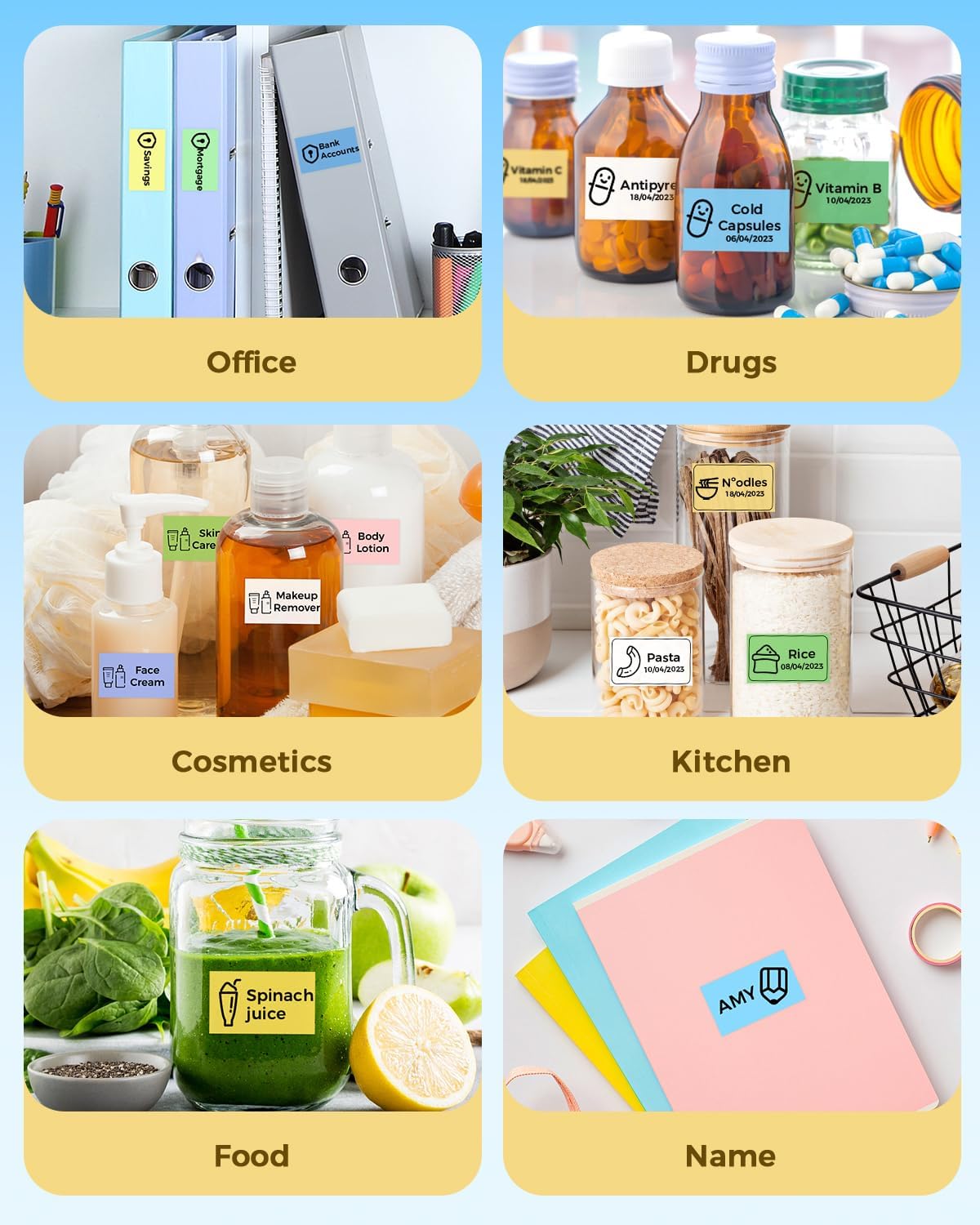
Сүрөт: Мисamples of NELKO P110 labels used for organizing items in office, kitchen, and personal care.
Video: A brief demonstration of the NELKO P110 Label Maker in various practical applications.
7. Техникалык тейлөө
To ensure optimal performance and longevity of your NELKO P110 Label Maker, follow these maintenance guidelines:
- Тазалоо: Принтердин сыртын жумшак, кургак чүпүрөк менен дайыма сүртүп туруңуз. Катуу химиялык заттарды же абразивдүү материалдарды колдонуудан алыс болуңуз.
- Басма башына кам көрүү: Эгерде басып чыгаруу сапаты начарлап кетсе, термикалык басып чыгаруу башын кебез тампон менен акырын тазалаңыз dampened with isopropyl alcohol. Ensure the printer is off and completely dry before use.
- Сактагыч: Принтерди салкын, кургак жерде, тике күндүн нурунан жана экстремалдык температурадан алыс сактаңыз.
- Батарея: Батареянын ден соолугун сактоо үчүн аппаратты тез-тез колдонбосо дагы, дайыма заряддаңыз.
8. Кыйынчылыктарды
If you encounter issues with your NELKO P110, try the following solutions:
- Принтер туташпай жатат: Ensure Bluetooth is enabled on your phone and the printer. Restart both devices and try connecting again through the "Qlabel" app.
- Начар басып чыгаруу сапаты: Check if the label roll is inserted correctly with the printing side down. Clean the print head as described in the Maintenance section. Adjust the print density settings in the "Qlabel" app.
- Labels Not Feeding Correctly / Printing Offset: Ensure the label roll is properly seated in the paper holder and the paper holder is correctly installed in the bin. Calibrate the paper position if necessary (refer to app settings or quick start guide).
- Түзмөк күйбөй жатат: Ensure the battery is charged. Connect the printer to a power source using the provided USB cable.
For further assistance, please refer to the official support resources.
9. Техникалык шарттар
| Өзгөчөлүк | Деталь |
|---|---|
| Модель аты | NELKO P110 Label Maker |
| Бренд | Нелко |
| Байланыш технологиясы | Bluetooth |
| Басма технологиясы | Термикалык |
| Шайкеш түзмөктөр | Смартфондор (Android, iOS) |
| Максималдуу кара жана ак басып чыгаруу чечими | 300дпи |
| Максималдуу медиа өлчөмү | 1.1 x 5.9 inches (Supports 20mm-50mm width labels) |
| Принтердин чыгышы | Single color (Black text) |
| Элемент Салмагы | 1.12 фунт (0.51 килограмм) |
| Продукциянын өлчөмдөрү | 5.11"D x 2.4"W x 3.3"H |
| Батареялар | 1 Литий Полимердик батарейка (кошулган) |
10. Кепилдик жана колдоо
The NELKO P110 Label Maker comes with a limited warranty. For detailed warranty information and support, please visit the official NELKO support page or contact customer service.
Расмий колдоо баракчасы: https://www.nelkoprint.com/pages/support


