Introduction
This manual provides detailed instructions for the installation, operation, and maintenance of your Strong SRT 7040 Digital Satellite HD Receiver. Please read this manual carefully before using the device to ensure proper functionality and to prevent damage.

Image: The Strong SRT 7040 DTT Tuner and its retail packaging.
The Strong SRT 7040 is a Full HD digital satellite receiver designed for Free-To-Air (FTA) channels. It features a USB port for multimedia playback and software updates, and supports Dolby Audio for enhanced sound quality.
1. Орнотуу
1.1 Пакеттен чыгаруу
Бардык компоненттерди таңгактан кылдаттык менен алып салыңыз. Төмөнкү нерселердин бар экенин текшериңиз:
- Strong SRT 7040 DTT Tuner
- Алыстан башкаруу (2 AAA батарейкасы менен)
- Кубаттуу адаптер
- User Manual
1.2 Аппаратты туташтыруу
Follow these steps to connect your SRT 7040 receiver:
- Спутник киргизүү: Спутник антеннасынын кабелин төмөнкүгө туташтырыңыз SAT IN port on the back of the receiver.
- Video Output (HDMI): HDMI кабелин түзмөктөн туташтырыңыз HDMI port on the receiver to an HDMI input on your television.
- Video Output (SCART): Же болбосо, эски сыналгылар үчүн SCART кабелин туташтырыңыз TV SCART ресивердеги портту телевизоруңуздагы SCART киргизүүгө.
- Audio Output (Digital): For digital audio, connect a coaxial cable from the COAXIAL S/PDIF port to your digital audio ampөмүрлүү.
- Audio Output (Analog): For analog audio, connect RCA cables from the AUDIO R/L ports to your audio Hi-Fi ampөмүрлүү.
- USB түзмөк: If desired, connect a USB storage device to the USB port for multimedia playback or software updates.
- Күч: Кубат адаптерин 12V === 1.5А input on the receiver, then plug the adapter into a wall outlet.

Image: Rear panel connections of the Strong SRT 7040 DTT Tuner, showing SAT IN, HDMI, TV SCART, COAXIAL S/PDIF, AUDIO R/L, USB, and Power input.
1.3 Биринчи жолу орнотуу жана каналды сканерлөө
Upon first power-on, the receiver will guide you through an initial setup wizard. Follow the on-screen prompts to select your language, country, and perform an automatic channel scan. This process will detect and store all available satellite channels.
2. Иштөө нускамалары
2.1 Алыстан башкарууview
The included remote control allows you to access all functions of the SRT 7040. Insert the two AAA batteries into the remote control, ensuring correct polarity.

Image: The remote control for the Strong SRT 7040 DTT Tuner, showing buttons for power, numbers, volume, channel, menu, and special functions.
2.2 Негизги функциялар
- Күч: басыңыз КҮЧ button to turn the receiver on or off (standby mode).
- Канал тандоо: колдонуу CH+ / CH- buttons to change channels sequentially, or use the numeric keypad to enter a channel number directly.
- Үндү көзөмөлдөө: колдонуу VOL+ / VOL- аудио үнүн жөндөө үчүн баскычтар.
- Үнсүз: басыңыз БАСУУ аудиону убактылуу басуу үчүн баскыч.
2.3 Меню Навигациясы
басыңыз МЕНЮ button to access the main menu. Use the arrow keys (UP, ылдый, СОЛ, ТУУРА) to navigate through options and OK to confirm selections. Press ЧЫГУУ to return to the previous screen or live TV.
2.4 Өзгөчөлүктөр
- Таймерлер: The receiver supports programming timers for recording or switching to specific channels at scheduled times. Access this feature via the menu.
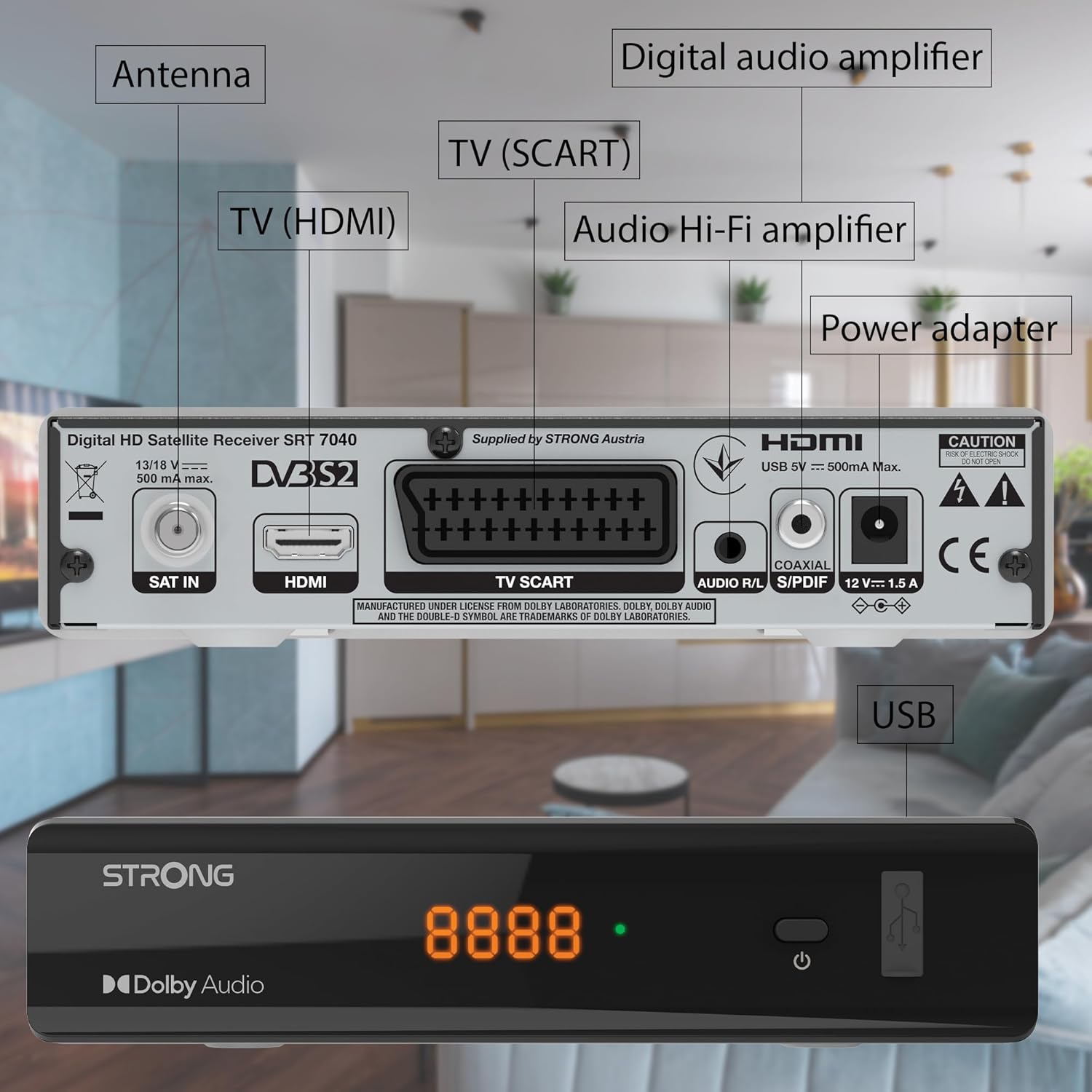
Image: The Strong SRT 7040 DTT Tuner displaying a timer icon, indicating its scheduling capabilities.
- Favorite Lists: Create customized lists of your preferred channels for quick access.
- Субтитрлер: Enable or disable subtitles for compatible broadcasts using the SUB пульттагы баскыч.
- Электрондук программалык колдонмо (EPG): басыңыз EPG баскычына view алдыдагы берүүлөрдүн программасы жөнүндө маалымат.
- Dolby Audio: The receiver supports Dolby Audio for a high-quality sound experience.

Image: The Strong SRT 7040 DTT Tuner with the Dolby Audio logo, illustrating its sound processing capability.
3. Техникалык тейлөө
3.1 Тазалоо
To clean the receiver, disconnect it from the power supply. Use a soft, dry cloth to wipe the exterior. Do not use liquid cleaners, aerosols, or abrasive materials, as these can damage the finish or internal components.
3.2 Программалык камсыздоо жаңыртуулары
Мезгил-мезгили менен өндүрүүчүнүн текшерүү website for available software updates. Updates can improve performance, add new features, or resolve issues. Software updates are typically performed via the USB port following specific instructions provided with the update file.
3.3 Коопсуздук маалыматы
- Do not open the receiver casinг. Ичинде колдонуучу тейлей турган бөлүктөр жок. Бардык тейлөөлөрдү квалификациялуу кызматкерлерге тапшырыңыз.
- Кабыл алгычты күндүн түз тийген нурунан, жылуулук булактарынан жана нымдуулуктан алыс кармаңыз.
- Ашыкча ысып кетүүнүн алдын алуу үчүн түзмөктүн айланасында жетиштүү желдетүүнү камсыз кылыңыз.
- Берилген кубат адаптерин гана колдонуңуз.
4. Кыйынчылыктарды
If you encounter problems with your SRT 7040, consult the following table before contacting support.
| Көйгөй | Мүмкүн себеп | Чечим |
|---|---|---|
| Күч жок | Кубат адаптери туташтырылган эмес; Розетка бузук | Check power adapter connection; Try a different power outlet |
| Сигнал жок / Кара экран | Satellite cable loose or disconnected; Incorrect input selected on TV; Satellite dish alignment issue | Check SAT IN cable connection; Ensure TV is on correct HDMI/SCART input; Perform a channel scan; Consult a professional for dish alignment if necessary |
| Пульт иштебей жатат | Batteries depleted or incorrectly inserted; Obstruction between remote and receiver | Replace batteries; Ensure correct polarity; Remove any obstructions; Point remote directly at receiver |
| Сүрөттүн сапаты начар | Weak satellite signal; Incorrect display settings | Check satellite signal strength in menu; Adjust TV display settings; Ensure Full HD content is being broadcast |
5. Техникалык шарттар
The following are the technical specifications for the Strong SRT 7040 Digital Satellite HD Receiver:
- Модел: SRT 7040 (SAT FTA Full HD)
- Бренд: Күчтүү
- Өлчөмдөрү: 3.39 x 6.46 x 1.38 дюйм (8.6 x 16.4 x 3.5 см)
- Элемент Салмагы: 9.2 унция (260 грамм)
- Түсү: Кара
- Байланыш технологиясы: USB
- Тtage: 100 - 240 В
- Жыштыгы: 50 - 60 Гц
- Энергияны керектөө: 18 kWh (operational, typical)
- Иштөө температурасынын диапазону: 0ºCден 40ºCге чейин
- Салыштырмалуу нымдуулук: 10% - 95%
- Батареялар: 2 AAA батарейкалар (алыштан башкаруу үчүн камтылган)
- Техникалык мүнөздөмөлөрү: DVB-S2
- Камтылган: Wally Receiver
6. Кепилдик жана колдоо
For warranty information and technical support, please refer to the warranty card included in your product packaging or visit the official Strong webсайт. Сатып алуу квитанциясын кепилдик дооматтары үчүн сатып алуунун далили катары сактаңыз.
For further assistance, you may contact Strong customer service through the contact details provided on their official webсайт.


