1. Киришүү
This manual provides detailed instructions for the assembly, operation, and maintenance of your RFIVER TF3001WHT TV Stand. Please read these instructions carefully before beginning assembly to ensure safe and correct installation and usage. Keep this manual for future reference.
2. Коопсуздук маалыматы
- Монтаждоо алдында бардык бөлүктөрдүн бар экенин жана бузулбаганын текшериңиз. Эгерде кандайдыр бир бөлүктөрү жок же бузулган болсо, колдонбоңуз.
- 35 кг (77 фунт) максималдуу салмактан ашпаңыз.
- This stand is designed for TVs between 32 and 65 inches. Verify your TV's size and VESA pattern before installation.
- Чийип кетпеш үчүн жумшак, таза бетке чогултуңуз.
- Tighten all screws firmly, but do not overtighten. Overtightening can damage threads.
- Чогултуу учурунда балдарды жана үй жаныбарларын алыс кармаңыз. Чакан бөлүктөрү муунтуу коркунучу болушу мүмкүн.
- Always ensure the TV is securely mounted to the stand and stable before use.
3. Пакеттин мазмуну
Төмөндө саналып өткөн бардык компоненттер пакетиңизге камтылганын текшериңиз:
- Температуралуу айнек базасы
- Негизги колдоо тилкеси
- Сыналгы орнотуу кронштейндери (сол жана оң)
- VESA адаптер плиталары (эгер бар болсо)
- Hardware Kit (various screws, washers, spacers for TV and stand assembly)
- Кабелдик башкаруу клиптери
- Non-slip Feet for Base

4. Монтаждоо боюнча нускамалар
Туура чогултуу үчүн бул кадамдарды кылдаттык менен аткарыңыз:
- Attach Non-slip Feet to Base: Carefully place the tempered glass base on a soft surface. Attach the non-slip feet to the designated spots on the underside of the glass base.
- Secure Main Support Column to Base: Align the main support column with the mounting holes on the tempered glass base. Use the provided screws and tools to securely fasten the column to the base. Ensure it is stable and upright.
- Сыналгыга монтаждоо кронштейндерин тагыңыз: Identify the VESA mounting holes on the back of your television. Select the appropriate screws, washers, and spacers from the hardware kit that fit your TV. Attach the left and right TV mounting brackets to the back of your TV. Ensure the brackets are level and securely fastened.
- Телевизорду стендге орнотуу: With assistance, carefully lift the television and hook the TV mounting brackets onto the main support column. Ensure the brackets are properly seated on the column's hooks.
- Secure TV with Safety Locks: Once the TV is hung, locate the safety locks on the bottom of the TV mounting brackets. Tighten these screws to secure the TV to the stand, preventing accidental dislodgement.
- Кабелдик башкаруу: Use the provided cable management clips to route and organize cables along the back of the main support column. This helps maintain a tidy appearance and prevents cable damage.


5. Иштөө нускамалары
5.1 Бийиктигин тууралоо
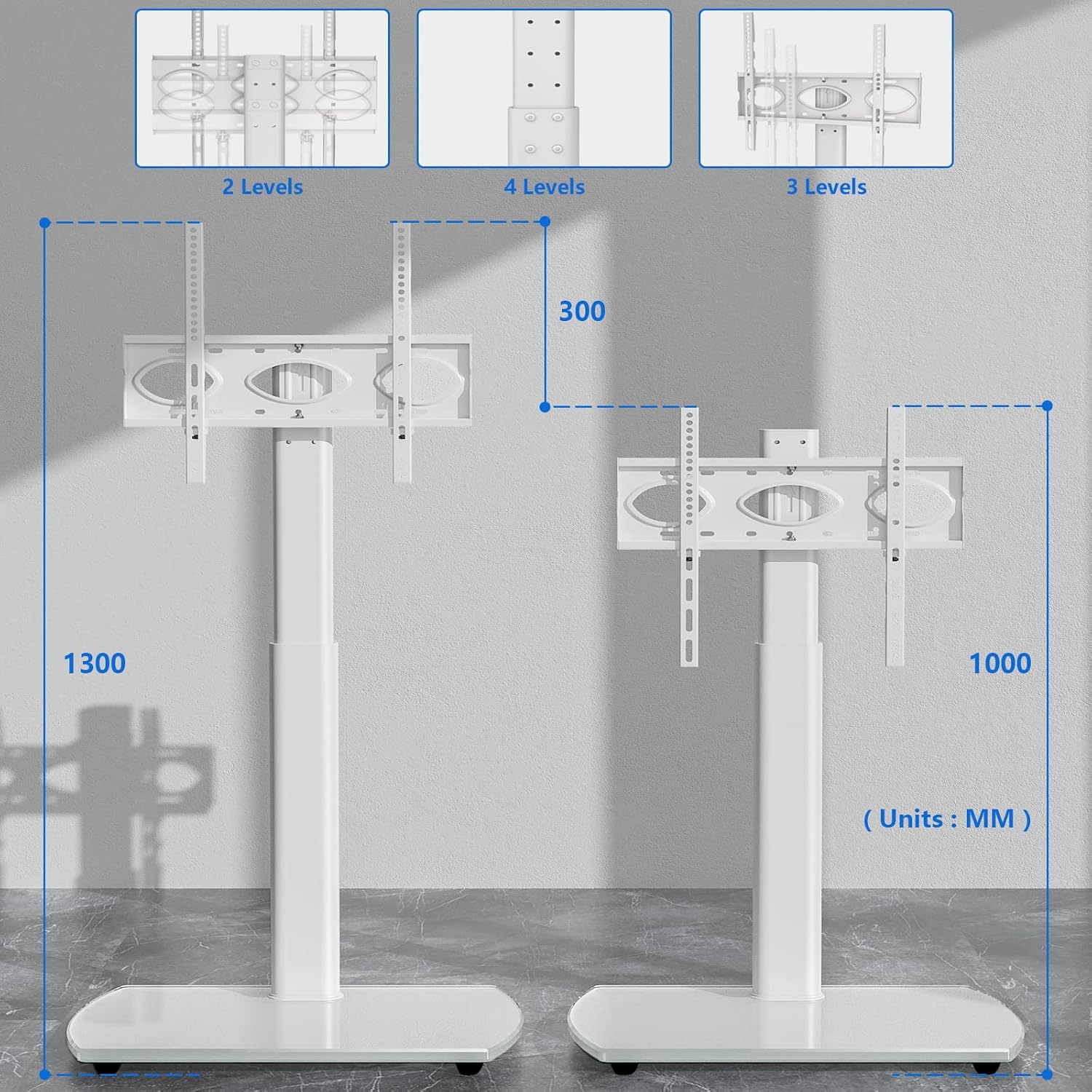
The RFIVER TF3001WHT TV stand allows for height adjustment to optimize your viewing experience. The TV can be adjusted between 1000 mm and 1300 mm from the floor.
- To adjust the height, loosen the screws on the main support column that secure the TV mounting plate.
- Carefully slide the TV (with brackets) up or down to the desired height.
- Once the desired height is achieved, retighten all screws firmly to secure the TV in place.
5.2 Айлануу функциясы
The TV stand features a swivel function, allowing you to rotate your television for optimal viewбурчтар.
- The TV can be swiveled up to 30 degrees to the left and 30 degrees to the right.
- Gently grasp the sides of your television and rotate it to the desired angle. No locking mechanism is required for the swivel function.

6. Техникалык тейлөө
Сыналгы стендиңиздин узак мөөнөттүү жана сырткы көрүнүшүн камсыз кылуу үчүн, төмөнкү тейлөө көрсөтмөлөрүн аткарыңыз:
- Тазалоо: жумшак колдонуу, damp cloth to clean the glass base and metal parts. Avoid abrasive cleaners or harsh chemicals that could damage the finish.
- Текшерүү: Мезгил-мезгили менен бардык бурамалар менен байланыштарды текшерип туруңуз, алар бекем бойдон калууда. Керек болсо кайра тартыңыз.
- Салмагын бөлүштүрүү: Avoid placing excessive weight on the stand, especially on the edges of the glass base.
7. Кыйынчылыктарды
Эгер кандайдыр бир көйгөйгө туш болсоңуз, төмөнкү жалпы көйгөйлөрдү жана чечимдерди караңыз:
- ТВ деңгээл эмес: Ensure the TV mounting brackets are installed evenly on the back of the TV. Check that the main support column is securely fastened to the base and is not leaning.
- Туруктуу сезилет: Verify that all assembly screws are fully tightened. Ensure the stand is placed on a flat, stable surface. Do not exceed the maximum weight capacity.
- Бийиктикти тууралоодогу кыйынчылыктар: Loosen the adjustment screws sufficiently before attempting to slide the TV. Ensure no cables are snagged.
- Жетишпеген бөлүктөр: If any parts are missing upon opening the package, contact RFIVER customer support for assistance.
8. Техникалык шарттар
Detailed product specifications for the RFIVER TF3001WHT TV Stand:
| Өзгөчөлүк | Спецификация |
|---|---|
| Модель номери | TF3001WHT |
| Туура келген сыналгы өлчөмдөрү | 32-65 дюйм |
| Максималдуу Салмак сыйымдуулугу | 35 кг (77 фунт) |
| VESA шайкештиги | 100x100ммден 400x400ммге чейин |
| Бийиктигин тууралоо диапазону | 1000 мм - 1300 мм |
| Swivel Angle | ±30 градус |
| Негизги материал | Температуралуу айнек |
| Түс | Ак |

9. Кепилдик жана колдоо
The RFIVER TF3001WHT TV Stand comes with a manufacturer's warranty of 5 years.
For warranty claims, technical support, or any questions regarding your product, please contact RFIVER customer service through the retailer's platform or the official RFIVER website. Please have your model number (TF3001WHT) and purchase information ready when contacting support.


