SV3C C17 Solar Security Camera User Manual
Model: C17(2 PACK) | Brand: SV3C
Introduction
Thank you for choosing the SV3C C17 Solar Security Camera. This manual provides detailed instructions for the installation, operation, and maintenance of your new wireless security camera system. Designed for outdoor use, this 2K/3MP PTZ camera features solar power, two-way audio, motion detection, and multiple night vision modes to ensure comprehensive surveillance of your property.
Кутуда эмне бар
- 2x Solar Wireless Security Cameras
- 2x Күн панелдери
- 2x Universal Joint
- 2x Set Screws Bags
- 2x Socket Nut
Жайгашуу
Баштапкы орнотуу жана заряддоо
Before installation, ensure the camera's internal battery is fully charged. Connect the camera to the solar panel and place the solar panel in direct sunlight for several hours. Alternatively, you can charge the camera via a 5V USB power adapter (not included).

Image: The SV3C C17 solar security cameras, showcasing their design and included solar panels.
App Download and Account Creation
Download the 'SV3C Cloud' app from your smartphone's app store (iOS or Android). Follow the on-screen instructions to create an account and log in.
Камераны орнотуу
Орнотуу үчүн ачык жерди тандаңыз view of the area you wish to monitor and allows the solar panel to receive maximum direct sunlight throughout the day. Use the provided screws and socket nuts to securely mount the camera and solar panel. The camera is IP65 waterproof, suitable for various weather conditions.
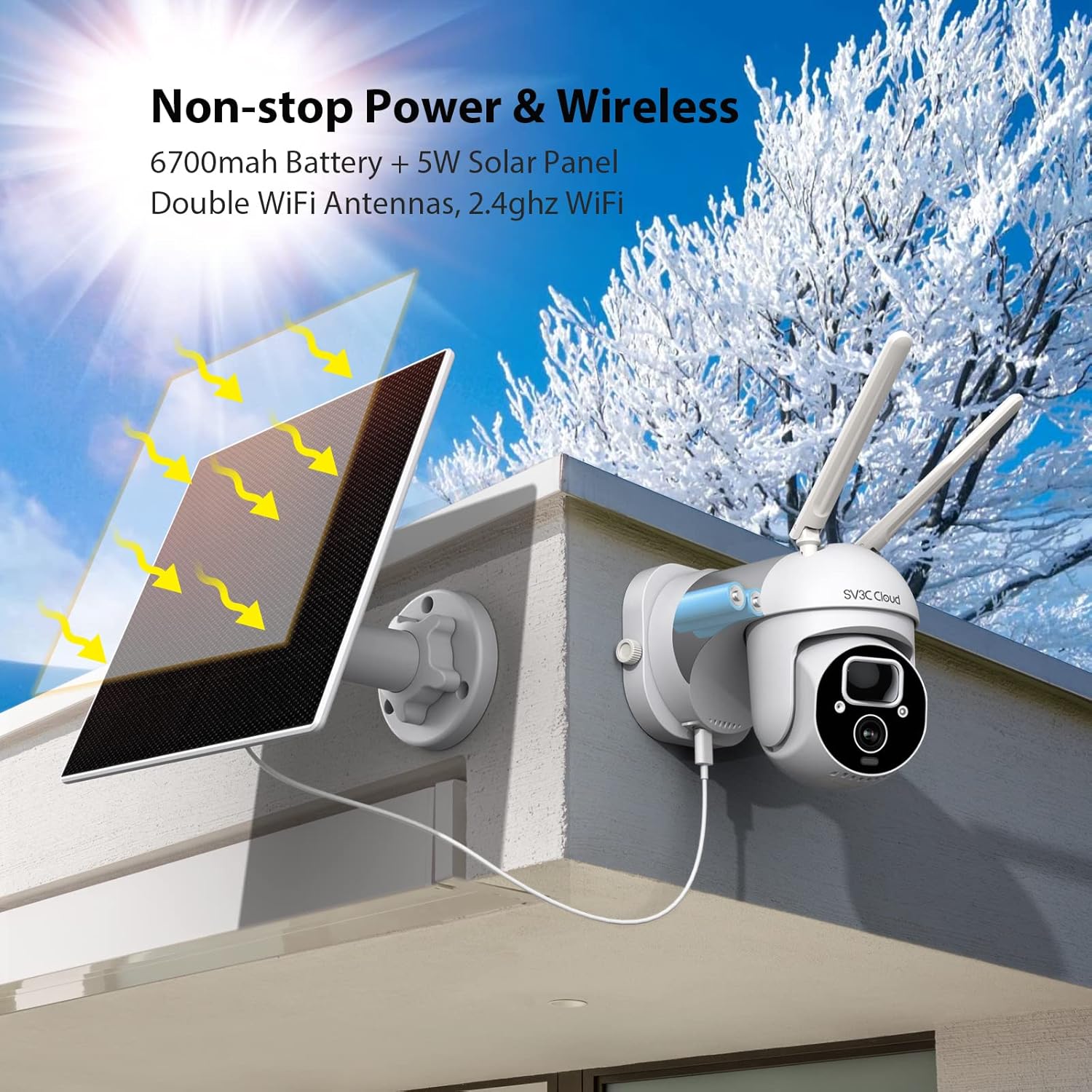
Image: An SV3C C17 camera installed on an exterior wall, connected to its solar panel for continuous power.
Операция
Wi-Fi'га туташууда
Open the SV3C Cloud app. Add your camera by following the in-app prompts, which typically involve scanning a QR code displayed on your phone with the camera lens. Ensure your Wi-Fi network is 2.4GHz for stable connection.
Video: This video demonstrates the initial setup process, including connecting the camera to Wi-Fi by scanning a QR code from your smartphone.
Pan, Tilt, and Digital Zoom Control
Түз эфирден view in the SV3C Cloud app, you can remotely control the camera's pan (360°) and tilt (90°) movements to cover a wider area. The camera also supports digital zoom for closer inspection of details.

Image: The camera's pan and tilt functionality is highlighted, demonstrating its wide coverage.
Түнкү көрүү режимдери
The camera offers three night vision modes: Full Color (with spotlight on), Intelligent Mode (spotlight activates upon motion), and Black & White (IR lights only). Select the mode that best suits your surveillance needs for clear night-time monitoring.

Image: Visual representation of the camera's three distinct night vision capabilities.
PIR Motion Detection & Alerts
The camera features PIR (Passive Infrared) motion detection, which accurately identifies human and animal movement, reducing false alarms. Upon detection, you will receive real-time app notifications, and the camera can trigger an alert sound and turn on its floodlight (at night) to deter intruders.

Image: Illustration of the PIR motion detection system, distinguishing between human and pet movement for accurate alerts.
Video: This video demonstrates the camera's smart PIR human motion detection and real-time app message alerts, including the audio warning and strobe light feature.
Эки тараптуу аудио
With a built-in microphone and speaker, the camera supports clear two-way audio. This allows you to listen to the surroundings and communicate with visitors or deter unwanted guests directly through the app.

Image: The camera's two-way audio feature is shown in use, alongside its robust waterproof design.
Storage & Sharing
The camera supports two storage methods: Cloud storage (subscription may be required) and Micro SD card storage (up to 128GB, not included). You can easily share access to your camera's live feed and recordings with family and friends through the SV3C Cloud app.

Сүрөт: An overview of the camera's storage options and its ability to share access with multiple users.
Техникалык тейлөө
Күн панелинин эффективдүүлүгү
To ensure optimal charging, periodically check that the solar panel is clean and free from dust, dirt, leaves, or snow. Position the panel to receive maximum direct sunlight, especially during winter months.
Тазалоо
Камеранын линзасын жана күн панелин жумшак, г менен акырын сүртүңүзamp cloth. Avoid using harsh chemicals or abrasive materials that could scratch the surfaces.
Орнотулган программаны жаңыртуу
Regularly check the SV3C Cloud app for available firmware updates. Keeping your camera's firmware up-to-date ensures optimal performance, security, and access to new features.
Проблемаларды чечүү
| Маселе | Чечим |
|---|---|
| Камера Wi-Fi'га туташпай жатат | Wi-Fi'ыңыз 2.4 ГГц экенин текшериңиз. Камеранын жайгашкан жериндеги Wi-Fi сигналынын күчүн текшериңиз. Камераны баштапкы абалга келтирип, кайра жупташтырып көрүңүз. |
| Батарея зарядды кармабайт | Verify the solar panel is clean and receiving direct sunlight. Check the connection between the solar panel and the camera. Charge the camera directly via USB if needed. |
| Көп кездешүүчү жалган кыймыл эскертүүлөрү | Adjust the PIR detection sensitivity in the app. Ensure the camera is not pointed at busy roads or areas with constant movement (e.g., swaying trees). |
| Түнкү көрүү сапаты начар | Clean the camera lens. Ensure there are no obstructions blocking the IR lights or spotlight. Check the selected night vision mode in the app. |
| Эки тараптуу аудио көйгөйлөр | Check microphone and speaker settings in the app. Ensure your phone's volume is up. Reduce background noise for clearer communication. |
Техникалык шарттар
| Өзгөчөлүк | Деталь |
|---|---|
| Модель аты | C17 |
| Видео тартуунун резолюциясы | 2K |
| Power Source | Күн энергиясы |
| Байланыш технологиясы | Зымсыз (Wi-Fi) |
| Pan/Tilt диапазону | Пан 355°, Тилт 90° |
| Viewбурч | 120 градус |
| Батарея сыйымдуулугу | 6700 мАч (литий-ион) |
| Эл аралык коргоо рейтинги | IP65, IP66 |
| Сактагыч параметрлери | Cloud, Micro SD Card (Max 128GB) |
| Өзгөчөлүктөр | PIR Motion Detection, Color Night Vision, Two-Way Audio, Alexa/Google Assistant Compatible |
Кепилдик жана колдоо
SV3C offers a 2-year warranty for this product. For any issues or support inquiries, please contact SV3C directly via your Amazon order details. Our customer service team is ready to assist you with technical support, troubleshooting, and warranty claims.
For further assistance, please visit the official SV3C website or refer to the support section within the SV3C Cloud app.


