1. Продукт бүтүп калдыview
The Technoline WT8945 is a radio-controlled wall clock designed for indoor use, offering precise timekeeping along with integrated temperature and humidity displays. Its timeless design with a black frame and white dial ensures clear readability and aesthetic appeal in various indoor environments.
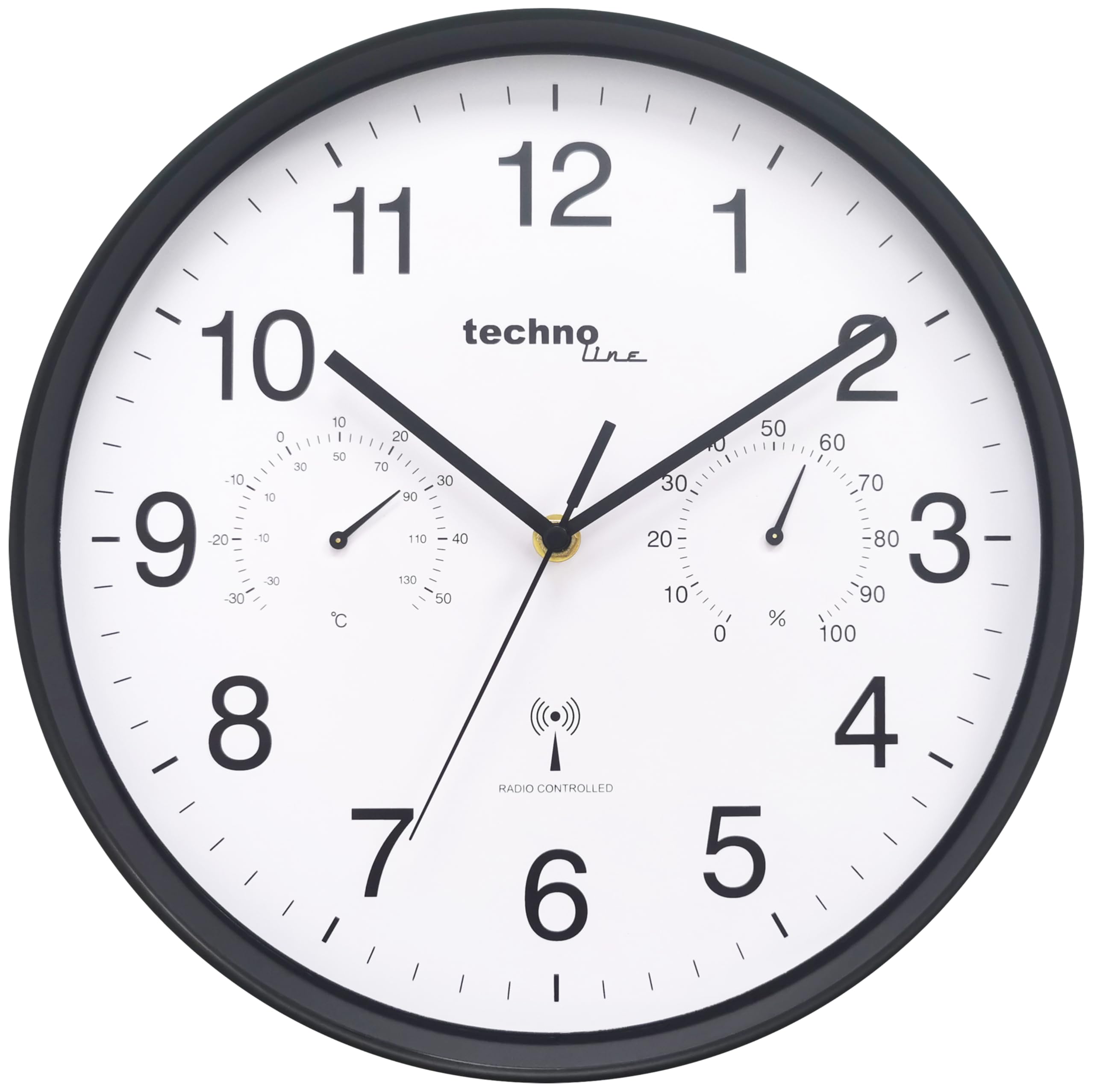
Сүрөт 1.1: Фронт view of the Technoline WT8945 Radio-Controlled Wall Clock. The clock features a black frame, a white dial with large black numbers, and smaller analog displays for temperature and humidity.
Негизги өзгөчөлүктөр төмөнкүлөрдү камтыйт:
- DCF-77 Radio Control: Ensures automatic and highly accurate time synchronization.
- Analog Temperature Display: Measures indoor temperature from -30 °C to +50 °C.
- Analog Humidity Display: Measures indoor humidity from 0% to 100%.
- Таза окулушу: High-contrast white dial with black numbers, visible from a distance.
- Туруктуу курулуш: Robust plastic frame.
- Кубат булагы: Operates on 1 x AA Mignon LR06 battery (not included).

Сүрөт 1.2: Visual representation of the clock's main features: temperature display, humidity display, and DCF-77 radio control, shown in a living room setting.
2. Пакеттин мазмуну
Please check the package contents upon unpacking to ensure all items are present and undamaged.
- 1 x Technoline WT8945 Radio-Controlled Wall Clock
- 1 х Инструкция (бул документ)
3. Орнотуу
3.1 Батареяны орнотуу
The clock requires one AA Mignon LR06 battery (not included) for operation.
- Сааттын артындагы батарея отсегин табыңыз.
- Батарея уясынын капкагын ачыңыз.
- Insert one AA Mignon LR06 battery, ensuring the correct polarity (+ and -) as indicated inside the compartment.
- Батарея уясынын капкагын бекем жабыңыз.
Эскертүү: Ар дайым сунушталган типтеги жаңы батареяларды колдонуңуз. Эски жана жаңы батареяларды же ар кандай типтеги батареяларды аралаштырбаңыз.
3.2 Баштапкы убакытты синхрондоштуруу
After battery installation, the clock will automatically attempt to synchronize with the DCF-77 radio signal. This process may take several minutes to a few hours, depending on your location and signal strength.
- The clock hands will typically move to the 12 o'clock position and then begin searching for the signal.
- Сигнал алынгандан кийин, саат автоматтык түрдө туура убакытты коёт.
- For best reception, place the clock near a window and away from electronic devices that may cause interference.
3.3 Орнотуу
Choose a suitable indoor location for your wall clock. Consider the following:
- Көрүнүш: Ensure the clock is easily visible from your desired viewаймак.
- Сигнал кабыл алуу: For optimal radio signal reception, avoid placing the clock near large metal objects, concrete walls, or other electronic devices that might interfere with the signal.
- Экологиялык шарттар: While the clock displays temperature and humidity, avoid placing it in direct sunlight, near heat sources, or in areas with extreme temperature fluctuations or high humidity, as this may affect the accuracy of the sensors.
4. Иштөө нускамалары
4.1 Убакытты окуу
The Technoline WT8945 displays time using traditional analog clock hands (hour, minute, second). The radio-controlled mechanism ensures the time is always accurate to the DCF-77 signal.
4.2 Температура жана нымдуулук көрсөткүчтөрү
The clock features two smaller analog dials on its face:
- Температура дисплейи: Located on the left side of the dial, it shows the indoor temperature in degrees Celsius (°C). The measurement range is from -30 °C to +50 °C.
- Нымдуулук дисплей: Located on the right side of the dial, it shows the indoor relative humidity as a percentage (%). The measurement range is from 0% to 100%.
These displays provide a quick overview of your indoor climate conditions.
4.3 Manual Time Adjustment (If Radio Signal is Unavailable)
In areas where the DCF-77 radio signal is weak or unavailable, the clock can be manually set. This feature is particularly useful if the clock fails to synchronize automatically.
- Remove the battery from the clock.
- Wait for approximately 1 minute.
- Reinsert the battery. The clock hands will move to the 12 o'clock position.
- Immediately after the hands reach 12, a small adjustment wheel or button should be accessible on the back of the clock (often near the battery compartment). Use this to manually set the time.
- Once the desired time is set, the clock will operate as a standard quartz clock until a DCF-77 signal is successfully received, at which point it will automatically re-synchronize.
Эскертүү: The exact method for manual adjustment may vary slightly. Refer to any specific markings or controls on the back of your clock if the above steps do not immediately apply.
5. Техникалык тейлөө
Proper maintenance ensures the longevity and accurate operation of your Technoline WT8945 wall clock.
- Тазалоо: Wipe the clock's surface with a soft, dry cloth. Do not use abrasive cleaners, solvents, or chemical agents, as these may damage the plastic frame or dial.
- Батареяны алмаштыруу: Replace the AA battery annually, or when the clock hands stop moving or become erratic. Remove depleted batteries promptly to prevent leakage and damage to the clock mechanism.
- Курчап турган чөйрөнү коргоо: Protect the clock from extreme temperatures, direct sunlight, and high humidity.
6. Кыйынчылыктарды
If you encounter issues with your Technoline WT8945 clock, refer to the following troubleshooting guide:
| Көйгөй | Мүмкүн себеп | Чечим |
|---|---|---|
| Clock hands do not move or stop. | Батарея түгөнүп калды. | AA батарейканы жаңысына алмаштырыңыз. |
| Clock does not synchronize or shows incorrect time. | Weak or no DCF-77 radio signal. Interference from other electronics. Incorrect initial setup. |
|
| Temperature or humidity display is inaccurate or stuck. | Sensor obstruction. Extreme environmental conditions. |
|
7. Техникалык шарттар

Сүрөт 7.1: Dimensions of the Technoline WT8945 Wall Clock, showing a 30 cm diameter.
| Өзгөчөлүк | Деталь |
|---|---|
| Бренд | Технолайн |
| Модель номери | WT8945 |
| Түс | Кара |
| Продукциянын өлчөмдөрү (L x W x Y) | 30 x 3.81 x 30 см |
| Элемент Салмагы | 730 грамм |
| Материал | Пластик |
| Дисплей түрү | Аналог |
| Өзгөчөлүктөр | Humidity Display, Radio-Controlled Time (DCF-77) |
| Температураны өлчөө диапазону | -30 °Cден +50 °Cге чейин |
| Нымдуулукту өлчөө диапазону | 0% - 100% |
| Power Source | 1 x AA Mignon LR06 Battery (not included) |
| Ички/тышкы колдонуу | Indoor |
| Форма | Тегерек |
8. Кепилдик жана колдоо
Technoline products are manufactured to high-quality standards. For information regarding warranty coverage, please refer to the warranty card included with your purchase or contact your retailer. For technical support or further assistance, please visit the official Technoline webсайтка же кардарларды тейлөө бөлүмүнө кайрылыңыз.
Сураныч, кепилдик дооматтар үчүн сатып алуу далилиңизди сактап коюңуз.


