Introduction
Thank you for choosing the Edillas Digital Watch for Kids, Model 2207L. This watch is designed for children, featuring a 7-color LED backlight, 50M (5ATM) water resistance, and multiple functions including time, date, alarm, and stopwatch. This manual provides detailed instructions to help you understand and operate your new watch.
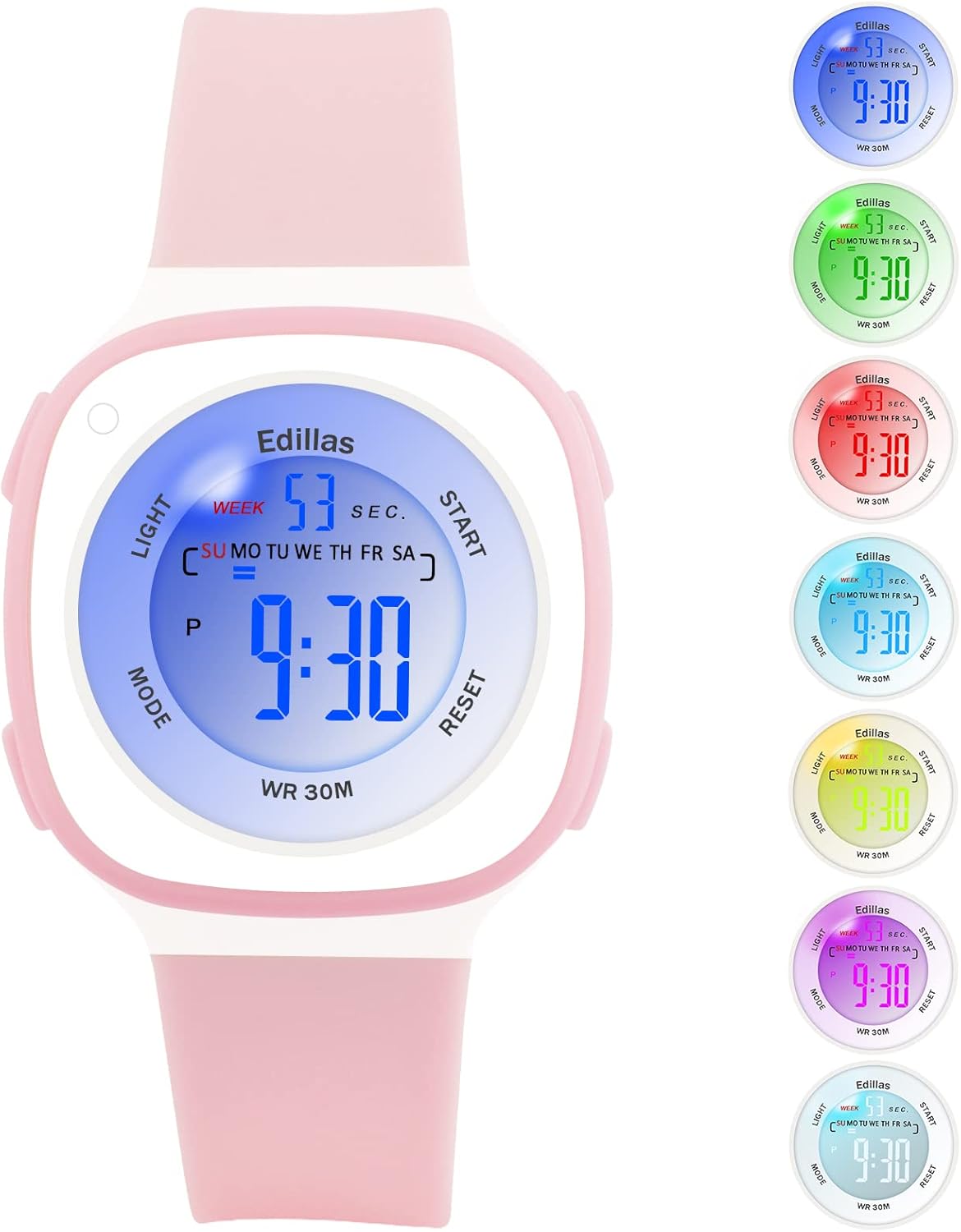
Figure 1: Edillas Digital Watch for Kids (Model 2207L)
Сааттын компоненттери жана баскычтары
Сааттын баскычтары жана дисплей элементтери менен таанышып алыңыз:

2-сүрөт: Саат баскычынын жана дисплейдин жайгашуусу
- LIGHT баскычы (жогорку сол): Арткы жарыкты иштетет жана арткы жарыктын түсүн өзгөртөт.
- MODE баскычы (төмөнкү сол): Ар кандай режимдер аркылуу цикл жасайт (Убакыт, Ойготкуч, Секундомер).
- БАШТОО баскычы (жогорку оң жакта): Used to start/stop functions in Stopwatch mode and adjust settings.
- КАЙРА ОРНОТУУ баскычы (Төмөнкү оң жакта): Used to reset functions in Stopwatch mode and adjust settings.
Орнотуу жана убакытты коюу
- Баштапкы күйгүзүү: The watch comes with a pre-installed battery. If the display is off, press any button to activate it.
- Убакытты орнотуу режимине кирүү: Кадимки убакыт дисплейинен баскычын басыңыз РЕЖИМ button three times. The seconds will start flashing, indicating you are in time setting mode.
- Секундду орнотуу: басыңыз RESET секундаларды нөлгө кайтаруу үчүн баскычты басыңыз.
- Setting Minutes: басыңыз START button to move to the minutes setting. The minutes will flash. Use the RESET мүнөттөрдү жөндөө үчүн баскычты басыңыз.
- Setting Hours: басыңыз START button again to move to the hours setting. The hours will flash. Use the RESET button to adjust the hours. Note the 'P' indicator for PM in 12-hour format.
- Setting Date (Day, Month, Year): Баскычын баса бериңиз START button to cycle through setting the day, month, and year. Use the RESET ар бир маанини тууралоо үчүн баскыч.
- Setting Day of Week: Датаны койгондон кийин басыңыз START to move to the day of the week. Use RESET туура күндү тандоо үчүн.
- Орнотуу режиминен чыгуу: Бардык орнотуулар аяктагандан кийин, басыңыз РЕЖИМ Кадимки убакытты көрсөтүү режимине кайтуу үчүн баскычын басыңыз.
Иштетүү функциялары
1. LED арткы жарык
The watch features a 7-color LED backlight. To activate the backlight, press the ЖАРЫК button. To change the backlight color, press and hold the ЖАРЫК button for approximately 3 seconds. The color will cycle through the available options. Release the button when your desired color is displayed.

Figure 3: LED Backlight Functionality
2. Ойготкуч функциясы
- Entering Alarm Mode: Кадимки убакыт дисплейинен баскычын басыңыз РЕЖИМ button once. The alarm time will be displayed.
- Ойготкучтун убактысын коюу: While in Alarm mode, press the RESET button. The hour digits will flash. Use the START саатты жөндөө үчүн баскыч.
- басыңыз RESET button again to move to the minute digits. Use the START мүнөттөрдү жөндөө үчүн баскычты басыңыз.
- Ойготкучту иштетүү/өчүрүү: басыңыз START Ойготкучту КҮЙГҮЗҮҮ/ӨЧҮРҮҮ баскычын басыңыз. Иштетилгенде дисплейде ойготкучтун сүрөтчөсү пайда болот.
- Exiting Alarm Mode: басыңыз РЕЖИМ Кадимки убакытты көрсөтүү режимине кайтуу үчүн баскычын басыңыз.
3. Секундомер функциясы
- Entering Stopwatch Mode: Кадимки убакыт дисплейинен баскычын басыңыз РЕЖИМ button twice. The display will show '00:00:00'.
- Starting/Stopping Stopwatch: басыңыз START button to begin timing. Press START кайрадан тындыруу үчүн басыңыз. START once more to resume.
- Resetting Stopwatch: While the stopwatch is paused, press the RESET Убакытты '00:00:00' кылып өзгөртүү үчүн баскычты басыңыз.
- Exiting Stopwatch Mode: басыңыз РЕЖИМ Кадимки убакытты көрсөтүү режимине кайтуу үчүн баскычын басыңыз.
4. 12/24 сааттык дисплей
To switch between 12-hour and 24-hour time formats, enter the time setting mode (press РЕЖИМ three times). When the hour digits are flashing, press the START button until you reach the hour setting. Press the RESET button to cycle between 12H (with 'P' for PM) and 24H formats. Exit setting mode by pressing РЕЖИМ.
Техникалык тейлөө
1. Water Resistance (50M / 5ATM)
This watch is water-resistant up to 50 meters (5 ATM), making it suitable for daily use, such as hand washing, rain, and showering. It is also suitable for swimming in shallow water. Саат сууга чөгүп турганда эч кандай баскычты баспаңыз. Avoid using the watch in extremely hot or cold water, as this can shorten its lifespan and compromise water resistance.

Figure 4: Water Resistance Applications
2. Тазалоо жана кам көрүү
- Саатты дайыма жумшак, гamp кездеме.
- Avoid using chemical cleaners, as they may damage the watch's materials.
- Колдонулбаган убакта саатты кургак жерде сактаңыз.
- Protect the watch from extreme temperatures and direct sunlight for prolonged periods.
3. Батареяны алмаштыруу
The watch uses one C-type battery. Battery replacement should ideally be performed by a qualified technician to ensure proper sealing and maintain water resistance. Incorrect battery replacement may void the warranty.
Проблемаларды чечүү
| Көйгөй | Мүмкүн себеп | Чечим |
|---|---|---|
| Дисплей бош же күңүрт. | Low battery or battery needs replacement. | Replace the battery. If issue persists, contact support. |
| Убакыт так эмес. | Убакыт туура коюлган эмес. | Refer to the "Setup and Time Setting" section to reset the time. |
| Ойготкуч угулбайт. | Ойготкуч иштетилген эмес же туура эмес орнотулган. | Ensure the alarm is set and activated (alarm icon visible). Check alarm volume if applicable (this model may not have adjustable volume). |
| Баскычтар жооп бербейт. | Temporary software glitch or watch is wet. | Allow the watch to dry completely if wet. Try a soft reset by pressing all four buttons simultaneously for a few seconds (if applicable, consult support if unsure). |
| Screen scratches easily. | Normal wear and tear for acrylic crystal. | Consider applying a screen protector. Handle with care. |
| Strap discolors. | Exposure to dirt, sweat, or chemicals. | Clean the strap regularly with mild soap and water. Avoid prolonged exposure to harsh chemicals. |
Техникалык шарттар

Figure 5: Watch Dimensions
| Өзгөчөлүк | Деталь |
|---|---|
| Модель номери | 2207L |
| Бренд | Edillas |
| Дисплей түрү | Санарип |
| Кыймыл түрү | Japanese Quartz (Digital Module) |
| Суу каршылык | 50M (5ATM) - Suitable for swimming, not for diving. |
| Өзгөчөлүктөр | 7-color LED backlight, Alarm, Stopwatch, Date, 12/24H display |
| Power Source | 1 x C Батарея (кошулган) |
| Боо материалы | Силикон |
| Иштин материалы | Каучук |
| Кристалл түрү | Акрил |
| Иштин диаметри | 37.4 мм (1.41 дюйм) |
| Case Thickness | 15 мм (0.39 дюйм) |
| Боо туурасы | 20 мм (0.63 дюйм) |
| Band Length | 19 см (7.48 дюйм) |
| Продукт Салмагы | 20 г |
| Жаш аралыгы | Балдар |
Кепилдик жана колдоо
Кепилдик маалымат
The Edillas Digital Watch for Kids, Model 2207L, comes with a Өмүр бою кепилдик. This warranty covers manufacturing defects and ensures the product's quality under normal use. Please retain your proof of purchase for warranty claims.
Кардарларды колдоо
For any questions, concerns, or technical assistance regarding your Edillas watch, please refer to the retailer where you purchased the product or visit the official Edillas brand store online. You can also consult the product listing page for additional support options.
We are committed to providing satisfactory service and ensuring the durability of our products.


