Introduction
The Keychron Q6 Pro is a full-size, full-metal custom mechanical keyboard designed for an unparalleled typing experience. It features QMK/VIA programmability, wireless Bluetooth and wired USB-C connectivity, hot-swappable switches, a double-gasket design, KSA double-shot PBT keycaps, screw-in stabilizers, and south-facing RGB backlighting. This manual provides essential information for setting up, operating, maintaining, and troubleshooting your Keychron Q6 Pro keyboard.

Image: The Keychron Q6 Pro keyboard, showcasing its full layout and a close-up of a K Pro Banana switch.
Пакеттин мазмуну
Баштоодон мурун, пакетте бардык элементтер бар экенин текшериңиз:
- 1x Fully Assembled Keyboard (including Aluminum Case, PCB, PC Plate, Sound Absorbing Foam, Case Foam, 16x Gaskets, 8 sets x Stabilizers, 1 set x Keycaps (Double-Shot KSA PBT), 1 set x Switches)
- 1x Type-C - Type-C кабели
- 1x Type-A to Type-C адаптер
- 1x Которгуч тарткыч
- 1x Баскыч капкагын тарткыч
- 1x Screwdriver
- 1x Hex ачкычы
- User Manual
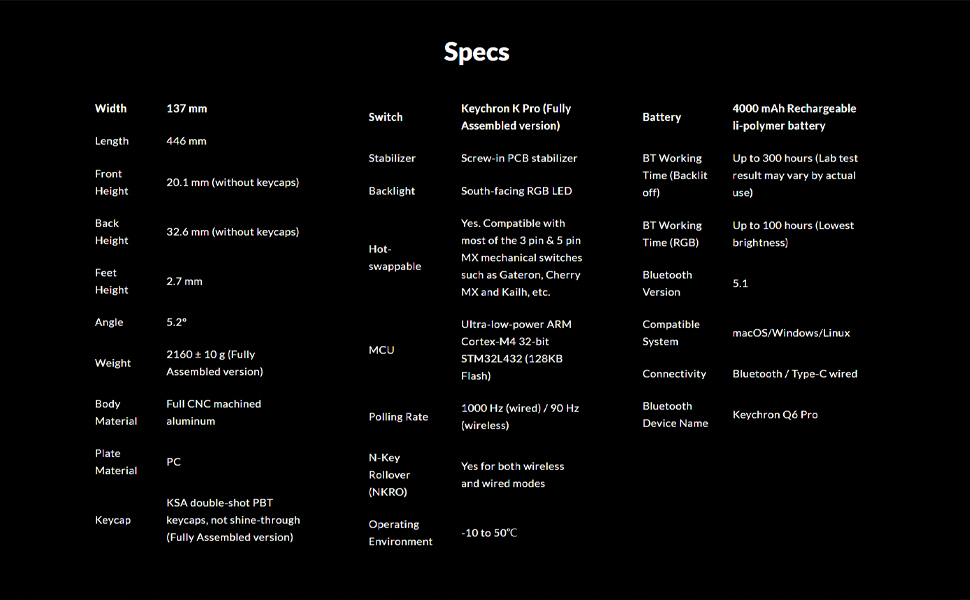
Image: An illustration showing all components included in the Keychron Q6 Pro package.
Жайгашуу
1. Баштапкы байланыш
The Keychron Q6 Pro supports both wired and wireless (Bluetooth) connectivity.
Зымдуу режим:
Connect the keyboard to your computer using the provided Type-C to Type-C cable or the Type-C to Type-A adapter. The keyboard will automatically be recognized. The polling rate in wired mode is 1000 Hz.
Wireless (Bluetooth) Mode:
- Баскычтоп кубатталганын текшериңиз.
- Flip the switch on the back of the keyboard to the Bluetooth mode.
- On your device (laptop, phone, tablet), enable Bluetooth and search for "Keychron Q6 Pro".
- Select the keyboard to pair. The keyboard can connect to up to 3 devices wirelessly.
The polling rate in wireless mode is 90 Hz.
2. Операциялык системанын которгучу
The Q6 Pro is fully compatible with both Mac and Windows operating systems. Use the OS switch located on the back of the keyboard to select the appropriate layout for your system.

Image: The Keychron Q6 Pro keyboard demonstrating its multi-device wireless connectivity with a phone, tablet, and laptop.
Иштөө нускамалары
1. QMK/VIA ыңгайлаштыруу
The Keychron Q6 Pro supports QMK/VIA for advanced customization. This allows you to remap any key, create macro commands, shortcuts, or key combinations.
- VIA программасын расмий Keychron сайтынан жүктөп алыңыз webсайт.
- Connect the keyboard in wired mode to ensure proper detection by VIA.
- Use the VIA interface to customize key assignments, create macros, and adjust lighting effects.

Image: A visual representation of the VIA software interface, used for programming and customizing the keyboard's functions.
2. RGB арткы жарыктандыруу
The keyboard features south-facing RGB backlighting with 22 types of preset effects. You can fine-tune the RGB hue, saturation, brightness, effect speed, and different modes directly on the keyboard or through QMK/VIA.

Image: The Keychron Q6 Pro keyboard illuminated with its south-facing RGB backlighting, displaying a spectrum of colors.
3. Ыкчам алмаштыруучу которгучтар
The Q6 Pro allows you to hot-swap every switch with almost all 3-pin and 5-pin MX style mechanical switches on the market (e.g., Cherry, Gateron, Kailh, Panda) without soldering.

Сүрөт: жакын план view of the Keychron Q6 Pro keyboard with several keycaps and switches removed, illustrating the hot-swappable sockets.
4. Айланма тутканын функционалдуулугу
The programmable rotary knob provides convenient control over various functions, typically volume control by default. Its function can be customized via QMK/VIA.
Техникалык тейлөө
1. Баскычтопту тазалоо
- Компьютериңизден клавиатураны ажыратыңыз.
- Кылдат тазалоо үчүн баскычтоптун капкактарын алып салуу үчүн баскычтоптун капкактарын тартуучу каражатты колдонуңуз.
- Кысылган абаны өчүргүчтөрдүн ортосундагы чаңды жана калдыктарды тазалоо үчүн колдонуңуз.
- Wipe keycaps and the keyboard frame with a soft, slightly damp кездеме. Ашыкча нымдуулуктан сактаныңыз.
2. Replacing Switches and Keycaps
Thanks to the hot-swappable design, switches and keycaps can be easily replaced.
- Каалаган клавиатураны акырын алып салуу үчүн берилген клавиатура тарткычын колдонуңуз.
- Use the provided switch puller to carefully remove the switch from its socket.
- Жаңы өчүргүчтүн төөнөгүчтөрүн платадагы тешиктер менен тегиздеп, ал ордуна чыкылдаган үн чыкканча бекем басыңыз. Төөнөгүчтөрдүн ийилбегенин текшериңиз.
- Place the new keycap onto the switch stem and press down.

Сүрөт: деталдуу view of the Keychron Q6 Pro keyboard with several keycaps detached, revealing the underlying switch stems and stabilizers.
Проблемаларды чечүү
If you encounter issues with your Keychron Q6 Pro, please refer to the following common solutions:
| Маселе | Мүмкүн болгон себеп / Чечим |
|---|---|
| Баскычтоп жооп бербей жатат (зымдуу) |
|
| Баскычтоп туташпай жатат (Bluetooth) |
|
| RGB backlight not working or incorrect |
|
| Атайын баскычтар иштебейт |
|
Көбүрөөк жардам алуу үчүн, расмий Keychron колдоо кызматына кайрылыңыз website or consult the full user guide PDF available online.
Техникалык шарттар
| Өзгөчөлүк | Деталь |
|---|---|
| Модел | Keychron Q6 Pro (Q6P-M4) |
| Макет | Full-size (108-Key) |
| Дене материалы | Full CNC machined aluminum |
| Клавиатура материалы | Double-shot KSA PBT |
| Которуу түрү | Keychron K Pro Banana (Hot-swappable) |
| Арткы жарык | Түштүктү караган RGB LED |
| Байланыш | Bluetooth 5.1 / Type-C wired |
| Добуш берүү көрсөткүчү (зымдуу) | 1000 Гц |
| Добуш берүү ылдамдыгы (зымсыз) | 90 Гц |
| MCU | Ultra-low-power ARM Cortex-M4 32-bit STM32L432 (128KB Flash) |
| Батарея | 4000 mAh Rechargeable Li-polymer battery |
| Battery Working Time (Backlight off) | 300 саатка чейин |
| Battery Working Time (RGB) | 100 саатка чейин (эң төмөн жарыктык) |
| Шайкеш система | macOS/Windows/Linux |
| Салмагы | Approximately 6.6 pounds (2160 ± 10 g) |
| Өлчөмдөрү (LxWxH) | 17.56 x 5.39 x 1.28 дюйм (446 x 137 x 32.6 мм) |
| Иштөө чөйрөсү | -10…50°С |
Кепилдик жана колдоо
Keychron products are designed for durability and performance. For information regarding product warranty, please refer to the official Keychron webсайтка же продуктуңузга кошулган кепилдик картасы.
For technical support, frequently asked questions, or to download the latest VIA software and firmware, please visit the Keychron support page:
You can also find additional resources, including the User Manual and User Guide PDFs, on the product's Amazon page under the "Product guides and documents" section.


