Introduction
Thank you for choosing the Technics EAH-AZ60M2 Wireless in-Ear Noise-Cancelling Headphones. This manual provides essential information for the proper setup, operation, and maintenance of your new headphones. Please read this manual thoroughly before use to ensure optimal performance and longevity of the product.

Image: The Technics EAH-AZ60M2 wireless in-ear headphones, shown alongside their compact black charging case.
Кутуда эмне бар
Upon opening the packaging, please verify that all the following components are included:
- Technics EAH-AZ60M2 Wireless In-Ear Noise-Cancelling Headphones (Left and Right earbuds)
- Заряддоо кутусу
- USB-C заряддоо кабели
- Multiple sizes of Earpieces (7 pairs)
- Колдонуучунун Колдонмосу (бул документ)
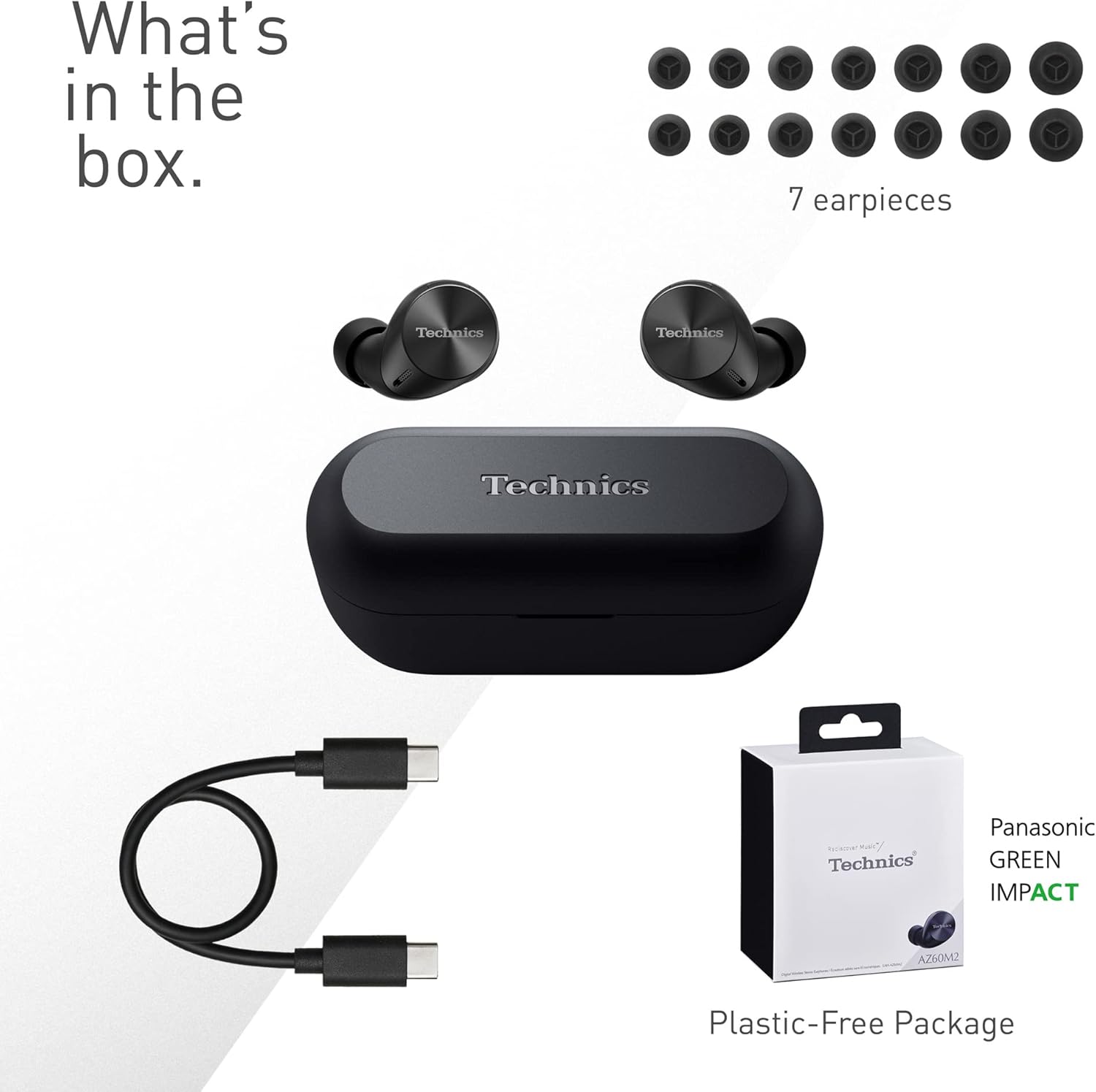
Image: A visual representation of the items included in the product packaging: the two earbuds, the charging case, a USB-C charging cable, and a selection of seven different earpiece sizes.
Жайгашуу
Баштапкы заряддоо
Биринчи колдонуудан мурун, наушникти жана кубаттоочу кутучаны толук заряддаңыз.
- Кулакчындардын экөөнү тең зарядкага салыңыз.
- Connect the USB-C charging cable to the charging port on the case and to a USB power source.
- The indicator lights on the case will show charging status. A full charge typically takes approximately 2.5 hours for the case and earbuds.
Түзмөк менен жупташтыруу
The EAH-AZ60M2 headphones use Bluetooth for wireless connection.
- Open the charging case with the earbuds inside. The earbuds will automatically enter pairing mode.
- Түзмөгүңүздө (смартфон, планшет, компьютер) Bluetooth иштетип, жеткиликтүү түзмөктөрдү издеңиз.
- Select "EAH-AZ60M2" from the list of found devices.
- Once connected, a confirmation sound will play from the headphones.
Technics Audio Connect колдонмосу
For enhanced control and customization, download the "Technics Audio Connect" app from your device's app store (Google Play for Android 6.0+ or App Store for iOS 12+). The app allows you to:
- Батареянын деңгээлин текшериңиз.
- Select EQ sound modes.
- Adjust noise cancelling levels.
- Customize touch sensor functions.
- Микропрограмма жаңыртууларын аткарыңыз.
Иштөө нускамалары
Наушник тагынуу
Select the earpieces that provide the most comfortable and secure fit for optimal sound quality and noise cancellation. The app can assist in finding the best fit. Insert the earbuds gently into your ears and rotate them slightly to ensure a snug seal.

Image: A person wearing the Technics EAH-AZ60M2 headphones, illustrating their comfortable, low-profile design. The image also displays the wide range of eartip sizes available for a customized fit.
Touch Controls
The headphones feature touch-sensitive panels on each earbud for controlling playback, calls, and noise modes. Functions can be customized via the Technics Audio Connect App.
| Акция | Сол кулакчын | Оң кулак |
|---|---|---|
| Single Tap | Ойнотуу/Пауза, Чакырууга жооп берүү | Ойнотуу/Пауза, Чакырууга жооп берүү |
| Эки жолу таптаңыз | Алдыга көз жиберүү | Үндү көтөрүү |
| Үч жолу таптаңыз | Жолду артка өткөрүп жиберүү | Үндү төмөндөтүү |
| Узак басуу | Toggle Noise Cancelling/Ambient Mode | Үн жардамчысы |
Ызы-чууну башкаруу режимдери
The EAH-AZ60M2 features Dual Hybrid Active Noise Cancelling for immersive listening and Ambient Sound Modes for situational awareness.
- Активдүү ызы-чууну жокко чыгаруу (ANC): Reduces external noise for focused listening.
- Natural Ambient Mode: Allows you to hear surrounding sounds naturally.
- Attention Mode: Focuses on human voices, making it easier to hear announcements or conversations without removing the headphones.
Toggle between these modes by long-pressing the left earbud's touch sensor, or adjust settings precisely using the Technics Audio Connect App.

Image: A close-up of a single Technics EAH-AZ60M2 earbud, highlighting its key audio features including Hi-Res Audio Wireless support, LDAC compatibility, 8mm drivers, and Noise Cancelling capabilities.
Көп чекиттүү туташуу
The headphones support multipoint connection, allowing simultaneous pairing with up to three devices (e.g., a smartphone, tablet, and PC). This enables seamless switching between audio sources without re-pairing.
- To switch audio, simply play content on the desired device. The headphones will automatically connect to the active audio source.
- Note: LDAC playback is not possible when connected to three devices simultaneously.

Image: A person sitting at a desk, demonstrating the smart 3-device switching feature of the Technics EAH-AZ60M2 headphones, with connection lines illustrating simultaneous pairing to a smartphone, tablet, and laptop.
Making and Receiving Calls (JustMyVoice Technology)
The EAH-AZ60M2 incorporates JustMyVoice Technology, utilizing 8 separate microphones and advanced wind noise reduction to isolate and amplify your speech while minimizing background noise during calls.
- Чакырууга жооп берүү: Кулакчындарды бир жолу таптаңыз.
- Чакырууну аяктоо: Чалуу учурунда кулакчындардын бирин бир жолу басыңыз.
- Чакырууну четке кагуу: Кулакчындын бирин көпкө басып коюңуз.
- Single Earphone Use: You can use one earbud independently while the other is charging or stored.

Image: A person outdoors, demonstrating the JustMyVoice Technology feature of the Technics EAH-AZ60M2 headphones, with visual cues indicating sound pickup and voice isolation.
Заряддоо жана батареянын иштөө мөөнөтү
The EAH-AZ60M2 headphones offer extended listening times with the included charging case.
- Наушниктин батареясынын иштөө мөөнөтү: Up to 7 hours of playback with Active Noise Cancelling (ANC) enabled.
- Case менен жалпы ойнотуу: Up to 24 hours of total playback time with multiple charges from the case.
- Тез кубаттоо: 15 мүнөттүк тез кубаттоо болжол менен 70 мүнөт ойнотууну камсыз кылат.
Qi зымсыз кубаттоо
The charging case supports Qi wireless charging. Simply place the case on a compatible Qi wireless charger (sold separately) to charge.

Image: An illustration depicting the battery life of the Technics EAH-AZ60M2 headphones, showing 7 hours of listening time for the earbuds and an additional 24 hours of backup with the charging case.
Техникалык тейлөө
Тазалоо
- Regularly clean the earbuds, especially the earpieces and mesh grilles, with a soft, dry, lint-free cloth.
- Remove earpieces and clean them with mild soap and water if necessary, ensuring they are completely dry before reattaching.
- Кулакчындардагы жана корпустун ичиндеги заряддоо контакттарын кургак кебез менен тазалаңыз.
- Абразивдүү тазалагычтарды, спиртти же эриткичтерди колдонбоңуз.
Суу каршылык
The EAH-AZ60M2 earbuds are IPX4 water resistant, meaning they are protected against splashing water from any direction. This makes them suitable for light rain or intensive workouts.
- Кубаттоочу корпус сууга туруштук бере албайт.
- Кулакчындарды сууга салбаңыз.
- Ensure earbuds are dry before placing them back into the charging case.
Сактагыч
Колдонулбай турган учурда, кулакчындарды коргоо жана кубаттоо үчүн кубаттоочу кутучасында сактаңыз. Түз күн нурунан жана өтө жогорку температурадан алыс, салкын, кургак жерде сактаңыз.
Проблемаларды чечүү
| Көйгөй | Мүмкүн себеп | Чечим |
|---|---|---|
| Наушниктен үн чыкпайт. | Headphones not paired or connected. Low battery. Volume too low. | Ensure headphones are paired and connected to your device. Charge headphones. Increase volume on both headphones and device. |
| Cannot pair headphones. | Headphones not in pairing mode. Device Bluetooth off. Interference. | Ensure earbuds are in the case and lid is open to enter pairing mode. Turn device Bluetooth off and on. Move closer to device. Forget device and re-pair. |
| Noise cancelling not effective. | Poor earbud fit. ANC mode not active. | Try different earpiece sizes for a better seal. Ensure ANC is enabled via touch control or app. |
| Чалуу сапаты начар. | Environmental noise. Single earbud use. | Ensure both earbuds are used for optimal call quality. Move to a quieter environment. |
| Наушник заряддалбай жатат. | Poor contact. Faulty cable/charger. | Ensure earbuds are correctly seated in the case. Clean charging contacts. Try a different USB-C cable or power source. |
For further assistance, refer to the Technics Audio Connect App or visit the official Technics support webсайт.
Техникалык шарттар
| Өзгөчөлүк | Деталь |
|---|---|
| Модель аты | Eah-AZ60m2 |
| Элемент моделинин номери | EAH-AZ60M2EK |
| Бренд | Техника |
| Түс | Кара |
| Байланыш технологиясы | Зымсыз (Bluetooth) |
| Форма фактору | In-Ear |
| Noise Control | Active Noise Cancellation (Dual Hybrid) |
| Айдоочунун өлчөмү | 8мм |
| Микрофондор | 8 (for JustMyVoice Technology) |
| Көп чекиттүү туташуу | 3 түзмөккө чейин |
| Суу каршылык | IPX4 (наушнактар гана) |
| Earbud Battery Life (ANC On) | 7 саатка чейин |
| Total Battery Life with Case | 24 саатка чейин |
| Заряддоо корпусунун батареясы | 24 Hours average life |
| Заряддоо | USB-C, Qi зымсыз кубаттоо |
| Элементтин салмагы (наушник) | 7 грамм (болжол менен 0.247 унция) |
| Көтөрүү кутусунун салмагы | 28 грамм |
| Продукциянын өлчөмдөрү | 1.1 x 0.91 x 1.02 дюйм (наушник) |
Кепилдик жана колдоо
For information regarding warranty coverage, terms, and conditions, please refer to the warranty card included with your product or visit the official Technics webсайт.
For technical support, product registration, or frequently asked questions, please visit the Technics support page or contact their customer service.
- Technics Official Webсайт: www.technics.com
- Technics Audio Connect колдонмосу: Google Play Store жана Apple App Store дүкөндөрүндө жеткиликтүү.


