1. Киришүү
Thank you for choosing the SPLITSKY NZFS Kids Alarm Clock. This device combines an alarm clock, white noise sleep aid, and an 8-mode RGB night light, designed to assist with sleep and wake-up routines for children and adults. Please read this manual thoroughly to understand its features and ensure proper operation.
Коопсуздук маалыматы:
- Түзмөктү суудан жана нымдуулугу жогору чөйрөлөрдөн алыс кармаңыз.
- Аппаратты өз алдынча бөлүүгө же оңдоого аракет кылбаңыз.
- Use only the provided USB-C power cable or a certified equivalent.
- Аппараттын айланасында туура желдетүүнү камсыз кылыңыз.
2. Пакеттин мазмуну
Пакетиңизде бардык буюмдар бар экенин текшериңиз:
- SPLITSKY NZFS Kids Alarm Clock
- 1.2M (4.7 inch) USB-C Power Cable
- Колдонуучунун Колдонмосу (бул документ)
- 1 x CR2032 Lithium Ion Battery (pre-installed for memory backup)
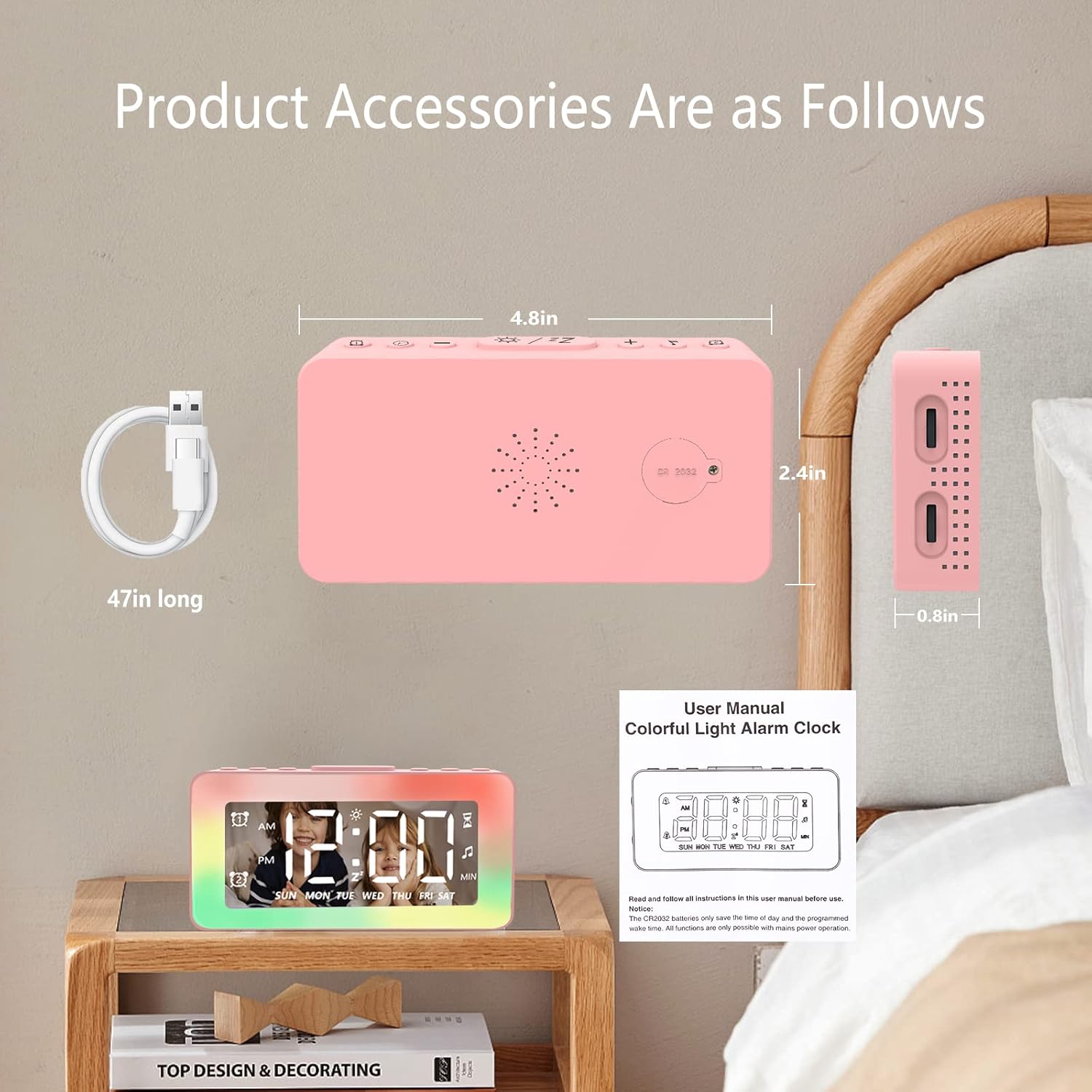
Image: The SPLITSKY NZFS Kids Alarm Clock, a USB-C power cable, and the user manual are included in the package.
3. Продукт бүтүп калдыview
Familiarize yourself with the buttons and ports on your alarm clock:

Сүрөт: деталдуу view of the alarm clock's top buttons and side ports, including Alarm 1, Time Setting, Light Minus/Settings, Snooze/Light Mode Switch, Light Plus/Setup, Music Switch, Alarm 2, Volume Setting, Time Brightness Setting, USB Output Charging Port, and Type-C Input Interface.
- Ойготкуч 1 баскычы: Set and activate Alarm 1.
- Убакытты орнотуу баскычы: Учурдагы убакытты тууралаңыз.
- Light Minus / Settings Button: Decrease light brightness or navigate settings.
- Snooze / Light Mode Switch Button: Activate snooze, or cycle through light modes.
- Light Plus / Setup Button: Increase light brightness or confirm settings.
- Music Switch Button: Cycle through white noise sounds.
- Ойготкуч 2 баскычы: Set and activate Alarm 2.
- Volume Setting Wheel (Side): Adjust alarm and white noise volume.
- Time Brightness Setting Wheel (Side): Дисплей жарыктыгын тууралоо.
- USB Output Charging Port (Side): Charge external devices.
- Type-C Input Interface (Side): Connect power cable to the alarm clock.
4. Орнотуу
4.1 Кубат туташтыруу
- Connect the provided USB-C power cable to the Type-C Input Interface on the side of the alarm clock.
- USB-C кабелинин экинчи учун туура келген USB кубат адаптерине (кошумча эмес) же USB портуна сайыңыз.
- Дисплей күйүп, сааттын күйүп турганын билдирет.

Image: The SPLITSKY NZFS Kids Alarm Clock is shown powered on and connected via its USB-C port, also demonstrating its capability to charge a smartphone.
4.2 Батареяны орнотуу (Эстутумдун камдык көчүрмөсү)
The alarm clock includes a pre-installed CR2032 battery. This battery serves as a memory backup to retain time and alarm settings during a power outage or when the main power is disconnected. It does not power the clock for regular operation.
- If the battery needs replacement, locate the battery compartment on the back of the unit.
- Бөлүктү ачуу үчүн кичинекей бурагычты колдонуңуз.
- Туура полярдуулукту камсыз кылуу үчүн жаңы CR2032 батарейкасы менен алмаштырыңыз.
- Отсекти коопсуз жабыңыз.
5. Иштөө нускамалары
5.1 Setting the Time (12H/24H Format)
- басып, кармап туруңуз Убакытты орнотуу баскычы until the hour digits begin to flash.
- колдонуу Light Minus / Settings Button (ылдый) же Light Plus / Setup Button (up) to adjust the hour.
- басыңыз Убакытты орнотуу баскычы again to move to minute adjustment. Adjust minutes using the Light Minus/Plus buttons.
- басыңыз Убакытты орнотуу баскычы a third time to select 12-hour or 24-hour format. Adjust using the Light Minus/Plus buttons.
- басыңыз Убакытты орнотуу баскычы убакытты орнотуу режимин ырастоо жана чыгуу үчүн дагы бир жолу басыңыз.
5.2 Setting Alarms (Dual Alarm, Daily/Weekday/Weekend Mode)
Саат эки көз карандысыз ойготкучту (1-ойготкуч жана 2-ойготкуч) колдойт.
- басып, кармап туруңуз Ойготкуч 1 баскычы (1-сигнализация үчүн) же Ойготкуч 2 баскычы (for Alarm 2) until the alarm hour digits flash.
- колдонуу Light Minus / Settings Button or Light Plus / Setup Button саатты тууралоо үчүн.
- Press the respective Alarm Button again to move to minute adjustment. Adjust minutes using the Light Minus/Plus buttons.
- Press the respective Alarm Button again to select the alarm mode:
- Күнүмдүк режим: Күн сайын ойготкуч ызы-чуу болуп турат.
- Weekday Mode: Alarm sounds Monday to Friday.
- Дем алыш күндөрү режими: Alarm sounds Saturday and Sunday.
- Press the respective Alarm Button once more to confirm and exit alarm setting mode.
- To enable/disable an alarm, short press the Ойготкуч 1 баскычы or Ойготкуч 2 баскычыДисплейде ойготкуч сүрөтчөсү пайда болот/жок болот.
5.3 Тындыруу функциясы
When an alarm sounds, tap the Snooze / Light Mode Switch Button on top to activate snooze. The alarm will pause for 9 minutes and then sound again. This can be repeated multiple times.
5.4 Night Light (8 Modes RGB, 10-level dimming)
The alarm clock features 6 solid color lights and 2 ambient colorful lights.
- баскычын кыска басыңыз Snooze / Light Mode Switch Button to turn on the night light and cycle through the 8 color modes.
- To adjust the brightness (10 levels), use the Light Minus / Settings Button or Light Plus / Setup Button while the night light is active.
- To turn off the night light, continue pressing the Snooze / Light Mode Switch Button жарык өчкөнчө.

Image: Multiple SPLITSKY NZFS Kids Alarm Clocks are shown, each displaying a different color from the 8 available RGB night light modes.
5.5 White Noise Sleep Aid (8 Sounds)
The clock offers 8 soothing sounds to aid sleep.
- баскычын кыска басыңыз Музыканы которуу баскычы to turn on the white noise and cycle through the available sounds.
- To adjust the volume (16 levels), use the Volume Setting Wheel on the side of the clock.
- To turn off the white noise, continue pressing the Музыканы которуу баскычы until the sound stops.

Image: The SPLITSKY NZFS Kids Alarm Clock is displayed on a bedside table, with icons illustrating the various white noise options such as rain, cicadas, piano, bonfire, waves, birdsong, and church bells.
5.6 Sleep Timer (10-120 minutes)
The sleep timer allows you to set a duration for the white noise and/or night light to play before automatically turning off.
- While white noise or night light is active, press and hold the Музыканы которуу баскычы (for white noise timer) or Snooze / Light Mode Switch Button (for light timer).
- колдонуу Light Minus / Settings Button or Light Plus / Setup Button to select the desired timer duration (10, 20, 30, 60, 90, 120 minutes).
- Press the respective button again to confirm the timer setting. The timer icon will appear on the display.
5.7 Дисплейдин жарыктыгын жөндөө
Adjust the brightness of the LED time display using the Time Brightness Setting Wheel on the side of the clock.
5.8 USB кубаттоо порту
The USB output charging port on the side of the alarm clock can be used to charge other small electronic devices, such as smartphones. Connect your device's charging cable to this port.
6. Техникалык тейлөө
6.1 Тазалоо
- Тазалоодон мурун аппараттын розеткадан ажыратылганын текшериңиз.
- Бетти жумшак, кургак чүпүрөк менен сүртүңүз.
- Абразивдүү тазалагычтарды, эриткичтерди же химиялык спрейлерди колдонбоңуз.
6.2 Сактоо
When not in use for extended periods, store the alarm clock in a cool, dry place, away from direct sunlight and extreme temperatures.
7. Кыйынчылыктарды
If you encounter issues with your SPLITSKY NZFS Kids Alarm Clock, refer to the table below for common problems and solutions.
| Көйгөй | Мүмкүн себеп | Чечим |
|---|---|---|
| Сааттын дисплейи өчүк же күңүрт. | Not connected to power; Time brightness set too low. | Ensure USB-C cable is securely connected to a power source. Adjust the Time Brightness Setting Wheel. |
| Ойготкуч угулбайт. | Alarm not activated; Alarm volume too low. | Check if the alarm icon is displayed. If not, short press the respective Alarm Button to activate. Adjust the Volume Setting Wheel. |
| Time/settings reset after power disconnection. | CR2032 резервдик батареясы түгөнүп калган же жок. | Replace the CR2032 battery in the battery compartment. |
| Night light or white noise not working. | Function not activated; Sleep timer active. | баскычын кыска басыңыз Snooze / Light Mode Switch Button or Музыканы которуу баскычы to activate. Check if a sleep timer is set. |
8. Техникалык шарттар
| Өзгөчөлүк | Деталь |
|---|---|
| Бренд | СПЛИЦКИ |
| Модель номери | NZFS |
| Дисплей түрү | Digital LED |
| Продукциянын өлчөмдөрү | 3.17" Туурасы x 3.17" Бийиктиги (болжол менен 8.05 см Туурасы x 8.05 см Бийиктиги) |
| Элемент Салмагы | 8.1 унция (болжол менен 230 грамм) |
| Power Source | Corded Electric (USB-C), Battery Powered (CR2032 for memory) |
| Түнкү жарык режимдери | 8 (6 solid colors, 2 ambient colorful) with 10-level dimming |
| Ак ызы-чуу | 8 тынчтандыруучу үн |
| Сигнал үндөрү | 7 wake-up alarm tones with 16-level volume control |
| Ойготкучтун өзгөчөлүктөрү | Dual Alarm, Daily/Weekday/Weekend modes, 9-minute Snooze |
| Таймер функциясы | 10-120 minute sleep timer for sounds and lights |
| Байланыш | USB-C Input, USB-A Output (for charging external devices) |
| Материал | Acrylonitrile бутадиен Styrene |
9. Кепилдик жана колдоо
9.1 Кепилдик маалыматы
Please refer to the warranty information provided at the time of purchase or contact your retailer for details regarding the product warranty. Keep your proof of purchase for any warranty claims.
9.2 Кардарларды колдоо
For technical assistance, troubleshooting beyond this manual, or general inquiries, please contact the seller through the platform where you purchased the product. Provide your order number and a detailed description of the issue for prompt support.


