Introduction
Сатып алганыңыз үчүн рахматasing the THOMSON Sound Bar B206. This sound bar is designed to enhance your audio experience for television, music, and gaming, featuring multiple connectivity options and two wireless microphones for karaoke. This manual provides essential information for safe and efficient use of your device. Please read it thoroughly before operation and retain it for future reference.
Коопсуздук маалыматы
- Аппаратты жамгырдын, нымдуулуктун же экстремалдык температуранын таасиринде калтырбаңыз.
- Ensure proper ventilation around the sound bar to prevent overheating.
- в ачпагылаasing; бардык тейлөөлөрдү квалификациялуу кызматкерлерге тапшырыңыз.
- Берилген кубат адаптерин гана колдонуңуз.
- Аппаратты күчтүү магнит талаасынан алыс кармаңыз.
- Avoid placing heavy objects on the sound bar.
Пакеттин мазмуну
Төмөндө тизмеленген нерселердин баары пакетиңизге камтылганын текшериңиз:
- THOMSON Sound Bar (B206) x 1
- Алыстан башкаруу x 1
- Зымсыз микрофон x 2
- Кубат адаптери x 1
- Аудио кабель x 1
- Coaxial Cable x 1
- Optical Fiber Cable x 1
- Wall Mounting Kit x 1 (includes padlocks, gel column, screws)
- Колдонуучунун колдонмосу x 1

Сүрөт 1: Камтылган аксессуарлар
This image displays the complete set of items provided with your THOMSON Sound Bar B206, including the sound bar unit, remote control, two wireless microphones, power adapter, user manual, audio cable, coaxial cable, optical fiber cable, and wall mounting kit components.
Продукт бүттүview
Sound Bar Components
The THOMSON Sound Bar B206 features a sleek design with integrated controls and various input ports for versatile connectivity.

Figure 2: Sound Bar, Microphones, and Remote
This image shows the main sound bar unit, two wireless microphones, and the remote control, providing a complete view негизги компоненттердин.
Internal Speaker Design
The sound bar is equipped with four large dual drive units, delivering a maximum output power of 200 Watts for HiFi sound quality, including dual bass and clear mid-range frequencies for a 3D surround sound effect.

Figure 3: Internal Speaker Structure
This diagram illustrates the internal construction of the sound bar's speakers, emphasizing the dual drive units responsible for audio output, alongside the Bluetooth connectivity symbol.
Rear Panel Connections and Remote Control
The rear panel provides various input options, while the remote control offers full command over the sound bar's functions.

Figure 4: Rear Panel Ports and Remote Control
This image details the connectivity options on the sound bar's rear panel, including the power switch, HDMI ARC, power input, subwoofer output, coaxial, optical, and AUX inputs. The accompanying remote control is also shown, indicating various function buttons.
Жайгашуу
1. Жайгаштыруу параметрлери
The THOMSON Sound Bar B206 can be placed on a desktop or mounted on a wall. A wall mounting kit is included for convenient installation.
- Иш тактада жайгаштыруу: Place the sound bar on a stable, flat surface in front of your TV.
- Дубалга орнотуу: Use the provided wall mounting kit (padlocks, gel column, screws) to securely attach the sound bar to a wall below your TV. Ensure the wall material can support the weight of the sound bar.
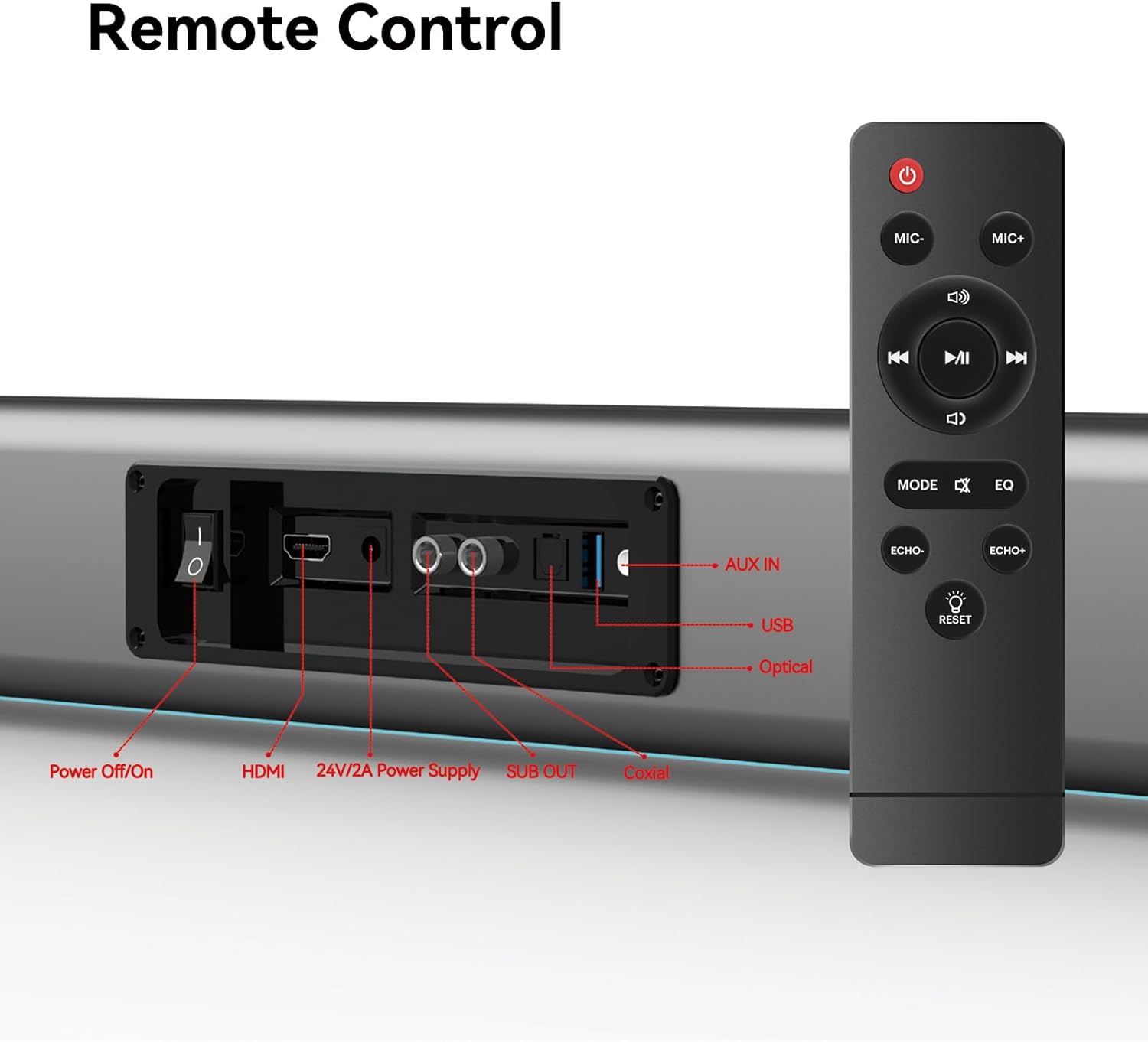
Figure 5: Placement Options (Wall Mount and Desktop)
This image illustrates the versatility of the sound bar's placement, showing it both mounted on a wall beneath a television and resting on a media console, highlighting the included wall mount kit for an elegant setup.
2. Кубатка туташуу
- Connect the power adapter to the "24V/2A Power Supply" port on the sound bar's rear panel.
- Кубат адаптерин розеткага сайыңыз.
3. Аудио байланыштары
Choose one of the following methods to connect the sound bar to your audio source (e.g., TV, smartphone, tablet, laptop):
- HDMI ARC:
Connect an HDMI cable (not included) from the HDMI ARC port on your TV to the HDMI port on the sound bar. Ensure your TV's HDMI ARC function is enabled in its settings.
- Оптикалык:
Connect the provided optical fiber cable from your TV's optical output to the "Optical" port on the sound bar. Select "Optical" as the input source on the sound bar.
- AUX (3.5 мм аудио уяча):
Connect the provided audio cable from your device's headphone jack or audio output to the "AUX IN" port on the sound bar. Select "AUX" as the input source.
- Коаксиалдуу:
Connect the provided coaxial cable from your TV's coaxial output to the "Coaxial" port on the sound bar. Select "Coaxial" as the input source.
- USB:
Аудио камтыган USB дискти салыңыз files into the "USB" port. The sound bar will automatically switch to USB mode and begin playback.
- Bluetooth:
Refer to the "Bluetooth Pairing" section under Operating Instructions for detailed steps.
Иштөө нускамалары
1. Күйгүзүү/өчүрүү
басыңыз Өчүрүү/күйгүзүү button on the sound bar's rear panel or the Күч аппаратты күйгүзүү же өчүрүү үчүн пульттун баскычын басыңыз.
2. Киргизүү булагын тандоо
басыңыз РЕЖИМ button on the remote control to cycle through available input sources: HDMI ARC, Optical, AUX, Coaxial, USB, and Bluetooth. The LED display on the sound bar will indicate the currently selected mode.
3. Үндү башкаруу
колдонуу Көлөм + жана Көлөмү - buttons on the remote control or the physical controls on the right side of the sound bar to adjust the volume. The sound bar supports 8 levels of bass and treble adjustment.
4. EQ режимдери
The sound bar offers 5 Equalizer (EQ) modes to optimize audio for different content types. Press the EQ button on the remote control to switch between modes:
- Кино режими: Enhances cinematic sound effects and dialogue.
- Музыка режими: Музыка ойнотуу үчүн аудиону оптималдаштырат.
- Жаңылыктар режими: Clarifies spoken dialogue for news and talk shows.
- Additional modes may be available for specific audio profiles.
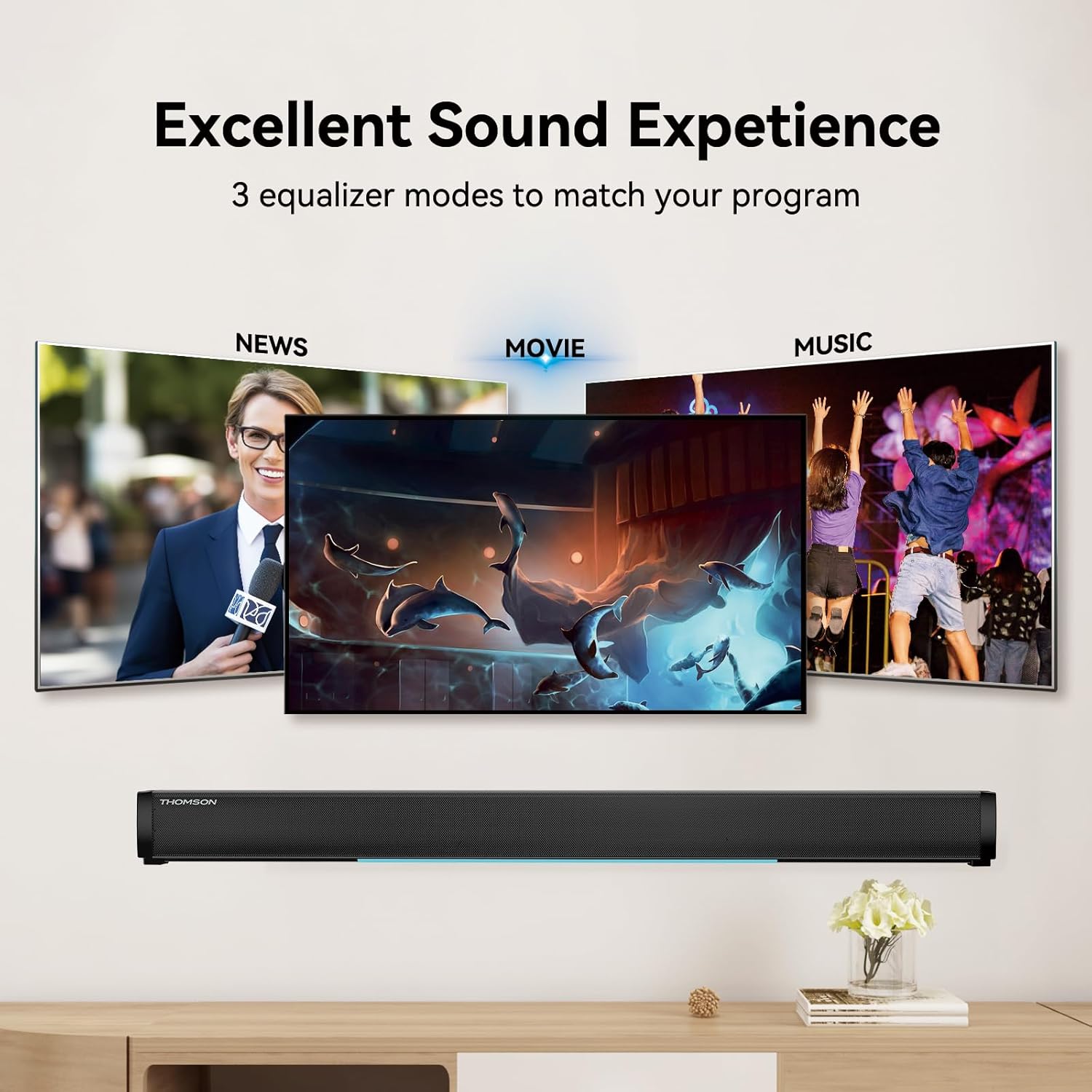
Figure 6: EQ Modes
This image illustrates the three primary equalizer modes (News, Movie, Music) available on the sound bar, demonstrating how each mode is tailored for different audio experiences.
5. Bluetooth Жупташтыруу
- Turn on the sound bar and select Bluetooth mode using the РЕЖИМ button on the remote. The LED display will show "BT" and flash, indicating pairing mode.
- Түзмөгүңүздө (смартфон, планшет ж.б.) Bluetooth иштетиңиз жана жеткиликтүү түзмөктөрдү издеңиз.
- Select "THOMSON B206" from the list. Once connected, the sound bar's LED display will stop flashing.
6. Зымсыз микрофондор
The sound bar comes with two wireless microphones for karaoke or vocal use.
- Ensure the microphones have fresh batteries (AAA, not included).
- Turn on the microphones. They should automatically pair with the sound bar.
- колдонуу MIC+ жана MIC- buttons on the remote to adjust microphone volume.
- колдонуу ECHO+ жана ЭХО- buttons to adjust the echo effect.

Figure 7: Karaoke Functionality
This image depicts two individuals enjoying a karaoke session, utilizing the THOMSON sound bar and its wireless microphones connected to a large display, showcasing the product's entertainment capabilities.
Проблемаларды чечүү
| Көйгөй | Мүмкүн себеп | Чечим |
|---|---|---|
| Күч жок | Электр кабели туташкан эмес; Электр розеткалары активдүү эмес. | Электр кабелинин бекем туташтырылганын текшериңиз. Розетка иштеп жатканын текшериңиз. |
| Үн жок | Туура эмес киргизүү булагы тандалды; Үн өтө төмөн; Кабелдер туура туташкан эмес. | Select the correct input source (HDMI, Optical, AUX, etc.). Increase volume. Check all audio cable connections. |
| Bluetooth жупташтырылган жок | Sound bar not in pairing mode; Device too far; Bluetooth disabled on device. | Ensure sound bar is in Bluetooth mode and flashing. Move device closer. Enable Bluetooth on your device. |
| Микрофондор иштебейт | Microphone batteries low/dead; Microphones not turned on. | Replace microphone batteries. Ensure microphones are switched on. |
| Volume jumps too much with one press | This can be a characteristic of the sound bar's volume control sensitivity. | Adjust volume carefully. Consider using the TV's volume control if connected via HDMI ARC, as it may offer finer adjustments. |
Техникалык шарттар
| Өзгөчөлүк | Деталь |
|---|---|
| Модель аты | THOMSON Sound Bar B206 |
| Динамик түрү | Саундбар |
| Динамиктин максималдуу чыгаруу күчү | 200 Ватт |
| Көлөмдүү үн каналынын конфигурациясы | 2.0 |
| Байланыш технологиясы | Auxiliary, Bluetooth, Coaxial, HDMI ARC, Optical, USB |
| Зымсыз байланыш технологиясы | Bluetooth |
| Башкаруу ыкмасы | Алыстан |
| Продукциянын өлчөмдөрү | 37"D x 3.35"W x 2.9"H |
| Элемент Салмагы | 8.63 фунт |
| Материал | Пластик |
| Power Source | Электр зымдары |
| Өзгөчө өзгөчөлүк | Зымсыз микрофондор |
Техникалык тейлөө
- Тазалоо: Үн тилкесинин бетин тазалоо үчүн жумшак, кургак чүпүрөктү колдонуңуз. Суюк тазалоочу каражаттарды же абразивдүү материалдарды колдонбоңуз.
- Сактагыч: Узак мөөнөткө колдонулбаганда, үн тилкесин салкын, кургак жерде, тике күн нурунан жана экстремалдык температурадан алыс сактаңыз.
- Микрофонго кам көрүү: Remove batteries from the wireless microphones if they will not be used for a long time to prevent leakage.
Кепилдик жана колдоо
THOMSON products are designed and manufactured to the highest quality standards. For warranty information and customer support, please refer to the warranty card included in your package or visit the official THOMSON webсайт. Сатып алганыңыздын далили катары сатып алуу дүмүрчөгүңүздү сактаңыз.
Шайкештик жөнүндө маалымат
This device complies with relevant regulations for electronic equipment. Any changes or modifications not expressly approved by the manufacturer could void the user's authority to operate the equipment.


