1. Киришүү
The EPOS Impact 1060T is a professional double-sided wireless headset designed for PC use, optimized for high-performance communication environments. It features advanced AI Noise Cancellation and Super Wideband Audio to ensure exceptional clarity during calls, even in noisy surroundings. The headset is Microsoft Teams Certified, providing seamless integration and optimal performance for virtual meetings.
Engineered for all-day comfort, the Impact 1060T includes soft memory foam earpads and a lightweight frame. Smart features such as a 360° busylight, mic-tip LED mute alerts, and intuitive boom-arm call control enhance efficiency and focus. This manual provides detailed instructions for setting up, operating, and maintaining your headset to ensure optimal performance and longevity.

Figure 1: EPOS Impact 1060T highlighting key features.
2. Пакеттин мазмуну
Пакетиңизде бардык буюмдар бар экенин текшериңиз:
- EPOS Impact 1060T Wireless Headset
- USB-C - USB-C кабели
- USB-C - USB-A адаптер
- Soft Carry Pouch
- Коопсуздук колдонмосу
- Шайкештик баракчасы
- Quick колдонмо
- BTD 800a Dongle (for models with dongle)

Figure 2: EPOS Impact 1060T package contents.
3. Орнотуу
3.1 Алгачкы заряддоо
Before first use, fully charge your headset. Connect the provided USB-C to USB-C cable to the headset and a power source. Use the USB-C to USB-A adapter if your power source only has USB-A ports. The headset can also be charged wirelessly if a compatible charging stand is available (charging stand sold separately for some models).
3.2 Күйгүзүү/өчүрүү
- Күйгүзүү үчүн: Күйгүзүү баскычын индикатор жарыгы күйгөнгө чейин басып туруңуз.
- Өчүрүү үчүн: Индикатор жарыгы өчкөнгө чейин Кубат баскычын басып, кармап туруңуз.
3.3 Түзмөктөргө туташуу
The EPOS Impact 1060T offers versatile connectivity options:
- Bluetooth жупташууда:
- Гарнитура өчүрүлгөнүн текшериңиз.
- Күйгүзүү баскычын болжол менен 4 секунд басып, LED индикатору көк жана кызыл түстө күйүп-өчкөнгө чейин, жупташтыруу режимин көрсөткөнгө чейин кармап туруңуз.
- On your device (PC, smartphone), go to Bluetooth settings and select "EPOS Impact 1060T" from the list of available devices.
- Туташтырылгандан кийин, LED индикатору көк түстө күйөт.
- USB-C зымдуу туташуу: Connect the headset directly to your device using the provided USB-C to USB-C cable. The headset will be recognized automatically.
- USB-A Wired Connection: Use the USB-C to USB-A adapter with the USB-C cable to connect to devices with USB-A ports.
- Using the BTD 800a Dongle: For optimal wireless performance and extended range, plug the BTD 800a USB dongle into your PC. The headset will automatically connect to the dongle.
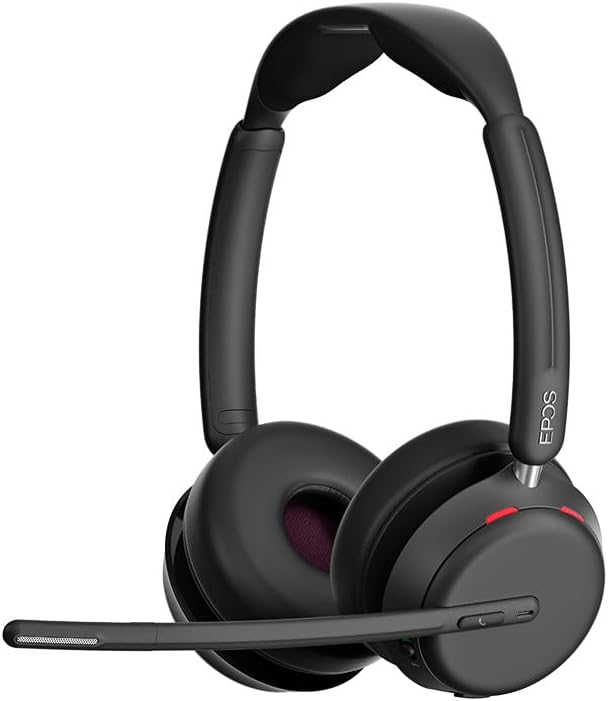
Сүрөт 3: Алдыңкы view of the EPOS Impact 1060T Headset.
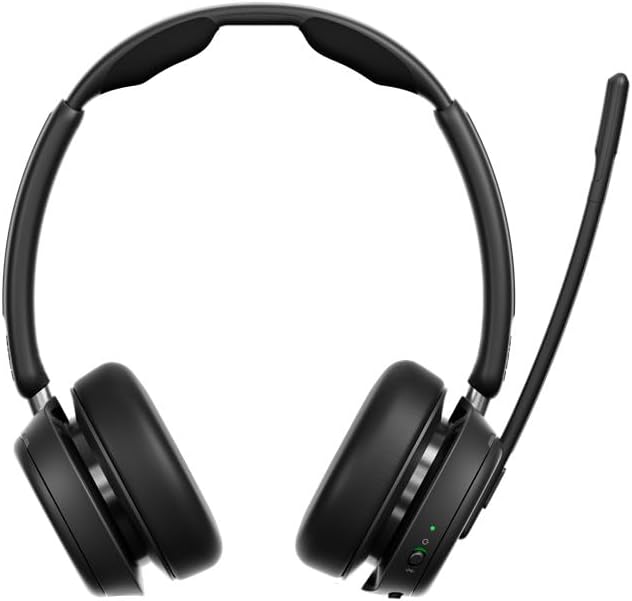
4-сүрөт: Артка view of the EPOS Impact 1060T Headset.
4. Иштөө нускамалары
4.1 Гарнитураны тагынуу
Adjust the headband for a comfortable and secure fit. The memory foam earpads are designed for extended wear. The microphone boom arm can be rotated to either side for optimal voice pickup.
4.2 Чалууларды башкаруу
- Чалууга жооп берүү/аяктоо: Use the intuitive inline controller or the dedicated call button on the earcup.
- Микрофондун үнүн басуу/ачуу:
- Lower the microphone boom arm to unmute and raise it to mute.
- A mic-tip LED will alert you if the microphone is muted.
- Alternatively, use the mute button on the inline controller.
- Үндү көзөмөлдөө: Adjust the volume using the dedicated buttons on the inline controller or earcup.
4.3 Noise Cancellation and Audio Features
- Жасалма интеллект ызы-чууну жокко чыгаруу: Three digital beamforming microphones powered by EPOS AI™ actively block out background noise, ensuring your voice is heard clearly.
- Super Wideband Audio: Provides rich, natural sound for both calls and media.
- BrainAdapt™ Technology: Designed to reduce brain fatigue and enhance focus during long calls.
4.4 Smart өзгөчөлүктөрү
- Бош жарык: A 360° busylight on the headset signals your availability to colleagues, preventing interruptions during calls.
- Microsoft командалары тастыкталган: Optimized for Microsoft Teams, offering dedicated controls and seamless integration for calls and meetings.

Figure 5: Headset optimized for Unified Communications.
Video 1: "Powerful Sound and Comfort for Your Workday" - An official EPOS video showcasing the features and comfort of the Impact series headsets, including the 1060T.
Video 2: "EPOS IMPACT 860T Microsoft Teams Headset" - An official EPOS video demonstrating features of the similar Impact 860T model, highlighting Microsoft Teams integration and sound quality.
Video 3: "EPOS Impact 860T ANC Headset" - An official EPOS video showcasing the Active Noise Cancellation and design of the similar Impact 860T model.
5. Техникалык тейлөө
- Тазалоо: Гарнитураны тазалоо үчүн жумшак, кургак чүпүрөктү колдонуңуз. Суюктуктарды же абразивдүү тазалоочу каражаттарды колдонуудан алыс болуңуз.
- Сактагыч: When not in use, store the headset in the provided soft carry pouch to protect it from dust and damage.
- Батареяга кам көрүү: Батареянын иштөө мөөнөтүн узартуу үчүн, бат-баттан батарейканы толук зарядсыздандырбаңыз. Дайыма заряддаңыз.
- Программалык камсыздоо жаңыртуулары: Integrate with EPOS Manager for device updates and analytics to ensure optimal performance and access to the latest features.
6. Кыйынчылыктарды
If you experience issues with your EPOS Impact 1060T, refer to the following common solutions:
| Көйгөй | Мүмкүн себеп | Чечим |
|---|---|---|
| Аудио/микрофон иштебей жатат | Headset not paired/connected, incorrect audio device selected, microphone muted. | Ensure headset is paired/connected. Check device audio settings to select "EPOS Impact 1060T" as input/output. Unmute microphone. |
| Poor audio quality/background noise | Weak Bluetooth signal, environmental interference, microphone not positioned correctly. | Move closer to the connected device. Ensure no obstructions. Adjust microphone boom arm for optimal voice pickup. |
| Гарнитура заряддалбай жатат | Cable not connected properly, faulty cable/charger, wireless charging misalignment. | Verify cable connections. Try a different USB port or charger. Ensure headset is correctly placed on the wireless charging pad. |
| Headset randomly restarts/disconnects | Firmware issue, device compatibility, low battery. | Ensure headset firmware is up to date via EPOS Manager. Fully charge the headset. Try connecting to a different device to isolate the issue. |
7. Техникалык шарттар
- Модель аты: IMPACT 1060T
- Байланыш технологиясы: Зымсыз (Bluetooth)
- Bluetooth версиясы: 5.0
- Ызы-чууну көзөмөлдөө: Ыңгайлаштырылган ызы-чууну жокко чыгаруу
- Микрофон: AI Noise Cancellation with three digital beamforming microphones
- Аудио: Super Wideband Audio
- Наушниктин формасы: On Ear
- Материал: Fabric/Silicone
- Элемент Салмагы: 3.68 унция (0.23 фунт)
- Продукциянын өлчөмдөрү: 19.69 x 19.69 x 11.02 дюйм
- Батареялар: 1 литий-иондук батарейка (кошулган)
- Өзгөчөлүктөр: Adjustable Headband, Lightweight, Noise Cancellation, Volume Control, Wireless Charging
- Өндүрүүчү: Demant Sound Epos Audio A/S
8. Кепилдик жана колдоо
The EPOS Impact 1060T is built for durability and comes with a 3 жылдык кепилдик. For technical support, warranty claims, or further assistance, please visit the official EPOS webсайтка же кардарларды тейлөөгө кайрылыңыз. Кепилдикти текшерүү үчүн сатып алганыңыздын далилин сактаңыз.
For additional resources and software updates, visit the EPOS Store on Amazon.


