1. Киришүү
This manual provides comprehensive instructions for the setup, operation, and maintenance of your TVIP S-Box v.710 4K UHD IP-Receiver. Please read this manual thoroughly before using the device to ensure proper functionality and to prevent damage.
2. Пакеттин мазмуну
Төмөндө тизмеленген нерселердин баары пакетиңизге камтылганын текшериңиз:
- 1x TVIP S-Box v.710 4K UHD Android 11 IP-Receiver (Black)
- 1x Алыстан башкаруу
- 1x HDMI кабели
- 1x Power адаптер
- 2x AAA батареялары
- 1x Колдонуучунун колдонмосу (бул документ)
3. Продукт бүтүп калдыview
The TVIP S-Box v.710 is a compact 4K UHD IP-Receiver designed for high-quality media streaming. It operates on Android 11 and supports various media formats and protocols.
3.1 Түзмөктүн өзгөчөлүктөрү
- Android 11.0 операциялык системасы
- 4K Ultra HD Resolution support
- HDR (жогорку динамикалык диапазон) колдоосу
- 1GB RAM & 8GB Flash Storage
- MicroSD-Slot for expandable storage
- HDMI 2.1 чыгышы
- Ethernet (10/100 Mbit/s) connectivity
- USB 2.0 порту
3.2 Түзмөктүн жайгашуусу жана порттору
Familiarize yourself with the physical layout and connection ports of your TVIP S-Box v.710.

1-сүрөт: Алдыңкы жагы view of the TVIP S-Box v.710. This image shows the compact black receiver with the 'TVIP' logo on the front.

2-сүрөт: Side view of the TVIP S-Box v.710, highlighting the USB 2.0 port, MicroSD card slot, IR receiver port, and AV output port.

3-сүрөт: Жогорку view of the TVIP S-Box v.710, showing its sleek, minimalist design.
3.3 Алыстан башкаруу
The included remote control allows for easy navigation and control of your TVIP S-Box v.710.
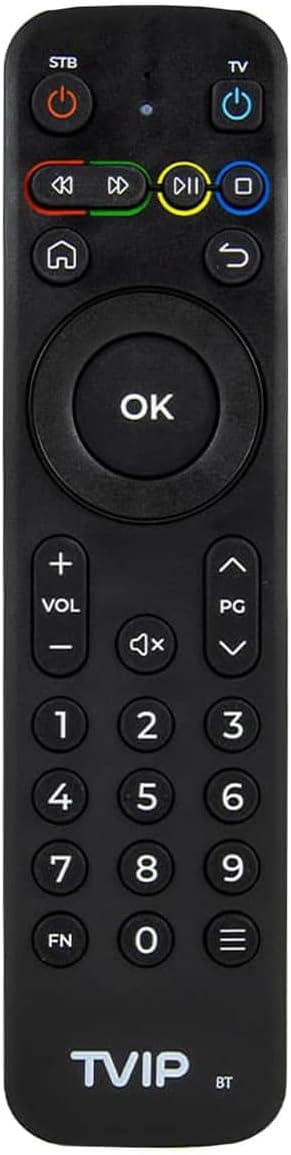
4-сүрөт: The TVIP S-Box v.710 remote control, featuring power buttons for STB and TV, navigation keys, number pad, volume controls, and media playback buttons.
4. Орнотуу
Follow these steps to set up your TVIP S-Box v.710.
4.1 Телевизоруңузга туташуу
- Connect one end of the provided HDMI cable to the HDMI 2.1 port on the TVIP S-Box v.710.
- HDMI кабелинин экинчи учун телевизоруңуздагы жеткиликтүү HDMI киргизүү портуна туташтырыңыз. HDMI киргизүү номерин белгилеп алыңыз (мисалы, HDMI 1, HDMI 2).
4.2 Тармакка туташуу
- For a stable connection, use an Ethernet cable. Connect one end of an Ethernet cable to the Ethernet (LAN) port on the TVIP S-Box v.710.
- Ethernet кабелинин экинчи учун роутериңиздеги же тармак которгучуңуздагы жеткиликтүү LAN портуна туташтырыңыз.
4.3 Кубат туташтыруу
- Insert the small end of the power adapter into the DC port on the TVIP S-Box v.710.
- Plug the power adapter into a wall outlet. The device should power on automatically or enter standby mode.
4.4 Баштапкы орнотуу устасы
- Телевизоруңузду күйгүзүп, сыналгынын пультунан туура HDMI киргизүү булагын тандаңыз.
- The TVIP S-Box v.710 will display a boot screen, followed by an initial setup wizard.
- Follow the on-screen prompts to configure language, display settings, and network settings.
5. Иштөө нускамалары
This section covers basic operation of your TVIP S-Box v.710.
5.1 Интерфейсте навигация
Use the included remote control to navigate the Android 11 interface:
- колдонуу directional arrow keys to move between menu items.
- басыңыз OK button to select an item or confirm an action.
- басыңыз Артка button (curved arrow) to return to the previous screen.
- басыңыз Үй button (house icon) to return to the main home screen.
5.2 Медиа ойнотуу
The TVIP S-Box v.710 supports various media applications and services. To play 4K or HDR content, ensure you have compatible media files and a 4K/HDR compatible television.
5.3 Using USB and MicroSD Storage
You can connect external storage devices to your TVIP S-Box v.710:
- USB Drive: Insert a USB flash drive or external hard drive into the USB 2.0 port. The device will typically detect it automatically, and you can access its contents via a file менеджер колдонмо.
- MicroSD картасы: Insert a MicroSD card into the MicroSD slot. Ensure it is inserted correctly. Access its contents using a file менеджер колдонмо.
6. Техникалык тейлөө
Туура тейлөө аппаратыңыздын узак мөөнөттүү жана оптималдуу иштешин камсыз кылат.
6.1 Тазалоо
- Тазалоодон мурун аппаратты электр энергиясынан ажыратыңыз.
- Аппараттын сыртын сүртүү үчүн жумшак, кургак чүпүрөктү колдонуңуз.
- Do not use liquid cleaners, aerosols, or abrasive materials, as these can damage the finish or internal components.
6.2 Программалык камсыздоо жаңыртуулары
Periodically check for software updates to ensure your device has the latest features and security enhancements. Updates are typically managed through the device's settings menu under 'About device' or 'System updates'.
7. Кыйынчылыктарды
If you encounter issues with your TVIP S-Box v.710, refer to the following common problems and solutions.
7.1 Күч жок
- Кубат адаптери аспапка да, иштеген электр розеткасына да бекем туташып турганын текшериңиз.
- Адаптерди башка розеткага сайып көрүңүз.
7.2 Телевизордо сүрөт жок
- Verify that the HDMI cable is securely connected to both the TVIP S-Box v.710 and your television.
- Телевизоруңуз туура HDMI киргизүү булагына коюлганын текшериңиз.
- Сыналгыңыздагы башка HDMI кабелин же HDMI портун колдонуп көрүңүз.
7.3 Алыстан башкаруучу жооп бербейт
- Ensure the AAA batteries in the remote control are correctly inserted and not depleted. Replace them if necessary.
- Point the remote directly at the front of the TVIP S-Box v.710, ensuring no obstructions.
7.4 Тармакка туташуу маселелери
- Check that the Ethernet cable is securely connected to both the device and your router.
- Restart your router and the TVIP S-Box v.710.
- Verify your network settings in the device's system settings.
7.5 4K/HDR Playback Problems
- Ensure your television supports 4K UHD and HDR content.
- Verify that the media content you are trying to play is indeed 4K or HDR.
- Check your TV's settings to ensure HDR or enhanced HDMI input is enabled for the connected port.
8. Техникалык шарттар
Detailed technical specifications for the TVIP S-Box v.710.
| Резолюция | 4K HDR (3840x2160) |
| Процессор | Amlogic S905W2 (Quad Core 1.8 GHz) |
| Операция системасы | Android 11 |
| RAM | 1 ГБ DDR |
| Flash Memory | 8 ГБ eMMC |
| Ethernet | 10/100M RJ45 Network Port |
| Видео декодерлери | AV1, H.265(10bit), VP9, H.264, MPEG4 ASP, Xvid, MPEG2, MJPEG 2160p 60fps |
| Аудио декодерлери | MPEG/MP3/MPA, AAC, WMA, OGG, WAV, FLAC, APE |
| Колдоого алынган протоколдор | UDP, RTP, HTTP, HLS, MPEG-DASH, RTSP, SMB, NFS, DLNA |
| Субтитрлер | DVBSUB, VOBSUB, Teletext, SSA/ASS, SubRip, MOV_TEXT, WebVTT |
| Байланыш | 1x HDMI 2.1, 1x USB 2.0, 1x MicroSD-Slot, 1x Ethernet (10/100 Mbit/s), 1x AV-Port, 1x DC-Port, 1x IR-Port |
| Өлчөмдөрү (WxHxD) | 67 x 67 x 15 мм |
| Салмагы | 70 г |
| Иштөө температурасы | 1°C - 40°C |
| Нымдуулук | 5% - 93% |
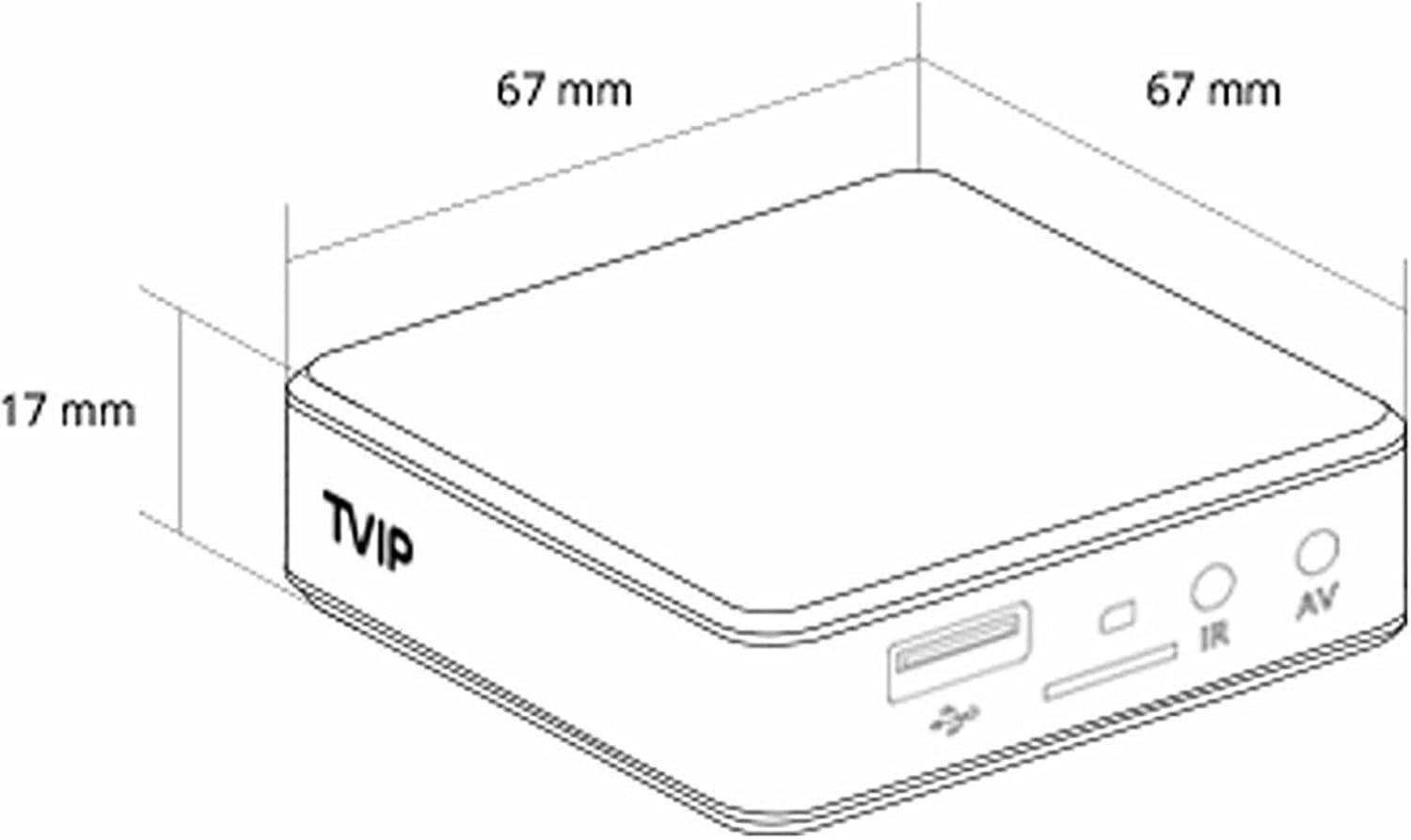
5-сүрөт: Diagram illustrating the dimensions of the TVIP S-Box v.710 (67mm x 67mm x 17mm).
9. Коопсуздук маалыматы
Сураныч, төмөнкү коопсуздук чараларын сактаңыз:
- Аппаратты сууга же нымга тийгизбеңиз.
- Аппаратты жылуулук булактарынын жанына же тике күн нуруна коюудан алыс болуңуз.
- Аппаратты өзүңүз ачууга же оңдоого аракет кылбаңыз. Бардык тейлөөлөрдү квалификациялуу кызматкерлерге тапшырыңыз.
- Берилген кубат адаптерин гана колдонуңуз.
- Аппаратты жана аксессуарларды балдар жетпеген жерде сактаңыз.
10. Кепилдик жана колдоо
Your TVIP S-Box v.710 comes with a standard manufacturer's warranty. For warranty claims or technical support, please contact your retailer or the official TVIP support channels. Keep your proof of purchase for warranty purposes.


