1. Киришүү
This manual provides detailed instructions for the installation, operation, and maintenance of your Jennov Security Camera, model IJ1-P23WJ35-3-FAS. This device is designed to provide reliable surveillance for indoor environments, offering features such as high-definition video, night vision, and motion detection. Please read this manual thoroughly before using the product to ensure proper functionality and safety.
2. Продукт бүтүп калдыview
The Jennov Security Camera is a compact, dome-shaped device designed for discreet monitoring. It integrates seamlessly into standard light bulb sockets for easy power and installation.
Негизги өзгөчөлүктөрү:
- Жогорку сапаттагы видео: Ачык фоону тартатtage 1080p токтому менен.
- Түнкү көрүнүш: Equipped with infrared LEDs for visibility up to 30 meters in low-light conditions.
- Кыймылды аныктоо: Sends notifications upon detecting movement within its field of view.
- Эки тараптуу аудио: Камера аркылуу байланышууга мүмкүндүк берет.
- Зымсыз туташуу: Operates via Wi-Fi for remote access.
- Ийкемдүү сактагыч: Supports Micro SD card (up to 128GB) and cloud storage options.
- Smart Home интеграциясы: Compatible with Amazon Alexa and Android devices.
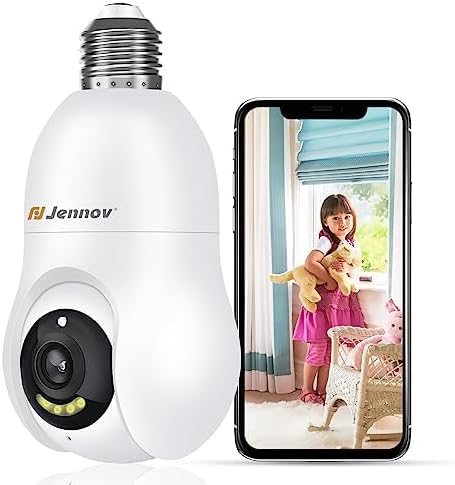
Figure 2.1: The Jennov Security Camera shown alongside a smartphone displaying live footage of a child.
3. Орнотуу
3.1 Пакеттин мазмуну
Пакетиңизде төмөнкү заттар бар экенин текшериңиз:
- 1 x Jennov Security Camera (Model: IJ1-P23WJ35-3-FAS)
- 1 х Колдонуучунун колдонмосу (бул документ)
3.2 Орнотуу
The Jennov Security Camera is designed for easy installation into a standard light bulb socket.
- Өчүрүү: Ensure the power to the light socket is turned off at the circuit breaker before installation.
- Кирүү: Carefully screw the camera into a standard E27/E26 light bulb socket. Ensure it is securely fastened but do not overtighten.
- Күйгүзүү: Restore power to the light socket. The camera will power on and initiate its startup sequence.

Figure 3.1: The camera is designed for quick installation by screwing it into an ordinary bulb base.
3.3 Колдонмону жүктөп алуу жана туташуу
To operate the camera, you will need to download the companion mobile application.
- Колдонмону жүктөп алуу: Издөө the official Jennov security camera app in your device's app store (e.g., Google Play Store for Android, Apple App Store for iOS).
- Эсеп түзүү: Колдонмону ачып, жаңы колдонуучу каттоо эсебин түзүү үчүн экрандагы нускамаларды аткарыңыз же сизде мурунтан эле бар болсо кириңиз.
- Түзмөк кошуу: Select the option to 'Add Device' or 'Add Camera' within the app.
- Wi-Fi'га туташуу: Follow the app's prompts to connect the camera to your 2.4GHz Wi-Fi network. Ensure your Wi-Fi password is correct.
- Жупташтыруу: The app will guide you through the pairing process, which may involve scanning a QR code displayed on your phone with the camera, or listening for an audible prompt.
- Конфигурация: Once connected, you can name your camera and adjust initial settings.
4. Иштөө нускамалары
4.1 Live View жана видеонун сапаты
Access the live feed of your camera through the mobile application. The camera provides 1080p Full HD resolution for clear monitoring.

Figure 4.1: Visual comparison demonstrating the enhanced clarity of 2K Ultra HD resolution provided by the Jennov camera compared to standard 1080p.
4.2 Motion Detection and Auto-Tracking
The camera features intelligent motion detection and auto-tracking capabilities.
- Кыймылды аныктоону иштетүү: In the app settings, activate motion detection and customize sensitivity levels.
- Эскертмелерди алуу: When motion is detected, you will receive push notifications on your smartphone.
- Автоматтык түрдө көзөмөлдөө: Камера автоматтык түрдө өз тармагында аныкталган кыймылды көзөмөлдөй алат view, ensuring the subject remains in frame.
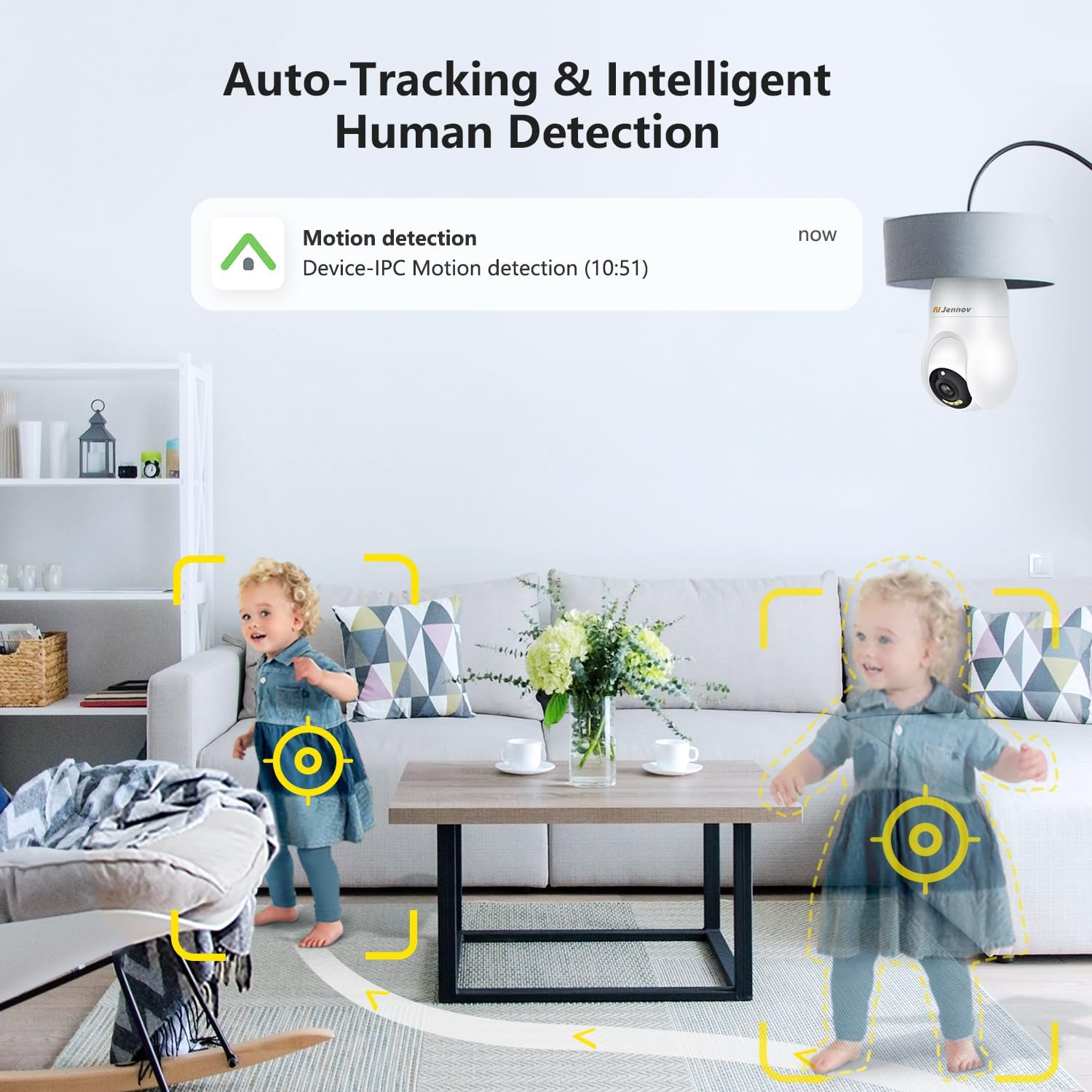
Figure 4.2: The camera's auto-tracking and intelligent human detection feature, showing a motion detection alert.
4.3 Түнкү көрүнүш
The camera is equipped with infrared LEDs to provide clear vision in low-light or no-light conditions.
- Автоматтык иштетүү: Night vision typically activates automatically when ambient light levels drop.
- Диапазон: Effective night vision range is up to 30 feet (approximately 9 meters).
- Starlight Color Night Vision: In certain low-light conditions, the camera may provide enhanced color night vision.

Figure 4.3: A visual comparison illustrating the clarity and color retention of Starlight Color Night Vision compared to traditional night vision.
4.4 Эки тараптуу аудио
Utilize the camera's built-in microphone and speaker for two-way communication.
- Сүйлөө: Түз эфирде микрофон сүрөтчөсүн басыңыз view interface of the app to speak through the camera.
- Угуу: The camera's microphone captures audio from its surroundings, which can be heard through the app.

Figure 4.4: Demonstration of the two-way audio feature, showing a child speaking through the camera and a parent responding via smartphone.
4.5 Видео сактагыч
The camera supports two primary methods for video storage:
- Micro SD картасы: Insert a Micro SD card (up to 128GB, not included) into the designated slot on the camera for local storage of recordings.
- Булуттагы сактагыч: The camera offers optional cloud storage services, which may require a subscription. Refer to the app for details on available plans.

Figure 4.5: The camera supports both cloud storage and local storage via a Micro SD card (up to 128GB).
4.6 Smart Home интеграциясы
The Jennov Security Camera is compatible with certain smart home platforms.
- Amazon Alexa: Link your camera to Amazon Alexa through the Alexa app to view шайкеш келген Echo Show түзмөктөрүндө түз эфирдеги берүүлөрдү көрүңүз же үн буйруктарын колдонуңуз.
- Android түзмөктөрү: The camera app is compatible with Android smartphones and tablets.

Figure 4.6: The camera's compatibility with Amazon Alexa, allowing users to view camera feeds on smart displays.
5. Техникалык тейлөө
5.1 Камераны тазалоо
To ensure optimal performance, keep the camera lens and body clean.
- Өчүрүү: Disconnect the camera from its power source before cleaning.
- Объектив: Gently wipe the camera lens with a soft, lint-free cloth. For stubborn smudges, use a lens cleaning solution designed for optics.
- Дене: Wipe the camera body with a dry or slightly damp кездеме. Катуу химиялык заттарды же абразивдүү материалдарды колдонуудан алыс болуңуз.
5.2 Микропрограмма жаңыртуулары
Periodically check the mobile application for available firmware updates. Updates can improve performance, add new features, and enhance security.
- Жаңыртууларды текшерүү: Navigate to the camera settings within the app to check for and install any available firmware updates.
- Туруктуу байланыш: Ensure the camera has a stable Wi-Fi connection and sufficient power during the update process. Do not interrupt the update.
6. Кыйынчылыктарды
If you encounter issues with your Jennov Security Camera, refer to the following common problems and solutions:
- Камера күйбөй жатат:
- Ensure the light socket has power and the camera is securely screwed in.
- Test the socket with a working light bulb to confirm power supply.
- Wi-Fi'га туташуу мүмкүн эмес:
- Verify your Wi-Fi network is 2.4GHz. The camera does not support 5GHz networks.
- Ensure the Wi-Fi password is entered correctly in the app.
- Сигналдын күчүн жакшыртуу үчүн камераны Wi-Fi роутериңизге жакыныраак жылдырыңыз.
- Роутериңизди жана камераңызды өчүрүп күйгүзүңүз.
- Кыймылды аныктоо боюнча эскертүүлөр жок:
- Check if motion detection is enabled in the app settings.
- Кыймылды аныктоо сезгичтигин тууралаңыз.
- Смартфонуңузда колдонмо эскертмелери иштетилгенин текшериңиз.
- Видеонун сапаты начар:
- Check your Wi-Fi signal strength; a weak signal can affect video streaming quality.
- Clean the camera lens for any dust or smudges.
- Оптималдуу күндүзгү видео үчүн шайкеш жарыктандырууну камсыз кылыңыз.
- Эки тараптуу аудио иштебей жатат:
- Ensure microphone and speaker permissions are granted to the app on your smartphone.
- Check the volume settings on both your phone and within the camera app.
7. Техникалык шарттар
| Модель номери | IJ1-P23WJ35-3-FAS |
| Монтаж түрү | Light socket (Screw In) |
| Видео тартуунун резолюциясы | 1080p |
| Зымсыз байланыш | Wi-Fi (2.4 ГГц гана) |
| Форма фактору | Купол |
| Материал | Пластик |
| Тtage | 220 вольт (AC) |
| Ватtage | 3 ватт |
| Өлчөмдөрү (L x W x Y) | 7.62 x 7.62 x 17.02 см |
| Элемент Салмагы | 177 г |
| Өзгөчөлүктөр | Night Vision, Motion Detection, Two-Way Audio |
| Сактагыч параметрлери | Micro SD card (Max 128GB), Cloud Storage |
| Ички/тышкы колдонуу | Indoor |
| Шайкеш түзмөктөр | Ноутбук, смартфон, планшет |
| Controller Type | Amazon Alexa, Android |
8. Кепилдик маалыматы
The Jennov Security Camera (Model: IJ1-P23WJ35-3-FAS) comes with a 1 жылдык чектелген кепилдик from the date of purchase. This warranty covers manufacturing defects and malfunctions under normal use. It does not cover damage caused by misuse, accidents, unauthorized modifications, or improper installation.
Please retain your proof of purchase for warranty claims. For detailed warranty terms and conditions, refer to the official Jennov webсайтка же кардарларды колдоо менен байланышыңыз.
9. Кардарларды колдоо кызматы
For further assistance, technical support, or inquiries regarding your Jennov Security Camera, please refer to the following resources:
- Онлайн колдоо: Visit the official Jennov website for FAQs, troubleshooting guides, and product information.
- Байланыш электрондук почтасы: Refer to the product packaging or the Jennov website for customer service contact email.
When contacting support, please have your product model number (IJ1-P23WJ35-3-FAS) and purchase information readily available.


