Introduction
Сатып алганыңыз үчүн рахматasing the iTOMA Wireless Charging Alarm Clock Radio 205. This device combines multiple essential bedside functions into one compact unit, including a wireless charger, USB charging port, dual alarm clock, FM radio, Bluetooth speaker, night light, and a dimmable display. Please read this manual carefully to ensure proper operation and to fully utilize all features.
Продукт бүттүview

1-сүрөт: Фронт view of the iTOMA Alarm Clock Radio, showcasing its wireless charging pad for smartphones and a USB port for charging other devices like smartwatches.

2-сүрөт: The alarm clock radio positioned on a nightstand, highlighting its various features through illustrative icons such as volume, snooze, dual alarm, LED decor, dimmer, USB port, FM radio, and wireless charging.

3-сүрөт: Жогору жактан ылдый карай деталдуу маалымат view of the alarm clock's control panel, showing the intuitive layout for setting dual alarms (AL1 and AL2) and other functions.

4-сүрөт: Diagram illustrating the compact dimensions of the iTOMA Alarm Clock Radio, measuring 5.67 inches in width, 5.67 inches in depth, and 2.8 inches in height.
Негизги өзгөчөлүктөрү:
- Double Charging Convenience: Built-in wireless charging board and USB interface for simultaneous charging of two devices.
- Dual Alarm Clock with Snooze: Set two different alarms with options for radio or buzzer wake-up sounds.
- FM Radio & Sleep Timer: Features an FM radio with 20 programmable preset stations and an external FM wire antenna. Sleep timer adjustable from 10 to 90 minutes.
- Dimmer Control & Night Light: 4-level dimmer and auto dimmer control for display brightness. Includes 2 night light modes.
- Bluetooth технологиясы: Connect to smartphones, tablets, or any Bluetooth-enabled device for wireless music streaming.
Жайгашуу
1. Power Connection
- Unpack the iTOMA Wireless Charging Alarm Clock Radio and all accessories.
- Connect the provided power adapter to the DC input port on the back of the unit.
- Plug the power adapter into a standard wall outlet. The display will light up, indicating the unit is powered on.
2. Убакытты белгилөө
- басып, кармап туруңуз Саат топтому button located on the top panel until the hour digits begin to flash.
- колдонуу HR+ жана Кадрлар бөлүмү саатты тууралоо үчүн баскычтар.
- басыңыз Саат топтому Саатты ырастоо жана мүнөт жөндөөсүнө өтүү үчүн баскычын кайра басыңыз. Мүнөттөрдүн сандары күйүп-өчүп турат.
- колдонуу MIN+ жана MIN- мүнөттөрдү тууралоо үчүн баскычтар.
- басыңыз Саат топтому button one more time to save the time and exit time setting mode.
Иштөө нускамалары
Зымсыз заряддоо
Place your Qi-compatible smartphone directly on the wireless charging pad located on the top of the unit. Ensure the phone is centered for optimal charging. A charging indicator will appear on the clock display or your phone screen.
USB заряддоо
Connect your device (e.g., smartwatch, another smartphone) to the USB charging port on the side of the unit using a compatible USB cable. The device will begin charging automatically.
Видео 1: An official product video demonstrating the wireless charging and USB charging capabilities of the iTOMA Alarm Clock Radio, along with other key features like dual alarm, FM radio, and dimmer control.
Ойготкучтарды орнотуу (Кош ойготкуч)
Түзмөк эки көз карандысыз сигнализацияны (AL1 жана AL2) колдойт.
- Ойготкуч 1 коюу үчүн, баскычын жылдырыңыз SET-♫-OFF switch for AL1 to the SET position. The alarm time will flash.
- колдонуу HR+ жана Кадрлар бөлүмү ойготкуч саатын тууралоо үчүн баскычтар.
- колдонуу MIN+ жана MIN- ойготкуч мүнөттөрдү тууралоо үчүн баскычтар.
- жылдырыңыз SET-♫-OFF switch for AL1 to the ♫ position to enable the alarm with a buzzer sound, or to the FM position to wake up to FM radio.
- Repeat steps 1-4 for Alarm 2 using the AL2 switch.
- To turn off an alarm, slide its respective switch to the ӨЧҮРҮҮ позиция.
Тындырма функциясы
Ойготкуч чыкканда чоң баскычты басыңыз ТЫНЧТЫКТЫ КҮЧҮРТҮҮ/КҮНӨӨРСҮЗДӨТҮҮ/УЙКУ button on the top panel to temporarily silence the alarm for a few minutes. The alarm will sound again after the snooze period ends.
FM радиосунун иштеши
- Extend the external FM wire antenna for better reception.
- басыңыз КҮЙГҮЗҮҮ/ӨЧҮРҮҮ радиону күйгүзүү үчүн баскыч.
- басыңыз FM FM режимине өтүү үчүн баскыч.
- басып, кармап туруңуз MEM./STO. button to auto-scan and store available FM stations (up to 20 presets).
- басыңыз MEM./STO. Сакталган алдын ала сакталган станцияларды карап чыгуу үчүн баскычты кыска убакытка басыңыз.
- колдонуу HR+ жана Кадрлар бөлүмү жыштыкты кол менен тууралоо үчүн баскычтар.

5-сүрөт: The alarm clock radio displaying an FM frequency, indicating active radio playback. The unit can store up to 20 programmable radio stations.
Bluetooth Жупташтыруу
- басыңыз КҮЙГҮЗҮҮ/ӨЧҮРҮҮ баскычты басуу менен
- басыңыз BT Bluetooth режимине өтүү үчүн баскычын басыңыз. Дисплейде "BT" көрсөтүлүп, ал жупташтыруу режиминде экенин көрсөтүп, жаркылдайт.
- On your smartphone or Bluetooth-enabled device, search for "iTOMA 205" in the Bluetooth settings.
- Select "iTOMA 205" to pair. Once connected, the "BT" indicator on the clock display will stop flashing.
- You can now play audio from your device through the clock's speaker.
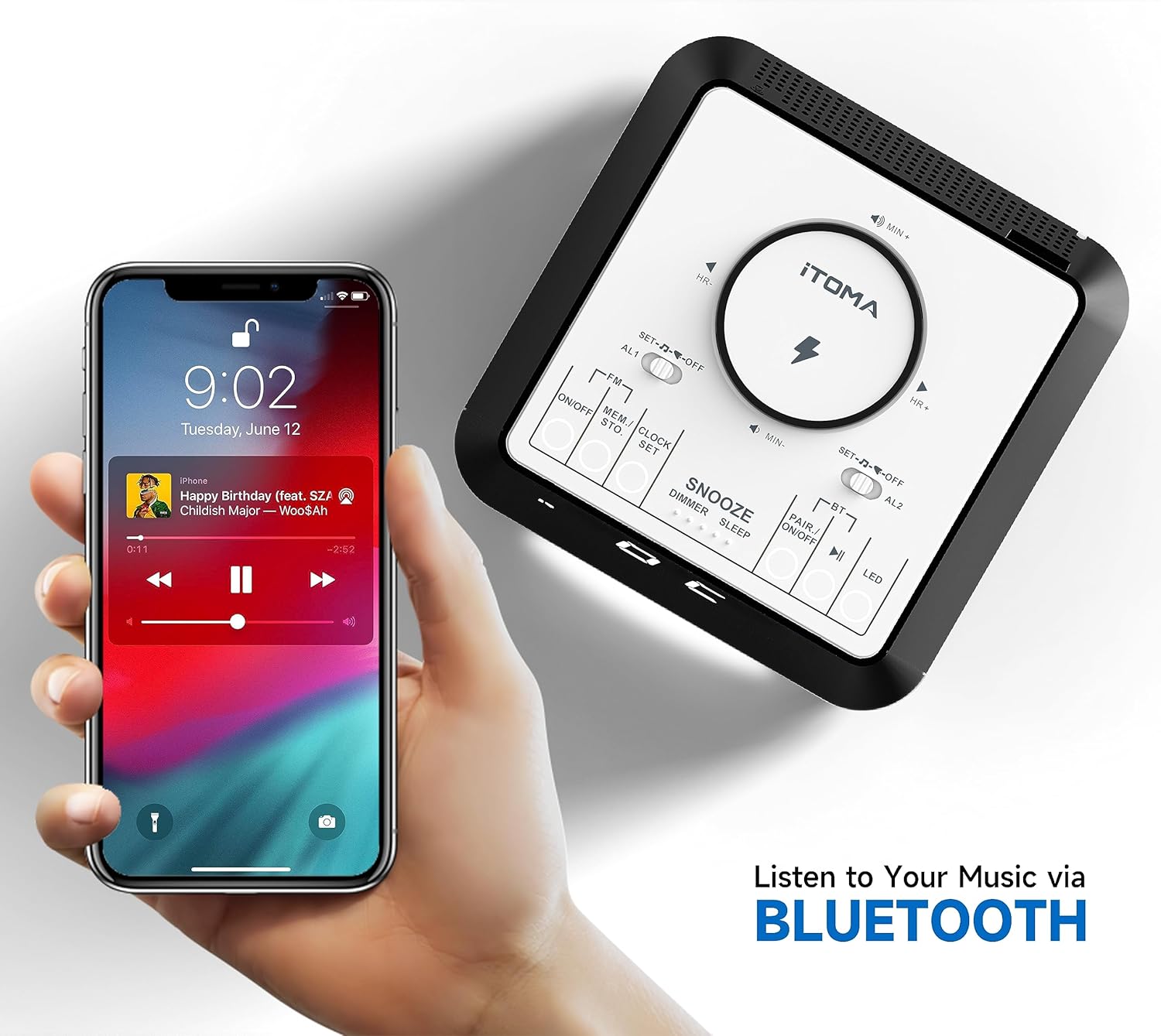
6-сүрөт: A smartphone displaying a music player interface, wirelessly connected to the iTOMA Alarm Clock Radio via Bluetooth, ready for audio streaming.
Dimmer Control режимин көрсөтүү
басыңыз ТЫНЧТЫКТЫ КҮЧҮРТҮҮ/КҮНӨӨРСҮЗДӨТҮҮ/УЙКУ button repeatedly to cycle through the 4 brightness levels (L-3, L-2, L-1, OFF) for the LED display. The unit also features an auto-dimmer function that adjusts brightness based on ambient light.

7-сүрөт: The alarm clock display illustrating the different dimmer control levels, from 0% (OFF) to 100% (L-3), allowing users to adjust brightness for comfort.
Night Light
басыңыз LED button to activate the night light feature. Press again to cycle through the 2 available night light modes or turn it off.
Уйку таймери
While playing FM radio or Bluetooth audio, press and hold the ТЫНЧТЫКТЫ КҮЧҮРТҮҮ/КҮНӨӨРСҮЗДӨТҮҮ/УЙКУ button to activate the sleep timer. Repeatedly press the button to set the sleep timer duration from 10 to 90 minutes. The audio will automatically turn off after the set time.
Техникалык тейлөө
- Тазалоо: Түзмөктүн бетин тазалоо үчүн жумшак, кургак чүпүрөктү колдонуңуз. Суюк тазалоочу каражаттарды же абразивдүү материалдарды колдонбоңуз.
- Күч: Always disconnect the power adapter from the wall outlet before cleaning or if the unit will not be used for an extended period.
- Жайгашкан жери: Аппаратты түз күн нурунан, жылуулук булактарынан жана ашыкча нымдуулуктан алыс, туруктуу, жалпак бетке коюңуз.
- Вентиляция: Ашыкча ысып кетүүнүн алдын алуу үчүн аппараттын айланасында туура желдетүүнү камсыз кылыңыз. Эч кандай желдетүүчү тешиктерди жаап албаңыз.
Проблемаларды чечүү
| Көйгөй | Мүмкүн себеп | Чечим |
|---|---|---|
| Түзмөк күйбөйт. | Кубат адаптери туташкан эмес же туура эмес розетка. | Кубат адаптери түзмөккө жана иштеп жаткан розеткага бекем сайылганын текшериңиз. Башка розетканы колдонуп көрүңүз. |
| Зымсыз кубаттоо иштебейт. | Phone not Qi-compatible, not centered, or phone case too thick. | Verify phone compatibility. Reposition phone on the charging pad. Remove thick phone cases. |
| FM радиосун кабыл алуу начар. | Антенна узартылган эмес же тоскоолдук. | Fully extend the FM wire antenna. Try repositioning the unit or antenna to reduce interference. |
| Bluetooth түзмөгү жупташа албайт. | Түзмөк жупташтыруу режиминде эмес же түзмөк өтө алыс. | Ensure the unit is in Bluetooth pairing mode (BT flashing). Move the Bluetooth device closer to the unit. |
| Ойготкуч угулбайт. | Ойготкуч коюла элек же үнү өтө төмөн. | Check if the alarm is enabled (AL1/AL2 switch not in OFF position). Increase the volume. |
Техникалык шарттар
- Бренд: iTOMA
- Модел: 205-АКШ
- Дисплей түрү: Digital LED
- Кубат булагы: Электр зымдары
- Продукциянын өлчөмдөрү: 5.67"W x 5.67"D x 2.8"H (144mm x 144mm x 70mm)
- Элемент Салмагы: Болжол менен 1.5 фунт (0.68 кг)
- Материал: Пластик
- Өзгөчөлүктөр: Wireless Charger, USB Charging Port, Dual Alarm, FM Radio, Bluetooth Speaker, Snooze, Sleep Timer, Dimmable Display, Night Light
- Бөлмө түрү: Bedroom, Home Office, Kid's Room, Living Room
Кепилдик жана колдоо
iTOMA products are designed for reliability and performance. This product comes with a standard manufacturer's warranty against defects in materials and workmanship. For specific warranty details, including duration and coverage, please refer to the warranty card included in your product packaging or visit the official iTOMA webсайт.
For technical support, troubleshooting assistance, or to inquire about replacement parts, please contact iTOMA Customer Service:
- Webсайт: iTOMA Official Store on Amazon (for product information and support links)
- Түз байланыш маалыматы (электрондук почта/телефон) үчүн продуктунун таңгагын караңыз.
Please have your model number (205-US) and purchase date available when contacting support.


