1. Киришүү
This manual provides detailed instructions for the setup, operation, maintenance, and troubleshooting of your Steelplay Adventure Controller for Nintendo Switch. Please read this manual thoroughly before using the product to ensure optimal performance and longevity.
2. Пакеттин мазмуну
- Steelplay Adventure Controller
- USB заряддоо кабели
- Колдонуучунун Колдонмосу (бул документ)
3. Controller Layout
Familiarize yourself with the buttons and features of your Steelplay Adventure Controller.

1-сүрөт: Фронт view of the Steelplay Adventure Controller. This image displays the controller's ergonomic design, featuring a teal main body, brown grips, and yellow accents on the analog sticks, D-pad, and face buttons. The layout includes two clickable analog sticks, a directional pad, A/B/X/Y action buttons, Home, Capture, Plus, Minus, and Turbo buttons.
- Сол аналогдук таякча: Кыймылды жана камераны башкаруу үчүн.
- Оң аналогдук таякча: For camera control or specific in-game actions.
- D-Pad: Багыттуу киргизүү.
- A/B/X/Y баскычтары: Аракет баскычтары.
- Сол/Оң баскычтар: Ийин баскычтары.
- ZL/ZR баскычтары: Триггер баскычтары.
- Үй баскычы: Nintendo Switch HOME менюсуна кайтып келет.
- CAPTURE Button: Скриншотторду же видео клиптерди тартат.
- + (плюс) баскычы: Start/Pause баскычы.
- - (Минус) баскычы: Тандоо баскычы.
- TURBO баскычы: For setting rapid-fire functionality (refer to operating section).
- LED көрсөткүчтөрү: Display connection status, player number, and charging status.
4. Орнотуу жана туташуу
4.1 Алгачкы заряддоо
Before first use, fully charge the controller. Connect the USB charging cable to the controller's charging port and the other end to a USB power source (e.g., Nintendo Switch dock, USB wall adapter, computer USB port). The LED indicators will show charging status and turn off or change color when fully charged.
4.2 Nintendo Switch менен жупташтыруу
- On your Nintendo Switch HOME Menu, select "Controllers".
- "Тартипти/Тартипти өзгөртүү" дегенди тандаңыз.
- On the Steelplay Adventure Controller, press and hold the HOME баскычы жана Y баскычы simultaneously for a few seconds until the LED indicators start flashing rapidly. This indicates the controller is in pairing mode.
- The Nintendo Switch will detect the controller. Once detected, the LED indicators on the controller will stop flashing and remain solid, indicating a successful connection.
- Press the L+R buttons on the controller as prompted by the Switch screen to finalize the connection.
Once paired, the controller will automatically connect to your Nintendo Switch when powered on and within range.
5. Контроллерди иштетүү
5.1 Негизги башкаруу каражаттары
The Steelplay Adventure Controller functions similarly to official Nintendo Switch Pro Controllers. Use the analog sticks for movement, D-pad for directional input, and A/B/X/Y buttons for in-game actions. The L/R and ZL/ZR buttons provide additional input options.
5.2 Кыймылды башкаруу
The controller supports motion control functionality, allowing for immersive gameplay in compatible titles. Ensure your Nintendo Switch system software is up to date for optimal motion control performance.
5.3 TURBO функциясы
The TURBO function allows a button to be pressed repeatedly as long as it is held down, providing a rapid-fire effect.
- TURBO функциясын иштетүү үчүн: басып, кармап туруңуз TURBO баскычы, then press the desired action button (e.g., A, B, X, Y, L, R, ZL, ZR). The button will now have TURBO functionality.
- TURBO функциясын өчүрүү үчүн: басып, кармап туруңуз TURBO баскычы again, then press the same action button. The TURBO function for that button will be turned off.
6. Техникалык тейлөө
6.1 Тазалоо
Контроллериңизди тазалоо үчүн жумшак, кургак чүпүрөктү колдонуңуз. Өжөр кир үчүн бир азampen the cloth with water and gently wipe the surface. Do not use harsh chemicals, solvents, or abrasive cleaners, as these can damage the controller's finish and internal components.
6.2 Сактоо
Store the controller in a cool, dry place away from direct sunlight, extreme temperatures, and high humidity. Avoid placing heavy objects on the controller to prevent damage to the buttons or casing.
6.3 Батареяга кам көрүү
The controller contains a built-in Lithium-ion battery. To prolong battery life, avoid fully discharging the battery frequently. If storing the controller for an extended period, charge it to approximately 50% capacity every few months.
7. Кыйынчылыктарды
| Көйгөй | Мүмкүн себеп | Чечим |
|---|---|---|
| Controller does not connect to Switch. |
|
|
| Киргизүүнүн кечигиши же жооп бербей жаткан баскычтар. |
|
|
| Controller does not charge. |
|
|
8. Техникалык шарттар
| Өзгөчөлүк | Деталь |
|---|---|
| Бренд | Steelplay |
| Модель номери | 3760352735322 |
| Байланыш | Bluetooth (зымсыз) |
| Шайкеш түзмөктөр | Nintendo Switch |
| Түс | Multicolore (Teal, Brown, Yellow) |
| Өзгөчөлүктөр | Wireless, Motion Control, TURBO Function |
| Салмагы | 185 грамм |
| Өлчөмдөрү (L x W x Y) | 16 x 11.5 x 6.3 сантиметр |
| Батарея түрү | 1 Lithium-ion (built-in) |
9. Кепилдик жана колдоо
The product packaging indicates a 5-year warranty. For specific warranty terms, conditions, and support inquiries, please refer to the official Steelplay webсайтка же түздөн-түз кардарларды тейлөөгө кайрылыңыз. Кепилдик дооматтар үчүн сатып алганыңыздын далилин сактаңыз.
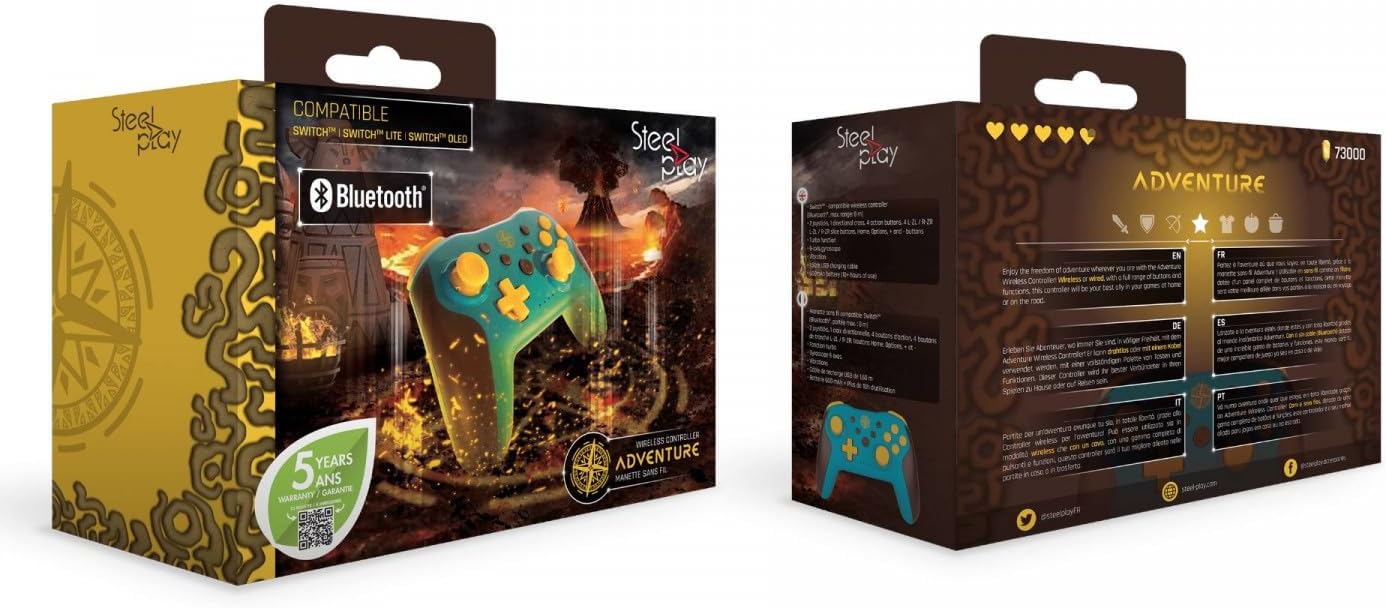
2-сүрөт: Packaging of the Steelplay Adventure Controller. The box prominently features the controller's design, compatibility with various Nintendo Switch models, Bluetooth logo, and a "5 years warranty" seal. The reverse side provides product information in multiple languages.


