1. Киришүү
This manual provides essential information for the safe and efficient use of your iiyama ProLite XB2481HSU-B5 monitor. Please read this manual thoroughly before operating the product and retain it for future reference.
The iiyama ProLite XB2481HSU-B5 is a 23.8-inch Full HD (1920x1080) monitor featuring a VA panel, designed to provide stable color display from various viewing angles. It includes versatile ergonomic adjustments such as height, pivot, swivel, and tilt, along with multiple connectivity options.
2. Коопсуздук маалыматы
- Монитор кулап калбашы үчүн, аны дайыма түз, туруктуу жерге кой.
- Вентиляция тешиктерин жаап албаңыз. Туура аба агымы үчүн монитордун айланасында жетиштүү мейкиндикти камсыз кылыңыз.
- Use only the power cord and adapters supplied with the monitor.
- Мониторду экстремалдык температуранын, нымдуулуктун же тике күн нурунун таасиринен сактаңыз.
- Мониторду өзүңүз оңдоого аракет кылбаңыз. Бардык тейлөөлөрдү квалификациялуу тейлөө кызматкерлерине тапшырыңыз.
- Чагылгандуу жаан учурунда же көпкө чейин колдонулбай турган учурда кубат сайгычын розеткадан сууруп коюңуз.
3. Пакеттин мазмуну
Төмөнкү нерселердин баары сиздин продукт таңгагыңызда камтылганын текшериңиз:
- iiyama ProLite XB2481HSU-B5 Monitor
- Stand Base (with fixing screw)
- Stand Neck
- HDMI кабели (1.5 м)
- DisplayPort Cable (1.8m)
- USB кабель (1.5 м)
- Power Cord (1.8m, for AC100V)
- L-shaped Driver
- Safety & Quick Start Guide (includes Warranty Card)
4. Орнотуу
4.1. Монитор Ассамблеясы
Монитордун стендин чогултуу үчүн бул кадамдарды аткарыңыз:
- Чийилбеш үчүн монитордун экранын кылдаттык менен жумшак, таза кездемеге ылдый каратып коюңуз.
- Attach the stand neck to the back of the monitor. Ensure it clicks securely into place or is fastened with screws if applicable.
- Attach the stand base to the bottom of the stand neck. Secure it with the provided fixing screw using the L-shaped driver.

4.2. Туташтыруучу кабельдер
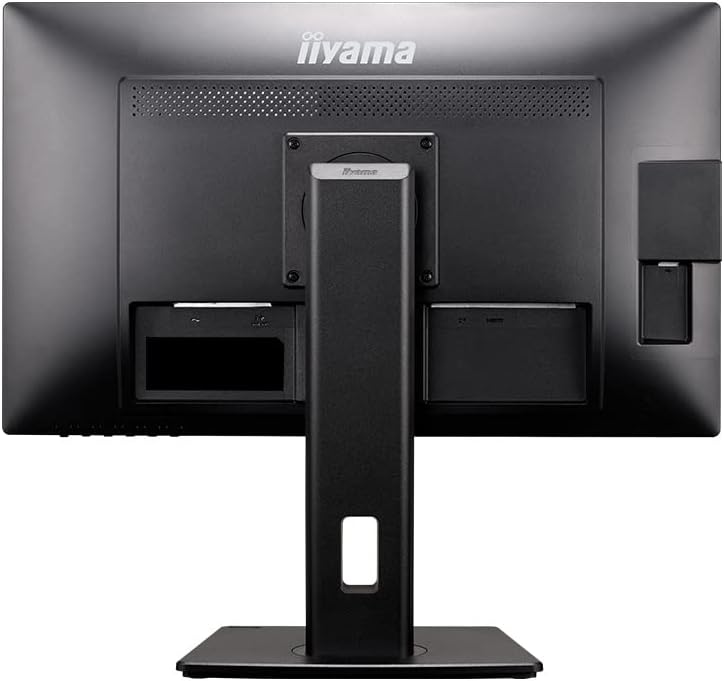
Connect the necessary cables to the corresponding ports on the monitor and your computer:
- Видео туташуу: Connect one end of the HDMI cable or DisplayPort cable to the monitor's input port and the other end to the corresponding output port on your computer.
- USB туташуу: Connect the USB cable from your computer to the monitor's upstream USB port to enable the monitor's USB hub functionality.
- Кубат туташуу: Connect the power cord to the monitor's AC input and then plug the other end into a grounded electrical outlet.

4.3. Күйгүзүү
Press the power button located on the front or bottom of the monitor to turn it on. The power indicator light will illuminate.
5. Мониторду иштетүү
5.1. On-Screen Display (OSD) Controls
The monitor features an On-Screen Display (OSD) menu for adjusting various settings. Use the control buttons, typically located on the bottom right bezel, to navigate the menu:
- Меню баскычы: OSD менюсун ачат.
- Чабыттоо баскычтары: Меню параметрлери (Жогору/Төмөн, Сол/Оң) боюнча жылдыруу үчүн колдонулат.
- Киргизүү/Тандоо баскычы: Тандоону ырастайт же кошумча менюга кирет.
- Чыгуу баскычы: Учурдагы менюдан же OSDден чыгат.
5.2. Эргономикалык тууралоо
The ProLite XB2481HSU-B5 offers several ergonomic adjustments for optimal viewсооронуч:
- Бийиктигин тууралоо: The monitor can be adjusted vertically by 150mm. Gently push or pull the monitor panel up or down while holding the base for stability.
- Россия: The screen can be tilted upwards by 23 degrees and downwards by 5 degrees. Hold the top and bottom edges of the screen and gently adjust the angle.
- Айлануучу: The monitor can swivel 45 degrees to the left and 45 degrees to the right. Rotate the monitor panel horizontally on its stand.
- Пивот: The screen can be rotated 90 degrees clockwise into portrait mode. Ensure the screen is at its highest position and tilted back slightly before pivoting to avoid contact with the desk.


5.3. Киргизүүнү тандоо
To switch between HDMI and DisplayPort inputs, use the OSD menu or a dedicated input selection button if available on your monitor model.
6. Техникалык тейлөө
6.1. Мониторду тазалоо
- Тазалоодон мурун мониторду дайыма электр розеткасынан сууруп алыңыз.
- Жумшак, түксүз кездемени жеңил колдонуңуз dampсуу же жумшак, абразивдүү эмес экран тазалагыч менен иштетиңиз.
- Тазалоочу каражатты түз экранга чачпаңыз.
- Avoid using harsh chemicals, solvents, or abrasive materials, as they can damage the screen and casing.
7. Кыйынчылыктарды
Мониторуңузда көйгөйлөргө туш болсоңуз, төмөнкү жалпы көйгөйлөрдү жана чечимдерди караңыз:
- Кубат жок: Ensure the power cord is securely connected to both the monitor and a working electrical outlet. Check if the power indicator light is on.
- Сүрөт жок: Verify that the video cable (HDMI or DisplayPort) is correctly connected to both the monitor and your computer. Ensure the correct input source is selected on the monitor.
- Жаркылдаган же бурмаланган сүрөт: Check the video cable for damage or loose connections. Try a different video cable or port. Ensure your computer's display resolution and refresh rate are compatible with the monitor's specifications.
- OSD менюсу көрүнбөй жатат: Ensure the monitor is powered on. Press the Menu button firmly.
- Динамиктерден үн жок: Check the audio settings in the OSD menu and on your computer. Ensure the volume is not muted and is set to an audible level.
If the problem persists after attempting these solutions, please contact iiyama support.
8. Техникалык шарттар
Detailed technical specifications for the iiyama ProLite XB2481HSU-B5 monitor:
| Өзгөчөлүк | Спецификация |
|---|---|
| Бренд | iiyama |
| Модель номери | XB2481HSU-B5 |
| Screen Size | 23.8 дюйм |
| Панел түрү | VA Panel, Non-glare |
| Резолюция | 1920 x 1080 (Full HD 1080p) |
| Жаңыртуу ылдамдыгы | 60 Гц |
| Жооп убактысы | 4ms (GtoG) |
| Байланыш | HDMI x 1, DisplayPort x 1, USB |
| Баяндамачылар | 2W х 2 |
| Бийиктигин тууралоо | 150мм |
| Айлануучу | 45 degrees left / 45 degrees right |
| Пивот | 90 degrees right rotation |
| Тит | Up 23 degrees / Down 5 degrees |
| VESA шайкештиги | VESA DDC2B |
| Продукт өлчөмдөрү (W x D x H) | 55.25 x 20.95 x 34.95~49.95 см |
| Элемент Салмагы | 5.8 кг |
| Power Source | AC |

9. Кепилдик жана колдоо
9.1. Өндүрүүчүнүн Кепилдиги
The iiyama ProLite XB2481HSU-B5 monitor comes with a 3 жылдык өндүрүүчүнүн кепилдиги. Please refer to the Warranty Card included in your Quick Start Guide for full terms and conditions.
In case of initial defects or any issues covered under warranty, please contact iiyama support directly.
9.2. Кардарларды колдоо кызматы
For technical assistance, troubleshooting, or warranty claims, please contact iiyama customer support:
- Телефон: 03-3570-6374
- Webсайт: iiyama Official Product Page (for reference and additional information)


