1. Киришүү
Thank you for choosing the LEOTEC LT-1811 Portable AM FM Bluetooth Radio. This manual provides essential information for the safe and efficient operation of your new radio. Please read it thoroughly before use and retain it for future reference. This radio offers versatile listening options, including AM/FM radio, Bluetooth connectivity, and a headphone jack, powered by either AC or batteries for both indoor and outdoor use.
2. Коопсуздук маалыматы
- Радиону жамгыр, нымдуулук же өтө жогорку температурага дуушар кылбаңыз.
- Радиону радиаторлор, жылыткычтар, мештер же башка шаймандар (анын ичинде ampкөтөргүчтөр) жылуулукту пайда кылуучу.
- Use only the power supply specified in this manual or on the product.
- When using batteries, ensure correct polarity (+/-) to prevent damage.
- Радио агып кетпеши үчүн узак убакыт бою колдонулбай турган болсо, батарейкаларды алып салыңыз.
- Do not disassemble or modify the radio. Refer all servicing to qualified service personnel.
- Кургак чүпүрөк менен гана тазалаңыз.
3. Пакеттин мазмуну
Сураныч, пакетте төмөнкү нерселерди текшериңиз:
- LEOTEC LT-1811 Portable AM FM Bluetooth Radio
- AC кубат кабели
- Колдонуучунун колдонмосу (бул документ)
4. Продукт бүтүп калдыview
Familiarize yourself with the various parts and controls of your LEOTEC LT-1811 radio.

Сүрөт 4.1: Алдыңкы view of the LEOTEC LT-1811 radio.
This image displays the main unit of the LEOTEC LT-1811 radio, featuring its dual speaker grilles, tuning dial, and an extended telescopic antenna. The model number LT-1811 is visible on the tuning dial.

Figure 4.2: Key controls of the LEOTEC LT-1811 radio.
This image highlights the primary controls: the Volume Control knob, the Tuning Control knob for station selection, and the Function Button for switching between modes like Bluetooth, FM, and AM.
Башкаруу сүрөттөмөлөрү:
- Үндү көзөмөлдөө: Rotary knob to adjust the audio output level.
- Түнүктү башкаруу: Rotary knob to select AM or FM radio frequencies.
- Функция баскычы: Slide switch to select between AM, FM, and Bluetooth modes.
- Жыйналып алынуучу антенна: FM кабыл алуусун жакшыртуу үчүн кеңейтилүүчү антенна.
- Наушник уячасы (3.5 мм): Наушник менен жеке угуу үчүн.
- AC кубаттуулугун киргизүү: Port for connecting the AC power cable.
- Батарея бөлүмү: Located on the back, for D-cell batteries.
5. Орнотуу
5.1 Электр энергиясы
Your LEOTEC radio can be powered by two methods: AC power or batteries.
AC кубаты иштеши:
- Радио өчүрүлгөнүн текшериңиз.
- Insert the included AC power cable into the AC input jack on the radio.
- Plug the other end of the AC power cable into a standard 120V/60Hz wall outlet.
- The radio is now ready for use with AC power.

Figure 5.1: Radio connected to AC power.
This image shows the LEOTEC radio placed on a shelf, with its power cable plugged into a standard wall outlet, demonstrating AC power operation.
Батарея кубаттуулугу менен иштөө:
For portable use, the radio requires 3 x 'D' cell batteries (not included).
- Радионун артындагы батарея бөлүкчөсүн табыңыз.
- Батарея уясынын капкагын ачыңыз.
- Insert 3 'D' cell batteries, ensuring the correct polarity (+/-) as indicated inside the compartment.
- Батарея уясынын капкагын бекем жабыңыз.
- The radio is now ready for use with battery power.

Figure 5.2: Battery installation for portable use.
This image illustrates the internal battery compartment of the radio, showing three D-cell batteries correctly inserted, ready for portable operation.
6. Иштөө нускамалары
6.1 Күйгүзүү/өчүрүү жана үндү башкаруу
- Радиону буруш үчүн ON, айлантуу Үндү көзөмөлдөө knob clockwise until you hear a click and the radio powers on.
- Үндү тууралоо үчүн бургулоону улантыңыз Үндү көзөмөлдөө knob clockwise to increase volume, or counter-clockwise to decrease volume.
- Радиону буруш үчүн ӨЧҮРҮҮ, айлантуу Үндү көзөмөлдөө knob counter-clockwise until you hear a click.
6.2 AM/FM радиосу
The radio supports AM (520-1710 kHz) and FM (87-108 MHz) frequencies.
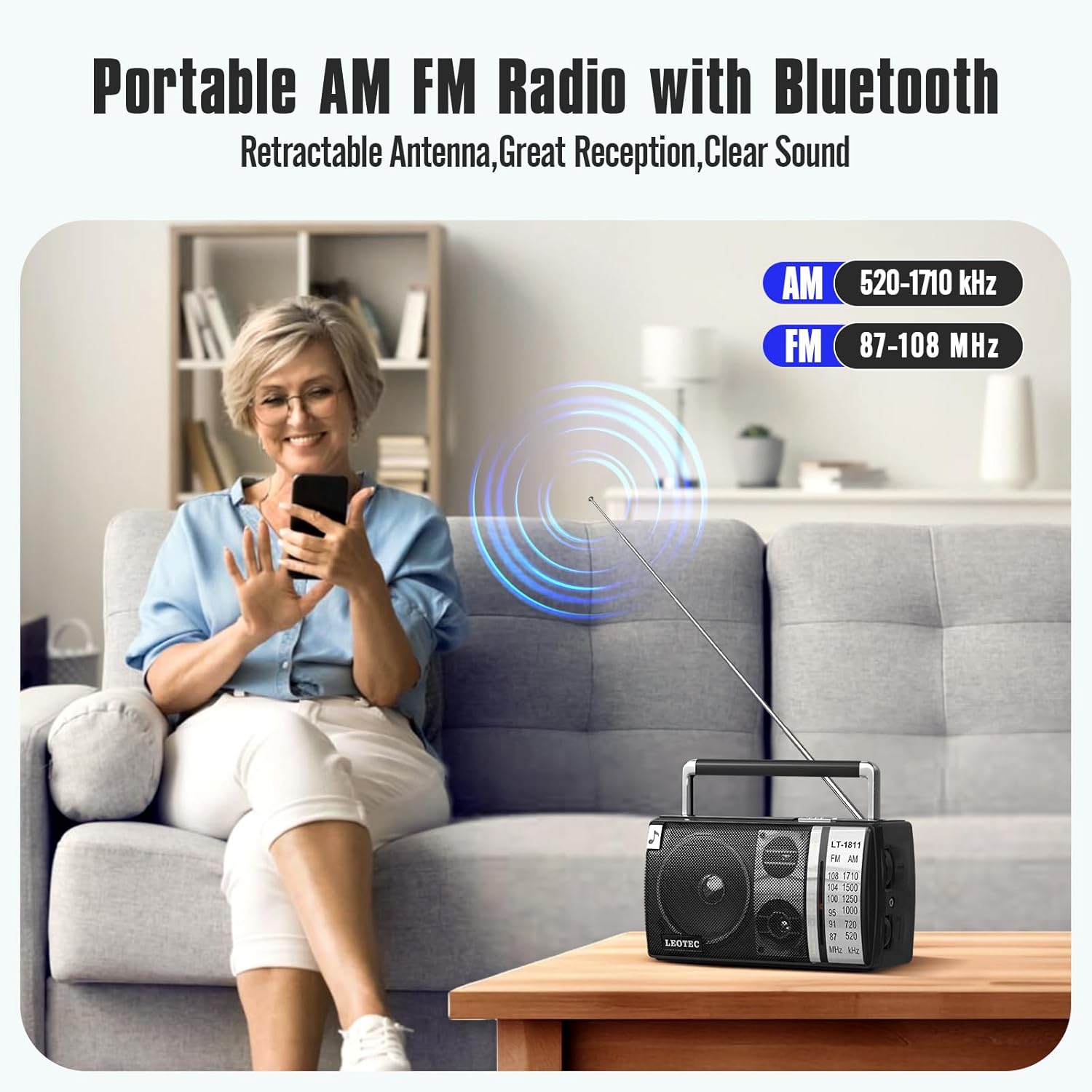
Figure 6.1: AM and FM frequency ranges.
This image illustrates the radio's capability to receive both AM (520-1710 kHz) and FM (87-108 MHz) radio bands, highlighting its versatility for different broadcast types.
- жылдырыңыз Функция баскычы to select either 'AM' or 'FM' mode.
- For FM reception, extend the Тартылуучу антенна fully for optimal signal. For AM reception, the internal antenna is generally sufficient, but you may need to rotate the radio for best signal.
- айлантыңыз Реттөөнү жөндөө knob to scan for radio stations. The tuning dial will indicate the selected frequency.
- тууралаңыз Үндү көзөмөлдөө каалаган угуу деңгээлиңизге чейин.
6.3 Bluetooth функциясы
Connect your smartphone or other Bluetooth-enabled device to the radio for wireless audio playback.

Figure 6.2: Bluetooth connection in progress.
This image depicts a user's hand holding a smartphone, with a Bluetooth icon indicating a wireless connection to the LEOTEC radio, which is placed on a table outdoors.
- жылдырыңыз Функция баскычы to 'BT' (Bluetooth) mode. The radio will enter pairing mode, indicated by an audible prompt or flashing indicator (if available).
- Bluetooth түзмөгүңүздө Bluetooth иштетиңиз жана жеткиликтүү түзмөктөрдү издеңиз.
- Select 'LEOTEC LT-1811' (or similar name) from the list of devices.
- Once paired, you will hear a confirmation sound, and you can now play audio from your device through the radio.
6.4 Гарнитураны колдонуу
For private listening, use the 3.5mm headphone jack.

Figure 6.3: Headphone jack detail.
Бул сүрөт жакындан тартууну камсыз кылат view of the 3.5mm earphone jack on the side of the LEOTEC radio, indicating its location for connecting headphones.
- Plug any standard 3.5mm stereo headphones into the headphone jack on the side of the radio.
- The radio's internal speakers will automatically mute when headphones are connected.
- тууралаңыз Үндү көзөмөлдөө ыңгайлуу угуу деңгээлине.
7. Техникалык тейлөө
7.1 Тазалоо
- Always disconnect the power cable and remove batteries before cleaning.
- Радионун сыртын жумшак, кургак чүпүрөк менен сүртүңүз.
- Абразивдүү тазалагычтарды, момдорду же эриткичтерди колдонбоңуз, анткени алар финишке зыян келтириши мүмкүн.
7.2 Сактоо
- If storing the radio for an extended period, remove the 'D' cell batteries to prevent leakage and corrosion.
- Радиону салкын, кургак жерде, күн нуру түз тийген жана өтө жогорку температурадан алыс сактаңыз.
8. Кыйынчылыктарды
If you encounter issues with your radio, please refer to the following common problems and solutions:
| Көйгөй | Мүмкүн себеп | Чечим |
|---|---|---|
| Радио күйбөйт. | No power supply; Batteries drained or incorrectly inserted; AC cable not connected. | Check AC power connection; Replace batteries or ensure correct polarity; Ensure Volume knob is turned ON. |
| Радионун начар кабыл алуусу (AM/FM). | Antenna not extended (FM); Radio position; Weak signal area. | Extend FM antenna fully; Rotate the radio for better AM reception; Try moving the radio to a different location. |
| Bluetooth туташпай жатат. | Radio not in BT mode; Device too far; Device not in pairing mode. | Ensure Function Button is set to 'BT'; Move device closer to the radio; Ensure Bluetooth is enabled on your device and it's searching for devices. |
| Динамиктерден үн жок. | Volume too low; Headphones connected; Mute function active (not applicable for this model). | Increase volume; Disconnect headphones if not desired; Ensure correct mode (AM/FM/BT) is selected. |
9. Техникалык шарттар
Technical specifications for the LEOTEC LT-1811 Portable AM FM Bluetooth Radio.
| Өзгөчөлүк | Деталь |
|---|---|
| Модел | LT-1811 |
| Бренд | LEOTEC |
| Продукциянын өлчөмдөрү | 8.26 x 3.74 x 4.6 дюйм (20.98 x 9.5 x 11.68 см) |
| Элемент Салмагы | 1.9 фунт (0.86 кг) |
| Түс | Кара |
| Өзгөчө өзгөчөлүк | Portable |
| Байланыш технологиясы | Bluetooth |
| Tuner Technology | AM/FM |
| Стиль | Classic |
| Power Source | AC Plug-in / 3 x 'D' Cell Batteries |
| Радио топтору колдоого алынат | AM (520-1710 кГц), FM (87-108 МГц) |
| Камтылган компоненттер | Owner's Manual, AC Power Cable |
10. Кепилдик жана колдоо
LEOTEC is committed to providing high-quality products and customer satisfaction. While specific warranty details are not provided in this manual, LEOTEC offers professional technical assistance and 24/7 after-sales support for its products. For any questions, concerns, or technical support needs, please contact LEOTEC customer service through the retailer's platform or the official LEOTEC webсайт.
Кепилдик боюнча дооматтар же колдоо боюнча суроолоруңуз болсо, сатып алуунун далили катары сатып алуу квитанцияңызды сактап коюңуз.


