1. Киришүү
This manual provides detailed instructions for the installation, operation, and maintenance of your BTF-LIGHTING RF 2.4GHz Wireless Remote (RC03RFB) and C03RF Tuya RGB LED Controller Kit. This kit is designed to control PWM RGB LED strips, offering versatile lighting options and smart home integration.
2. Коопсуздук маалыматы
- электр менен жабдууну камсыз кылуу voltage matches the requirements of your LED strip and controller (DC5V/DC12V/DC24V).
- Do not exceed the maximum allowable current for the controller's power interfaces (5A and 12A respectively).
- Бул продукт ички колдонуу үчүн гана арналган.
- Аппаратты суудан, нымдан жана жогорку температурадан алыс кармаңыз.
- Do not attempt to disassemble or modify the device. Contact qualified personnel for service.
- Batteries for the remote control are not included and must be purchased separately.
3. Пакеттин мазмуну
Пакетиңизде бардык буюмдар бар экенин текшериңиз:
- 1x RC03RFB Wireless Remote
- 1x C03RF Tuya Controller
- 1x RF Remote Bracket
- 2x бурамалар
- 1x Double-sided Adhesive Pad
- 1x RC03RF Remote Control Manual
- 1x C03RF Controller Manual
Note: The Tuya Gateway (GW01W) and 3A batteries for the remote are not included and must be purchased separately.

Image: Components of the BTF-LIGHTING RF 2.4GHz Wireless Remote and C03RF Tuya RGB LED Controller Kit, including the remote, controller, and mounting bracket.
4. Техникалык шарттар
| Өзгөчөлүк | Description |
|---|---|
| Модель номери | RC03RFB+1XC03RF |
| Шайкеш жарыктар | PWM 5050SMD, 3528SMD, 5630SMD RGB, FCOB, COB RGB 4-wire (+ R G B) LED strip, Neon Rope light. Not compatible with SPI LED strips (e.g., WS2811, WS2812B). |
| Тtage Колдоо | DC5V, DC12V, DC24V |
| Max Current (Controller) | 5A and 12A (depending on power interface) |
| Зымсыз технология | 2.4GHz RF Wireless Transmission |
| Башкаруу диапазону | Ачык чөйрөдө 98 футка (30 метрге) чейин |
| Топтук башкаруу | 4-zone group control, no device limits per zone |
| Auto-Transmitting Function | Signals transmit between controllers within 30m for extended range |
| Smart Home интеграциясы | Works with Tuya Gateway (GW01W) for Smart Life/Tuya Smart APP, Alexa, Google Home (Gateway sold separately) |
| Алыскы функциялар | Touch wheel for color selection, brightness/color adjustment, dynamic modes, speed control, zone control |
| Материал | Пластик |
| Колдонуу | Үй ичинде гана колдонуу |
5. Орнотуу
5.1. LED контроллерин зымдары
Ensure your LED strip is compatible with this controller (PWM RGB 4-wire). Connect the LED strip to the controller's output terminals (V+, R, G, B) and the appropriate DC power supply to the controller's input terminals (V+, V-). The input voltage томго дал келиши керекtage of your LED strip (e.g., 12V strip requires a 12V power supply).

Image: Diagram illustrating the connection of a power supply and an RGB LED strip to the C03RF controller.
5.2. Алыстан башкаруу жупташтыруу
To pair the RC03RFB remote with the C03RF controller:
- Контроллердин өчүрүлгөнүн текшериңиз.
- Контроллерди күйгүзүңүз.
- Within 3 seconds of powering on, press the 'ON' button on the remote control.
- The connected LED strip should flash to indicate successful pairing.
5.3. Tuya Gateway Connection (Optional)
For smart home integration and app control, a GW01W Tuya Gateway (sold separately) is required. Follow these steps:
- Power Your Light Sources: Connect the LED strip to the power supply and the C03RF controller.
- Power the GW01W Tuya Gateway: Install the gateway within 30m of your lights and near your WiFi router.
- Download the Smart Life or Tuya Smart App: Create an account, add the device, then select the device working WiFi and enter the password. Ensure to select 2.4G WiFi. The gateway indicator should show blue light (Linking). When the light shows green light, the connection is successful.
- Link the Lights or Controller to GW01W Gateway: l өчүрүүamps you want to link, then switch them on again. Press the 'SET' button once on the 2.4G gateway within 5 seconds. The lights will blink 3 times slowly, indicating successful linking.

Image: Visual guide for connecting the LED strip controller to the Tuya Smart Life app using the GW01W Tuya Gateway.
6. Иштөө нускамалары
6.1. Remote Control Functions (RC03RFB)
The RC03RFB remote features a touch wheel and various buttons for comprehensive control:
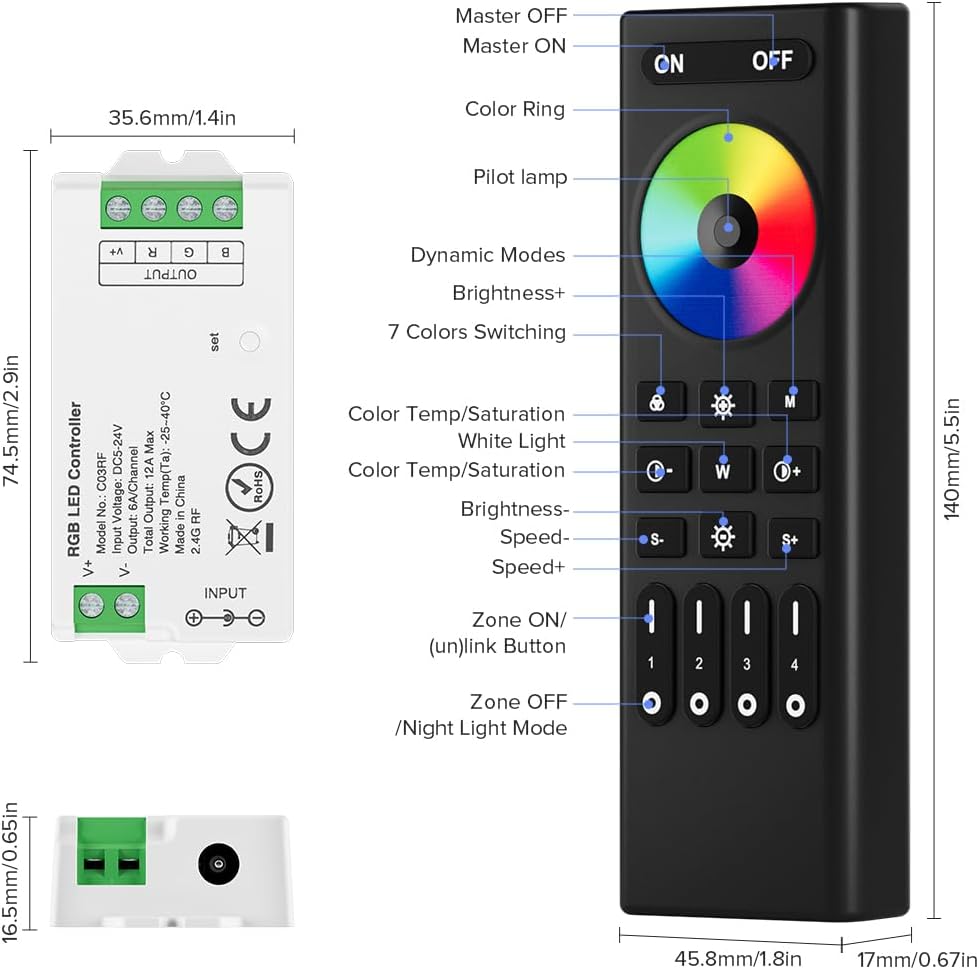
Image: Labeled diagram of the RC03RFB remote control, showing the color ring, power buttons, mode buttons, brightness/speed controls, and zone selection buttons.
- КҮЙГҮЗҮҮ/ӨЧҮРҮҮ: Power on/off the connected lights.
- Түстүү шакек: Touch to select from 16 million colors.
- Учкуч Л.amp: Indicates remote activity.
- Динамикалык режимдер: Cycle through various pre-programmed lighting effects.
- Жарыктык +/-: Жарыктык деңгээлин тууралаңыз.
- 7 Colors Switching: Quickly switch between primary colors.
- Color Temp/Saturation: Adjust color temperature or saturation (if applicable to your LED strip).
- Ак жарык: Activate white light mode.
- Ылдамдык +/-: Динамикалык режимдердин ылдамдыгын жөндөңүз.
- Zone ON/(un)link Button (1-4): Turn on/off specific zones or link/unlink controllers to zones.
- Zone OFF/Night Light Mode: Turn off a specific zone or activate a low-brightness night light mode.
6.2. Топтук көзөмөл
The remote supports 4 independent zones. You can assign multiple controllers to a single zone, allowing for synchronized control of various lighting areas. The 2.4GHz RF wireless transmission allows for control up to 98 feet (30 meters) in open environments.

Image: Illustration of 2.4GHz wireless transmission enabling 4-zone control across different rooms in a house.
6.3. Auto-Transmitting Function
The controllers feature an auto-transmitting function. One controller can transmit signals from the remote to another controller within 30 meters. As long as there is a controller within 30 meters of the remote or another controller, the effective control distance can be extended significantly.

Image: Diagram showing how the auto-transmitting function extends the remote control distance by relaying signals between controllers.
6.4. App Control Features (with Tuya Gateway)
When connected via the Tuya Gateway, the Smart Life or Tuya Smart app unlocks additional features:
- 16 миллион түстөр: Access a full spectrum of colors.
- Жарыктык жана түстү жөндөө: Fine-tune light output and color temperature.
- Dynamic Scenes: Choose from various pre-set or custom lighting scenes.
- Музыка ритм: Synchronize lights with music.
- Таймерди орнотуу: Жарыктарды белгилүү бир убакта күйгүзүү/өчүрүү тартибин түзүңүз.
- Үн менен башкаруу: Compatible with third-party voice assistants like Amazon Alexa and Google Home.
- Түзмөктү бөлүшүү: Үй-бүлө мүчөлөрү менен көзөмөлдү бөлүшүңүз.
- Таптоо үчүн иштетүү жана автоматташтыруу: Create custom automation routines.
- Don't Disturb Mode: Prevents lights from turning on after power outages until manually activated twice.
7. Техникалык тейлөө
- Clean the remote and controller with a soft, dry cloth. Do not use abrasive cleaners or solvents.
- Replace remote batteries (3A, not included) when the control range decreases or the remote becomes unresponsive.
- Бардык туташуулардын коопсуз жана коррозиядан алыс болушун камсыз кылыңыз.
8. Кыйынчылыктарды
| Көйгөй | Мүмкүн чечим |
|---|---|
| LED тилкеси күйбөйт. | Электр менен камсыздоонун туташуусун жана үнүн текшериңизtage. Ensure LED strip is correctly wired to the controller (V+, R, G, B). Verify remote is paired. |
| Алыстан башкаруу жооп бербей жатат. | Replace batteries in the remote. Ensure remote is within range of the controller. Re-pair the remote if necessary. |
| Colors are incorrect or flickering. | Check wiring connections for the RGB channels. Ensure the LED strip type is compatible (PWM RGB 4-wire). |
| Колдонмону башкаруу иштебей жатат. | Ensure Tuya Gateway (GW01W) is powered and connected to 2.4GHz WiFi. Verify the controller is linked to the gateway via the app. Check internet connection. |
| Group control issues. | Ensure all controllers are correctly assigned to their respective zones. Check the distance between controllers for auto-transmitting functionality. |
9. Расмий продукт Video
Бул расмий видеону аягына чейин көрүңүзview of the BTF-LIGHTING 2.4GHz RF LED Controller Series, demonstrating its features and compatibility.
Video: An official BTF-LIGHTING video showcasing the 2.4GHz RF LED Controller Series, including its various models and smart home integration capabilities.
10. Кепилдик жана колдоо
For warranty information and technical support, please refer to the documentation included with your product or visit the official BTF-LIGHTING webсайт. Кепилдик дооматтары үчүн сатып алуу дүмүрчөгүңүздү сактаңыз.


