Introduction
This manual provides comprehensive instructions for the XTRIKE ME GM209W RGB Gaming Mouse. Please read this manual thoroughly before using the product to ensure proper operation and to maximize your gaming experience.

Сүрөт: Жогорку view of the XTRIKE ME GM209W RGB Gaming Mouse, showcasing its lightweight honeycomb design and blue RGB illumination.
Коопсуздук маалыматы
- Аппаратты суюктуктардан жана ашыкча нымдуулуктан алыс кармаңыз.
- Ашыкча температурадан сактаныңыз.
- Аппаратты ажыратууга же өзгөртүүгө аракет кылбаңыз.
- Шайкеш келген USB порттору менен гана колдонуңуз.
Пакеттин мазмуну
- XTRIKE ME GM209W RGB Gaming Mouse
- Колдонуучунун Колдонмосу (бул документ)
Продукт бүттүview
The XTRIKE ME GM209W is a lightweight RGB gaming mouse designed for precision and comfort. It features an optical sensor, customizable RGB lighting, and multiple programmable buttons.

Сүрөт: бурчтуу view of the mouse, highlighting the scroll wheel and the RGB lighting visible through the honeycomb shell.
Баскычтын түзүлүшү:
- Сол чыкылдатуу баскычы
- Оң баскычты чыкылдатыңыз
- Жылдыруу дөңгөлөгү / Ортоңку чыкылдатуу баскычы
- DPI Cycle Button (located behind scroll wheel)
- Алга тарап баскычы
- Артка каптал баскычы

Сүрөт: каптал view of the mouse, clearly showing the two accessible side buttons.
Жайгашуу
Follow these steps to set up your XTRIKE ME GM209W Gaming Mouse:
- Чычканды туташтыруу: Чычкандын USB туташтыргычын компьютериңиздеги жеткиликтүү USB портуна сайыңыз.
- Драйверди орнотуу: The mouse is plug-and-play. Your operating system (Windows 7 or newer) will automatically detect and install the necessary drivers. No additional software installation is typically required for basic functionality.
- Текшерүү: Once connected, the mouse's RGB lighting will illuminate, and the cursor should respond to movement.
Иштөө нускамалары
DPI жөндөө:
The mouse features an optical sensor with adjustable DPI (Dots Per Inch) settings, up to 8,000 DPI.
- басыңыз DPI цикл баскычы (Button 4) located behind the scroll wheel to cycle through available DPI settings.
- Each press will switch to the next DPI level, indicated by a change in the RGB lighting color or pattern (specific indications may vary).
- Select the DPI setting that best suits your preference for cursor speed and precision.
RGB жарыкты башкаруу:
The mouse features customizable RGB illumination. While specific software for advanced customization is not mentioned, the lighting typically cycles through various effects automatically or changes with DPI settings.
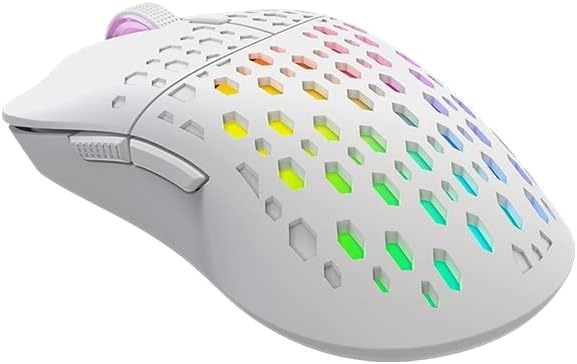
Сүрөт: бурчтуу view of the mouse, displaying its vibrant, multi-color RGB lighting effects through the honeycomb pattern.
Каптал баскычтары:
The Forward (Button 5) and Backward (Button 6) side buttons are typically pre-programmed for navigation in web браузерлер жана file explorers. Their functionality can often be customized through operating system settings or third-party software, if available.
Техникалык тейлөө
To ensure the longevity and optimal performance of your gaming mouse, follow these maintenance guidelines:
- Тазалоо: Чычкандын бетин сүртүү үчүн жумшак, кургак чүпүрөктү колдонуңуз. өжөр кир үчүн, бир аз гampчүпүрөктү суу менен. Катуу химиялык заттарды же абразивдүү тазалагычтарды колдонуудан алыс болуңуз.
- Сенсорго кам көрүү: Көз салуу тактыгын сактоо үчүн чычкандын астыңкы жагындагы оптикалык сенсорду чаңдан же таштандыдан таза кармаңыз.
- Кабелдик башкаруу: Зыян келтирбөө үчүн USB кабелинин кескин ийилип же кыйшайып кетишинен алыс болуңуз.
- Сактагыч: When not in use, store the mouse in a clean, dry environment.
Проблемаларды чечүү
| Көйгөй | Чечим |
|---|---|
| Чычкан жооп бербей жатат |
|
| Туура эмес көзөмөлдөө же курсордун туруксуз кыймылы |
|
| RGB жарыктандыруу иштебейт |
|
Техникалык шарттар
| Өзгөчөлүк | Деталь |
|---|---|
| Модел | GM209W |
| Сенсор түрү | Оптикалык |
| DPI | 8,000 XNUMX DPI чейин |
| Buttons | 6 (Programmable via OS/software) |
| Байланыш | USB |
| Жарыктандыруу | RGB жарыктандыруу |
| Салмагы | 65г (жеңил) |
| Өлчөмдөр | 12.5 x 6.6 x 0.1 см |
| Операциялык системанын шайкештиги | Windows 7 же жаңыраак |

Image: Diagram showing the dimensions of the XTRIKE ME GM209W RGB Gaming Mouse: 12.5 cm length and 6.6 cm width.
Кепилдик жана колдоо
For warranty information and technical support, please refer to the XTRIKE ME official webсайтына кириңиз же жергиликтүү сатуучуңузга кайрылыңыз. Кепилдик талаптары үчүн сатып алганыңызды тастыктаган документти сактап коюңуз.


